Components: Snackbar and dialog taking full screen in production
Bug, feature request, or proposal:
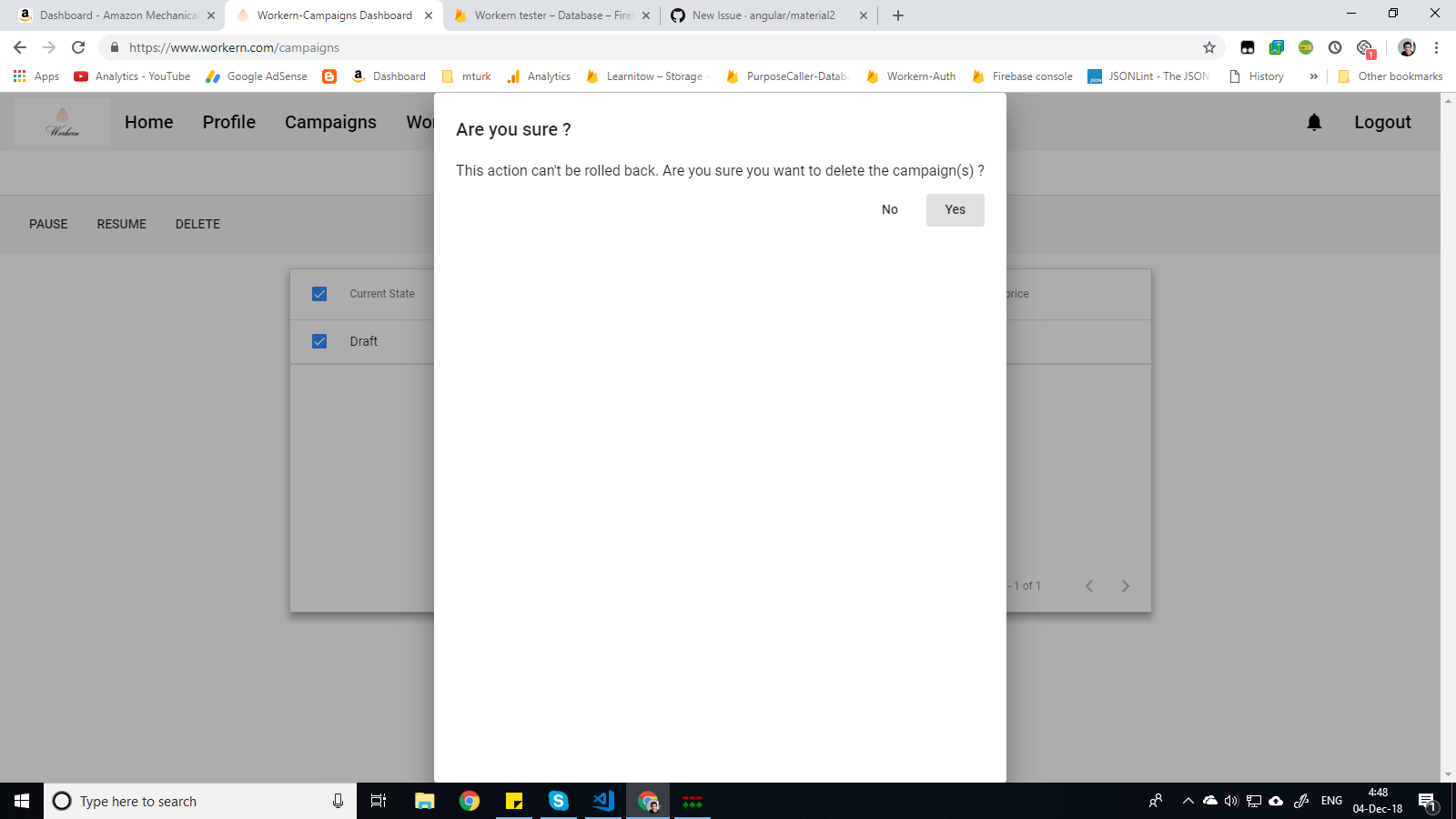
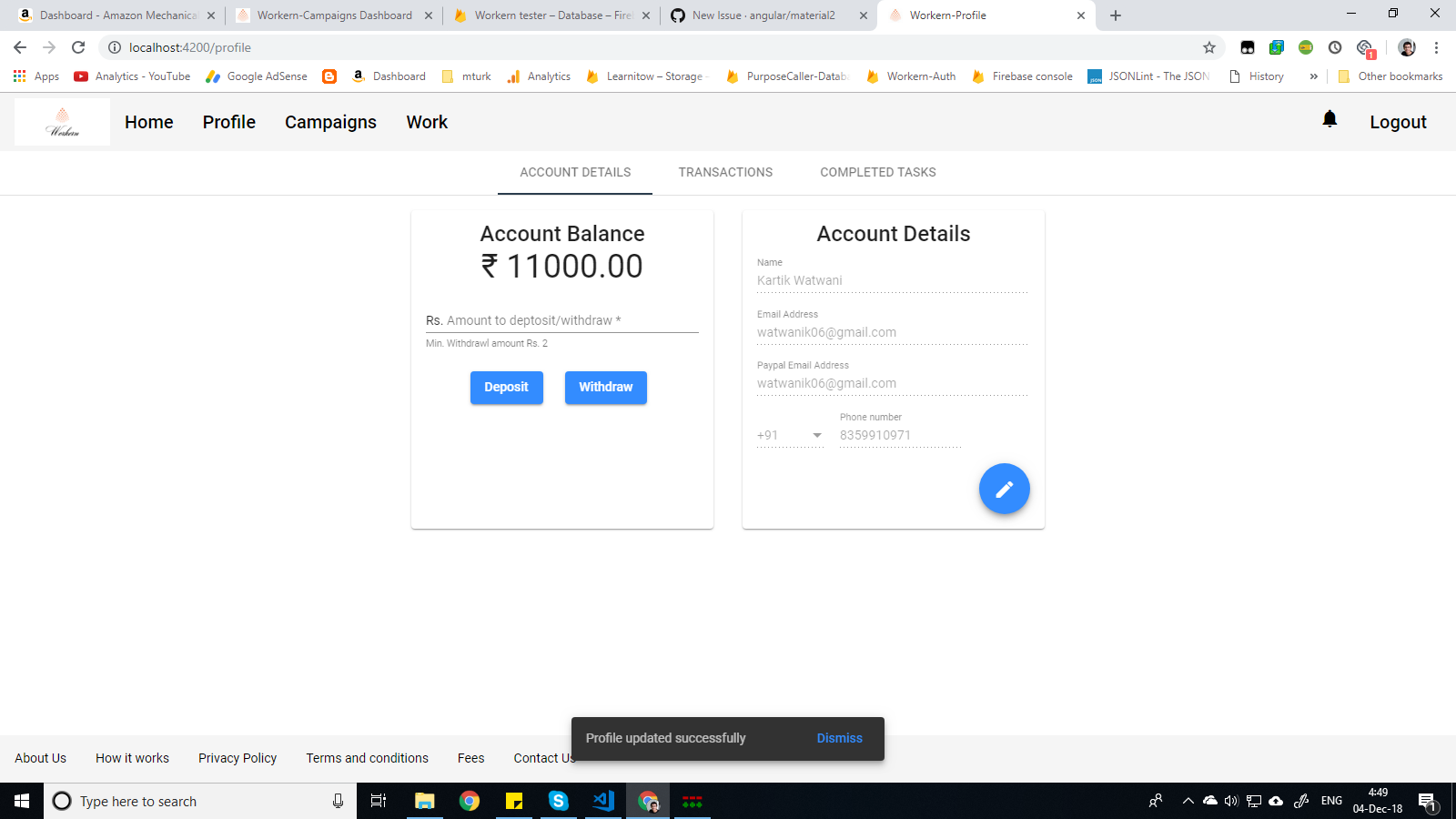
I use MatDialog and MatSnackBar at various points in my web app to notify/ warn user about something. When I use these in debug mode using ng serve the size and position of snackbar is correct like snackbar is at the bottom of the page with height approximately 50-60px and dialog is at center of page with height enough to wrap the content. Now the problem what is occuring is when I am using ng build --prod --build-optimizer and uploading files to firebase hosting these same dialogs and snackbars are taking full height and full width.
What is the expected behavior?
The dialogs and snackbars should show normal behaviour in production mode
What is the current behavior?
Dialogs and snackbars cover whole screen in production mode
What is the use-case or motivation for changing an existing behavior?
Nice UI for the user
Which versions of Angular, Material, OS, TypeScript, browsers are affected?
  "@angular/animations": "^7.0.1",
    "@angular/cdk": "^7.0.2",
    "@angular/common": "^7.0.1",
    "@angular/compiler": "^7.0.1",
    "@angular/core": "^7.0.1",
    "@angular/fire": "^5.1.0",
    "@angular/forms": "^7.0.1",
    "@angular/http": "^7.0.1",
    "@angular/material": "^7.0.2",
Is there anything else we should know?
Images in production

Images in debug mode

 itsmeneartou
All 6 comments
I digged into the inspect section and found that the align-items:center is not working for outer most div in below code in production but is working in debug mode. I got to know this by opening debug and production dialog side by side in different tabs and then for the outermost div I was toggling the align-items:center property in chrome tools and what I saw was in debug mode on unmarking align-items:center the look was same for debug and production but when I was marking or unmarking align-items:center in div for production code. There was no change in look for dialog. So from here I concluded align-items:center is not working in production mode for outermost div of below code. What should I do to solve this problem?
<div class="cdk-global-overlay-wrapper" dir="ltr" style="justify-content: center;align-items: center;">
    <div id="cdk-overlay-8" class="cdk-overlay-pane" style="max-width: 80vw; pointer-events: auto; position: static;">
        <div tabindex="0" class="cdk-visually-hidden cdk-focus-trap-anchor"></div>
        <mat-dialog-container aria-modal="true" class="mat-dialog-container ng-tns-c26-133 ng-trigger ng-trigger-dialogContainer ng-star-inserted" tabindex="-1" id="mat-dialog-1" role="dialog" aria-labelledby="mat-dialog-title-1" style="transform: none;">
            <!---->
            <app-dialog _nghost-c33="" class="ng-star-inserted">
                <h1 _ngcontent-c33="" class="mat-dialog-title" mat-dialog-title="" id="mat-dialog-title-1">Are you sure ?</h1>
                <div _ngcontent-c33="" class="mat-dialog-content" mat-dialog-content=""> This action can't be rolled back. Are you sure you want to delete the campaign(s) ?
                </div>
                <mat-dialog-actions _ngcontent-c33="" align="end" class="mat-dialog-actions">
                    <button _ngcontent-c33="" mat-button="" mat-dialog-close="" type="button" class="mat-button" aria-label="Close dialog"><span class="mat-button-wrapper">No</span>
                        <div class="mat-button-ripple mat-ripple" matripple=""></div>
                        <div class="mat-button-focus-overlay"></div>
                    </button>
                    <button _ngcontent-c33="" cdkfocusinitial="" mat-button="" type="button" class="mat-button" aria-label="Close dialog"><span class="mat-button-wrapper">Yes</span>
                        <div class="mat-button-ripple mat-ripple" matripple=""></div>
                        <div class="mat-button-focus-overlay"></div>
                    </button>
                </mat-dialog-actions>
            </app-dialog>
        </mat-dialog-container>
        <div tabindex="0" class="cdk-visually-hidden cdk-focus-trap-anchor"></div>
    </div>
</div>
I was able to find the problem. The problem was in my index.html. I hadn't closed the <head> tag. I made the change and everything was fine. Also I found while searching for this problem was that no <!DOCTYPE html> at the top of index.html can also cause this problem.
itsmeneartou
on 4 Dec 2018
I can't remember exactly but there was some error in template html.
On Thu 4 Apr, 2019, 4:18 PM Debashis Nath, notifications@github.com wrote:
Hey I also facing the same issue
[image: Screenshot (54)]
https://user-images.githubusercontent.com/41103885/55550176-3ce30d00-56f5-11e9-93e1-cdffca86adc7.png—
You are receiving this because you modified the open/close state.
Reply to this email directly, view it on GitHub
https://github.com/angular/material2/issues/14376#issuecomment-479847845,
or mute the thread
https://github.com/notifications/unsubscribe-auth/Aa6TQcXsksibim3F8hZ92VoTAyqfThA7ks5vddiVgaJpZM4Y_nIs
.
itsmeneartou
on 4 Apr 2019
If possible share your template html for component and index.html.
On Thu, Apr 4, 2019 at 5:24 PM Debashis Nath notifications@github.com
wrote:
I can't remember exactly but there was some error in template html.
… <#m_-7489960490068905989_>
On Thu 4 Apr, 2019, 4:18 PM Debashis Nath, @.*> wrote: Hey I also
facing the same issue [image: Screenshot (54)]
https://user-images.githubusercontent.com/41103885/55550176-3ce30d00-56f5-11e9-93e1-cdffca86adc7.png
— You are receiving this because you modified the open/close state. Reply
to this email directly, view it on GitHub <#14376 (comment)
https://github.com/angular/material2/issues/14376#issuecomment-479847845>,
or mute the thread
https://github.com/notifications/unsubscribe-auth/Aa6TQcXsksibim3F8hZ92VoTAyqfThA7ks5vddiVgaJpZM4Y_nIs
.same scenario doesn't appear in mozila, it works fine there
—
You are receiving this because you modified the open/close state.
Reply to this email directly, view it on GitHub
https://github.com/angular/material2/issues/14376#issuecomment-479866597,
or mute the thread
https://github.com/notifications/unsubscribe-auth/Aa6TQdUpaXTv4JIlLxGtyJJSc7dAWwfnks5vdegNgaJpZM4Y_nIs
.
itsmeneartou
on 4 Apr 2019
I have ran into a similar issue. This happens on safari after deploying to firebase. This is a project created in stackblitz using the built in firebase deployment.
I tried adding the html tag and doctype into the index.html file in stackblitz but it looks like i'm still running into this issue after the firebase deploy on production.
I also went through all my components to search for missing closing tags and resolved all I could find... I'm fairly confident that's all resolved.
Has anyone else ran into this? Any ideas
 trevordowdle
on 24 Jul 2019
trevordowdle
on 24 Jul 2019
This issue has been automatically locked due to inactivity.
Please file a new issue if you are encountering a similar or related problem.
Read more about our automatic conversation locking policy.
_This action has been performed automatically by a bot._
![angular-automatic-lock-bot[bot] picture](https://avatars.githubusercontent.com/in/40213?v=4&s=40) angular-automatic-lock-bot[bot]
on 11 Sep 2019
angular-automatic-lock-bot[bot]
on 11 Sep 2019
Related issues
 vitaly-t
·
3Comments
vitaly-t
·
3Comments
 LoganDupont
·
3Comments
LoganDupont
·
3Comments
 shlomiassaf
·
3Comments
shlomiassaf
·
3Comments
 xtianus79
·
3Comments
xtianus79
·
3Comments
 alanpurple
·
3Comments
alanpurple
·
3Comments
Most helpful comment
I was able to find the problem. The problem was in my index.html. I hadn't closed the
<head>tag. I made the change and everything was fine. Also I found while searching for this problem was that no<!DOCTYPE html>at the top of index.html can also cause this problem.