Components: Select-all toggle in tree example has the wrong state
Bug, feature request, or proposal:
Checkbox tree don't work properly (official documentation example) => https://material.angular.io/components/tree/examples
What is the expected behavior?
Se attached images, after click on parent childs are not selected
What is the current behavior?
1)

2)

3)

What are the steps to reproduce?
see my images and offical examples:
https://material.angular.io/components/tree/examples
or:
https://stackblitz.com/angular/gabkadkvybq?file=app%2Ftree-checklist-example.ts
Thanks and Regards
 leonasta
All 10 comments
I actually just had this brought to my attention by my team's QA. I have not yet been able to figure out how to get around this. My process to reproduce this bug is exactly the same as listed above.
 anna-lamoureux
on 28 Sep 2018
anna-lamoureux
on 28 Sep 2018
Actually the problem is not the children selection, but the root internal handling:
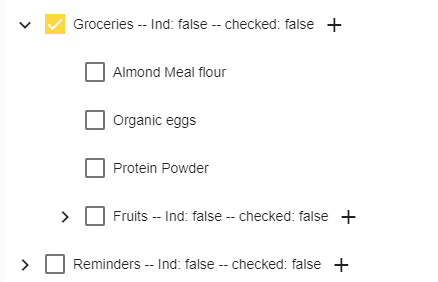
As you can see in the above image, the properties indetermined and checked are set as false both on the root left on the initial situation (Reminders) and on the root on which I followed the steps on the initial post (Groceries).
The first root is both not-indefined and not-checked, but is displayed as checked,
 bellons91
on 4 Oct 2018
bellons91
on 4 Oct 2018
I ran into the same issue a couple of days ago, I managed to find a solution.
On the checkboxes I suggest to bind the handler to the "click" event instead of the "change" .
First in the handler do event.preventDefault() so the internal state of the checkboxes won't change and it won't affect the visual state of the checkbox.
The handlers:
- For simple node, toggle it's state and then go over all his ancestors to the top and update the state by using the descendantsAllSelected and descendantsPartiallySelected for each ancestor.
- For parent node which contains children, instead of simple toggle
"this.checklistSelection.toggle(node);"
get it's new status by the data of it's descendants, as mentioned in section 1
More over, consider adding the mappers of simpleNode and flatNode inside the dataSource. It will save time and space instead of declaring those every time.
 Nastia1409
on 4 Oct 2018
Nastia1409
on 4 Oct 2018
Found a solution:
in the component you have to define another method, say descendantsAllUnselected(node), similar to the existing descendantsAllSelected(node).
descendantsAllUnselected(node: TodoItemFlatNode): boolean {
    const descendants = this.treeControl.getDescendants(node);
    return descendants.every(child => !this.checklistSelection.isSelected(child));
  }
In the HTML, change the [checked] property of the root checkbox to
[checked]="descendantsAllSelected(node) || !descendantsAllUnselected(node)".
Why? I don't know. But it works.
Probably there's a bug in the isSelected method of the SelectionModel class.
bellons91
on 4 Oct 2018
@bellons91, with your solution if you:
- expand "Groceries"
- check "Almond Meal flour"
- check "Groceries" => all "Groceries" childs become checked, but "Grocerie" becomes unchecked
 ducalai
on 4 Oct 2018
ducalai
on 4 Oct 2018
@Nastia1409 This solved the issue for me. Thanks!
anna-lamoureux
on 4 Oct 2018
@ducalai damn, you are right! Thanks
bellons91
on 5 Oct 2018
I have found a solution, I will be creating a pull request shortly. It also solves your problem @ducalai
 fabioloreggian
on 9 Oct 2018
fabioloreggian
on 9 Oct 2018
@fabioloreggian thanks for your solution! Almost done...
- Expand Groceries
- Check "Almond Meal flour"
- Check "Organic eggs"
- Check "Protein Powder"
- Check "Fruits"
=> "Groceries" becomes checked - Uncheck "Groceries"
=> All children stay checked
ducalai
on 10 Oct 2018
This issue has been automatically locked due to inactivity.
Please file a new issue if you are encountering a similar or related problem.
Read more about our automatic conversation locking policy.
_This action has been performed automatically by a bot._
![angular-automatic-lock-bot[bot] picture](https://avatars.githubusercontent.com/in/40213?v=4&s=40) angular-automatic-lock-bot[bot]
on 10 Sep 2019
angular-automatic-lock-bot[bot]
on 10 Sep 2019
Related issues
 crutchcorn
·
3Comments
crutchcorn
·
3Comments
 MurhafSousli
·
3Comments
MurhafSousli
·
3Comments
 vitaly-t
·
3Comments
vitaly-t
·
3Comments
 shlomiassaf
·
3Comments
shlomiassaf
·
3Comments
 jelbourn
·
3Comments
jelbourn
·
3Comments