Components: Support UTC mode for datepicker
Bug, feature request, or proposal:
feature request
What is the expected behavior?
having docs and examples
What is the current behavior?
not having docs and examples
What are the steps to reproduce?
look here :
https://github.com/angular/material2/blob/master/src/lib/datepicker/datepicker.md
and here :
https://material.angular.io/components/datepicker/api
fail to find out how to implement a mat datepicker input that doesn't localize dates.
What is the use-case or motivation for changing an existing behavior?
my end-user wishes to save universal dates to his ERP and have those be loaded into this client without localization as this would mess with the shipment calculations.
NOTE : end-user DOES however wish for internationalized currency and date formats. So I do have global internationalization set up in my modules but within my specific form component I wish to stop the datepicker's current behavior of messing with the date that the user picks : right now with FR i18n, when I pick

then hit "send" my Typsescript function is set to grab the datepickers value and send it to the JAVA backend.
In my chrome code inspector, I can see that the API call has : 2018-11-24T23:00:00.000Z
that's one day earlier. how do I end this once and for all?
I tried this in the component :
import { MAT_MOMENT_DATE_ADAPTER_OPTIONS } from '@angular/material-moment-adapter';

@Component({
  selector: 'app-details',
  templateUrl: './details.component.html',
  styleUrls: ['./details.component.scss'],
  animations: [slideLeftAnimation],
  providers: [
    { provide: MAT_MOMENT_DATE_ADAPTER_OPTIONS, useValue: { useUtc: true } }
  ]
})
export class DetailsComponent implements AfterContentInit, OnDestroy {

  @ViewChild(MatDatepicker) datepicker: MatDatepicker<Date>;
but that did nothing, then I tried this :
import { MAT_MOMENT_DATE_ADAPTER_OPTIONS } from '@angular/material-moment-adapter';
import { MatDatepicker } from '@angular/material';

@Component({
  selector: 'app-details',
  templateUrl: './details.component.html',
  styleUrls: ['./details.component.scss'],
  animations: [slideLeftAnimation],
  providers: [
    { provide: MAT_MOMENT_DATE_ADAPTER_OPTIONS, useValue: { useUtc: true } }
  ]
})
export class DetailsComponent implements AfterContentInit, OnDestroy {

  @ViewChild(MatDatepicker) datepicker: MatDatepicker<Date>;
but I got this :

("can't assign date to matDatePicker", basically)
So I deduced a setter function of some sort must have been implemented, not being auto-suggested any by my IDE, I decided to head on over to the datepicker documentation which feature no setter function.
I'm stuck.
 tatsujb
All 9 comments
So I'm resorting to using a hack :
before sending my date value I parse it :
onValidate(){
    const date2 = moment.utc(this.options.value.poCollabPromDt)
              .add(moment(this.options.value.poCollabPromDt).utcOffset(), 'm');
    // ^dirty hack
    const sending = {
      id: this.selectedPo['id'],
      porStatus: this.options.value.porStatus,
      poCollabPromDt: date2,
      poCollabPromQty: this.options.value.poCollabPromQty,
      poSupAckNumber: this.options.value.poSupAckNumber,
      poCollabComment: this.options.value.poCollabComment,
    }
    this.calls.purchaseOrdersValidate(sending);
  }
@mmalerba is there a way to make the datepicker always in UTC today?
 jelbourn
on 3 Oct 2018
jelbourn
on 3 Oct 2018
@mmalerba I'm seeing the same problem.
To me it seems a duplicate of #12023 which is closed as believed to be fixed by MR #12029 but it actually is not.
 cec
on 12 Mar 2019
cec
on 12 Mar 2019
It appears to be working to me: https://stackblitz.com/edit/angular-vesksm?file=main.ts
 mmalerba
on 12 Mar 2019
mmalerba
on 12 Mar 2019
@mmalerba adding the providers in your stackblitz was a life savior thanks! to edit the date format to 'dd/mm/yyyy' I added to the providers {provide: MAT_DATE_LOCALE, useValue:'en-GB'}
 chipicow
on 13 Mar 2019
chipicow
on 13 Mar 2019
@mmalerba the only difference I see with our project is
    // These should be provided by MatMomentDateModule, but it has never worked in stackblitz for some reason:
    {
      provide: DateAdapter,
      useClass: MomentDateAdapter,
      deps: [MAT_DATE_LOCALE, MAT_MOMENT_DATE_ADAPTER_OPTIONS]
    },
Maybe this should be inserted even when not on StackBblitz...
I'll try this today and let you know
cec
on 14 Mar 2019
@cec Thanks for your tip, the combination of the following worked for me!
[
        { provide: MAT_MOMENT_DATE_ADAPTER_OPTIONS, useValue: { useUtc: true } },
        { provide: DateAdapter, useClass: MomentDateAdapter, deps: [MAT_DATE_LOCALE, MAT_MOMENT_DATE_ADAPTER_OPTIONS] }
]
 EjaYF
on 28 May 2019
EjaYF
on 28 May 2019
I've followed all of this to the T but still am having issues with mat-datepicker converting display based on locale timezone. When using the stackblitz above, and having my browser spoofing India time:
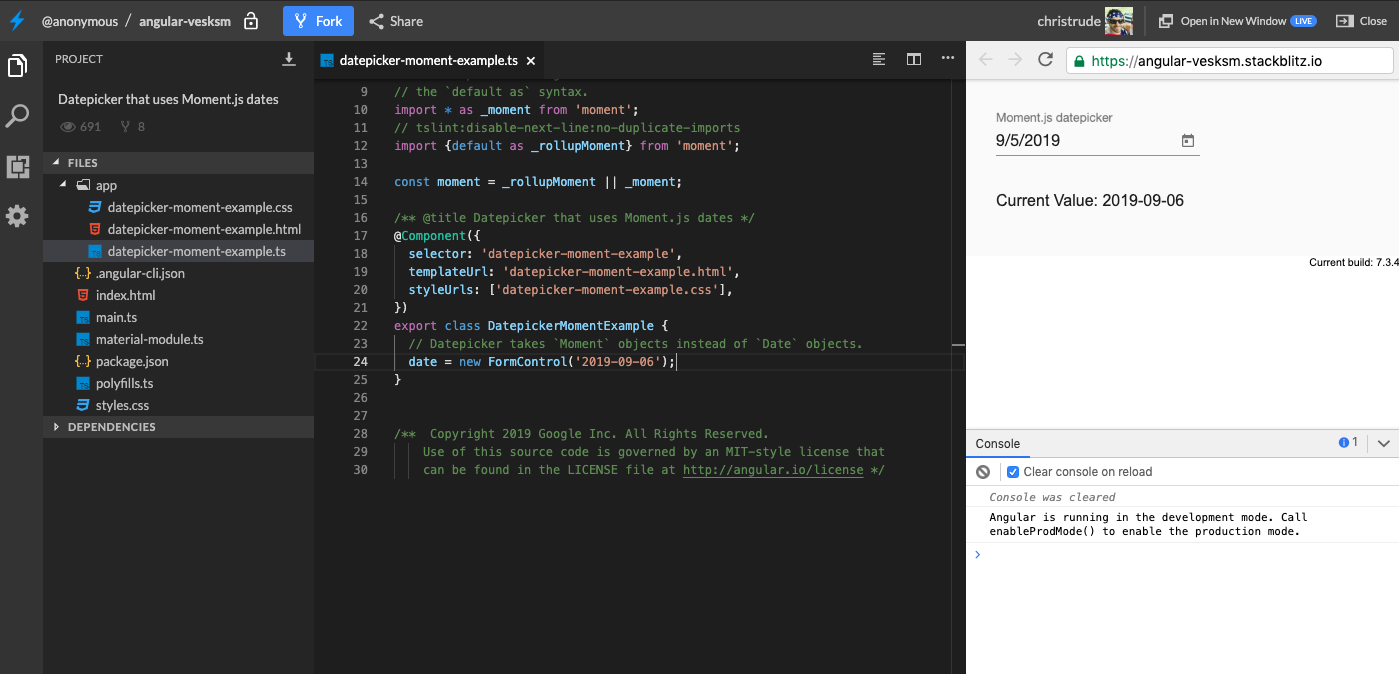
Note that the date is set to the 6th, but the datepicker displays it as the 5th.
 christrude
on 6 Sep 2019
christrude
on 6 Sep 2019
This issue has been automatically locked due to inactivity.
Please file a new issue if you are encountering a similar or related problem.
Read more about our automatic conversation locking policy.
_This action has been performed automatically by a bot._
![angular-automatic-lock-bot[bot] picture](https://avatars.githubusercontent.com/in/40213?v=4&s=40) angular-automatic-lock-bot[bot]
on 7 Oct 2019
angular-automatic-lock-bot[bot]
on 7 Oct 2019
Related issues
 Miiekeee
·
3Comments
Miiekeee
·
3Comments
 kara
·
3Comments
kara
·
3Comments
 MurhafSousli
·
3Comments
MurhafSousli
·
3Comments
 dzrust
·
3Comments
dzrust
·
3Comments
 theunreal
·
3Comments
theunreal
·
3Comments
Most helpful comment
@mmalerba is there a way to make the datepicker always in UTC today?