Components: Feature request: Enable/Disable label in calendar-body
Bug, feature request, or proposal:
feature request
Disable label in calendar-body.html
Line 5:
What is the expected behavior?
default enable, but could be disabled visibility.
What is the current behavior?
is alway visible
What are the steps to reproduce?
Providing a StackBlitz reproduction is the best way to share your issue.
StackBlitz starter: https://goo.gl/wwnhMV
What is the use-case or motivation for changing an existing behavior?
We need this for customer request, wouldn't have label there
Which versions of Angular, Material, OS, TypeScript, browsers are affected?
Anguarl 6.0.8, Material 6.4.2
Is there anything else we should know?
 lordgit
All 11 comments
You should be able to control the visibility of the label via css targeting the mat-calendar-body-label class.
 josephperrott
on 10 Aug 2018
josephperrott
on 10 Aug 2018
I would like this feature as well, or at least some guidance for the css. Here are the things I can achieve, neither or which are quite right.
As you can see in this example the first row doesn't align properly
.mat-calendar-body-label {
    display: none;
}

As you can see in this example there is a row of white space which I don't want
.mat-calendar-body-label {
visibility: hidden;
}
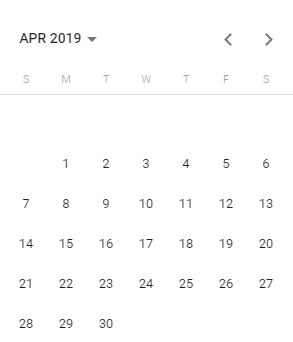
 timruhle
on 3 May 2019
timruhle
on 3 May 2019
I would like this feature as well, or at least some guidance for the css. Here are the things I can achieve, neither or which are quite right.
As you can see in this example the first row doesn't align properly
.mat-calendar-body-label { display: none; }``
Hi, you should be more specific using css selectors.
.mat-calendar-body-label also creates free space in the beginning of calendar. Try this workaround:
[aria-hidden=true] .mat-calendar-body-label {
    display: none;
}
This is for whole line label. And:
td.mat-calendar-body-label {
    visibility: hidden;
}
This for partial line label.
 mihdemarko
on 8 May 2019
mihdemarko
on 8 May 2019
@mihdemarko unfortunately this is not enough since only using css to hide stuff is not taking in consideration when the height is calculated.. look how it looks here:

cool would be some input where we could hide the body
 x1c0
on 27 Feb 2020
x1c0
on 27 Feb 2020
These selectors can be used for hiding the label, and not breaking the date positions.
.mat-calendar-body-label:not(:last-of-type) {
visibility: hidden;
}
.mat-calendar-body-label:last-of-type {
display: none;
}
I think the fix height is intentional, otherwise changing months would result in jumps. Imagine clicking a datepicker the bottom of the screen, it opens an overlay above the trigger. If the height is not fixed and you interact with the calendar it would jump down, or reveal space between the trigger and the calendar. I think neither of these scenarios are better than the current.
 Totati
on 27 Feb 2020
Totati
on 27 Feb 2020
Sure I understand that, since my intention is to remove 1 row of the table then it would be nice that, that change was taken into consideration when calculating the height (and this cannot be achieved by CSS only)
here I have a 6 rows month (the bigger possible) and still there is this last unnecessary table row:

x1c0
on 28 Feb 2020
Now I understand your problem. You have to override this value. Since it's a scss variable, but it's not a default one, you can't override it. You have to calculate your calendar height by hand like they did, and add a selector to your calendar like this:
.mat-datepicker-content .mat-calendar {
height: 300px;
}
Totati
on 28 Feb 2020
You can try something like this (works for me - I have a custom dialog):
.datepicker-dialog { // custom class
max-width: 700px !important;
width: 100vw;
position: absolute !important;
.mat-calendar {
width: 100vw;
max-width: 100%;
height: 100vw;
max-height: 700px;
}
.mat-calendar-body-label:not(:last-of-type) {
visibility: hidden;
}
.mat-calendar-body-label:last-of-type {
display: none;
}
}
 duxor
on 11 Apr 2020
duxor
on 11 Apr 2020
Sounds like this issue has been resolved using style overrides
 andrewseguin
on 28 May 2020
andrewseguin
on 28 May 2020
Now I understand your problem. You have to override this value. Since it's a scss variable, but it's not a default one, you can't override it. You have to calculate your calendar height by hand like they did, and add a selector to your calendar like this:
.mat-datepicker-content .mat-calendar { height: 300px; }
use height:auto !important; instead
 RkSabando
on 17 Jun 2020
RkSabando
on 17 Jun 2020
This issue has been automatically locked due to inactivity.
Please file a new issue if you are encountering a similar or related problem.
Read more about our automatic conversation locking policy.
_This action has been performed automatically by a bot._
![angular-automatic-lock-bot[bot] picture](https://avatars.githubusercontent.com/in/40213?v=4&s=40) angular-automatic-lock-bot[bot]
on 18 Jul 2020
angular-automatic-lock-bot[bot]
on 18 Jul 2020
Related issues
 LoganDupont
·
3Comments
LoganDupont
·
3Comments
 RoxKilly
·
3Comments
RoxKilly
·
3Comments
 MurhafSousli
·
3Comments
MurhafSousli
·
3Comments
 shlomiassaf
·
3Comments
shlomiassaf
·
3Comments
 julianobrasil
·
3Comments
julianobrasil
·
3Comments
Most helpful comment
Hi, you should be more specific using css selectors.
.mat-calendar-body-label also creates free space in the beginning of calendar. Try this workaround:
[aria-hidden=true] .mat-calendar-body-label {
    display: none;
}
This is for whole line label. And:
td.mat-calendar-body-label {
    visibility: hidden;
}
This for partial line label.