Components: MatCard size increases on applying matRipple
Bug, feature request, or proposal:
Bug
What is the current behavior?
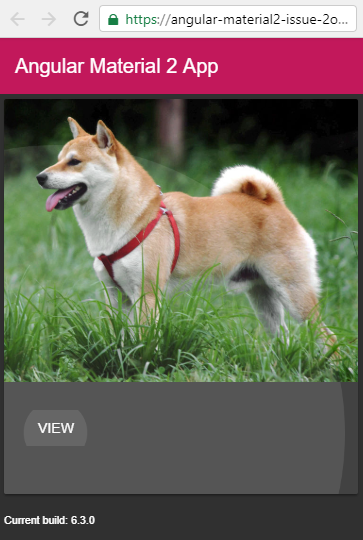
On adding matRipple to a mat-card with mat-card-actions and clicking on the action button, the card size increases since the <mat-ripple-element> appears at the bottom and takes up some empty space.
What is the expected behavior?
<mat-ripple-element> should not take up the aforementioned extra space.
What are the steps to reproduce?
- Add a mat-card with mat-card-actions buttons
- Add matRipple to mat-card
- Click on the action button
https://stackblitz.com/edit/angular-material2-issue-2ocoap?embed=1&file=app/app.component.html
Which versions of Angular, Material, OS, TypeScript, browsers are affected?
Angular: 6.0.7
Material: 6.3.0
OS: win32 x64
Typescript: 2.7.2
Browser: Chrome Version 67.0.3396.99 (Official Build) (64-bit)
Screenshot
 batbrain9392
All 5 comments
Thanks for your issue. I'm still looking for possible solutions to fix that issue.
But closing this particular issue since there is already a similar one: https://github.com/angular/material2/issues/10898
 devversion
on 15 Jul 2018
devversion
on 15 Jul 2018
it's still present
 adarowiec
on 12 Feb 2019
adarowiec
on 12 Feb 2019
Use a div -Tag inside of mat-card -Tag. This Fix my issue.
<mat-card matRipple *ngFor="let row of itmes"><div><mat-card-header><div mat-card-avatar>
{{row.ava}}
        </div>
        <mat-card-title>{{row.title}}</mat-card-title>
        <mat-card-subtitle>{{row.createdate | date}}</mat-card-subtitle>
      </mat-card-header>
      <mat-card-content>
        {{row.content}}
      </mat-card-content>
    </div>
  </mat-card>
 rzeiler
on 24 Apr 2019
rzeiler
on 24 Apr 2019
Or you could just add a custom style property to remove the bottom margin.
Something to the effect of -->
<mat-card-content style="margin-bottom: 0">
 cyberbeast
on 25 Apr 2019
cyberbeast
on 25 Apr 2019
This issue has been automatically locked due to inactivity.
Please file a new issue if you are encountering a similar or related problem.
Read more about our automatic conversation locking policy.
_This action has been performed automatically by a bot._
![angular-automatic-lock-bot[bot] picture](https://avatars.githubusercontent.com/in/40213?v=4&s=40) angular-automatic-lock-bot[bot]
on 10 Sep 2019
angular-automatic-lock-bot[bot]
on 10 Sep 2019
Related issues
 constantinlucian
·
3Comments
constantinlucian
·
3Comments
 vitaly-t
·
3Comments
vitaly-t
·
3Comments
 LoganDupont
·
3Comments
LoganDupont
·
3Comments
 jelbourn
·
3Comments
jelbourn
·
3Comments
 alanpurple
·
3Comments
alanpurple
·
3Comments
Most helpful comment
it's still present