Components: MatTable : MatSort : variety of bugs
Bug, feature request, or proposal:
MatSort from Material Table bugs
What is the expected behavior?
sorting the column. In ascending descending or original.
What is the current behavior?
Variety of bugs,
- if one of the items in the column to sort is a
/sort will fail and result in a column where items are in disorder :
|unsorted : |asc : | desc : |
|:-:|:-:|:-:|
| |
| |
| |
|
- if items contain preceding zeroes even if the passed var was a string these are ignored
(and this ...regardless of context should be regarded as unintended behavior, it makes more sence for the Angular user to have to add "skip preceding zeroes" himself then to have to add "sort including preceding zeroes" himself. to have this sort of behavior my strings must have been parsed. something that would make sense to me if there was, for example, a "typeOf" directive in<mat-header-cell>or something of the like, but parsing my values without my specific demand should not be standard-issue) :
|unsorted : |asc : |desc : |
|:-:|:-:|:-:|
| |
|  |
| |
|
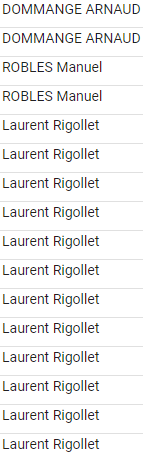
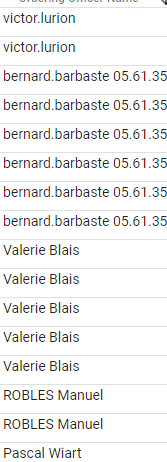
- now... I understand if you see this one as intended behavior, although to be fair it's pretty shocking to your John Doe ...MatSort places :
- Numers first 0 - 9
- Uppercases second A - Z
- LoweCases third a - z
my beef with that is of course the unmerged lower and uppercases.
...This results in (asc sorted) : 44684, 7545, 9, Barbarra, Xavier, Yvonne, Zachary, arnold, barbarra
which is a pretty useless sort-type to have displayed in a table.
a simple .toLowerCase() costs nothing to you and saves the guy implementing mat-table, who wants a very basic and quick setup a lot of time. (and is just good practice)
|unsorted : |asc : |desc : |
|:-:|:-:|:-:|
| |
| |
| |
|
 tatsujb
All 10 comments
I wasn't able to reproduce the first issue just by adding a slash in some of the data. Can you post a Stackblitz that shows the issue?
 crisbeto
on 6 Jul 2018
crisbeto
on 6 Jul 2018
@crisbeto I'll try, I can't find the base mat table stackblitz without async api data reload on sort. I just want a static data const I replace to test it.
tatsujb
on 6 Jul 2018
You can use this one which has a static array of data: https://stackblitz.com/angular/lyvjkxvjqvm.
crisbeto
on 6 Jul 2018
@crisbeto you're right : /<something> works, / doesn't though.
tatsujb
on 6 Jul 2018
Can you fork the link from above to show it breaking? I tried changing some of the names to /, but I couldn't get it to break.
crisbeto
on 7 Jul 2018
here : thanks for the stackblitz btw 🙂 . it's going to be very handy to me! :
https://stackblitz.com/edit/angular-xuksqd?file=app/table-sorting-example.ts
and here i can also reproduce the /<something> bug :
https://stackblitz.com/edit/angular-xuksqd-el14r8?file=app/table-sorting-example.ts
tatsujb
on 9 Jul 2018
Other chars make it break also:
(
*
)
 RodEsV
on 12 Jul 2018
RodEsV
on 12 Jul 2018
the reason why mat-table's sort is giving me so much pains is that it's making a shift-select impossible to implement because the sorted data is 100% obscured from us devs.
I dunno where but deep within mat-table's npm package code is buried the actual sort method that mat table uses to read the table instead of simply reading this.dataSource.data.
no member of this.dataSource contains the sorted array.
this may have performance benefits but it's ruining the dev's life.
instead (I deduce that) mat table reads this.dataSource.data, reads this.dataSource.sort.direction to get the current sorting direction and see if sorting is on, reads this.dataSource.sort.active to get the sorted column, calculates its sort from these three vars, and this sortedArray is returned on the fly to mat table for display and never stored anywhere, which I deplore.
My first instinct was to call :
<mat-table
        matSort
        [dataSource]="dataSource"
        (matSortChange)="sortData($event.active, $event.direction)"
      >
matSortChange to superimpose what happens with sort. as it turns out this method doesn't do that. (and you can't just remove matSort but keep the sorting header arrows and events either, that makes the construction of the table error out)
matSortChange just executes some code before matSort but no matter what you replace this.dataSource.data with, that array will be re-sorted by matSort anyways. so you don't get to have the final word.
I thought that maybe I could at least recreate this object myself so as to get correct index count and iteration as a means to accomplish my shift-select :
(In the below I use a simple js array of indexes instead of angular-cdk selection-model because I ran into yet more bugs with the latter, so I dropped it in favor of reliability.)
addToSelection(row, event, checkbox){
    let specialSelection = [];
    const copy = [...this.dataSource.data];
    if(this.dataSource.sort.direction !== ''){
      let [v1, v2] = (this.dataSource.sort.direction === 'asc') ? [-1, 1] : [1, -1];
      copy.sort((a,b) => b[this.dataSource.sort.active] > a[this.dataSource.sort.active] ? v1 : v2);
    }
    const indexOf = copy.indexOf(row);
    const tog = (i) => {
      console.log(i);
      if(specialSelection.indexOf(i) !== -1) specialSelection = _.without(specialSelection, i);
      else specialSelection.push(i);
      this.selected.push(this.dataSource.data[i]['numberOfRow']);
    };
    if(event.shiftKey && this.previous !== -1 && this.previous !== indexOf) {
      const currentSet = [];
      copy.forEach((o, i) => currentSet.push(i));
      if(this.previous < indexOf){
        const toToggle = currentSet.slice(currentSet.indexOf(this.previous) +1, currentSet.indexOf(indexOf) + 1);
        toToggle.forEach(x => tog(x));
        console.log(specialSelection);
      }else{
        const toToggle = currentSet.slice(currentSet.indexOf(indexOf), currentSet.indexOf(this.previous));
        toToggle.forEach(x => tog(x));
        console.log(specialSelection);
      }
    } else if(event.ctrlKey || checkbox) {
      tog(indexOf);
    } else {
      if(specialSelection.length === 1 && specialSelection[0] === indexOf) {
        specialSelection = [];
        this.selected = [];
      } else {
        specialSelection = [];
        this.selected = [];
        specialSelection.push(indexOf);
        this.selected.push(row['numberOfRow'])
      }
    }
    this.store.setSelected(row);
    this.setSelectionOfInterest();
    this.setSelection();
    this.previous = indexOf;
  }
html :
<mat-row *matRowDef="let row; columns: displayedColumns;"
                 class=""
                 [ngClass]="{ 'selected': selected.indexOf(row['numberOfRow']) !== -1}"
                 (click)="addToSelection(row, $event, false)"></mat-row>
but my log (console.log(indexOf, copy);), after a sort and select returns :
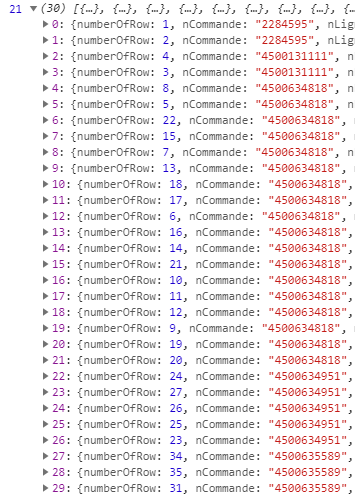
whereas my mat table is showing :

So indexOf() finds our (counting from 0) 4th row at the at the 21st position
...because that's where it is in the sorted array we created ( ) which has similar
 nCommande (at least visually) but not in truth as we can clearly tell from our first column, numberOfRow which is just an enumeration counting from one allowing us to witness the order of elements after sorting. (this is explained by, as an example, position 4 all the way down to position 26, having the same nCommande value).
it's interesting to note that these results (for sorting a === b) aren't random... they're the same every time.
...for both differing sorts.
If I repeat the experiment n times, that is :
- load the page
- sort the
nCommandecolumn
(I already have an identical sort as last time and I know it's not only visual because the row numbers I created are in the same sequence as I saw before (and that you see in the above screenshot) : "2, 1, 3, 4, 20, 22, 19, 7...")
- (counting from 0) click on the line 4, (the one with my row number 20), my console log still says the index of is 21 when it should be 4.
...I always end up with the same results.
a simple solution to all this would be to have (if you absolutely MUST keep the unsorted original array for some reason), another member in this.dataSource called sortedData to be loaded by matTable.
all said and done the above code works as intended for filter. just not with sort and it's extremely hacky considering the sorted array of mat-table and my sorted array are not _actually_ the same.
tatsujb
on 13 Jul 2018
The issue here is that the sort function does not know whether the user is trying to sort numbers or strings. It simply compares two values at a time. This causes some issues if the array contains both.
To fix this, provide a sort data accessor that does not try to coerce numbers from a string. Just make the data accessor return the value directly:
  constructor() {
    this.dataSource.sortingDataAccessor = (data: any, key: string) => data[key];
  }
https://stackblitz.com/edit/angular-y8pwh9?file=src/app/table-sorting-example.ts
 andrewseguin
on 28 May 2020
andrewseguin
on 28 May 2020
This issue has been automatically locked due to inactivity.
Please file a new issue if you are encountering a similar or related problem.
Read more about our automatic conversation locking policy.
_This action has been performed automatically by a bot._
![angular-automatic-lock-bot[bot] picture](https://avatars.githubusercontent.com/in/40213?v=4&s=40) angular-automatic-lock-bot[bot]
on 7 Jul 2020
angular-automatic-lock-bot[bot]
on 7 Jul 2020
Related issues
 savaryt
·
3Comments
savaryt
·
3Comments
 dzrust
·
3Comments
dzrust
·
3Comments
 3mp3ri0r
·
3Comments
3mp3ri0r
·
3Comments
 michaelb-01
·
3Comments
michaelb-01
·
3Comments
 jelbourn
·
3Comments
jelbourn
·
3Comments