Components: mat-autocomplete: panel is shifted way too high in small devices (mobile)
Bug, feature request, or proposal:
Bug: the overlay panel position is bugged in small devices, when pushed up by the virtual keyboard on mobile devices.
What is the expected behavior?
If there's no space to show the autocomplete neither above, nor bellow the associated input, maybe it's better to do nothing, just leaving the panel where it was initially opened (or maybe it's better to push it downwards).
What is the current behavior?
Notice how the panel just goes off the screen
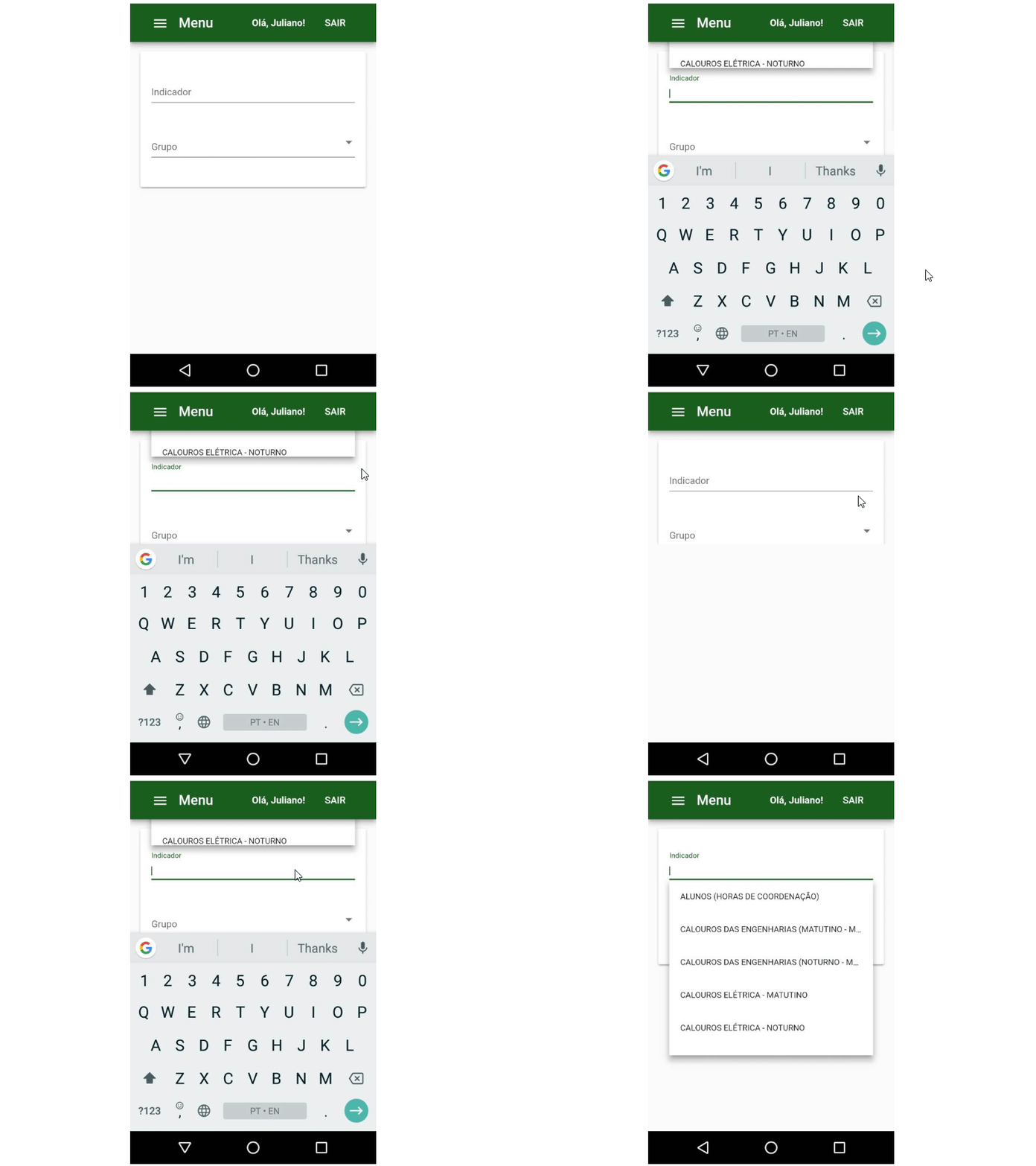
What are the steps to reproduce?
There's no special steps to reproduce it. Just open an autocomplete panel in a small screen.
What is the use-case or motivation for changing an existing behavior?
UX in small devices
Which versions of Angular, Material, OS, TypeScript, browsers are affected?
Angular CLI: 6.0.8
Node: 8.11.2
OS: win32 x64
Angular: 6.0.5
... animations, common, compiler, compiler-cli, core, forms
... http, platform-browser, platform-browser-dynamic
... platform-server, router

Package                            Version
------------------------------------------------------------
@angular-devkit/architect          0.6.8
@angular-devkit/build-angular      0.6.8
@angular-devkit/build-optimizer    0.6.8
@angular-devkit/core               0.6.8
@angular-devkit/schematics         0.6.8
@angular/cdk                       6.3.0
@angular/cli                       6.0.8
@angular/flex-layout               6.0.0-beta.16
@angular/material                  6.3.0
@angular/material-moment-adapter   6.3.0
@ngtools/webpack                   6.0.8
@schematics/angular                0.6.8
@schematics/update                 0.6.8
rxjs                               6.2.1
typescript                         2.7.2
webpack                            4.8.3
Is there anything else we should know?
Maybe related to #6965
cc: @crisbeto
 julianobrasil
All 7 comments
@julianobrasil from what I can gather from the gif, there probably is more space to show the menu above than below. It's being cut off in your case, because the toolbar's z-index is higher than the z-index of the cdk-overlay-container. You should be able to work around it either by reducing the z-index on the toolbar or increasing the one of the container.
 crisbeto
on 25 Jun 2018
crisbeto
on 25 Jun 2018
You're completely right, @crisbeto. I'm closing this.
julianobrasil
on 25 Jun 2018
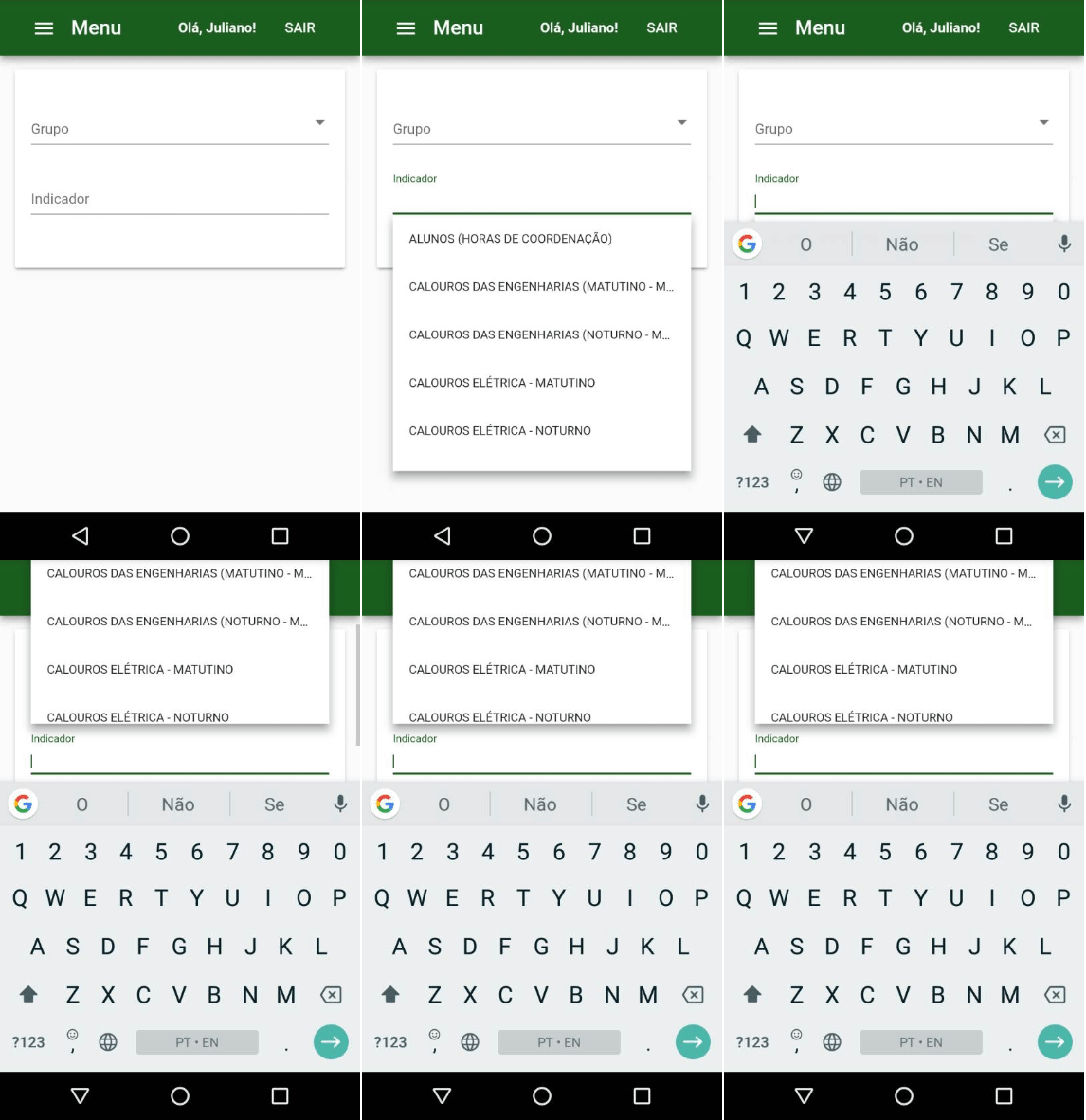
@crisbeto, unfortunately, I'm reopening this one. I've tested it again (changing the z-index so the toolbar became behind the autocomplete panel). Notice in the gif below that the panel is opened with 5 options. After the virtual keyboard is shown and the panel is shifted upwards, one of the options (the very first one) is hidden at the top of the browser (chrome in Android). If the user wishes to select the first option (which I think it's the most probable situation), he/she must close the panel first, using Android's footer buttons.
julianobrasil
on 25 Jun 2018
We should be able to resolve that case by enabling pushing for the autocomplete, however doing so is on hold until https://github.com/angular/material2/pull/11628 gets in.
crisbeto
on 26 Jun 2018
@crisbeto Enabling push for autocomplete by setting .withPush(true) on the position strategy causes the "MatAutocomplete Fallback positions should reposition the panel on scroll" test to fail since the autocomplete panel doesn't scroll off the top of the screen (which is the expected behavior with push). By setting the scroll in the above mentioned test to a smaller number, the test will still pass (since it doesn't scroll enough to push the top of the overlay off the screen). Is this the expected behavior?
I can submit a PR if this is how it is supposed to act.
Btw https://github.com/angular/material2/pull/12624 which was a resubmit of https://github.com/angular/material2/pull/11628 is in
 kwkelly
on 29 Aug 2018
kwkelly
on 29 Aug 2018
@kwkelly that's how pushing is supposed to work. If you add withLockedPosition it'll only push on the first positioning and will stay in place when scrolling.
crisbeto
on 30 Aug 2018
@crisbeto wouldn't that mean that in this event (an autocomplete near the top on mobile devices with the keyboard opened):
- the options will occlude the input
- the overlay will still be too large to fit
An alternative approach would be to add a class like mat-autocomplete-smallheight whenever the viewport height is <300 or so (256 + some the input + some margin) that overrides the max-height to 96 (2xAUTOCOMPLETE_OPTION_HEIGHT).
It's not ideal, but it's the only thing I could think of to address those two points too. Would you folks be open to this approach? If so, it might be something useful to more than just mat-autocomplete, so maybe instead of a state class, a class further up the dom tree would be better.
 captaincaius
on 13 Sep 2019
captaincaius
on 13 Sep 2019
Related issues
 vitaly-t
·
3Comments
vitaly-t
·
3Comments
 vanor89
·
3Comments
vanor89
·
3Comments
 kara
·
3Comments
kara
·
3Comments
 savaryt
·
3Comments
savaryt
·
3Comments
 theunreal
·
3Comments
theunreal
·
3Comments
Most helpful comment
We should be able to resolve that case by enabling pushing for the autocomplete, however doing so is on hold until https://github.com/angular/material2/pull/11628 gets in.