Components: Outline form field visual bug in 6.2
Bug, feature request, or proposal:
mat-form-field-outline-gap and mat-form-field-outline-start classes are not styling right
What is the expected behavior?
Same behaviour as material 6.1
What is the current behavior?
When you move between routes and load a component with some form fields with values, the outline gap doenst calculate the width, so label is bad styled. When you click anywhere, the width is recalculated fine.
What are the steps to reproduce?
GIF with the problem:

What is the use-case or motivation for changing an existing behavior?
Prior to 6.2 everything worked fine
Which versions of Angular, Material, OS, TypeScript, browsers are affected?
Angular Material 6.2
Is there anything else we should know?
Angular Material 6.1 didnt have this issue
The problem seems to be related with the width applied to mat-form-field-outline-gap and mat-form-field-outline-start classes, when the bug happens, the width is set to 0, like:
<div class="mat-form-field-outline-start" style="width: 0px;">...</div>
And then if you click anywhere:
<div class="mat-form-field-outline-start" style="width: 5.48608px;">...</div>
 bop10
bop10
All 11 comments
@bop10 Can you provide a stackblitz or minimial reproduction repo? I'm not able to reproduce it.
@crisbeto This is probably related to #11406
 mmalerba
on 31 May 2018
mmalerba
on 31 May 2018
@mmalerba @crisbeto Hey, i'm not able to reproduce it in stackblitz, it's going to take me a while to find why i can't reproduce it.
In my app happens in some forms, not in every single one, but i don't know why since all my forms are similar. It has to be related with #11406, because it didn't happen in 6.1
bop10
on 4 Jun 2018
I'm having the same issue and I have not yet been able to find any solution. Would be nice If you could give us some advice.
Thanks!
 Jock-gm
on 4 Jun 2018
Jock-gm
on 4 Jun 2018
Same issue here.
 alejojimenezmp
on 11 Jun 2018
alejojimenezmp
on 11 Jun 2018
I'm still unable to reproduce this, if anyone seeing the issue is able to reproduce on stackblitz or a minimal github repo that would help me track it down
mmalerba
on 15 Jun 2018
@mmalerba @crisbeto I think I have a reproducer. The problem seems to be when loading via route, the mat-form-field-outline-gap is not being calculated at all. It is set to the default 0.
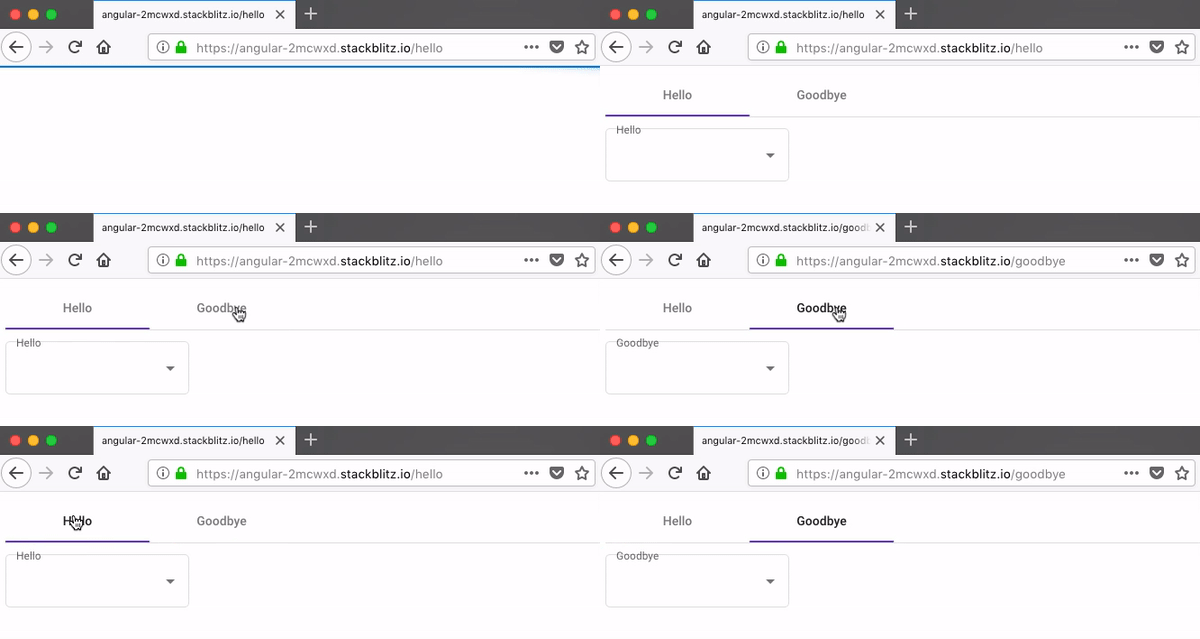
Here's what I coded to reproduce it: https://stackblitz.com/edit/angular-2mcwxd
I've been able to get the no-gap behavior on Firefox, Safari, Edge, and Chrome.
The reproducer app works best when run in its own window.
.
This reproducer was done with @angular 6.0.9 and @angular/material 6.4.0.
 czeckd
on 20 Jul 2018
czeckd
on 20 Jul 2018
I'm using this as a base class for my form components as a temporary fix until this is resolved.
import { AfterViewInit, ChangeDetectorRef, Component, QueryList, ViewChildren }
  from '@angular/core';
import { MatFormField } from '@angular/material/form-field';

@Component({
  template: ''
})
export class FormFieldFixComponent implements AfterViewInit {
  @ViewChildren(MatFormField) formfields: QueryList<MatFormField>;

  constructor(protected cdr: ChangeDetectorRef) { }

  // This is a temporary work around for: https://github.com/angular/material2/issues/11577
  ngAfterViewInit() {
    this.formfields.forEach( (ff: MatFormField) => {
      ff.updateOutlineGap();
    });
    this.cdr.detectChanges();
  }
}
Hopefully this issue can get another look from the Material team?
czeckd
on 24 Jul 2018
Having the same issue. Two components using the same structure. One has the issue the other does not and I can't find a reason for it.
@czeckd Your workaround fixes it.
 mbeckenbach
on 8 Aug 2018
mbeckenbach
on 8 Aug 2018
I think #12555 should fix this
mmalerba
on 9 Aug 2018
this issue is still existing
 shristi-cashify
on 12 Mar 2019
shristi-cashify
on 12 Mar 2019
This issue has been automatically locked due to inactivity.
Please file a new issue if you are encountering a similar or related problem.
Read more about our automatic conversation locking policy.
_This action has been performed automatically by a bot._
![angular-automatic-lock-bot[bot] picture](https://avatars.githubusercontent.com/in/40213?v=4&s=40) angular-automatic-lock-bot[bot]
on 10 Sep 2019
angular-automatic-lock-bot[bot]
on 10 Sep 2019
Related issues
 theunreal
·
3Comments
theunreal
·
3Comments
 xtianus79
·
3Comments
xtianus79
·
3Comments
 vanor89
·
3Comments
vanor89
·
3Comments
 julianobrasil
·
3Comments
julianobrasil
·
3Comments
 RoxKilly
·
3Comments
RoxKilly
·
3Comments
Most helpful comment
this issue is still existing