Components: IE11 Table rows sticked on the top ?
Hi everyone
as suggested by @crisbeto, after to try your last version of Ng I still get the following issue
BTW: I don't have this issue here: https://material.angular.io/components/table/overview
Bug, feature request, or proposal:
Bug since Angular / Material 6.0.0
What is the expected behavior?

What is the current behavior?
IE 11

chrome:
What are the steps to reproduce?
In 6.0.0
https://stackblitz.com/edit/angular-material2-issue-gd2jqa?file=app%2Fapp.component.html
In 6.0.3
https://angular-material2-issue-7ugtae.stackblitz.io
I can see under IE that we have a problem of style with row:
(Text is sticked at the top of the row)
Which versions of Angular, Material, OS, TypeScript, browsers are affected?
Angular 6.0.3
Material: 6.0.3
CDK: 6.1.0
OS: Windows 7 64 bits pro
TypeScript: 2.7.2
Browser affected: IE 11
 kevincaradant
All 8 comments
Removing min-height: inherit; from the mat-cell seems to fix the problem. Doesn't also have any bad influence in other browsers.
Probably this: https://github.com/philipwalton/flexbugs#flexbug-3
There seems to be a workaround for this already in place for the mat-row, probably needs to be applied to the mat-cell, too, since the mat-cell changed to be flex now, too.
https://github.com/angular/material2/blob/c68ccc93e251a986b7d1571d52a2c12bc0e1e539/src/lib/table/table.scss#L30
 pfeigl
on 23 May 2018
pfeigl
on 23 May 2018
@pfeigl getting rid of the min-height on the cell should be enough. The cells are already being stretched to the height of the row by the flexbox properties.
 crisbeto
on 24 May 2018
crisbeto
on 24 May 2018
So, is this issue resolved? cause it's still happening on latest version.
 gagandeepbal
on 29 Aug 2018
gagandeepbal
on 29 Aug 2018
I solved this problem with this style for IE. Work texts with badges too.
@media all and (-ms-high-contrast: none), (-ms-high-contrast: active) {
  /* IE10+ CSS styles go here */
  .mat-header-row, .mat-row {
    -ms-flex-align: stretch;
  }
}
 b-mi
on 20 Sep 2018
b-mi
on 20 Sep 2018
@b-mi works great thanks. don't forget .mat-footer-row if you're using it
 adamdport
on 23 Oct 2018
adamdport
on 23 Oct 2018
the issue seems to be present (again) with the latest material 7.2.1:
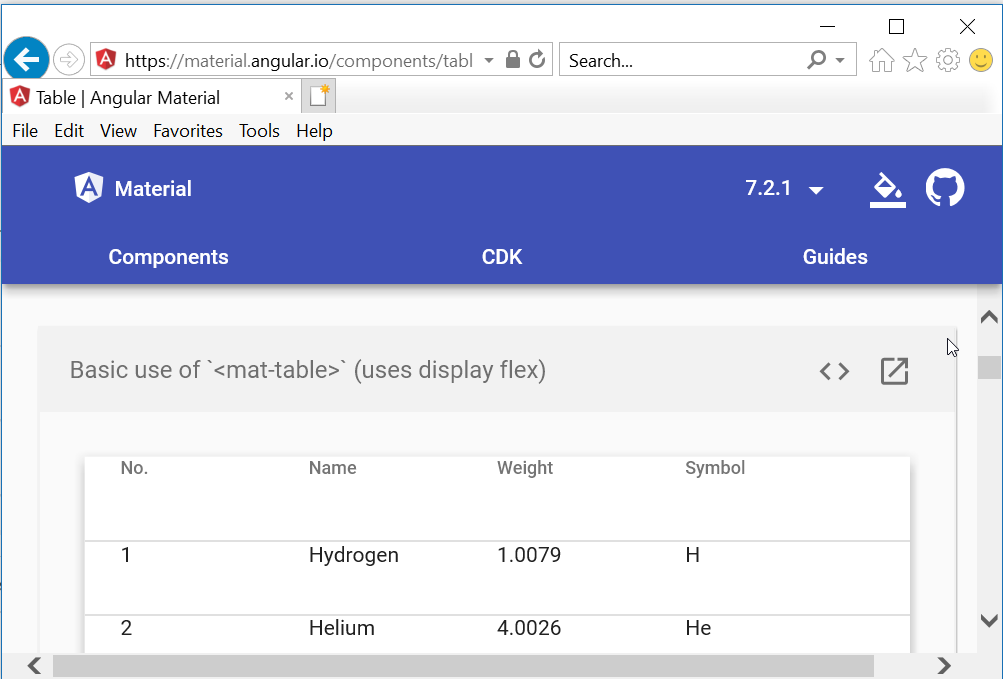
Somehow the changes of @crisbeto in https://github.com/angular/material2/commit/b296523276c7e6732d60d3c1bbcd3175f3bec8cd#diff-8ba7f84c84d5b5139955359c65e64b9aR75 are not present anymore: https://github.com/angular/material2/blob/master/src/lib/table/table.scss#L66
 macjohnny
on 16 Jan 2019
macjohnny
on 16 Jan 2019
@media all and (-ms-high-contrast: none), (-ms-high-contrast: active) {
  /* IE10+ CSS styles go here */
  .mat-header-row, .mat-row {
    -ms-flex-align: stretch;
  }
}
Can we have any working sample please?
 harshadray
on 28 May 2019
harshadray
on 28 May 2019
Resetting min-height does the trick:
.mat-cell,
.mat-header-cell,
.mat-footer-cell {
  min-height: 0; // Reset min-height.
}
Works on IE11, Edge, Firefox (latest), Safari, and Chrome.
 arodr967
on 30 Jan 2020
arodr967
on 30 Jan 2020
Related issues
 Hiblton
·
3Comments
Hiblton
·
3Comments
 LoganDupont
·
3Comments
LoganDupont
·
3Comments
 MurhafSousli
·
3Comments
MurhafSousli
·
3Comments
 michaelb-01
·
3Comments
michaelb-01
·
3Comments
 jelbourn
·
3Comments
jelbourn
·
3Comments
Most helpful comment
I solved this problem with this style for IE. Work texts with badges too.