Components: Hide years superior to max date in datepicker
Bug, feature request, or proposal:
Proposal, change the view years if a maxdate is set.
What is the expected behavior?
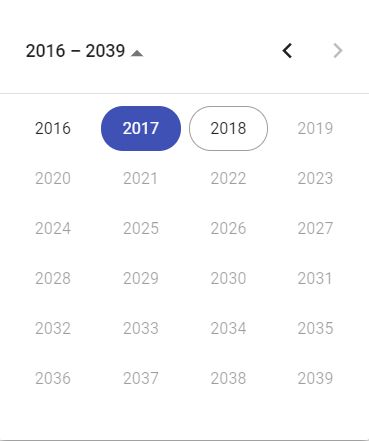
If i set the maxdate as today (in 2018) i don't expect to see 2019, 2020, 2021... in the years view.
What is the current behavior?
All the years are visible but 2019, 2020, 2021... are disabled.
What is the use-case or motivation for changing an existing behavior?
I set a max date to limit the possibilities, i'm not (and the user) interrested in years that i can't select.
The extreme is if i set 2016, i can choose only this one among 24 differents years...
Which versions of Angular, Material, OS, TypeScript, browsers are affected?
Latest
Is there anything else we should know?
I think the right disabled arrow if enough for understand that you can't go further in years.
 WizardPC
All 16 comments
I'd like to try working this, adding the feature if @josephperrott you agree it's a nice to have. Thoughts? 😄
 raygervais
on 9 Apr 2018
raygervais
on 9 Apr 2018
I will defer to @mmalerba for if its something that he would like to have included in datepicker as he is the component owner.
 josephperrott
on 9 Apr 2018
josephperrott
on 9 Apr 2018
I think it was originally done this way because the component responsible for rendering the cells didn't actually know what the min and max were. I believe it was refactored at some point and it should now be possible to do this.
@raygervais sure I would appreciate if you're willing to take a stab at it and send me a PR.
 mmalerba
on 9 Apr 2018
mmalerba
on 9 Apr 2018
@raygervais : i think it's in the datepicker/multi-year-view.ts, in the init() function we need to change the let activeOffset = activeYear % yearsPerPage;.
Actually the years view is build like that :
2018 % 24 = 2 so 2018 - 2 = 2016,2017,2018...
2039 % 24 = 23 so 2039 - 23 = 2016,2017,2018...
For the new behavior, if maxDate is not null, activeOffset = yearsPerPage - 1.
What do you think ?
@mmalerba
From my point of view, this will end with four differents "years" view :
- No min or max date => Actual behavior
- Only the min date =>
activeOffset = 0(what do you think ?) - Only the max date =>
activeOffset = yearsPerPage - 1 - Both min and max date => I propose
activeOffset = yearsPerPage - 1too. Because it's seems prettier to display disabled past date than disabled future date.
Or for the fourth item, we can make minDatehaving the same behavior but with impacts :
activeOffset < minDate < maxDateThere will be only one page with less than 24 years.minDate < activeOffsetThe first page of calendar will display less than 24 years too.
WizardPC
on 10 Apr 2018
Thanks for the explanation @WizardPC, I'll get to that very soon. Apologies for the delay, just wrapping up loose ends during the final days of the school semester and preparing for a new job. If I got a WIP PR going, would you be able to guide if in the case I stray from the agreed upon logic?
raygervais
on 16 Apr 2018
@raygervais i'm not an expert but i can try :)
WizardPC
on 16 Apr 2018
Hi guys, any update on this ?
 labyed
on 7 May 2018
labyed
on 7 May 2018
Sorry for the delay, I intend to get back to it this weekend. Currently adjusting to new job / location and getting everything set up.
raygervais
on 8 May 2018
@raygervais @mmalerba Hi, any update on this. It was updated almost a year ago
 UmutAkkaya
on 7 Mar 2019
UmutAkkaya
on 7 Mar 2019
I had an intern who was working on it at one point, but it never got finished
mmalerba
on 7 Mar 2019
@mmalerba can it be reassigned to someone? As it is, I believe its a really bad UX
UmutAkkaya
on 7 Mar 2019
I don't think anyone on the team has time to take it on right now, but if someone wants to contribute a PR I'll review it
mmalerba
on 7 Mar 2019
I believe this website is using the angular material date picker and it seems like you can control the year range.
https://my.questforhealth.com/mobile/info/contact-us
Anyone know what's a quick hack to enable this?
 comc49
on 13 Mar 2019
comc49
on 13 Mar 2019
@mmalerba Seems like currently there's no one working on a PR for this? May I give it a go?
 jysoo
on 5 May 2019
jysoo
on 5 May 2019
@jysoo You're welcome to give it a go. Please also make sure that the keyboard shortcuts work in addition to looking right visually.
mmalerba
on 6 May 2019
This issue has been automatically locked due to inactivity.
Please file a new issue if you are encountering a similar or related problem.
Read more about our automatic conversation locking policy.
_This action has been performed automatically by a bot._
![angular-automatic-lock-bot[bot] picture](https://avatars.githubusercontent.com/in/40213?v=4&s=40) angular-automatic-lock-bot[bot]
on 11 Sep 2019
angular-automatic-lock-bot[bot]
on 11 Sep 2019
Related issues
 savaryt
·
3Comments
savaryt
·
3Comments
 RoxKilly
·
3Comments
RoxKilly
·
3Comments
 kara
·
3Comments
kara
·
3Comments
 3mp3ri0r
·
3Comments
3mp3ri0r
·
3Comments
 xtianus79
·
3Comments
xtianus79
·
3Comments
Most helpful comment
Sorry for the delay, I intend to get back to it this weekend. Currently adjusting to new job / location and getting everything set up.