Components: Textarea with matTextareaAutosize has spinner arrows
Bug, feature request, or proposal:
Bug
What is the expected behavior?
textarea element with matTextareaAutosize should not have spinner arrows
What is the current behavior?
textarea element with matTextareaAutosize has spinner arrows that go away after entering the first character
What are the steps to reproduce?
https://stackblitz.com/edit/angular-talhyo
What is the use-case or motivation for changing an existing behavior?
Which versions of Angular, Material, OS, TypeScript, browsers are affected?
Chrome Version 65.0.3325.146
Is there anything else we should know?
 EamonKavanagh
All 16 comments
What do you mean with 'spinner arrows'? Do you have a screenshot?
 donroyco
on 12 Mar 2018
donroyco
on 12 Mar 2018
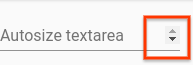
EamonKavanagh
on 12 Mar 2018
Personally, I don't reproduce with your stackblitz on Chrome & Firefox.
 WizardPC
on 13 Mar 2018
WizardPC
on 13 Mar 2018
Weird, I definitely see exactly the screenshot I posted from the link I provided.
I was able to create it by taking the example here and removing matAutosizeMinRows="2" andmatAutosizeMAxRows="5".
EamonKavanagh
on 13 Mar 2018
@EamonKavanagh Not showing up here, Google Chrome, latest version.
donroyco
on 13 Mar 2018
Interesting. Confirming I don't see it in Firefox but in Chrome Version 65.0.3325.146 I do see it.
EamonKavanagh
on 14 Mar 2018
I have same issue. It might be related with placing that on flex layout or combination with input values. My markup:
<div class="section-container">
    <mat-form-field class="full-width">
          <textarea
            id="item-description"
            matTextareaAutosize
            matInput
            [placeholder]="'DESCRIPTION_PLACEHOLDER' | translate | uppercase"
            [formControl]="descriptionControl"
          >
          </textarea>
    </mat-form-field>
</div>
As a temporary workaround, such css could be use:
textarea.mat-autosize {
    resize: auto !important;
    overflow: hidden !important;
  }
Ugly, but it works...
 oskardudycz
on 28 Mar 2018
oskardudycz
on 28 Mar 2018
I am able to reproduce without flex layout but it seems to be specific to the version of Chrome I'm on. See https://stackblitz.com/edit/angular-talhyo?file=app%2Finput-autosize-textarea-example.html for how I reproduced it.
EamonKavanagh
on 28 Mar 2018
I'm able to repro on Chrome 65.0.3325.181. It looks like the height isn't calculated quite right when there's a blank line. The textarea always seems to grow a pixel or 2 when I type the first character on a new line. Though I don't see the scrollbars on Firefox, it does display the same jitter when typing the first character
 mmalerba
on 28 Mar 2018
mmalerba
on 28 Mar 2018
@mmalerba any update on that?
oskardudycz
on 11 Apr 2018
The fix for this issue seems to be the cause of the exact same issue in Chrome 68, and possibly also the source of clipped characters in textareas in Mobile Safari. In Chrome 68, with Angular Material 6.4.5, I get a scrollbar in every autosized textarea. The scrollbar disappears if I either increase the height of the textarea by 4px (after calculation), or disable the padding and margin styles for textarea.mat-input-element (after calculation).
In both Chrome 68 and Mobile Safari, with this version of Angular Material, anything below the baseline on the last line of text in autosized textareas is clipped. Again, increasing height by 4px so the scrollbar disappears fixes this issue.
I have yet to figure out a workaround.
 jkruse
on 21 Aug 2018
jkruse
on 21 Aug 2018
@jkruse I'm not seeing the issue on Chrome 68 on my Linux desktop with Angular Material 6.4.6. Are you still able to reproduce? If so, which OS are you using?
mmalerba
on 21 Aug 2018
@mmalerba I can repro what @jkruse reported-- Angular Material 6.4.6 and Chrome 69 (Windows)
 HUU
on 8 Oct 2018
HUU
on 8 Oct 2018
As a workaround I came up with this added style:
textarea.cdk-textarea-autosize-measuring {
  padding: 4px 0 !important;
}
textarea.mat-input-element {
    padding: 0;
    margin: 0;
}

.mat-form-field {
    line-height: normal;
}
 rtsdgim
on 11 May 2019
rtsdgim
on 11 May 2019
This issue has been automatically locked due to inactivity.
Please file a new issue if you are encountering a similar or related problem.
Read more about our automatic conversation locking policy.
_This action has been performed automatically by a bot._
![angular-automatic-lock-bot[bot] picture](https://avatars.githubusercontent.com/in/40213?v=4&s=40) angular-automatic-lock-bot[bot]
on 10 Sep 2019
angular-automatic-lock-bot[bot]
on 10 Sep 2019
Related issues
 alanpurple
·
3Comments
alanpurple
·
3Comments
 LoganDupont
·
3Comments
LoganDupont
·
3Comments
 kara
·
3Comments
kara
·
3Comments
 crutchcorn
·
3Comments
crutchcorn
·
3Comments
 michaelb-01
·
3Comments
michaelb-01
·
3Comments
Most helpful comment
The fix for this issue seems to be the cause of the exact same issue in Chrome 68, and possibly also the source of clipped characters in textareas in Mobile Safari. In Chrome 68, with Angular Material 6.4.5, I get a scrollbar in every autosized textarea. The scrollbar disappears if I either increase the height of the textarea by 4px (after calculation), or disable the padding and margin styles for textarea.mat-input-element (after calculation).
In both Chrome 68 and Mobile Safari, with this version of Angular Material, anything below the baseline on the last line of text in autosized textareas is clipped. Again, increasing height by 4px so the scrollbar disappears fixes this issue.
I have yet to figure out a workaround.