Components: [mat-flat-button, mat-stroked-button] mat-icon within button doesnt align center vertically
Bug, feature request, or proposal:
Bug
What is the expected behavior?
To have a mat-icon element align center vertically within all material button types.
What is the current behavior?
A mat-icon element aligns top when using attribute mat-flat-button or mat-stroked-button.
What are the steps to reproduce?
https://stackblitz.com/edit/vertical-alignment-issue
Screenshot:

As the demo illustrates, the icon is not aligned correctly in the mat-flat-button and mat-stroked-button.
I also noticed that the height of a mat-flat-button and mat-stroked-button differs from the height of a mat-button or mat-raised-button. These should all have the same height in order to give the UI balance when combining button types.
Which versions of Angular, Material, OS, TypeScript, browsers are affected?
Angular 5.2.1
Angular Material 5.2.0
Chrome
 eTallang
All 6 comments
Thanks. I've already fixed this in PR #9771. This one is pending for review.
 devversion
on 6 Feb 2018
devversion
on 6 Feb 2018
Even the one where it says "The icon is aligned" looks a bit off to me. The plus is a bit too far down .... ?
 flipZomb
on 22 Feb 2018
flipZomb
on 22 Feb 2018
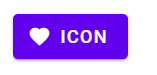
I was about to open another Bug Report for this, but as @flipZomb already said the middle button icon is not aligned aswell. Have a look at this:
| From Material Guide | From Angular/Material | Workaround |
| -- | -- | -- |
|  |
|  |
|  |
|
I added a Workaround to my Example:
<style>
/* Possible Workaround */
.icon-centered-button span.mat-button-wrapper{
  display: flex;
}

.icon-centered-button mat-icon {
  margin: auto 2px auto 0;
}
</style>
<button mat-raised-button color="primary" class="icon-centered-button">
    <mat-icon>favorite</mat-icon>
    ICON
</button>
 DanielHabenicht
on 21 Dec 2018
DanielHabenicht
on 21 Dec 2018
Seems like this has been fixed. https://stackblitz.com/edit/vertical-alignment-issue-4fwnlo?file=app/app.module.ts
devversion
on 29 May 2020
I wouldn't say so. They still look pretty off for me:

(from your Stackblitz)
Considering the angular material design guide:
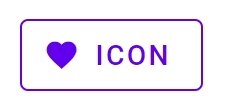
Viewing it in the developer console confirms it:
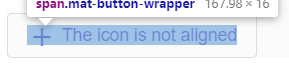
Seems like it is off by 2px.
DanielHabenicht
on 29 May 2020
@DanielHabenicht Yeah, looks like you're right. I'm reopening this. The general alignment problem seems to be caused by us using line-height for the button height. I don't have enough insight on why we use that over a plain min-height/height as done in MDC.
It looks like this will be fixed in our MDC-based version of the button though. #16196
devversion
on 29 May 2020
Related issues
 michaelb-01
·
3Comments
michaelb-01
·
3Comments
 LoganDupont
·
3Comments
LoganDupont
·
3Comments
 dzrust
·
3Comments
dzrust
·
3Comments
 jelbourn
·
3Comments
jelbourn
·
3Comments
 vitaly-t
·
3Comments
vitaly-t
·
3Comments
Most helpful comment
I was about to open another Bug Report for this, but as @flipZomb already said the middle button icon is not aligned aswell. Have a look at this:
| From Material Guide | From Angular/Material | Workaround | |
|  |
|  |
|
| -- | -- | -- |
|
I added a Workaround to my Example: