Components: MatFormField placeholders problematic on production builds
Bug, feature request, or proposal:
Bug
What is the expected behavior?
When the user inputs text to MatInput or selects an option in MatSelect, the placeholder should disappear (as defined by the MAT_LABEL_GLOBAL_OPTIONS) and form validations should activate.
What is the current behavior?
The behavior works as expected on development builds. However when bundled with "ng build -prod" we get the following outcomes:
- MatInput: text starts typing behind the placeholder text. only when you click on the input field does the placeholder disappear.
- MatSelect: the select box either refuses to open, or when opened clicking on an option does nothing.
These behaviors also affect form validations.
What are the steps to reproduce?
build an app with the -prod flag
Which versions of Angular, Material, OS, TypeScript, browsers are affected?
when tested on a demo app with the following package.json configuration, we get expected behavior
"dependencies": {
    "@angular/animations": "^4.0.0",
    "@angular/cdk": "^2.0.0-beta.8",
    "@angular/common": "^4.0.0",
    "@angular/compiler": "^4.0.0",
    "@angular/core": "^4.0.0",
    "@angular/forms": "^4.0.0",
    "@angular/http": "^4.0.0",
    "@angular/material": "^2.0.0-beta.8",
    "@angular/platform-browser": "^4.0.0",
    "@angular/platform-browser-dynamic": "^4.0.0",
    "@angular/router": "^4.0.0",
    "core-js": "^2.4.1",
    "hammerjs": "^2.0.8",
    "material-design-icons": "^3.0.1",
    "rxjs": "^5.4.1",
    "zone.js": "^0.8.14"
  },
  "devDependencies": {
    "@angular/cli": "1.3.1",
    "@angular/compiler-cli": "^4.0.0",
    "@angular/language-service": "^4.0.0",
    "@types/jasmine": "~2.5.53",
    "@types/jasminewd2": "~2.0.2",
    "@types/node": "~8.0.17",
    "codelyzer": "~3.1.2",
    "firebase-tools": "^3.9.1",
    "jasmine-core": "~2.7.0",
    "jasmine-spec-reporter": "~4.2.0",
    "karma": "~1.7.0",
    "karma-chrome-launcher": "~2.2.0",
    "karma-cli": "~1.0.1",
    "karma-coverage-istanbul-reporter": "^1.2.1",
    "karma-jasmine": "~1.1.0",
    "karma-jasmine-html-reporter": "^0.2.2",
    "protractor": "~5.1.2",
    "ts-node": "~3.3.0",
    "tslint": "~5.6.0",
    "typescript": "~2.4.2"
  }
however when updated to Angular v.5 packages, the demo app also fails to produce expected behavior.
 oytuneyucel
All 26 comments
It looks like your Material version is pretty old. Can you try using the latest version?
 crisbeto
on 25 Dec 2017
crisbeto
on 25 Dec 2017
my apologies, I should've posted the configuration that fails instead. The above configuration was used to test whether an app using an older version behaves differently or not. The failing configuration is:
"dependencies": {
    "@angular/animations": "^5.1.2",
    "@angular/cdk": "^5.0.2",
    "@angular/common": "^5.1.2",
    "@angular/compiler": "^5.1.2",
    "@angular/core": "^5.1.2",
    "@angular/forms": "^5.1.2",
    "@angular/http": "^5.1.2",
    "@angular/material": "^5.0.2",
    "@angular/platform-browser": "^5.1.2",
    "@angular/platform-browser-dynamic": "^5.1.2",
    "@angular/router": "^5.1.2",
    "angular2-text-mask": "^8.0.4",
    "core-js": "^2.5.3",
    "font-awesome": "^4.7.0",
    "jquery": "^3.2.1",
    "rxjs": "^5.5.6",
    "text-mask-addons": "^3.7.1",
    "zone.js": "^0.8.14"
  },
  "devDependencies": {
    "@angular/cli": "^1.6.2",
    "@angular/compiler-cli": "^5.1.2",
    "@angular/language-service": "^5.1.2",
    "@types/jasmine": "~2.5.53",
    "@types/jasminewd2": "~2.0.2",
    "@types/node": "^6.0.95",
    "@types/jquery": "^3.2.17",
    "codelyzer": "^4.0.2",
    "jasmine-core": "~2.6.2",
    "jasmine-spec-reporter": "~4.1.0",
    "karma": "~1.7.0",
    "karma-chrome-launcher": "~2.1.1",
    "karma-cli": "~1.0.1",
    "karma-coverage-istanbul-reporter": "^1.2.1",
    "karma-jasmine": "^1.1.1",
    "karma-jasmine-html-reporter": "^0.2.2",
    "protractor": "~5.1.2",
    "ts-node": "~3.2.0",
    "tslint": "~5.7.0",
    "typescript": "~2.4.2"
  }
oytuneyucel
on 25 Dec 2017
When you updated (2.0.0-beta.8 => 5.0.2) did you follow the 3 steps below before npm install it?
- Remove node_modules
- Remove package-lock.json
- Replace all
mdwithmatprefix
 julianobrasil
on 25 Dec 2017
julianobrasil
on 25 Dec 2017
all of the above steps were done multiple times to ensure that nothing slips by. this example app was run just to see whether it was a local issue or was consistent across different apps as well. the original app that I had problems with was built with “ng new” on the angular-cli 1.6.1
the most important issue is that, whilst the following commands produce the desired outcome on browsers:
- ng serve
- ng build [also with —aot]
production builds with the -prod flag seem create the problem and disable everything (such as text-mask) on the input fields, a feature that worked prior to switching over to angular material
oytuneyucel
on 25 Dec 2017
I have downloaded the official Angular Material template provided here and ran the app both with and without -prod flag
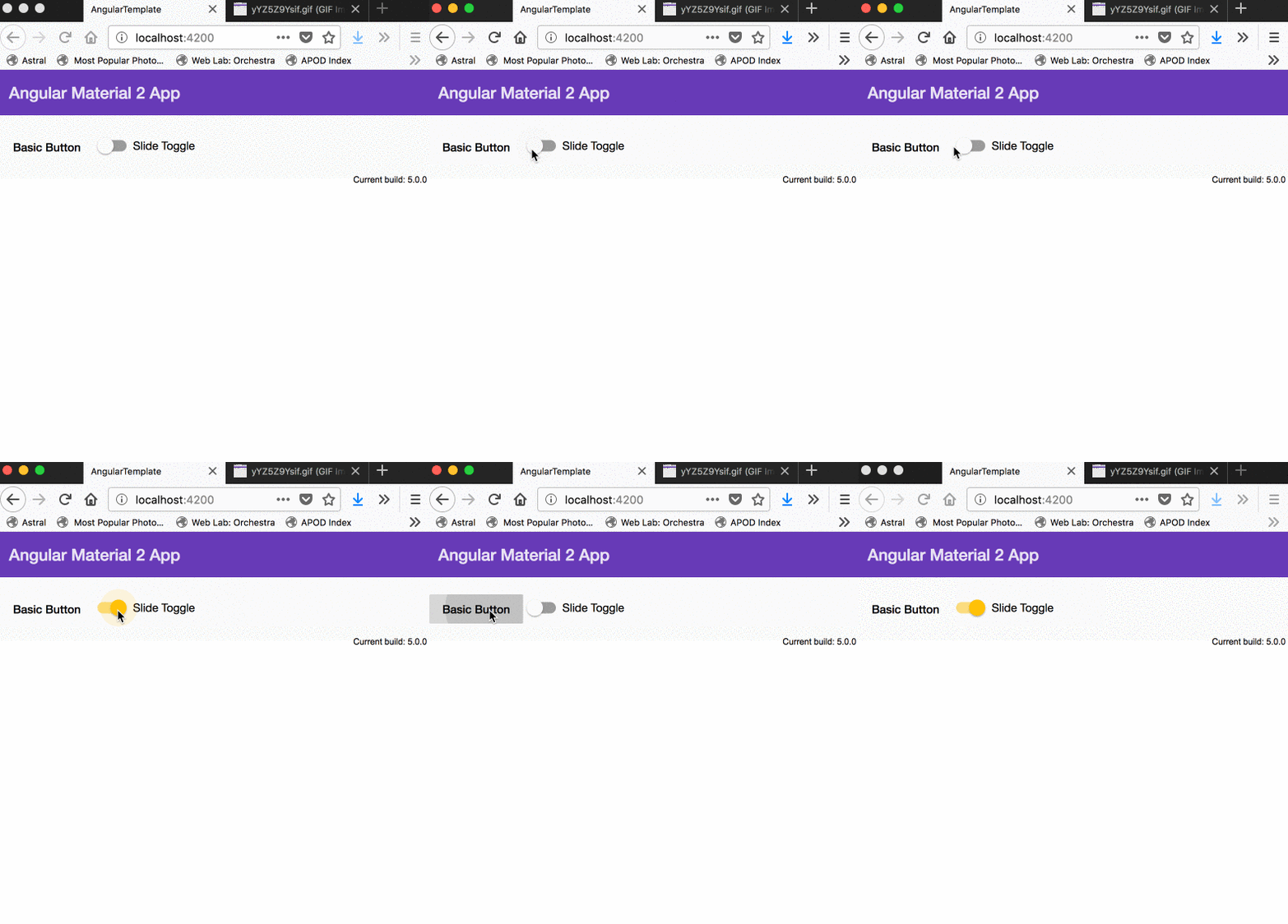 [ng serve/build]
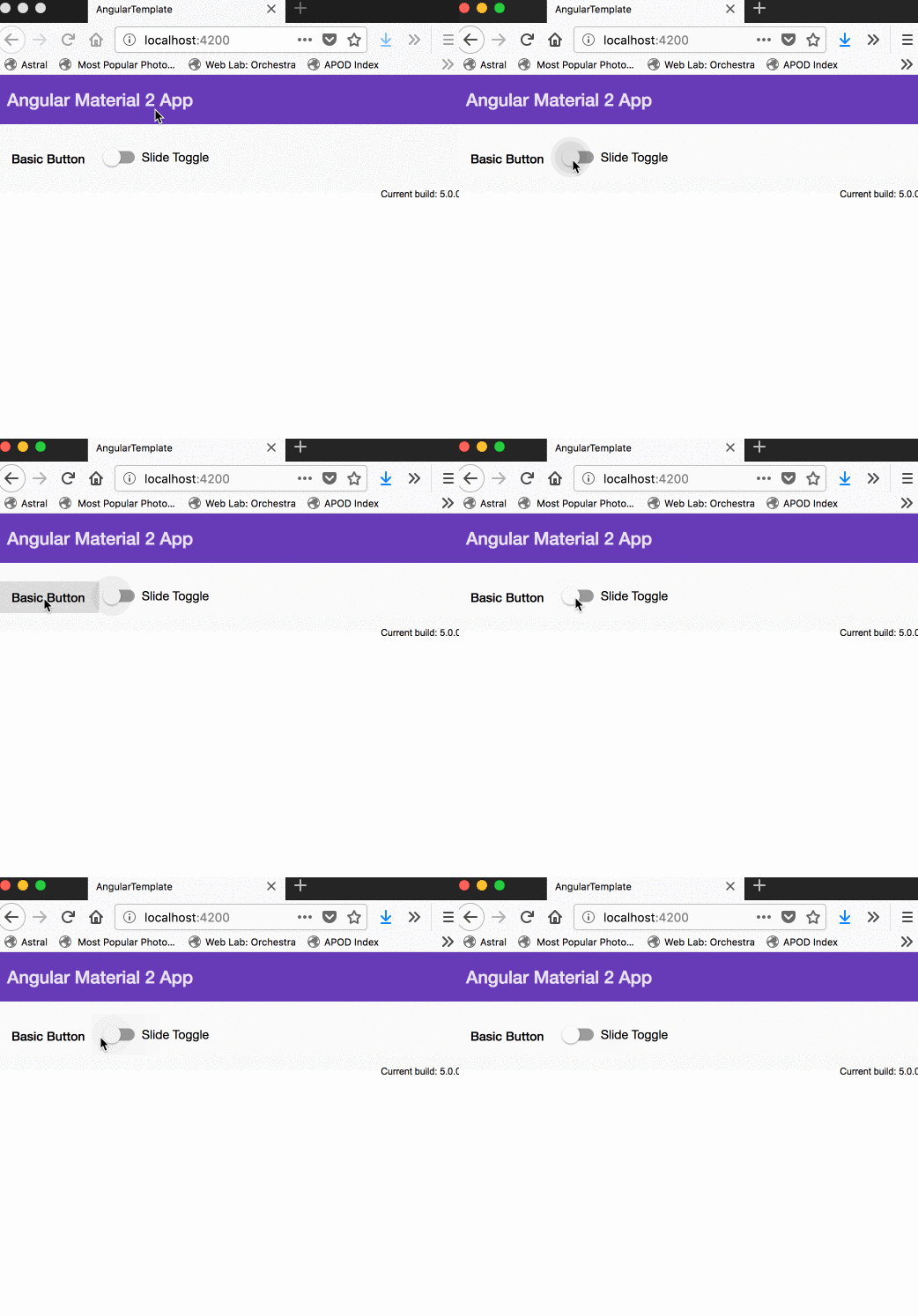 [ng serve/build -prod]
Same issue occurred on 3 different machines, tested on 2 different browsers, both with regular and incognito modes
oytuneyucel
on 25 Dec 2017
Ok... so the problem is easily reproducible by following the steps you've pointed out (create a new project and build it to production). I can give it a try, maybe tomorrow.
julianobrasil
on 25 Dec 2017
The machines you used... All of them run Mac OS + SAFARI?
julianobrasil
on 25 Dec 2017
2 machines we have tested on are Mac OS, one tested with safari + chrome, other tested with firefox + safari
the other machine is our deployment platform, Ubuntu 16.04 hosted on Amazon AWS.
Just to make sure that this might be an issue with the v5 release, I have checked some example apps built with Material, and it seems that the placeholder issue is there as well.
For example, this is a test app that uses Angular + Material v2 and as you can see the placeholder restores to its original location when the input is empty.
This here is one built with v5 and if you try to use the searchbar on top right, you should be experiencing the same issue that we are experiencing and the autocomplete shouldn't work as well as a floating placeholder when input is left blank.
oytuneyucel
on 25 Dec 2017
I confirm I could see the problem in the links you've posted.
julianobrasil
on 25 Dec 2017
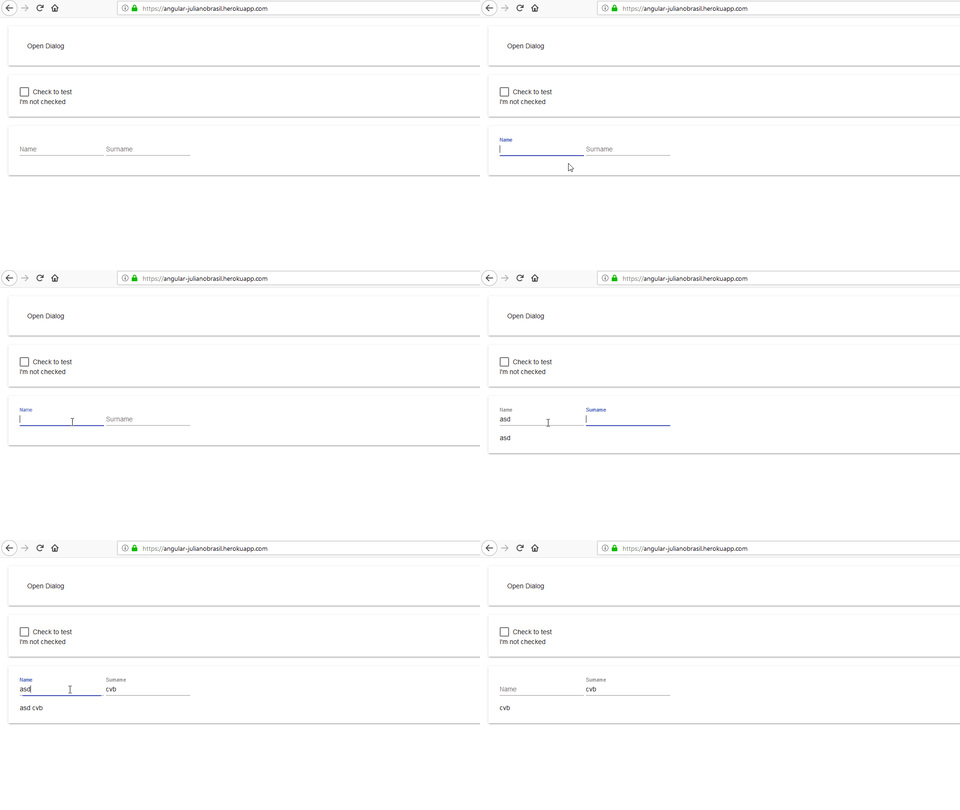
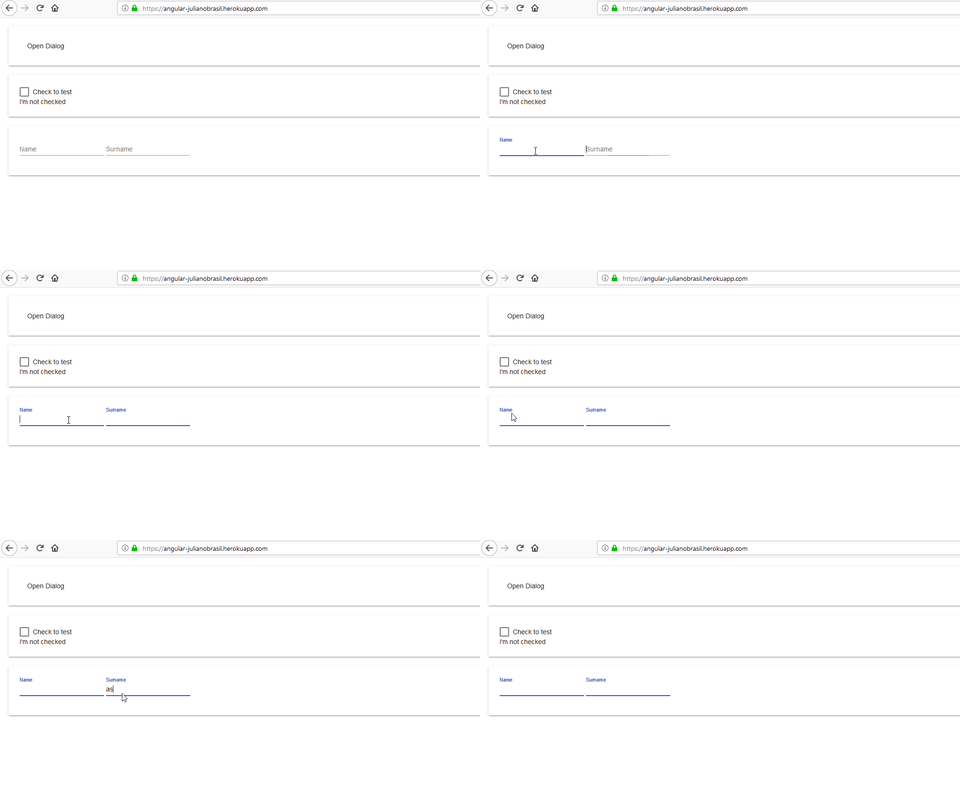
@oytuneyucel, I could reproduce it in a test app, available in heroku. In the images below you can notice that not just the label stops working, but also the interpolation (see the gifs, just beneath the inputs). It doesn't seems to be related just to material... maybe @angular/cli's build-optimizer flag has something to do with it. I noticed the problem using Chrome and Firefox (Windows 10)
without --prod
with --prod
If it helps, the repo for the test app above: https://github.com/julianobrasil/material2-test
Some time after you push to master (it's not protected - anyone can push), the app can be viewed from https://angular-julianobrasil.herokuapp.com/ (it's a free heroku account so it goes to sleep after 30 min idle and takes some time to wake up after someone tries do access it for the first time)
cc: @filipesilva
julianobrasil
on 25 Dec 2017
@oytuneyucel, this @cuiliang's suggestion (https://github.com/angular/angular-cli/issues/8997#issuecomment-353957698) worked partially for me (in my tiny test project)
ng build --aot --build-optimizer true --output-hashing all --extract-css true --name
         d-chunks false --sourcemaps false --environment prod
But the chunks size increased a lot 😸 - cannot use it in production
julianobrasil
on 26 Dec 2017
after a few verbose builds, I think I have pinpointed the operation that causes the problem yet don’t have a solution.
after ejecting the app from the cli, you can go to webpack configuration file and set UglifierJsPlugin’s mangle option to false. building the app with this config restores text input functionality albeit making it not so pleasant for a prod build.
I have read in couple issues submitted to angular repo that the UglifyJS mangler has been problematic in the past but didn’t have the chance to analyze how these two can be related.
on mobile now, will post with references when back on my computer
oytuneyucel
on 26 Dec 2017
@julianobrasil thought I tried all possible combination of flags, but will give it a try again
oytuneyucel
on 26 Dec 2017
@oytuneyucel, @trotyl suggested the same in angular-cli repo: https://github.com/angular/angular-cli/issues/8997#issuecomment-353962335
julianobrasil
on 26 Dec 2017
I am also experiencing the same issue. All the forms in application are affected. Form validations have stopped working. Solution needed ASAP. It is working fine on local but not on prod. Have a demo in couple of hours.
 kd2801
on 26 Dec 2017
kd2801
on 26 Dec 2017
It's being tracked at @angular/cli repo: https://github.com/angular/angular-cli/issues/8997
julianobrasil
on 26 Dec 2017
@oytuneyucel, @kd2801:
As suggested by @filipesilva (the problem seems to be related to [email protected]):
So, temporarily:
1 - add [email protected] to dependencies array in package.json
2 - delete package-lock.json, node_modules and dist
3 - npm install
Or, to linux users:
npm i [email protected] --save-exact && rm -rf package-lock.json node_modules && npm i && npm ls uglify-es
@julianobrasil I can confirm that @filipesilva 's solution does work for our project and uglify-es 3.3.0 indeed causes the problem with the production build
oytuneyucel
on 26 Dec 2017
+1. Angular forms didn't work at all in production builds when MatInputModule is imported. Using [email protected] instead of 3.3.2 fixed the problem
 alexbyk
on 26 Dec 2017
alexbyk
on 26 Dec 2017
+1. Now, all forms builds in production mode, didn't work! :(
 monoflash
on 26 Dec 2017
monoflash
on 26 Dec 2017
@monoflash, have you tried what's pointed out in https://github.com/angular/material2/issues/9120#issuecomment-353972441 ?
julianobrasil
on 26 Dec 2017
Now I tried to do what is stated in the comments again.
It worked.
Apparently the cache was not cleared at the first attempts.
Very bad bug! It took a long time to find the problem... :(
monoflash
on 26 Dec 2017
We just released @angular/[email protected] which works around a problem in uglify that causes this. See angular/angular-cli#8997 for more information.
 filipesilva
on 27 Dec 2017
filipesilva
on 27 Dec 2017
Cool! Thank you guys! Saved my day!!!
 Radon222
on 28 Dec 2017
Radon222
on 28 Dec 2017
Closing since this has been sorted out by the CLI team.
crisbeto
on 29 Dec 2017
This issue has been automatically locked due to inactivity.
Please file a new issue if you are encountering a similar or related problem.
Read more about our automatic conversation locking policy.
_This action has been performed automatically by a bot._
![angular-automatic-lock-bot[bot] picture](https://avatars.githubusercontent.com/in/40213?v=4&s=40) angular-automatic-lock-bot[bot]
on 8 Sep 2019
angular-automatic-lock-bot[bot]
on 8 Sep 2019
Related issues
 vanor89
·
3Comments
vanor89
·
3Comments
 savaryt
·
3Comments
savaryt
·
3Comments
 Miiekeee
·
3Comments
Miiekeee
·
3Comments
 michaelb-01
·
3Comments
michaelb-01
·
3Comments
 3mp3ri0r
·
3Comments
3mp3ri0r
·
3Comments
Most helpful comment
@oytuneyucel, @kd2801:
As suggested by @filipesilva (the problem seems to be related to
[email protected]):So, temporarily:
1 - add
[email protected]to dependencies array in package.json2 - delete package-lock.json, node_modules and dist
3 - npm install
Or, to linux users: