Components: [Datepicker] Need affordance for open-on-click for inputs
Bug, feature request, or proposal:
feature
What is the expected behavior?
When i click on input - i want to see calendar without click on icon and input must be focused
What is the current behavior?
To view calndar i need click on icon... and input not focused
What are the steps to reproduce?
Use datepicker and click on input (not icon) - calendar not opened... when click on icon - calendar opened, but input not focus
 sometime
All 32 comments
You can use the (focus) and the (click) events to programmaticaly open the calendar. Also you can mark the input as readonly if you want to prevent users to type into the input field. If I remember right this approach needed a workaround in IE11, but it's not so difficult. I'll open another issue about IE11 behavior.
stackblitz: https://stackblitz.com/edit/open-calendar-on-focus
 julianobrasil
on 10 Dec 2017
julianobrasil
on 10 Dec 2017
readonlyis not appropriate: if user want - he can write date on keyboard. And when focus on input, placholder must go to up, like default behavior, but this does not happen.
sometime
on 10 Dec 2017
I see... the calendar get the focus as soon as it opens, that's why the label doesn't animate. Well, as a workaround you can get rid of the readonly and force the focus back to the input:
<mat-form-field>
  <input matInput [matDatepicker]="picker"
         placeholder="Choose a date"
         (focus)="_openCalendar(picker)"
         (click)="_openCalendar(picker)"
         #elementToFocus>
  <mat-datepicker #picker="matDatepicker"></mat-datepicker>
</mat-form-field>
@ViewChild('elementToFocus') _input: ElementRef;

...

_openCalendar(picker: MatDatepicker<Date>) {
    picker.open();

    // use the setTimeout to push the focus capturing
    // into the event loop and put it off until the calendar
    // routines finish.
    // Otherwise the calendar will get the focus back
    setTimeout(() => this._input.nativeElement.focus());
}
I've updated the stackblitz with this.
If you use Datepicker like this very often, wrap it in a component so you doesn't need to do all this to achieve the UX you're looking for, everytime you need a calendar.
BTW, don't forget to build a date adapter if you need the user to type in the date in specific format.
julianobrasil
on 10 Dec 2017
Exactly what is needed! Thank you so much!
sometime
on 10 Dec 2017
Found a bug. When i click on input and calendar opened - very good, but if i not select the date and just click on other body empty place (to focus out) - calendar is closed, but cursor again focused on input.. Very not friendly.
sometime
on 11 Dec 2017
@sometime since you are now triggering the events via the input you would then have to also account for the blur() I've looked at @julianobrasil stackblitz example and with some minor changes got it to work:
<mat-datepicker #picker="matDatepicker" (closed)="eventCloseHandler($event)"></mat-datepicker>
eventCloseHandler(e){
    setTimeout(() => this._input.nativeElement.blur());
  }
I also don't think it's a bug since what @julianobrasil provided was a work-around in itself.
I hope this helps.
 cephillips117
on 12 Dec 2017
cephillips117
on 12 Dec 2017
No, this not help.
Example from real life: i add two elements to form - input for name and datepicker for birthdate. First, i focus cursor to datepicker and calendar is opened - good... but if i not select the date and mouse click in input with name - input with name not selected... i must click to input name second time.
sometime
on 12 Dec 2017
Can you provide a stackblitz or plunker showcasing your use case?
 andrewseguin
on 12 Dec 2017
andrewseguin
on 12 Dec 2017
Ah I see the issue now and you can see it with https://material.angular.io/components/datepicker/examples
When the user opens the calendar whether by using the mat-datepicker-toggle or the implementation above it requires 2 clicks to trigger the focus of another input box.
Steps to reproduce:
- Choose any Date Picker from the Examples page linked above open the Date Picker popup
- Click on any other input box, date picker, or button on the page. It require 2 clicks to focus.
cephillips117
on 12 Dec 2017
Can you provide a stackblitz or plunker showcasing your use case?
yes, https://stackblitz.com/edit/angular-fxsfj2
It require 2 clicks to focus.
It is very not frendly... if i see user element in interface and click it - i expect that I will be in the context of this element after this click... not after second click
sometime
on 12 Dec 2017
@sometime, when you click outside the calendar panel, you're not hitting any element, but the backdrop built by the cdk-overlay. So, the first click just close the panel and dismiss the backdrop.
You will need to inspect the point that was clicked and, in the next moment, after the backdrop is dismissed, you can set the focus on your next input,
Something like this:
this._subcription = Observable.fromEvent(document, 'click')
      .subscribe(e => {
        if (e instanceof MouseEvent) {
          const x = e['pageX'];
          const y = e['pageY']
          const element = document.elementFromPoint(x, y);
          setTimeout(() => {
            if (element instanceof HTMLInputElement) {
              (<HTMLInputElement>element).focus();
            }
          });
        }
      });
Here is the stackblitz: https://stackblitz.com/edit/open-calendar-on-focus-v2
julianobrasil
on 12 Dec 2017
Your stackblitz not working.
I think this method - wrong way and very difficult for simple expected behavior.
The problem in the datepicker core. When calendar is opened - he takes a lot of power about herself. Closing the calendar should not depend on the standard behavior of other user interface elements.
For example: when input (matInput) mouseover - cursor is "text"... but if this form contains datepicker and i open calendar then if input (matInput) mouseover - cursor is "pointer". Why?
I think - the mechanism of opening calendar must not depend of other user interface elements.
sometime
on 13 Dec 2017
very good example, how must work datepicker: https://www.primefaces.org/primeng/#/calendar
if i click one datepicker and not select date.. then click another datepicker - first calendar closing and open next calendar... by one click.. very friendly!
sometime
on 13 Dec 2017
If i use one material element in form, for example - one datepicker, - this working very good.
But I have a lot of material elements in the one form (two datepickers, two inputs, two autocompletes). And switching between these elements works very unfriendly.
sometime
on 13 Dec 2017
@sometime, as the feature you're looking for isn't out-of-the box, if you wrap up the datepicker in a component and hide all the complexity in this new reusable custom component, maybe it makes your life easier after it's ready. But I agree that it should be more simple to do what you're trying to.
I'll try out to build up something and put in that stackblitz.com example and let you know if I manage to do a basic reusable component (without the ControlValueAccessor implementation part). Maybe using a custom form field control. If I succeed I post it here (I really don't know when I'll be able to do it).
julianobrasil
on 13 Dec 2017
Will be great!
sometime
on 14 Dec 2017
@mmalerba, it looks like the backdrop turn the task of wraping up the datepicker in a custom component into a hard time (I was trying to to build up a workaround following @sometime's requisite: to be able to close the datepicker and focus other components with a single mouse click).
I've tried playing around with document.elementFromPoint(x,y) to find out which element was clicked to set the focus there _after_ the backdrop was dismissed (by using a setTimout).
It looks like this kind of thing should be a feature of MatDatepicker itself. It takes too much effort to be setup by the developer in this valid use case IMO.
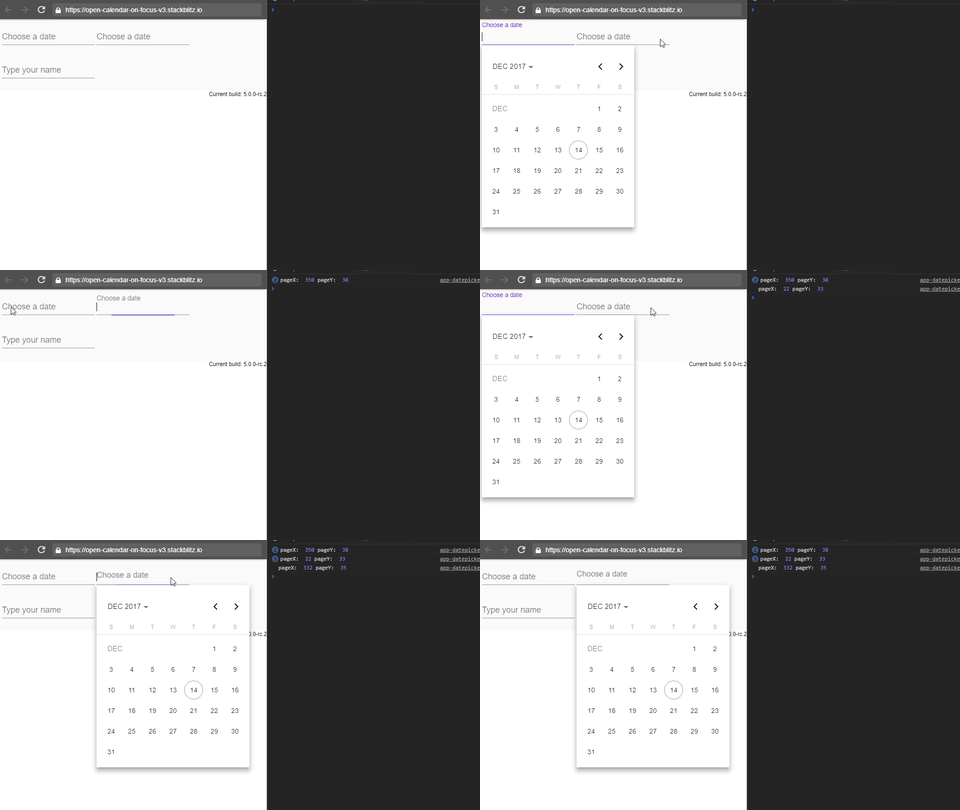
I don't think it's worth looking at it, but just in case you want to see what I've tried to do in order to checkout whether I haven't done anything wrong: https://stackblitz.com/edit/open-calendar-on-focus-v3
julianobrasil
on 14 Dec 2017
@julianobrasil Yeah currently the datepicker is not set up to easily allow this. I think your implementation is close to working though, there's was just a bug with the way the observables were set up. Here's a fixed version: https://stackblitz.com/edit/open-calendar-on-focus-v3-zkrepy?file=app/custom-datepicker/app-datepicker.component.ts
 mmalerba
on 14 Dec 2017
mmalerba
on 14 Dec 2017
Nice, as always!
julianobrasil
on 14 Dec 2017
Thank you!
This works for me.
But i think this must be as option in datepicker... options name for example "auto open on focus", i think it is must be in datepicker core.
sometime
on 15 Dec 2017
Yep, will leave this open to track adding the feature at some point. For now thanks @julianobrasil for the workaround :)
mmalerba
on 15 Dec 2017
As a little contribution to the workaround, here it is with ControlValueAccessor implemented: https://stackblitz.com/edit/open-calendar-on-focus-mmalerba-v2
julianobrasil
on 15 Dec 2017
@julianobrasil Works really well except using Safari. When you erase an input value manually or using clear button and then select a new date value with the calendar, input placeholder overlaps text value.
Maybe it is related to this issue: #8679
 Furg
on 3 Apr 2018
Furg
on 3 Apr 2018
@Furg, unfortunately, I have no easy way to test it with safari 😃. The apps I deal with have to work primarily (I think I can say "only") in an environment where people use almost exclusively chrome (updated once a year, or less), so I haven't setup anything to test things against specific browsers other than Chrome, IE11 and Firefox.
Oh, and concerning this original issue I was just trying to help someone else. This is not a robust solution IMO (it lacks tests and further development). I think the behavior requested here reflects a better way for the Datepicker (and other components) to work. That being said, I have never heard an end user complaining about the need to perform two clicks in these situations. Of course, this is specific to my scenario.
julianobrasil
on 4 Apr 2018
@Furg, I've updated all the dependencies in stackblitz sample. Could you check whether it behaves different in safari? https://stackblitz.com/edit/open-calendar-on-focus-mmalerba-v2
julianobrasil
on 4 Apr 2018
@julianobrasil The Safari problem still happens with all the dependencies updated, and also with all stackblitz workarounds from this issue.
I know that this is not an official solution, don't worry and thanks for your time. :+1:
Furg
on 4 Apr 2018
How about this..?
(click)="birth_date.open()" (focus)="birth_date.open()" as shown below.
<mat-form-field>
    <input matInput [matDatepicker]="birth_date" formControlName="birth_date" (click)="birth_date.open()" (focus)="birth_date.open()">
    <mat-datepicker-toggle matSuffix [for]="birth_date"></mat-datepicker-toggle>
    <mat-datepicker #birth_date></mat-datepicker>
</mat-form-field>
 Satish-Lakhani
on 25 Jul 2018
Satish-Lakhani
on 25 Jul 2018
@Satish-Lakhani, I used to do it. I took away this approach of some projects of mine because of the focus event though. Navigating using tab key is great, but if you close the calendar, you have to build a workaround to prevent it to reopen as the focus is restored to the original datepicker input. If you switch windows back and forth to the browser after choosing a date, there comes the focus again along with the calendar poping up... 🤣
julianobrasil
on 25 Jul 2018
I love how people show enthusiasm to come up with a workaround until an official solution is provided! Thank you everyone.
Meanwhile, I've noticed some accessibility issues with the current workarounds:
- In the stackblitz by @julianobrasil (https://stackblitz.com/edit/open-calendar-on-focus-mmalerba-v2) if you click on the input of a datepicker and then you press Tab to go to the next datepicker, it doesn't do that. Instead it just reopens the same datepicker.
- The example by @mmalerba (https://stackblitz.com/edit/open-calendar-on-focus-v3-zkrepy?file=app/custom-datepicker/app-datepicker.component.ts) works a bit better in this regard, but the focus is trapped between the datepickers. I'm not able to tab to the input control (the third control).
 DmitryEfimenko
on 12 Mar 2020
DmitryEfimenko
on 12 Mar 2020
Also, the calendar does not get updated while you type in the associated input. You have to close and re-open the calendar to see the change
DmitryEfimenko
on 13 Mar 2020
@DmitryEfimenko, usually workarounds aren't finished solutions. They are just start points, from where people can adapt to do whatever they needed when they opened the issue.
julianobrasil
on 13 Mar 2020
I certainly realize that. I'm just pointing out edge cases.
By the way, this seems relevant: #13486
DmitryEfimenko
on 13 Mar 2020
Related issues
 kara
·
3Comments
kara
·
3Comments
 alanpurple
·
3Comments
alanpurple
·
3Comments
 vanor89
·
3Comments
vanor89
·
3Comments
 vitaly-t
·
3Comments
vitaly-t
·
3Comments
 Hiblton
·
3Comments
Hiblton
·
3Comments
Most helpful comment
I see... the calendar get the focus as soon as it opens, that's why the label doesn't animate. Well, as a workaround you can get rid of the
readonlyand force the focus back to the input:I've updated the stackblitz with this.
If you use Datepicker like this very often, wrap it in a component so you doesn't need to do all this to achieve the UX you're looking for, everytime you need a calendar.
BTW, don't forget to build a date adapter if you need the user to type in the date in specific format.