Components: [Chip] Color is not applied when using *ngFor
Bug:
Color does not get applied to "mat-chip" if using *ngFor and selected is not set to "true".
What is the expected behavior?
I would expect:
<mat-chip *ngFor="let chip of availableColors" [color]="chip.color">
          {{chip.name}
</mat-chip>
To work the same as:
<mat-chip *ngFor="let chip of availableColors" selected="true" [color]="chip.color">
          {{chip.name}}
</mat-chip>
What is the current behavior?
In the above examples modified from https://material.angular.io/components/chips/examples
The first example does not apply color to the chips
The second example does.
What are the steps to reproduce?
 ctwoolsey
All 4 comments
It seems to be because the theming is only scoped to selected chips: https://github.com/angular/material2/blob/master/src/lib/chips/_chips-theme.scss#L44. @tinayuangao do you remember the reasoning behind it?
 crisbeto
on 8 Dec 2017
crisbeto
on 8 Dec 2017
This is working as intended.
I think we need a way to differentiate selected chips from unselected chips.
In our docs we said "The selected color of an <mat-chip> can be changed by using the color property. " See https://github.com/angular/material2/blob/master/src/lib/chips/chips.md
 tinayuangao
on 19 Dec 2017
tinayuangao
on 19 Dec 2017
@tinayuangao What is the difference between a selected chip and a focused chip?
Currently, the color is applied to the most recently added chip because it is considered "selected". This remains the case even if I manually click or use arrow keys to focus an earlier chip (giving it a corresponding shadow). Now there are two visual indicators that a chip is focused on two different chips.
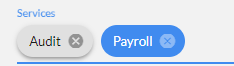
If this is the intended behavior, it seems counterintuitive. What exactly is a "selected" chip if not the one which currently has focus and can be deleted?
Edit: Nevermind, after reading the docs I found the selection action is controlled by the spacebar. I don't find it user friendly but I can see the use cases for the selection event. I still feel there should be an API for styling chips regardless of selection. Something like color="primary" and selectedColor="accent" seems more usable than having to resort to custom CSS to style normal chips.
 AndrewEckart
on 11 Jan 2018
AndrewEckart
on 11 Jan 2018
This issue has been automatically locked due to inactivity.
Please file a new issue if you are encountering a similar or related problem.
Read more about our automatic conversation locking policy.
_This action has been performed automatically by a bot._
![angular-automatic-lock-bot[bot] picture](https://avatars.githubusercontent.com/in/40213?v=4&s=40) angular-automatic-lock-bot[bot]
on 8 Sep 2019
angular-automatic-lock-bot[bot]
on 8 Sep 2019
Related issues
 michaelb-01
·
3Comments
michaelb-01
·
3Comments
 LoganDupont
·
3Comments
LoganDupont
·
3Comments
 Hiblton
·
3Comments
Hiblton
·
3Comments
 xtianus79
·
3Comments
xtianus79
·
3Comments
 kara
·
3Comments
kara
·
3Comments
Most helpful comment
@tinayuangao What is the difference between a selected chip and a focused chip?
Currently, the color is applied to the most recently added chip because it is considered "selected". This remains the case even if I manually click or use arrow keys to focus an earlier chip (giving it a corresponding shadow). Now there are two visual indicators that a chip is focused on two different chips.
If this is the intended behavior, it seems counterintuitive. What exactly is a "selected" chip if not the one which currently has focus and can be deleted?
Edit: Nevermind, after reading the docs I found the selection action is controlled by the spacebar. I don't find it user friendly but I can see the use cases for the selection event. I still feel there should be an API for styling chips regardless of selection. Something like
color="primary"andselectedColor="accent"seems more usable than having to resort to custom CSS to style normal chips.