Components: Styles in single component are not applied
Hi guys,
my problem is following:

as you see my navbar has the background color red, so I styled my md-input in the navbar white. I defined those styles in my styles.scss, where I overwrite the styles of a prebuilt theme.
styles.scss:

Inside of the component you can see under the navbar, I want to overwrite the styles of the md-input because the background-color there is white and so you can´t even see the md-input. In the following screenshot you can see the stylesheet of the component:

these styles does not overwrite styles for my component. I also tried the single encapsulation types of angular 2, didn´t work either and I also tried the "/deep/" in my scss but this overwrites also the global styles.
thank you for your help,
kind regards,
Mario
 mduerr18
All 5 comments
Hey Mario, take a look at this guide. Your selectors are probably not specific enough.
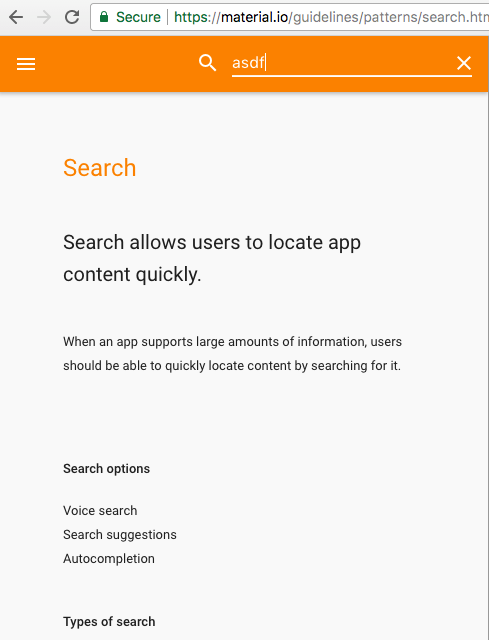
That said, @jelbourn, what do you think about support for default contrast of inputs inside toolbars? Either automatically or via an "invert" property/color option? Placing search inputs in a toolbar seems like a common pattern.
http://plnkr.co/edit/189GoQGKlpQMWExbOIlZ?p=preview
 willshowell
on 18 Sep 2017
willshowell
on 18 Sep 2017
While the spec doesn't every really make this super explicit, the kind of input you'd put in a toolbar like that is a variant called a "solo field". It doesn't have a floating label, errors, or hints (though it can have prefix/suffix). Based on how different they are, I consider this to be a totally separate component from our existing input (the form-field style).
 jelbourn
on 18 Sep 2017
jelbourn
on 18 Sep 2017
Thank you guys for your answers,
@jelbourn do you know a good tutorial where you can see how to create such a solo field
mduerr18
on 19 Sep 2017
Closing this since we don't intend to build this variant of text input (since there' not much to it- you can just use a native input)
jelbourn
on 25 May 2020
This issue has been automatically locked due to inactivity.
Please file a new issue if you are encountering a similar or related problem.
Read more about our automatic conversation locking policy.
_This action has been performed automatically by a bot._
![angular-automatic-lock-bot[bot] picture](https://avatars.githubusercontent.com/in/40213?v=4&s=40) angular-automatic-lock-bot[bot]
on 6 Jul 2020
angular-automatic-lock-bot[bot]
on 6 Jul 2020
Related issues
 crutchcorn
·
3Comments
crutchcorn
·
3Comments
 Miiekeee
·
3Comments
Miiekeee
·
3Comments
 vanor89
·
3Comments
jelbourn
·
3Comments
vanor89
·
3Comments
jelbourn
·
3Comments
 savaryt
·
3Comments
savaryt
·
3Comments
Most helpful comment
Hey Mario, take a look at this guide. Your selectors are probably not specific enough.
That said, @jelbourn, what do you think about support for default contrast of inputs inside toolbars? Either automatically or via an "invert" property/color option? Placing search inputs in a toolbar seems like a common pattern.
http://plnkr.co/edit/189GoQGKlpQMWExbOIlZ?p=preview