Components: Dialog with fixed height less than 100% has 2 scrollbars
Bug
What is the expected behavior?
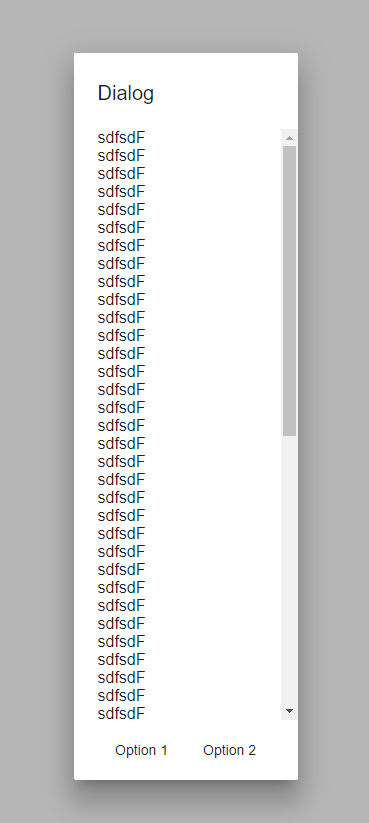
Dialog with fixed height, that is less than 100% to have only one scroll bar - for content section.
What is the current behavior?
Dialog has 2 scrollbars - 1 for content and 1 for the whole dialog.
What are the steps to reproduce?
https://plnkr.co/edit/1teyLZLR7MVsrZLPD94V?p=preview
What is the use-case or motivation for changing an existing behavior?
2 scrollbars is weak user-experience.
Which versions of Angular, Material, OS, TypeScript, browsers are affected?
Browsers: Chrome (Windows 10, Lunix Ubuntu 16.04 LTS), IE11 (Windows 10)
Material: 2.0.0-beta.6, 2.0.0-beta.8
OS, Typescript - not applicable
Is there anything else we should know?
Probably the same is applicable to fixed width, but lets not noise the issue with it.
 tytskyi
All 8 comments
It seems ok over here (Chrome, Windows 10);
 julianobrasil
on 23 Aug 2017
julianobrasil
on 23 Aug 2017
@julianobrasil could you shrink browser vertically?

I have this problem on 2 laptops + 1 desktop monitor
- Laptop 1, 13" full hd
- Laptop 2, 13" 4k
- Desktop monitor 24" regular resolution
tytskyi
on 23 Aug 2017
It happened with the browser shrinked.
julianobrasil
on 23 Aug 2017
Is there any temporary solution I can apply, until this is fixed?
 surachaitanya
on 6 Feb 2018
surachaitanya
on 6 Feb 2018
The issue is still happening with fixed height:
const dialogRef = this.dialog.open(DialogOverviewExampleDialog, {
      height: '400px',
      width: '250px',
      data: {name: this.name, animal: this.animal}
    });
 mergin
on 7 May 2019
mergin
on 7 May 2019
Came here for a solution and it's happening to me as well with a fixed height dialog. Same as the previous post. It only happens for me if I use the mat-dialog-content directive to wrap my content. Otherwise the main dialog scrollbar is the only one present.
Use cases:
fixed height on dialog
use mat-dialog-content directive
double scroll bars
fixed height on dialog
no mat-dialog-content
single scroll bar, but not fixed header
no fixed height on dialog
use mat-dialog-content-directive
single scroll bar, but not the height I want.
 mycroft16
on 7 Jun 2019
mycroft16
on 7 Jun 2019
Almost another year has passed by and this error still persists. No news whatsoever on this?
 tommueller
on 5 May 2020
tommueller
on 5 May 2020
@andrewseguin @crisbeto Could you please look into this again. As @mycroft16 stated the problem is not there when you don't use the mat-dialog-content slot... But when you do that and you have focus on the action buttons on init of dialog, you do not see the dialog title. And for the content only the bottom part...
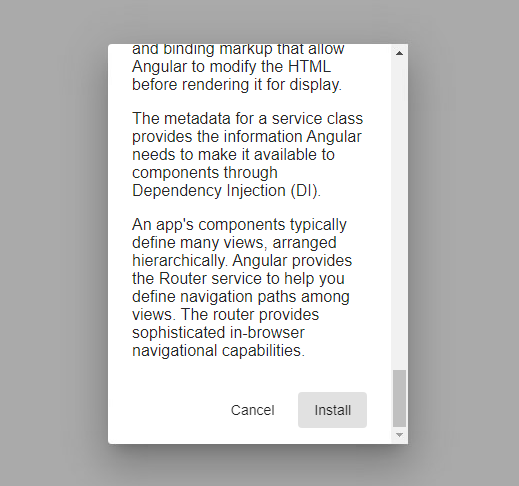
So if you use the dialog as it is supposed to be, to have "sticky" header title and footer actions, you get this:

The expected result would be:

Therefore you need to look at the dialog config if there is a value present "height" or "maxHeight" and according to those values, calculations need to be made to set the correct "height" or "maxHeight" on the mat-dialog-content as inline styling (same as for the panel)... In our example this would be "max-height: 256px". We need to do this because the mat-dialog-content class has a fixed "responsive" height, being "max-height: 65vh;".
Thanks for looking into it and please do keep us posted!
 Laurensvdw
on 12 Mar 2021
Laurensvdw
on 12 Mar 2021
Related issues
 dzrust
·
3Comments
dzrust
·
3Comments
 constantinlucian
·
3Comments
constantinlucian
·
3Comments
 shlomiassaf
·
3Comments
shlomiassaf
·
3Comments
 kara
·
3Comments
kara
·
3Comments
 Hiblton
·
3Comments
Hiblton
·
3Comments
Most helpful comment
The issue is still happening with fixed height:
https://stackblitz.com/edit/angular-axeibr