Components: datepicker doesn't open to correct month for non US date format
Bug, feature request, or proposal:
Bug
What is the expected behavior?
When reopening the date-picker, it should always open on the selected month
What is the current behavior?
If a date can be parsed as mm/dd/yyyy it will open at the month in that format, even if though it has correctly parsed the date and has the correct date highlighted if you scroll to the correct month
What are the steps to reproduce?
- Select a date with the date picker that can be parsed as mm/dd/yyyy e.g. 10th July 2017 (10/07/2017).


- Re-open the date picker, see that it is open on October, not July.
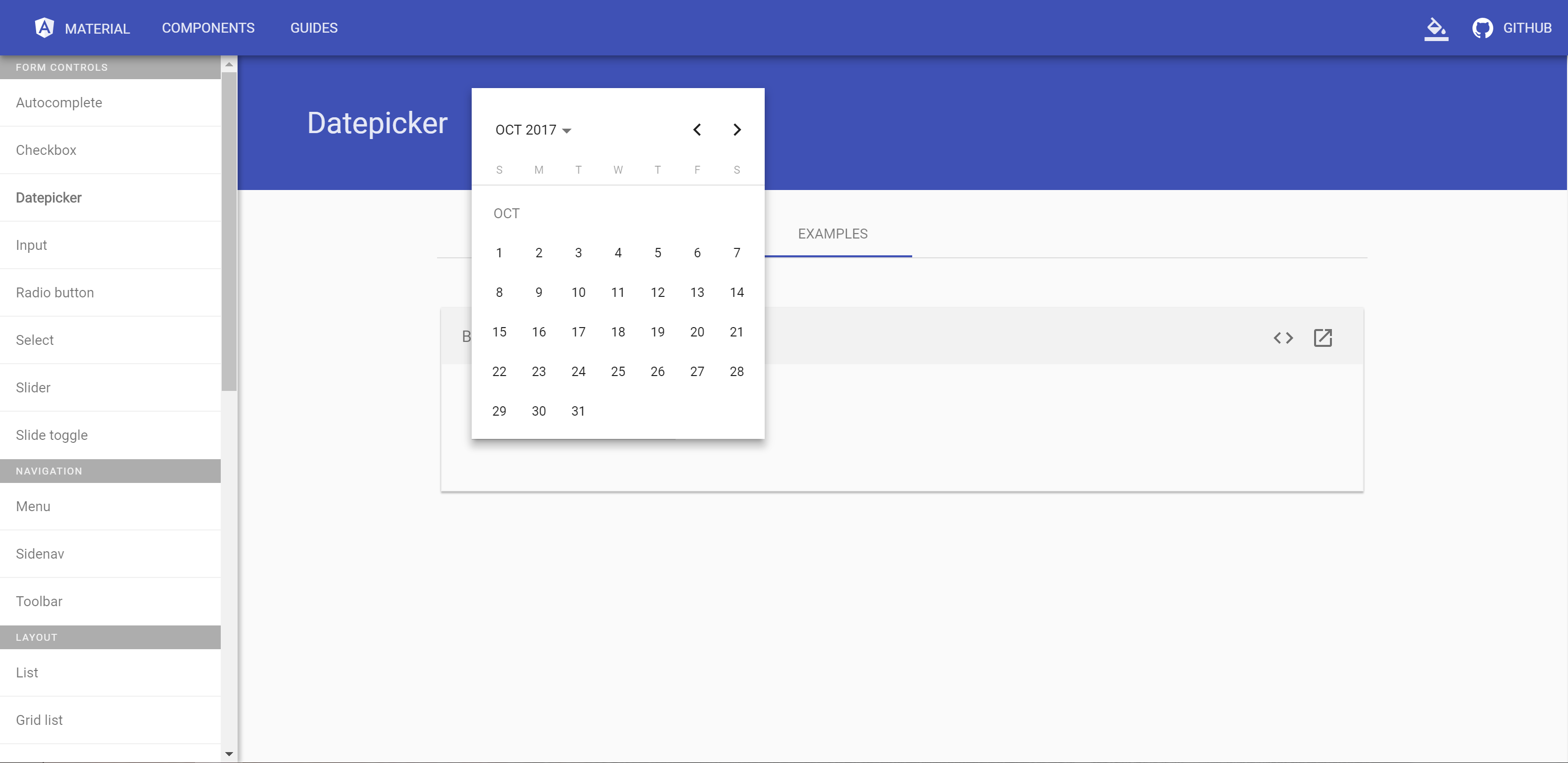
- Scroll to July and see that the correct date is highlighted, so date picker has correctly parsed the date at some point, just not when deciding which month to open.
Providing a Plunker (or similar) is the best way to get the team to see your issue.
Plunker template: https://goo.gl/DlHd6U
This behaviour can be seen in the angular material examples: https://material.angular.io/components/datepicker/examples
What is the use-case or motivation for changing an existing behavior?
Which versions of Angular, Material, OS, TypeScript, browsers are affected?
angular 4.2.4
material 2.0.0-beta.8
Windows 10, Chrome 59.0.3071.115
TS 2.4.1
Is there anything else we should know?
 drewzo
All 9 comments
If faced the same issue when trying to use the datepicker with the Dutch date format (which is dd-MM-yyyy). When opening the date picker with a date from a previous month, it opened on the current month instead of the month of the selected date. Scrolling to the previous month showed the selected date correctly (highlighted), as you stated above.
My fix was to the set the LOCALE_ID to the Dutch language in app.module.ts:
providers: [
  { provide: LOCALE_ID, useValue: 'nl' }
]
After that, the datepicker opens with the month of the date (instead of the current month), showing the highlighted date correctly at once.
 petertangelder
on 11 Jul 2017
petertangelder
on 11 Jul 2017
Thanks for the comment and workaround for this Peter. I've seen similar workarounds, however I feel this should be addressed as a bug as the date picker clearly knows how to correctly parse the date in the correct browser without the work around, however it seems to parse it again when deciding which month to open, rather than opening the month of the date that it currently has highlighted.
drewzo
on 12 Jul 2017
There's a similar workaround for setting locale which does work (as opposed to providing a LOCALE_ID in AppModule) in issue #4832, however this does not resolve the problem of mm/dd/yyyy vs dd/mm/yyyy.
It would be superbly awesome if somebody suggested either an alternative solution so that when the datepicker input shows 01/02/2000, the date opened is 1st February, not 2nd January, as it does now.
 lightheaded
on 12 Jul 2017
lightheaded
on 12 Jul 2017
Take a look at this: https://plnkr.co/edit/uPNESrA5VbKDrIjP9BaS?p=preview
It's configured to Brazilian Portuguese and I think it's a workaround for all the issues pointed here. It is the docs recommended setup built by extending Material NativeDateAdapter (except for the format function, that probably will be not necessary in the next beta and provides the correct display of DST dates in the past for some very specific cases).
See this PR: #5747
 julianobrasil
on 18 Jul 2017
julianobrasil
on 18 Jul 2017
Any updates on this? Was about to report the same bug, just before i noticed this issue.
 eTallang
on 25 Aug 2017
eTallang
on 25 Aug 2017
I think it's being handled over there : #6785 , with the PR #6798
 foxx9
on 7 Sep 2017
foxx9
on 7 Sep 2017
FYI #6798 makes the breakage less noticeable because it removes unnecessary calls to DateAdapter.parse, but it does not fix the problem. If the user manually types input it will still need to go through DateAdapter.parse and unless you're using a DateAdapter that can handle dd/mm/yyyy format it will not be interpreted correctly.
In order to make this work correctly you will need to use a custom DateAdapter that can parse this date format (@julianobrasil has an example above), or wait for the official MomentDateAdapter which is being worked on now (#6860).
 mmalerba
on 7 Sep 2017
mmalerba
on 7 Sep 2017
Closing this since MomentDateAdapter has been added now
mmalerba
on 13 Oct 2017
This issue has been automatically locked due to inactivity.
Please file a new issue if you are encountering a similar or related problem.
Read more about our automatic conversation locking policy.
_This action has been performed automatically by a bot._
![angular-automatic-lock-bot[bot] picture](https://avatars.githubusercontent.com/in/40213?v=4&s=40) angular-automatic-lock-bot[bot]
on 7 Sep 2019
angular-automatic-lock-bot[bot]
on 7 Sep 2019
Related issues
 dzrust
·
3Comments
dzrust
·
3Comments
 Hiblton
·
3Comments
Hiblton
·
3Comments
 3mp3ri0r
·
3Comments
3mp3ri0r
·
3Comments
 shlomiassaf
·
3Comments
shlomiassaf
·
3Comments
 kara
·
3Comments
kara
·
3Comments
Most helpful comment
Any updates on this? Was about to report the same bug, just before i noticed this issue.