Components: Duplicated Material modules in aot generaed lazy load chunk files (Angular CLI)
Bug, feature request, or proposal:
I've taken a look at my (lazy load) chunk files generated by Angular CLI (--prod so with aot) and I wonder why do I have the used material components also in there floating around when they are already in the vendor.bundle file?
Is this an issue on Material side, Angular CLI or it's just the way it has to be?
Lazy load chunk 1

Lazy load chunk 2

Vendor bundle

What is the expected behavior?
Don't duplicate the Material modules throuh the app - at least not the styles.
What is the current behavior?
Every chunk gets the modules (& css) for the md components that it components use added
What are the steps to reproduce?
Plunker won't do it so i've added a repo.
https://github.com/bboehm86/mat-chunk-test
- You'll need
@angular/[email protected] - source-map-explorer might be helful (run
npm run buildto generate files with sourcemaps)
What is the use-case or motivation for changing an existing behavior?
smaller chunk sizes
Which versions of Angular, Material, OS, browsers are affected?
Angular 2.x, Angular CLI 1.0.0-beta.32.3, all Material versions
Is there anything else we should know?
That is probably not related and a webpack issue.. but in the vendor.bundle everything for Material gets inclued no matter what. The only way to prevent that is to include just the modules we use. On both, our app.module and then in every module that uses a component
 bboehm86
All 15 comments
I'm experiencing the same since updating to material v2.0.0-beta.3.
 CarmenPopoviciu
on 11 Apr 2017
CarmenPopoviciu
on 11 Apr 2017
same for me.
 M-Adoo
on 28 Apr 2017
M-Adoo
on 28 Apr 2017
I'm closing this since it seems to be resolved with the latest Angular CLI release (1.1.0-rc.1)
bboehm86
on 25 May 2017
@bboehm86 are you sure that version of the Angular CLI fixes this issue? I just upgraded the cli to version 1.1.1 and I'm still seeing duplicate material modules in my lazy-loaded bundles...
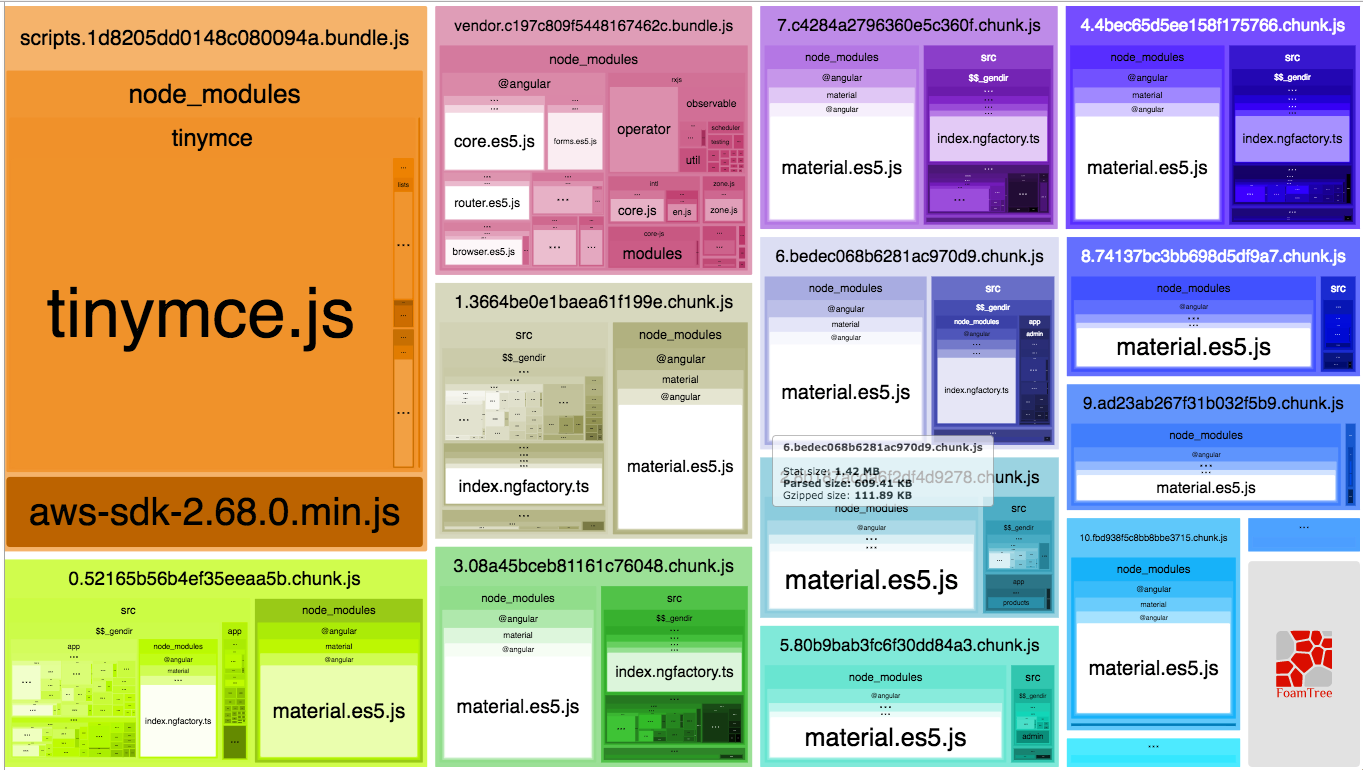
Look at all of the material.es5.js areas.
 kblestarge
on 13 Jun 2017
kblestarge
on 13 Jun 2017
It looks like my material module is not in the vendor bundle. Maybe that'll fix it if I get it in there. How do you get it in the vendor bundle?
kblestarge
on 13 Jun 2017
Alright, I added the material module to the imports on the app.module.ts file, which fixed the duplication of material.es5.js in each bundle, however, I'm still seeing the index.ngfactory.ts file showing up in most of the modules:

Should I be worried about that?
kblestarge
on 13 Jun 2017
What about those who don't use the cli? I don't see any changes with the latest update to @angular/compiler-cli
 evanjmg
on 13 Jun 2017
evanjmg
on 13 Jun 2017
@kblestarge I've updated the example to the latest versions. I didn't get the index.ngfactory.ts inside the chunk files but in the vendor.bundle.js... all this seems to be more a tooling issue than a material one. It's by design: https://github.com/angular/angular-cli/pull/6338
@evanjmg I honestly don't know since I'm just using the CLI
bboehm86
on 14 Jun 2017
@bboehm86 I'm seeing the node_modules>@angular>material>typings>index.ngfactory.ts files in nearly all of my chunks and not in my vendor.bundle.js. Are you saying this is by design?
kblestarge
on 14 Jun 2017
@kblestarge it should be just inside the vendor.bundle.js not in your chunks. You might want to check how you import your NgModules. The MaterialModule is deprecated so just import the NgModules that you actually use or create a separate NgModule that imports all the Components that you need (take a look at the Getting Guide or at the demo app from my first post)
bboehm86
on 15 Jun 2017
@bboehm86 this is what my custom-ng-materials.module.ts file looks like:
import {MdButtonModule, MdCheckboxModule, MdInputModule, MdSelectModule, MdCardModule} from '@angular/material';
import {NgModule} from "@angular/core";

@NgModule({
    exports: [
        MdButtonModule,
        MdCheckboxModule,
        MdInputModule,
        MdSelectModule,
        MdCardModule,
    ],
})
export class CustomNgMaterialsModule { }
This module is then imported into each module that has declared components using any of these material components.
I think I'm doing everything correctly according to the Getting Started Guide and your demo app. What do you think is the problem?
kblestarge
on 15 Jun 2017
This happens to my apps too.
index.ngfactory.ts is in all of my lazy loaded chunks. material.es5.js is only in vendor chunk.

 GeorgeKnap
on 28 Jul 2017
GeorgeKnap
on 28 Jul 2017
Does anyone know what that index.ngfactory.ts file is and why it is duplicated in every lazy-loaded chunk?
kblestarge
on 30 Jul 2017
Still having the same issue. index.ngfactory.ts files are in app and chunk but not in vendor.
I'm only importing what I need. I can't seem to find anybody else mentioning this issue anywhere else but here.
 CarolLevesque
on 8 May 2018
CarolLevesque
on 8 May 2018
This issue has been automatically locked due to inactivity.
Please file a new issue if you are encountering a similar or related problem.
Read more about our automatic conversation locking policy.
_This action has been performed automatically by a bot._
![angular-automatic-lock-bot[bot] picture](https://avatars.githubusercontent.com/in/40213?v=4&s=40) angular-automatic-lock-bot[bot]
on 9 Sep 2019
angular-automatic-lock-bot[bot]
on 9 Sep 2019
Related issues
 vanor89
·
3Comments
vanor89
·
3Comments
 julianobrasil
·
3Comments
julianobrasil
·
3Comments
 xtianus79
·
3Comments
xtianus79
·
3Comments
 savaryt
·
3Comments
savaryt
·
3Comments
 Miiekeee
·
3Comments
Miiekeee
·
3Comments
Most helpful comment
@bboehm86 this is what my custom-ng-materials.module.ts file looks like:
This module is then imported into each module that has declared components using any of these material components.
I think I'm doing everything correctly according to the Getting Started Guide and your demo app. What do you think is the problem?