Community-edition: You are trying to sign in from a browser or app that doesn't allow us to keep your account secure.
Steps to reproduce
- Add Gmail or Google Hangouts to Rambox
- Try to login
Expected behavior
I can login.
Actual behavior
Get this message:
You are trying to sign in from a browser or app that doesn't allow us to keep your account secure.
Try using a different browser. Learn more
ENVIRONMENT
Rambox: v0.7.2
OS: Mac Mojave
Arch: x64
I even tried changing the user agent to the user agent of my Chrome installation as suggested here: https://github.com/ramboxapp/community-edition/issues/2385 but that did not work
 eristoddle
All 19 comments
Thanks for opening your first issue here! Be sure to follow the issue template!
![welcome[bot] picture](https://avatars0.githubusercontent.com/in/4141?v=4&s=40) welcome[bot]
on 27 Nov 2019
welcome[bot]
on 27 Nov 2019
We want to know if you still have this problem, or we can close this ticket.
 fvulich
on 29 Nov 2019
fvulich
on 29 Nov 2019
Yeah, I still have this problem. Nothing I try seems to fix it. I did like using Rambox. Going to have to look for another tool I think though.
eristoddle
on 29 Nov 2019
I get the same problem but on Linux OS. Same version of Rambox.
 babastienne
on 2 Dec 2019
babastienne
on 2 Dec 2019
Same issue. It also occurs in RamboxPro and it's ANY google app.
If you are already signed in on Rambox to a google APP, don't sign out. it will continue to work just fine. it's only NEW sign-in attempts that fail.
 darkeyce
on 2 Dec 2019
darkeyce
on 2 Dec 2019
I couldn't reproduce the issue, could you tell us from which country are you trying to get logged? Could you try using a User Agent? We really want to fix this ASAP, but we need more information.
fvulich
on 3 Dec 2019
Guys, we cannot reproduce this problem. We think it is a new privacy policy Google is releasing in parts.
Any other idea you have will help us to reproduce the problem and fix it ASAP.
 saenzramiro
on 3 Dec 2019
saenzramiro
on 3 Dec 2019
I'm in the USA and it occurs consistently for me.
I tried a chrome user agent for v.72 & 74 but it still occurs. if you have a suggestion for a different user agent I'll try that.
darkeyce
on 3 Dec 2019
I'm in France. Still can't connect by default, but i tried with this user agent : Mozilla/5.0 (platform; rv:geckoversion) Gecko/geckotrail Firefox/firefoxversion and it worked, showing the old basic HTML version of gmail.
Wiih the user agent Mozilla/5.0 (X11; Ubuntu; Linux x86_64; rv:70.0) Gecko/20100101 Firefox/70.0 it worked perfectly, showing the last version of gmail.
babastienne
on 3 Dec 2019
I'm in France. Still can't connect by default, but i tried with this user agent :
Mozilla/5.0 (platform; rv:geckoversion) Gecko/geckotrail Firefox/firefoxversionand it worked, showing the old basic HTML version of gmail.
Wiih the user agentMozilla/5.0 (X11; Ubuntu; Linux x86_64; rv:70.0) Gecko/20100101 Firefox/70.0it worked perfectly, showing the last version of gmail.
Neither of those Agents work for me from the US. :(
darkeyce
on 3 Dec 2019
Same here. Was working fine yesterday and today it stopped working, same issue as others above. Changing the user agent does not fix it. I have 2FA
 franciscarriere
on 4 Dec 2019
franciscarriere
on 4 Dec 2019
Some relevant links:
Electron Issue: Google Sign-in Breaking in June 2019 for embedded frameworks
https://github.com/electron/electron/issues/17887
Chromium Group: Google to block sign-ins from Chromium embedders
https://groups.google.com/a/chromium.org/d/msg/embedder-dev/STyM5ZNTHMM/ir476rkhBAAJ
Google-Play-Music-Desktop-Player-UNOFFICIAL Issue (the owner is in the Electron Project)
https://github.com/MarshallOfSound/Google-Play-Music-Desktop-Player-UNOFFICIAL-/issues/3545
fvulich
on 4 Dec 2019
@fvulich after reading through WAY to many git commits from the links you provided above, I found this user agent that works for me and allows me to log into Google services. While this works, the Pro development team needs to find the correct User Agent for and build it into the application.
"Mozilla/5.0 (Macintosh; Intel Mac OS X 10.12; rv:58.0) Gecko/20100101 Firefox/58.0"
To make this work, you need to add this user agent in the settings of any Google service you want to use. From the hamburger menu, select tools and clear the cache. After these steps, I was able to log in to the services.
darkeyce
on 5 Dec 2019
Mostly posting so I can follow.
I've been getting the login error for some time. Just today I had a moment to reinstall from a new pull and look at it again. I'm not in a virtual environment, just a metal box I thrash regularly.
Adding Squirrel log here in case its useful.
SquirrelSetup.log
 daemoch
on 5 Dec 2019
daemoch
on 5 Dec 2019
Issue just started for me today, and boy am I unhappy about it.
I've been poking around trying to figure out a user agent that works for me, but my Chrome install's user agent isn't it.
Version: 0.7.2
Platform: linux (x64) // Pop OS! 19.10, for clarity
Electron: 7.1.1
Chromium: 78.0.3904.99
Node: 12.8.1
Attempted User Agents:
- Default- NO DICE (obviously)
- Mozilla/5.0 (X11; Linux x86_64) AppleWebKit/537.36 (KHTML, like Gecko) Chrome/78.0.3904.108 Safari/537.36 - NO DICE
- Mozilla/5.0 (Windows NT 6.1; WOW64; rv:33.0) Gecko/20120101 Firefox/33.0 - BASIC HTML ONLY (Ew)
- Mozilla/5.0 (Linux; Android 4.4.2; Nexus 4 Build/KOT49H) AppleWebKit/537.36 (KHTML, like Gecko) Chrome/34.0.1847.114 Mobile Safari/537.36 - ANDROID WEB VIEW AS EXPECTED, BUT ALSO WAAAAY EW
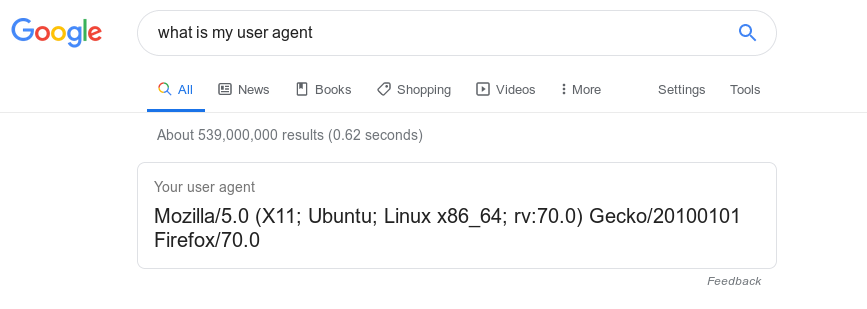
- Mozilla/5.0 (X11; Ubuntu; Linux x86_64; rv:70.0) Gecko/20100101 Firefox/70.0 - Worked like a charm. Awesome!
THE WORKAROUND:
- Download your system's native Firefox, and/or open it (the more up to date version, the better, it seems)
- Google search "What is my User Agent" (See attached image below)
- CTRL+C the text Google reports back to you.
- Open Rambox, open the Rambox tab, open the settings dialog all the way on the right.
- Scroll down until you see the user agent field, CTRL+V your User Agent in there.
- Click Save, allow the restart.
- Profit. It should work just fine from there.
I hope that helps, gang.
 futurehaskins
on 6 Dec 2019
futurehaskins
on 6 Dec 2019
@fvulich after reading through WAY to many git commits from the links you provided above, I found this user agent that works for me and allows me to log into Google services. While this works, the Pro development team needs to find the correct User Agent for and build it into the application.
"Mozilla/5.0 (Macintosh; Intel Mac OS X 10.12; rv:58.0) Gecko/20100101 Firefox/58.0"
To make this work, you need to add this user agent in the settings of any Google service you want to use. From the hamburger menu, select tools and clear the cache. After these steps, I was able to log in to the services.
This worked for me finally in the US. I also have 2FA. And I get the full version of Gmail.
eristoddle
on 6 Dec 2019
A note on that fix though. It created a similar error now with Slack but I give up on that.
eristoddle
on 6 Dec 2019
We're working on a built-in fix. It's gonna be part of a new release very soon.
fvulich
on 6 Dec 2019
This thread has been automatically locked since there has not been any recent activity after it was closed. Please open a new issue for related bugs.
![lock[bot] picture](https://avatars1.githubusercontent.com/in/6672?v=4&s=40) lock[bot]
on 5 Jan 2020
lock[bot]
on 5 Jan 2020
Related issues
 Izin
·
3Comments
Izin
·
3Comments
 biggestchops
·
3Comments
biggestchops
·
3Comments
 soulchainer
·
3Comments
soulchainer
·
3Comments
 juanmlambre
·
3Comments
juanmlambre
·
3Comments
 leif
·
4Comments
leif
·
4Comments
Most helpful comment
We're working on a built-in fix. It's gonna be part of a new release very soon.