Community-edition: Copying with CTRL+C results in "READY READY READY READY..."
Version: 0.7.1
Platform: win32 (x64)
Electron: 7.1.1
Chromium: 78.0.3904.99
Node: 12.8.1
If I copy text from any app (Discord, Slack,...) and paste it, the result is this:
 Ready

 Ready

 Ready

 Ready

 Ready

 Ready
But if I copy the text by right-click -> copy then it works. Sometimes. for what ever reason it also works with CTRL+C but I've no idea why it fails most times. I also restarted Rambox.
 punkr0ck
All 36 comments
Thanks for opening your first issue here! Be sure to follow the issue template!
![welcome[bot] picture](https://avatars0.githubusercontent.com/in/4141?v=4&s=40) welcome[bot]
on 21 Nov 2019
welcome[bot]
on 21 Nov 2019
We released 0.7.2 could you check if your issue is solved?
 fvulich
on 21 Nov 2019
fvulich
on 21 Nov 2019
Version: 0.7.2
Platform: linux (x64)
Electron: 7.1.1
Chromium: 78.0.3904.99
Node: 12.8.1
0.7.2 doesn't solve the issue.
 flplatet
on 21 Nov 2019
flplatet
on 21 Nov 2019
I thought I was going crazy! Just upgraded to 0.7.1 today, and copying from any internal tab adds a "Ready" for each tab I have open, it seems.
 torrobinson
on 22 Nov 2019
torrobinson
on 22 Nov 2019
@torrobinson yes, exactly. the number of tabs you have in rambox matches the number of "ready's" when copying. maybe this helps the devs to get to the root of the problem.
what is more weird. i just opened rambox the first time today. i copied text from discord (a message by some user in in some channel). it copied correct. then i copied text from the input field in discord (where you type your message) and copied it and it results again in READYREADYREADY... - after this: i copied the same text from the user that worked before. now it's not working anymore.
so no, @fvulich - not solved.
punkr0ck
on 22 Nov 2019
We're investigating this issue, all the information that seems relevant for you please share it with us.
fvulich
on 22 Nov 2019
As a side note, when I disable the option "Always display Status Bar" it starts to copying empty text with breaks `` instead of those Ready's for me
 0xCCD
on 26 Nov 2019
0xCCD
on 26 Nov 2019
Also it looks like the status bar text is selected once the copy scope changes
0xCCD
on 26 Nov 2019
When you press Ctrl + A within the message box it selects all your written text and additionally the text within the status bar including the popup message "closing statusbar until next time" (if you hover your mouse over the X)
 Ready
Close statusbar until next time
Furthermore, the issue only seems to happen after Ctrl + A has been pressed for the first time since the last reloading.
When it happens, reloading the window (Ctrl + R) resolves the issue until Ctrl + A is pressed again.
Edit: reloading a single tab/service with Ctrl + Shift + R is not enough to reset the issue.
 pdecat
on 26 Nov 2019
pdecat
on 26 Nov 2019
I can only reproduce the issue when a text input field has the focus and Ctrl + A is pressed.
Pressing Ctrl + A when the focus is outside of any input field does not trigger the issue ~on the first Ctrl + C but it will on the following Ctrl + C presses~.
pdecat
on 26 Nov 2019
I also have this problem. It doesn't happen 100% of the time, I got it to work by right-clicking and clicking Copy... that might not be the real issue though
 JDHannan
on 26 Nov 2019
JDHannan
on 26 Nov 2019
Exact same thing happening to me when I do CTRL+C, can only select, right click and copy.
CTRL+V pastes:
 Ready

 Ready

 Ready

 Ready

 Ready

 Ready
 joaopsys
on 27 Nov 2019
joaopsys
on 27 Nov 2019
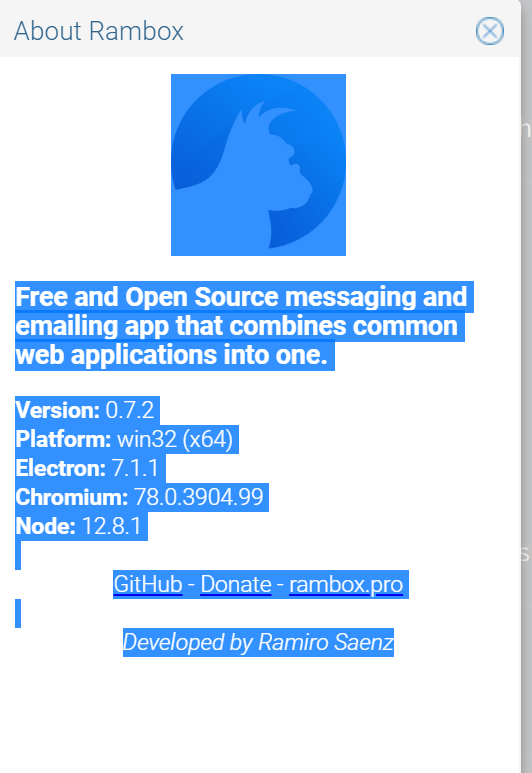
another thing that i noticed: go to "Help -> About Rambox". It is marked if you previously copied text with CTRL+C. Now click in the About Rambox text to remove the marking. Then you will be able to copy one time with CTRL+C as it should be. After this the "About Rambo"-text is again marked by ghost hand. Maybe it's part of the root problem.
punkr0ck
on 27 Nov 2019
The application is pretty unusable on Windows due to this issue. :(
 KrisGerhard
on 29 Nov 2019
KrisGerhard
on 29 Nov 2019
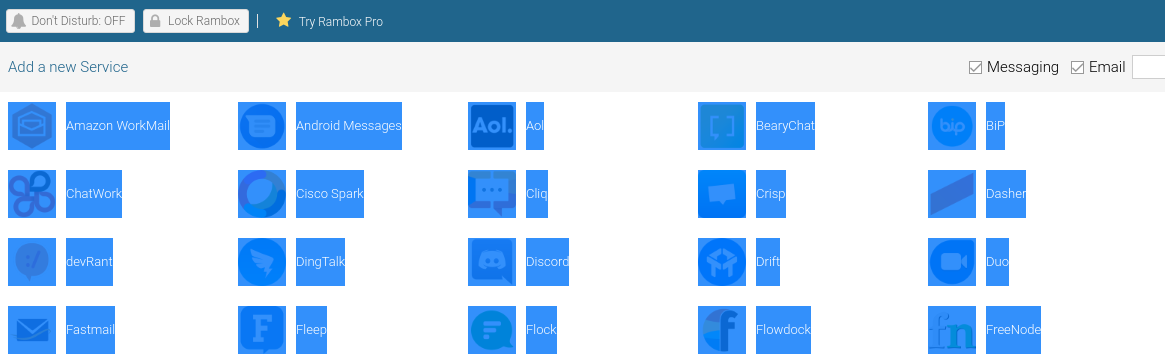
Ctrl+a also selects the main tab
So far :
- selecting with the mouse then right click+copy works fine. It's just a shortcut issue.
- ctrl+c doesn't copy the selected text in the focused service but some text from the Rambox app itself :
- "Ready" from the status bar (bottom left), unless the option "Always display Status Bar" is disabled then there's to text to copy.
- "Close statusbar until next time" when hovering the status bar X (bottom right)
- the Rambox info when displayed (Help > About Rambox)
- the number of "Ready" matches the number of tabs
It seems the focus of the shortcuts is not the good one, it points to Rambox instead of the service.
(additional note : ctrl + x works fine)
flplatet
on 29 Nov 2019
It's been fixed in https://github.com/ramboxapp/community-edition/commit/906c997ccba45f80f15f90fa82e00a4d9e7e0361 It's gonna be part of our new release
fvulich
on 29 Nov 2019
Yeah o/
Thanks
flplatet
on 29 Nov 2019
I also have the same problem.
 KrystianGraba
on 1 Dec 2019
KrystianGraba
on 1 Dec 2019
Custom built current master and can confirm the issue with Ctrl-C is fixed on Ubuntu.
pdecat
on 4 Dec 2019
When is the next release? This is annoying as hell.
 rekire
on 5 Dec 2019
rekire
on 5 Dec 2019
The new release with the fix is coming very soon!
fvulich
on 6 Dec 2019
How soon is very soon? :)
 jakeb2c2
on 6 Dec 2019
jakeb2c2
on 6 Dec 2019
How soon is very soon? :)
The team told me in a private chat, let me paste to you what they said:
READY READY READY READY READY READY READY
Seriously I hope soon because sharing code with teammates is now a hilarious guessing game and involves accidentally yelling "READY" at people 😄
torrobinson
on 6 Dec 2019
This is really a nasty bug.
 NIXKnight
on 10 Dec 2019
NIXKnight
on 10 Dec 2019
when the fix will come? its so annoying this bug ....almost migrating to STATION
 C-Nog
on 10 Dec 2019
C-Nog
on 10 Dec 2019
This one is a dealbreaker -- even more than broken spellcheck.
 fnagel
on 10 Dec 2019
fnagel
on 10 Dec 2019
I'm READY for an alternative client without ads for a paid version
rekire
on 10 Dec 2019
I'm READY for an alternative client without ads for a paid version
That's the most entitled comment I've read in a long time. Make me a better, free app! Don't even think about asking me to pay for it!
JDHannan
on 10 Dec 2019
I hate ads, I see absolutely no use in the paid version. Such an annoying bug for more then 2 weeks on production is a no go.
I didn't notice any new features since the pro version was introduced. However there were at least 4 updates. Bugs are normal but why was the update not simply reverted until the bug is fixed?
Sorry if you don't like my honestly opinion.
rekire
on 10 Dec 2019
Don't translate "I'm an asshole" as "I'm being honest"
If you're not paying, you don't really get to complain.
JDHannan
on 10 Dec 2019
Appears to be fixed in 0.7.3.
 modo-lv
on 12 Dec 2019
modo-lv
on 12 Dec 2019
Fixed in the 0.7.3. Thanks for the patience. :)
fvulich
on 12 Dec 2019
Just happened again for me on 0.7.3. I copied from a slack code snippet, ended up with
Ready
Ready
Ready
Ready
Version: 0.7.3
Platform: linux (x64)
Electron: 7.1.1
Chromium: 78.0.3904.99
Node: 12.8.1
 Gabb1995
on 16 Dec 2019
Gabb1995
on 16 Dec 2019
Just happened again for me on 0.7.3.
Confirmed: I copied some text and then tried to create a new Code Snippet, and when pasting into the Create Snippet modal, I got the Ready text.
Then it started happening in the normal Slack's chat WYSIWYG editor.
The only thing that seems different now is that I'm getting some unicode unknown character boxes after each one (I don't recall seeing these before now):

Version: 0.7.3
Platform: win32 (x64)
Electron: 7.1.1
Chromium: 78.0.3904.99
Node: 12.8.1
torrobinson
on 16 Dec 2019
This thread has been automatically locked since there has not been any recent activity after it was closed. Please open a new issue for related bugs.
![lock[bot] picture](https://avatars1.githubusercontent.com/in/6672?v=4&s=40) lock[bot]
on 15 Jan 2020
lock[bot]
on 15 Jan 2020
Related issues
 menzow
·
4Comments
menzow
·
4Comments
 mforcer
·
3Comments
mforcer
·
3Comments
 LiBOSS-CZ
·
4Comments
LiBOSS-CZ
·
4Comments
 juanmlambre
·
3Comments
juanmlambre
·
3Comments
 soulchainer
·
3Comments
soulchainer
·
3Comments
Most helpful comment
The team told me in a private chat, let me paste to you what they said:
Seriously I hope soon because sharing code with teammates is now a hilarious guessing game and involves accidentally yelling "READY" at people 😄