Community-edition: Rambox uses 100% CPU
Steps to reproduce
- Install Rambox
- Use services throughout multiple locks/sleeps etc
Expected behavior
Nothing unusual happens
Actual behavior
CPU spikes on all cores to 100%, system becomes unusable, can't switch tty, need to perform a forcefull restart.
ENVIRONMENT
Rambox: v0.6.3
OS: Kubuntu 18.04 LTS, Plasma desktop
Arch: x64
 boorac
All 39 comments
Thanks for opening your first issue here! Be sure to follow the issue template!
![welcome[bot] picture](https://avatars0.githubusercontent.com/in/4141?v=4&s=40) welcome[bot]
on 20 Feb 2019
welcome[bot]
on 20 Feb 2019
Hi, @boorac could you give us the list of apps that you use? so we try to reproduce this error and find a solution
 fvulich
on 25 Feb 2019
fvulich
on 25 Feb 2019
@fvulich the services are:
- Messanger
- Gmail
- Inbox
- A custom service using Google Calendar
Currently, I'm using them one by one so I could find the exact culprit. I will report back if I succeed.
boorac
on 1 Mar 2019
This issue has been automatically marked as stale because it has not had recent activity. It will be closed if no further activity occurs. Thank you for your contributions.
![stale[bot] picture](https://avatars3.githubusercontent.com/in/1724?v=4&s=40) stale[bot]
on 30 Apr 2019
stale[bot]
on 30 Apr 2019
@boorac Can you please check if this still happens in new version 0.6.7?
 saenzramiro
on 30 Apr 2019
saenzramiro
on 30 Apr 2019
Hi everybody,
I can confirm that I experience this issue at least since Rambox version 0.6.5 and that it still seems to be present in 0.6.7.
I have the following services in use: WhatsApp and Facebook Messenger. I also used to have two instances of Slack workspaces running in Rambox, which I deactivated because of the CPU load issue, and now employ the Slack desktop app to read and write messages in them.
Still, with both Slack services deactivated, the issue exists, and over time Rambox first becomes unavailable itself and then slows down the whole system by causing CPU load spikes (according to htop). When I kill the Rambox process, everything gets back to normal.
My environment:
- Rambox: v0.6.7
- OS: Linux Mint 19.1 with Cinnamon 4.0.10, Kernel 4.15.0-44-generic
- Processor: i7-8550U
- Arch: x64
I hope this helps to track down this problem.
 frademacher
on 1 May 2019
frademacher
on 1 May 2019
I'm using Ubuntu 19.04 and i3 and I'm experiencing a huge load in CPU.
- Rambox v0.6.7
- OS: Ubuntu 19.04 Kernel 5.0.0-05
- CPU: Intel(R) Core(TM) i7-8550U
 abacao
on 15 May 2019
abacao
on 15 May 2019
I'm using Windows 10 and also experiencing 100% CPU usage.
- Rambox v0.6.9 - win32 (x64)
- OS: Win 10 May 2019
- CPU: Core i5 7200U
Services: WhatsApp, Gmail, Google Voice, Slack, LinkedIn, Outlook 365
 dhruvmhjn
on 22 Jul 2019
dhruvmhjn
on 22 Jul 2019
Windows 10 Pro and 100% CPU usage too.
- Rambox v0.6.9 - win32 (x64)
- OS: Win 10 Pro 1903
- CPU: Core i5 7300HQ
Services : Gmail, Messenger, Android Messages, Discord, google Calendar, Google Chat
 mowdep
on 23 Sep 2019
mowdep
on 23 Sep 2019
Same here on elementary OS 5.0 Juno (based on Ubuntu 18.04.2).
- Rambox v0.6.9 - Linux (x64)
- Electron 4.1.4
- Chromium: 69.0.3497.128
- Node: 10.11.0
- CPU: Core i5 6300HQ
Services: Slack, Messenger, Skype
 vaclavhlobil
on 15 Oct 2019
vaclavhlobil
on 15 Oct 2019
Same here.
- Rambox v0.6.9 - win32 (x64)
- OS: Win 10 Pro 1903
- CPU: i5-7200U
Services: Messenger, WhatsApp, Zulip
 Aidam20
on 11 Nov 2019
Aidam20
on 11 Nov 2019
Still encountering this on the latest version of rambox, windows 10 64-bit. Rambox has become completely unusable for me.
- CPU: i7-4770k
Services: Gmail, messenger, slack, whatsapp, hangouts, feedly, Discord
 TippyTipster
on 24 Nov 2019
TippyTipster
on 24 Nov 2019
Same issue here.
- Version: 0.7.3
- Platform: linux (x64)
- Electron: 7.1.1
- Chromium: 78.0.3904.99
- Node: 12.8.1
- CPU: Intel(R) Core(TM) i5-7200U CPU @ 2.50GHz
- RAM: 16G
Services: Slack, Twitter, Mattermost (2x), Threema, Telegram
 zobelhelas
on 16 Jan 2020
zobelhelas
on 16 Jan 2020
Same (not 100% but still way too much)
> Rambox 0.7.3
> Electron 7.1.1
> win32 x64 10.0.18362
> RAM: 16 GB
Services: slack, whatsapp, hangouts, discord, messenger
 Lambik
on 28 Jan 2020
Lambik
on 28 Jan 2020
Same Issue, goes up to 95% CPU
- Rambox 0.7.3
- Electron 7.1.1
- macOS Catalina 10.15.2
- i7 2.8GHz
Services: Teams, Outlook, Telegram, WhatsApp
 Paul12191
on 5 Feb 2020
Paul12191
on 5 Feb 2020
Same here, records 100% CPU and grinds 32GB machine to a halt, commonly after sleep/resume cycle.
- Rambox Pro v1.2.2 (so it's not just the CE version)
- Gmail
- Teams
- Outlook
 jsobell
on 17 Feb 2020
jsobell
on 17 Feb 2020
Similar issue, on a smaller scale since I only use two services.
- Rambox 0.7.3
- macOS 10.13.6
- i5 2.3Ghz
From Activity Monitor:
- Rambox Helper (Renderer): 42%
- Rambox Helper (GPU): 11%
Services:
- Messenger
- LinkedIn Messaging
 vincentcast
on 28 Feb 2020
vincentcast
on 28 Feb 2020
Mac user, LinkedIn was the one increasing the CPU usage. Once I turned off LinkedIn it went from 40% usage to 10-20%
 ilgor
on 5 Mar 2020
ilgor
on 5 Mar 2020
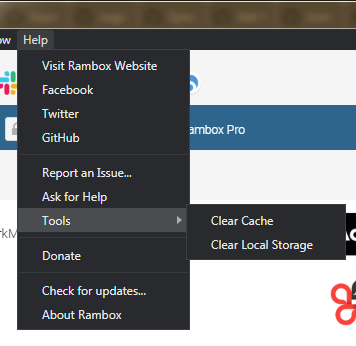
Could you try doing a Clear cache & a Clear Storage and tell us how it goes?
fvulich
on 9 Mar 2020
Cleared cache and local storage. Will report in a few days if anything improves.
vincentcast
on 9 Mar 2020
Cleared cache and local storage. Will report in a few days if anything improves.
Clearing cache and local storage didn't improve the performance. Rambox Helper (Renderer) is still around 30% of CPU and Rambox around 10%.
However, as another user suggested, LinkedIn seems to be the culprit here. Turning it off yields much better performances: Rambox Helper (Renderer) is down to 0,4% and Rambox down to 1,3%.
vincentcast
on 10 Mar 2020
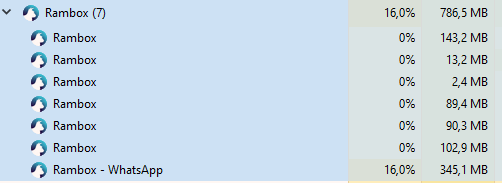
Cleared both, had to log in to all my services (yay.), still same. For me it appears to be whatsapp (i don't have linkedin), but that could also just be random.
Lambik
on 10 Mar 2020
Sorry to hear that... We are gonna release soon a new version with an Electron update, I think that the issue is related with Electron, because neither LinkedIn nor WhatsApp have a weird setting inside Rambox CE
fvulich
on 10 Mar 2020
Version: 0.7.3
Platform: linux (x64)
Electron: 7.1.1
Chromium: 78.0.3904.99
Node: 12.8.1
Fedora 31
Rambox works with 0% CPU if I clear local storage.
However this means no services configured.
Will be waiting for new version.
Thank you for your efforts.
Update:
Following storage clearing, I added back 10 e-mail services (yahoo, gmail, outlook365, zoho).
Now RamBox works really light in CPU terms.
There are some pick when using a service but nothing like the past.
Will add more services to check if there is a specific one killing the CPU.
 tkontogi
on 19 Mar 2020
tkontogi
on 19 Mar 2020
Version: 0.7.4
Platform: linux (x64)
Electron: 7.1.12
Chromium: 78.0.3904.130
Node: 12.8.1
Fedora 31
Hi, I have the same setup as @tkontogi, unfortunately, the latest update to 0.7.4 doesn't improve anything. It's still rendering my PC basically unusable. I have cleared local storage and reconfigured just two slack and a whatsapp service, and it's maxing out constantly.
 loomsen
on 24 Mar 2020
loomsen
on 24 Mar 2020
@loomsen What package are you using? Could you try with other? You can download them from HERE
fvulich
on 24 Mar 2020
hi @fvulich
I've been trying both the rpm and AppImage packages, same outcome. I've updated to latest (0.7.5), but reading the changelogs, nothing in this regard changed, and load pretty much looks the same as well.
loomsen
on 26 Mar 2020
I can confirm this also happens to me on:
Mac Os 10.15.4
Rambox 0.7.5
Had the following services on:
2x Whatsapp
Twitter
Messenger
Telegram
Slack
CPU usage via WindowServer and kernel_task render my system almost unusable. Can't keep using it unless it's fixed :(
 dekaru
on 3 Apr 2020
dekaru
on 3 Apr 2020
Version: 0.7.3
Platform: linux (x64)
Electron: 7.1.1
Chromium: 78.0.3904.99
Node: 12.8.1
Fedora 31
Rambox works with 0% CPU if I clear local storage.
However this means no services configured.Will be waiting for new version.
Thank you for your efforts.
Update:
Following storage clearing, I added back 10 e-mail services (yahoo, gmail, outlook365, zoho).
Now RamBox works really light in CPU terms.
There are some pick when using a service but nothing like the past.
Will add more services to check if there is a specific one killing the CPU.
Hi Again.
Updated to 0.7.5 after clearing cache and storage.
It looks that conditionally RamBox still uses high CPU.
Upgrading AND clearing cache & storage did help, but there are still perceivable issues.
Right now RamBox is minized and not in active use, but two threads of RB are using 50% of the CPU.
Will keep updating, not to put pressure to the developer, but to help him to help us.
Please do not consider my updates as a demand to fix.
Setup:
Version: 0.7.5
Platform: linux (x64)
Electron: 7.1.12
Chromium: 78.0.3904.130
Node: 12.8.1
tkontogi
on 9 Apr 2020
I can confirm that, it happens in many linux distros, debian 10, ubuntu 18.04, 19.10, 20.04 beta, and almost all computers (from 2 cores to 8 cores) get 100% of cpu usage
Setup:
Version: 0.7.5
Platform: linux (x64)
Electron: 7.1.12
Chromium: 78.0.3904.130
Node: 12.8.1
 cjdg
on 19 Apr 2020
cjdg
on 19 Apr 2020
I checked Franz, Rambox and Station in their current versions - they all have the issue of high CPU load and - even worse - high battery drain on notebooks.
 spi43984
on 21 Apr 2020
spi43984
on 21 Apr 2020
I can't confirm that @spi43984 . I'm running Franz on Fedora on different notebooks, none of which have a high CPU load. I don't experience battery drain neither.
loomsen
on 22 Apr 2020
I can't confirm that @spi43984 . I'm running Franz on Fedora on different notebooks, none of which have a high CPU load. I don't experience battery drain neither.
That's interesting. What version of Franz are you using? I checked 5.4.0 and 5.5.0 Beta 3. Are you running Franz on a notebook? If so, could you please check power consumption of Franz while working on battery?
When running Franz my power consumption is increased by 5-8 Watts, reducing the remaining battery running time dramatically. I have to shut down Franz while working on battery.
spi43984
on 22 Apr 2020
I can't confirm that @spi43984 . I'm running Franz on Fedora on different notebooks, none of which have a high CPU load. I don't experience battery drain neither.
That's interesting. What version of Franz are you using? I checked 5.4.0 and 5.5.0 Beta 3. Are you running Franz on a notebook? If so, could you please check power consumption of Franz while working on battery?
When running Franz my power consumption is increased by 5-8 Watts, reducing the remaining battery running time dramatically. I have to shut down Franz while working on battery.
I'm using the 5.4.1 AppImage. But I don't think this is the right place to talk about that, as this is the Rambox high CPU issue.
loomsen
on 22 Apr 2020
It seems that an app inside Rambox CE is crashing, could you try to do this? Once you notice that Rambox CE is consuming an abnormal amount of resources, try to disable apps one by one to see if one of them is the culprit.
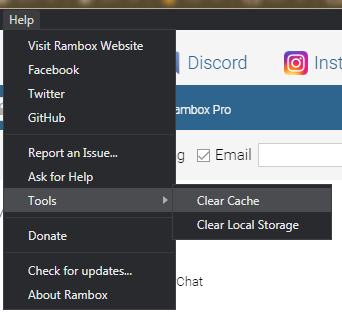
If that doesn't do the trick, could you try doing a Clear cache & a Clear Storage and tell us how it goes? Before doing this, backup all your services following this tutorial , because you will lose them.
If that doesn't work either, please, try uninstalling/reinstalling Rambox CE, this guide (Clean uninstall) will help you out.
If you are a Linux user you could try different packages because depending on your Linux distribution some are better than the others. You can download them from HERE or AUR from HERE
fvulich
on 22 Apr 2020
Version: 0.7.4
Platform: linux (x64)
Electron: 7.1.12
Chromium: 78.0.3904.130
Node: 12.8.1
Fedora 31Hi, I have the same setup as @tkontogi, unfortunately, the latest update to 0.7.4 doesn't improve anything. It's still rendering my PC basically unusable. I have cleared local storage and reconfigured just two slack and a whatsapp service, and it's maxing out constantly.
Following the cache cleanup, for long time I have no high CPU.
However when it start again, I started deactivating services one by one.
It looks like messaging apps like Google Chat, Talk and Skype are creating high CPU utilization.
Right now I have active 3xGmail, 2xOutlook, 1xYahoo, 4xZoho mail, 1xWhatsApp, 3xTelegram, 1xGitter and all runs smoothly.
Once I activate Hangouts, Hangouts Chat or Skype, at some point CPU util goes over the roof.
It is not a very evidence based approach, rather a perception based one, but hope it helps a bit.
tkontogi
on 25 Apr 2020
If that doesn't work either, please, try uninstalling/reinstalling Rambox CE, this guide (Clean uninstall) will help you out.
If you are a Linux user you could try different packages because depending on your Linux distribution some are better than the others. You can download them from HERE or AUR from HERE
Ok, that's what I did:
- clean uninstall (removed ~/.config/Rambox)
- downloaded AppImage, snap and deb each in version 0.7.5
- configured the following services: Trello, Zenkit To Do, WhatsApp, Gmail account 1, Gmail account 2, Threema. Xing, Google Translate, Yandex Translate, Leo Dict, Hangouts
- closed almost all additional apps (notebook consumed around 3-4 W in battery mode) and only run Rambox as AppImage, then as snap, than as installed app from deb
- checked battery consumption in powertop
- this was just done by observation without any sophisticated analyzer by:
1) waiting for notebook to settle around 3-4 W (used powertop to display battery drain)
2) run Rambox, clicked on all services, put Rambox in background
3) waited some time for battery consumption to settle, verified battery consumption in powertop
4) closed Rambox, run 'killall rambox'
5) verified battery consumption in powertop to be again 3-4 W
Observations:
- AppImage adds permanently 2-3 W while running. snap around 2 W and the installed deb also around 2 W, sometimes a bit less than 2 W
- 2 W permanently added battery consumption reduces remaining time on battery by more than 2 hours (and that is the main issue, saw same behaviour with Franz, there it is even worse)
- measured CPU load by running
while true; do ps auxf | grep rambox | awk '{ print $3; SUM += $3} END { print "SUM " SUM }'; sleep 1; done
in terminal: - deb adds around 100% CPU load (100% = 1 whatever core on an Intel i7 with 4 physical and 4 virtual cores)
- AppImage ~ 145%
- snap ~120%
Played around a bit with the services. If I diable Hangouts and Leo Dict, I save around 1 W.
spi43984
on 25 Apr 2020
for me, i didnt have this issue until literally yesterday. I have not installed an update for rambox quite a while and i am running the latest version.
it is 100% slack web app for me. the strange thing is though, i have 4-5 slack app tabs open and its only my largest community (my companies workspace) that causes the high load so i feel like it is more a problem with the slack app trying to maybe cache all the images and gifs in each channel or something?
it hits 100% cpu and locks up the app only when i receive a message from more than one person..
i don't think this will help much but this is my perspective on the issue, its the webapps themselves causing the problems.. there isnt much that can be done i feel
(hopefully i am wrong) 👍
 phyzical
on 23 Jun 2020
phyzical
on 23 Jun 2020
I agree that the issue is Slack, I removed a lot of workspaces and now is better.
As I can remember Slack use React in dev mode so every page is more heavy on resources (I don't remember where I saw that).
 Mte90
on 24 Aug 2020
Mte90
on 24 Aug 2020
Related issues
 andrii-riabchun
·
3Comments
andrii-riabchun
·
3Comments
 bnn-y
·
4Comments
bnn-y
·
4Comments
 mforcer
·
3Comments
mforcer
·
3Comments
 saalkom
·
3Comments
saalkom
·
3Comments
 LiBOSS-CZ
·
4Comments
LiBOSS-CZ
·
4Comments
Most helpful comment
Hi everybody,
I can confirm that I experience this issue at least since Rambox version 0.6.5 and that it still seems to be present in 0.6.7.
I have the following services in use: WhatsApp and Facebook Messenger. I also used to have two instances of Slack workspaces running in Rambox, which I deactivated because of the CPU load issue, and now employ the Slack desktop app to read and write messages in them.
Still, with both Slack services deactivated, the issue exists, and over time Rambox first becomes unavailable itself and then slows down the whole system by causing CPU load spikes (according to htop). When I kill the Rambox process, everything gets back to normal.
My environment:
I hope this helps to track down this problem.