Community-edition: Custom Service Unread Badge doesn't work
Steps to reproduce
- Add Feedly as a custom service; log in
- Use custom JS script:
const originalTitle = document.title;

function checkUnread() {
  const e = document.querySelectorAll('[data-category="global.all"].categoryUnreadCount')[0];
  const count = parseInt(e.innerHTML.trim());

  if(count >= 1) {
    document.title = `(${count}) ${originalTitle}`;
  } else {
    document.title = originalTitle;
  }
}

setInterval(checkUnread, 3000);
- Verify the
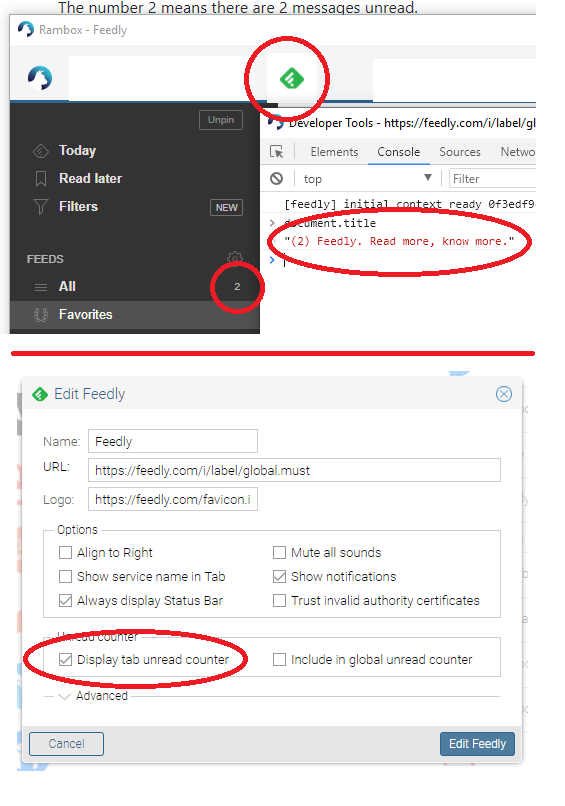
document.titlehas in fact been changed by typingdocument.titlein DevTools console.
Expected behavior
Unread badge should appear on Feedly tab
Actual behavior
It does not.
ENVIRONMENT
Version: 0.6.3
Platform: win32 (x64)
Electron: 2.0.14
Chromium: 61.0.3163.100
Node: 8.9.3
 burtek
All 6 comments
Thanks for opening your first issue here! Be sure to follow the issue template!
![welcome[bot] picture](https://avatars0.githubusercontent.com/in/4141?v=4&s=40) welcome[bot]
on 5 Feb 2019
welcome[bot]
on 5 Feb 2019
I checked this as it was happening to me.
Try updating the unread count, instead of changing the document title as specified in https://github.com/ramboxapp/community-edition/tree/master/app/model
That is, instead of
document.title = '(${count}) ${originalTitle}';
do
rambox.setUnreadCount(count);
(having parsed the count string to number).
In my case I'm also clearing the count, don't know if that is necessary:
rambox.clearUnreadCount();
You can try these at the developer tools first.
Tested on
Version: 0.6.3\
Platform: win32 (x64)
Electron: 2.0.14
Chromium: 61.0.3163.100
Node: 8.9.3
 Agresina
on 6 Feb 2019
Agresina
on 6 Feb 2019
Works perfectly, thanks!
So now my code is:
function checkUnread() {
  const e = document.querySelectorAll('[data-category="global.all"].categoryUnreadCount')[0];
  const count = parseInt(e.innerHTML.trim());

  rambox.setUnreadCount(count || 0);
}

setInterval(checkUnread, 3000);
It would be nice to have that in the docs... @saenzramiro
burtek
on 6 Feb 2019
This issue has been automatically marked as stale because it has not had recent activity. It will be closed if no further activity occurs. Thank you for your contributions.
![stale[bot] picture](https://avatars3.githubusercontent.com/in/1724?v=4&s=40) stale[bot]
on 7 Apr 2019
stale[bot]
on 7 Apr 2019
This issue has been automatically closed since there has not been any recent activity. Please open a new issue for related bugs.
stale[bot]
on 14 Apr 2019
This thread has been automatically locked since there has not been any recent activity after it was closed. Please open a new issue for related bugs.
![lock[bot] picture](https://avatars1.githubusercontent.com/in/6672?v=4&s=40) lock[bot]
on 14 May 2019
lock[bot]
on 14 May 2019
Related issues
 bnn-y
·
4Comments
bnn-y
·
4Comments
 soulchainer
·
3Comments
soulchainer
·
3Comments
 juanmlambre
·
3Comments
juanmlambre
·
3Comments
 LiBOSS-CZ
·
4Comments
LiBOSS-CZ
·
4Comments
 mforcer
·
3Comments
mforcer
·
3Comments