Community-edition: Slack will require Chromium 66 or later after March 15
Slack has made it known that they're bumping up their minimum browser requirements as of March 15. They're going to require Chrome 66 or later.
ENVIRONMENT
Rambox: v0.6.3
OS: macOS 10.12.6
Arch: x64
 bkimmett
All 14 comments
Thanks for opening your first issue here! Be sure to follow the issue template!
![welcome[bot] picture](https://avatars0.githubusercontent.com/in/4141?v=4&s=40) welcome[bot]
on 15 Jan 2019
welcome[bot]
on 15 Jan 2019
Steps to reproduce
- Open https://get.slack.help/hc/en-us/articles/115002037526 in the browser.
- Read announcement that on March 15, 2019, Slack is changing the browser requirements so that Chromium needs to be on version 66 or newer.
- From the menu, select _Rambox_ » _About Rambox._
Expected behavior
The About Rambox dialog shows a Chromium version of 66 or newer.
Actual behavior
The About Rambox dialog shows a Chromium version of 61.0.3163.100.
ENVIRONMENT
Rambox: v0.6.3
OS: macOS 10.14.3 (18D42)
Arch: x64
 claui
on 23 Jan 2019
claui
on 23 Jan 2019
Currently getting this notification now and then when using Slack:
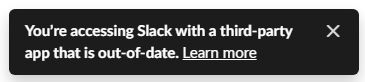
The link goes to the help article listed above.
 StormPooper
on 23 Jan 2019
StormPooper
on 23 Jan 2019
We will release a new version of Rambox CE ASAP, and of course will be before March 15.
 saenzramiro
on 23 Jan 2019
saenzramiro
on 23 Jan 2019
FWIW, I'm using Rambox Pro and have Amazon Music as one of my tabs - also getting a similar message (totally unrelated to Slack) about outdated Chromium version and deprecated support. Just another hint that it would probably be good to bump it.
 daveaglick
on 25 Jan 2019
daveaglick
on 25 Jan 2019
@daveaglick also a Rambox Pro update will be coming soon (with an updated Chromium)
 fvulich
on 1 Feb 2019
fvulich
on 1 Feb 2019
@saenzramiro what's the progress with 0.6.4? Just curious, I know it's not March 15th yet
 burtek
on 11 Mar 2019
burtek
on 11 Mar 2019
Anyone willing to review PR #2111?
I’ve tried on my machine; it refuses to launch the app even from upstream master:
Sencha Cmd 6.6.0.13 - Crash report
================================================
An error occurred while executing the following command: app watch
[…]
/opt/Sencha/Cmd/6.6.0.13/plugin.xml:378: The following error occurred while executing this line:
/Users/claudia/Documents/dev/rambox/.sencha/app/build-impl.xml:252: The following error occurred while executing this line:
/Users/claudia/Documents/dev/rambox/.sencha/app/watch-impl.xml:87: The following error occurred while executing this line:
/Users/claudia/Documents/dev/rambox/.sencha/app/build-impl.xml:291: The following error occurred while executing this line:
/Users/claudia/Documents/dev/rambox/.sencha/app/sass-impl.xml:205: The following error occurred while executing this line:
/Users/claudia/Documents/dev/rambox/.sencha/app/sass-impl.xml:297: Problem: failed to create task or type x-compass-compile
Cause: The name is undefined.
Action: Check the spelling.
Action: Check that any custom tasks/types have been declared.
Action: Check that any <presetdef>/<macrodef> declarations have taken place.
Did you install ruby ?
 maxerbox
on 13 Mar 2019
maxerbox
on 13 Mar 2019
@maxerbox Yes, I do have Ruby 2.6.1 installed. A 2.3.7 installation also came with the OS, which is macOS 10.14.3.
claui
on 13 Mar 2019
I’ve upgraded sencha from 6.6.0.13 to 6.7.0.37 and run sencha app upgrade.
I still get the same error when running sencha app watch. 😞
Any ideas how to troubleshoot that?
Anyone else willing to review #2111? There’s only one day left in Slack’s grace period.
claui
on 14 Mar 2019
@claui
Can you check if everything required is installed https://stackoverflow.com/a/34339357 ?
maxerbox
on 14 Mar 2019
If you would like to test it, I merged every open pull requests and made a build :
https://github.com/maxerbox/community-edition/releases/tag/0.6.4-a
maxerbox
on 14 Mar 2019
This thread has been automatically locked since there has not been any recent activity after it was closed. Please open a new issue for related bugs.
![lock[bot] picture](https://avatars1.githubusercontent.com/in/6672?v=4&s=40) lock[bot]
on 14 Apr 2019
lock[bot]
on 14 Apr 2019
Related issues
 MakuSensei
·
4Comments
MakuSensei
·
4Comments
 saalkom
·
3Comments
saalkom
·
3Comments
 bnn-y
·
4Comments
bnn-y
·
4Comments
 arnauldb
·
4Comments
arnauldb
·
4Comments
 igalic
·
3Comments
igalic
·
3Comments
Most helpful comment
We will release a new version of Rambox CE ASAP, and of course will be before March 15.