Community-edition: Error occurred when trying to backup your configuration
Steps to reproduce
- Using the backup button under profile
Expected behavior
configuration is backed up
Actual behavior
Idk if the configuration is indeed backed up but I get "Error occurred when trying to backup your configuration"
ENVIRONMENT
First noticed issue on version 0.6.2
Platform: darwin (x64)
Electron: 3.1.4
Chromium: 66.0.3359.181
Node: 10.2.0
Issue still occurs:
Version: 0.6.9
Platform: win32 (x64)
Electron: 4.1.4
Chromium: 69.0.3497.128
Node: 10.11.0
Possible Workaround/Fix:
https://github.com/ramboxapp/community-edition/issues/1932#issuecomment-562420311
 brij1234
All 62 comments
Thanks for opening your first issue here! Be sure to follow the issue template!
![welcome[bot] picture](https://avatars0.githubusercontent.com/in/4141?v=4&s=40) welcome[bot]
on 27 Oct 2018
welcome[bot]
on 27 Oct 2018
Same problem for me !
Version: 0.6.2
Platform: win32 (x64)
Electron: 2.0.8
Chromium: 61.0.3163.100
Node: 8.9.3
 Kourai
on 6 Nov 2018
Kourai
on 6 Nov 2018
Same problem on my machine. Same behavior. Though it does list last sync from cloud as Friday 27 Oct, 2017 as the last backup on my machine in the cloud.
Version: 0.6.2
Platform: darwin (x64)
Electron: 2.0.8
Chromium: 61.0.3163.100
Node: 8.9.3
 bmoggedhwm
on 8 Nov 2018
bmoggedhwm
on 8 Nov 2018
Same problem here.
Version: 0.6.2
Platform: win32 (x64)
Electron: 2.0.8
Chromium: 61.0.3163.100
Node: 8.9.3
 B97theFallen
on 8 Nov 2018
B97theFallen
on 8 Nov 2018
Same problem on two clients:
Version: 0.6.2
Plattform: win32 (x64)
Electron: 2.0.8
Chromium: 61.0.3163.100
Node: 8.9.3
 MichaelDwucet
on 21 Nov 2018
MichaelDwucet
on 21 Nov 2018
Same problem here:
Version: 0.6.3
Platform: darwin (x64) (macOS Sierra 10.12.6)
Electron: 2.0.14
Chromium: 61.0.3163.100
Node: 8.9.3
I also can't check for updated backups. It seems that the whole functionality is deprecated.
 dmetzler1988
on 12 Dec 2018
dmetzler1988
on 12 Dec 2018
Same problem here:
Version: 0.6.3
OS: macOS 10.14.1
 evancaldwell
on 17 Jan 2019
evancaldwell
on 17 Jan 2019
Same problem here!
Version: 0.6.3
OS: Lubuntu 18.04
 danielrosehilljlm
on 28 Feb 2019
danielrosehilljlm
on 28 Feb 2019
Same problem here !
Version: 0.6.3
OS: Mint 19
 Rafaelblsilva
on 10 Mar 2019
Rafaelblsilva
on 10 Mar 2019
Same here, is anybody caring at all about this? Is there a way for manual export/import?
Version: 0.63
OS: Windows 10
 dreamflasher
on 13 Mar 2019
dreamflasher
on 13 Mar 2019
Same here.
Version: 0.64
OS: Windows 7
 Rik67
on 16 Mar 2019
Rik67
on 16 Mar 2019
Same here. How do we debug this? Or manually wipe/overwrite the configuration?
Version: 0.6.4
Platform: win32 (x64)
Electron: 3.1.4
Chromium: 66.0.3359.181
Node: 10.2.0
 antzpantz
on 17 Mar 2019
antzpantz
on 17 Mar 2019
Same here, is there a manual fix?
Version: 0.6.4
Platform: linux (x64)
Electron: 3.1.4
Chromium: 66.0.3359.181
Node: 10.2.0
 jonathanargentiero
on 19 Mar 2019
jonathanargentiero
on 19 Mar 2019
same problems
Version: 0.6.4
Platform: win32(x64)
Electron: 3.1.4
Chromium: 66.0.3359.181
Node: 10.2.0
I guess the problem caused by importing custom service that rambox cannot recognize
 dreistein543
on 22 Mar 2019
dreistein543
on 22 Mar 2019
Version: 0.6.4
Platform: darwin (x64)
Electron: 3.1.4
Chromium: 66.0.3359.181
Node: 10.2.0
 jaredkotoff
on 15 Apr 2019
jaredkotoff
on 15 Apr 2019
same problems
Version: 0.6.4
Platform: win32(x64)
Electron: 3.1.4
Chromium: 66.0.3359.181
Node: 10.2.0
I guess the problem caused by importing custom service that rambox cannot recognize
it is very strange that I can restore my configuration between different PCs and OSs even if the error still exists. And another problem emerges that I cannot find the regulation of how Rambox will hold the LOGIN state when I restart Rambox
dreistein543
on 17 Apr 2019
Is this ever going to be resolved? With each new version that comes out I expect that this will have been addressed, and yet the issue persists indefinitely!
danielrosehilljlm
on 1 May 2019
With the debug console, I noticed that there was an incorrect header for the Bearer token or something... I logged out and back in, then I was able to get the backup to work. Similarly, I had to log out and back in on my restore machine, but eventually it worked. So try that if you haven't.
 chrisfromredfin
on 4 May 2019
chrisfromredfin
on 4 May 2019
Same error here.
Tried to backup, got an error. Tried a restore, Rambox removed ALL of my services.
Added the services back, logged out the Rambox user and then logged back in.
Did the logout/login thing a few times before backup started working.
 qasim-arbisoft
on 9 May 2019
qasim-arbisoft
on 9 May 2019
I have this problem too
Version: 0.6.9
Platform: linux (x64)
Electron: 4.1.4
Chromium: 69.0.3497.128
Node: 10.11.0
 Ho3ein-Boka
on 5 Jul 2019
Ho3ein-Boka
on 5 Jul 2019
I have the same Problem since 10.Dez.2018:
Version: 0.6.9
Plattform: win32 (x64)
Electron: 4.1.4
Chromium: 69.0.3497.128
Node: 10.11.0
Tried to back up, got an error.
Today Rambox restore all my services from Dez.
I added all services new, but now I have the same backup problem.
I dont know what can I do. Please help me.
 KH2019new
on 31 Jul 2019
KH2019new
on 31 Jul 2019
any solutions for that problem?
 viperdriver2000
on 31 Jul 2019
viperdriver2000
on 31 Jul 2019
This issue has been automatically marked as stale because it has not had recent activity. It will be closed if no further activity occurs. Thank you for your contributions.
![stale[bot] picture](https://avatars3.githubusercontent.com/in/1724?v=4&s=40) stale[bot]
on 21 Oct 2019
stale[bot]
on 21 Oct 2019
ping...
viperdriver2000
on 24 Oct 2019
I still have this problem in latest version 0.7.2
(I logged in with a gmail account)
 shaal
on 22 Nov 2019
shaal
on 22 Nov 2019
I still have this problem in latest version 0.7.2
(I logged in with a gmail account)
Me too, same version 0.7.2 and logged with gmail acc too)
 5jubsPRO
on 3 Dec 2019
5jubsPRO
on 3 Dec 2019
Is there any way to clean up de backup?
I still have this problem in latest version 0.7.2, so I had created a new account, e the problem persists, what is happening?
Version: 0.7.2
Platform: win32 (x64)
Electron: 7.1.1
Chromium: 78.0.3904.99
Node: 12.8.1
5jubsPRO
on 3 Dec 2019
Just switch to Station... it's a much better app for multi-tasking.
antzpantz
on 4 Dec 2019
I think it's working for me now!
On the homepage with all the services listed, I saw a login button in the top right with a little orange star symbol. I logged in with my google account and now I can save backups. I will close the issue if more people can comment on their experiences.
brij1234
on 6 Dec 2019
Any updates?
Also station is a no-go for me. It doesn't allow multiple Skype accounts
 huang-jy
on 14 Jan 2020
huang-jy
on 14 Jan 2020
For me, still the same problem...and there are no updates...
Version: 0.7.2
Platform: win32 (x64)
Electron: 7.1.1
Chromium: 78.0.3904.99
Node: 12.8.1
5jubsPRO
on 14 Jan 2020
The suggestion to log out and back in again doesn't help, it'll reset all services back to logged out state, so you would have to log back in again on everyrthing
huang-jy
on 15 Jan 2020
@huang-jy same for me...and the problem persists...
5jubsPRO
on 16 Jan 2020
@saenzramiro, you are aware of the problem? could you give us a position?
5jubsPRO
on 22 Jan 2020
Just give up. Unless we get access to our backups stored 'somewhere' on Rambox's servers, this issue won't be fixed.
I've moved onto "Station" which is many times better than Rambox. Try it!
antzpantz
on 23 Jan 2020
Station doesn't allow multiple Skype accounts, so it's no-go for me.
huang-jy
on 23 Jan 2020
@antzpantz I've tried station, and don't have many mods as we want...
5jubsPRO
on 23 Jan 2020
Any Update?
5jubsPRO
on 9 Mar 2020
same issue i use rambox on kubuntu through snap. I linked my gmail account to rambox. When i try to backup it generates on console the message:
https://rambox.auth0.com/api/v2/users/google-oauth2%7C10XXXXXXXXXXX net::ERR_CONNECTION_CLOSED
Version: 0.7.3
Platform: linux (x64)
Electron: 7.1.1
Chromium: 78.0.3904.99
Node: 12.8.1
 lordvault
on 11 Mar 2020
lordvault
on 11 Mar 2020
At least was marked as Bug~
5jubsPRO
on 13 Mar 2020
same problem here on
Version: 0.7.3
Platform: win32 (x64)
Electron: 7.1.1
Chromium: 78.0.3904.99
Node: 12.8.1
 IARI
on 18 Mar 2020
IARI
on 18 Mar 2020
new version, and still the problem~ 😒
Version: 0.7.4
Platform: win32 (x64)
Electron: 7.1.12
Chromium: 78.0.3904.130
Node: 12.8.1
5jubsPRO
on 24 Mar 2020
Problem continues in Version: 0.7.5
 rmodi6
on 25 Mar 2020
rmodi6
on 25 Mar 2020
having this issue now
Version: 0.7.5
Plattform: win32 (x64)
Electron: 7.1.12
Chromium: 78.0.3904.130
Node: 12.8.1
 jnsw
on 16 Apr 2020
jnsw
on 16 Apr 2020
I Still have this problem! I guess is a auth0 problem, instead of Rambox...
Version: 0.7.5
Plattform: win32 (x64)
Electron: 7.1.12
Chromium: 78.0.3904.130
Node: 12.8.1
5jubsPRO
on 16 Apr 2020
Used to work. Not today.
~ ᐅ apt show rambox
Package: rambox
Version: 0.7.5-180
Status: install ok installed
Priority: extra
Section: default
Maintainer: Rambox <[email protected]>
Installed-Size: 211 MB
Depends: libgtk-3-0, libnotify4, libnss3, libxss1, libxtst6, xdg-utils, libatspi2.0-0, libuuid1, libappindicator3-1, libsecret-1-0
Homepage: https://rambox.pro
License: GPL-3.0
Vendor: Rambox <[email protected]>
Download-Size: inconnu
APT-Manual-Installed: yes
APT-Sources: /var/lib/dpkg/status
Description: Free and Open Source messaging and emailing app that combines common web applications into one.

~ ᐅ cat /etc/os-release
NAME="Ubuntu"
VERSION="19.10 (Eoan Ermine)"
ID=ubuntu
ID_LIKE=debian
PRETTY_NAME="Ubuntu 19.10"
VERSION_ID="19.10"
HOME_URL="https://www.ubuntu.com/"
SUPPORT_URL="https://help.ubuntu.com/"
BUG_REPORT_URL="https://bugs.launchpad.net/ubuntu/"
PRIVACY_POLICY_URL="https://www.ubuntu.com/legal/terms-and-policies/privacy-policy"
VERSION_CODENAME=eoan
UBUNTU_CODENAME=eoan
 rgarrigue
on 6 May 2020
rgarrigue
on 6 May 2020
Same here!
Version: 0.7.5
Plattform: win32 (x64)
Electron: 7.1.12
Chromium: 78.0.3904.130
Node: 12.8.1
5jubsPRO
on 15 May 2020
Same issue as well.
Version: 0.7.5
Platform: linux (x64) [Arch Linux via AUR]
Electron: 7.1.12
Chromium: 78.0.3904.130
Node: 12.8.1
 aarongraham9
on 21 May 2020
aarongraham9
on 21 May 2020
We are investigating this issue, seems that performing a logout and then login again could be a workaround for this issue (be aware that you may lose your current services by doing this)
 fvulich
on 5 Jun 2020
fvulich
on 5 Jun 2020
We are investigating this issue, seems that performing a logout and then login again could be a workaround for this issue
i did that and lost all my tabs
COULDN'T YOU WARN US?
EDIT: btw. it worked for me, I can backup again! thanks!
jnsw
on 7 Jun 2020
Logout / login didn't worked for me.
rgarrigue
on 11 Jun 2020
We are investigating this issue, seems that performing a logout and then login again could be a workaround for this issue (be aware that you may lose your current services by doing this)
This didn't worked for me, at all. I'm in using the 6th e-mail account to backup once, to restore in the future...
5jubsPRO
on 20 Jul 2020
I have the same problem on:
Version: 0.7.6
Platform: win32 (x64)
Electron: 7.2.4
Chromium: 78.0.3904.130
Node: 12.8.1
I have installed Rambox yesterday. Added several services for test purposes. Signed up to Rambox cloud service using E-Mail. Made a backup of configuration for three times successfully. Added several more services. But I am not able to backup any more: "Error occurred when trying to backup your configuration." I tried to logout and login again. Added all my services again. But the error still exists.
The program becomes unstable if the backup is unsuccessful. For example I cannot add a new service or change settings. OK/Apply/Save/Edit buttons have no any effect. It is necessary to restart Rambox in order to resolve this issue.
 dansoftware
on 6 Oct 2020
dansoftware
on 6 Oct 2020
In the end, I migrated to Ferdi mostly because of this.
rgarrigue
on 6 Oct 2020
In the end, I migrated to Ferdi mostly because of this.
Funny that, I went from Franz to Rambox. Now it's looking like I might head back, even if it is a fork of Franz.
huang-jy
on 6 Oct 2020
I'm using "Biscuit" now, no issues for months.
antzpantz
on 6 Oct 2020
You have chosen a strange place for negative advertisement of Rambox :-)
dansoftware
on 6 Oct 2020
Version: 0.7.6
Platform: win32 (x64)
Electron: 7.2.4
Chromium: 78.0.3904.130
Node: 12.8.1
For me in this version the backup button its working.
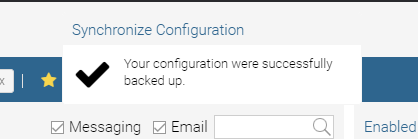
lordvault
on 6 Oct 2020
Negative advertisement is the 2 years old issue with ~50 "me too" comment on such an important feature.
rgarrigue
on 7 Oct 2020
Maybe we need to demand General Data Protection Regulation (GDRP) because we need to have transparent access to the data that's stored in our accounts?
antzpantz
on 8 Oct 2020
We could. That would be refering to this Art 20 right to data portability. Which they could answering giving you the json, period.
Anyway I don't want to hinder the (their) open source momentum doing this, they are most likely trying their best w/o time to do everything. I've been in their seat, still am. If you don't like it, ask for your data deletion & use something else.
rgarrigue
on 8 Oct 2020
New version is released:
Version: 0.7.7
Platform: win32 (x64)
Electron: 7.2.4
Chromium: 78.0.3904.130
Node: 12.8.1
But the problem still exists :-(
dansoftware
on 10 Oct 2020
Related issues
 MakuSensei
·
4Comments
MakuSensei
·
4Comments
 SimJoSt
·
4Comments
SimJoSt
·
4Comments
 igalic
·
3Comments
igalic
·
3Comments
 bnn-y
·
4Comments
bnn-y
·
4Comments
 soulchainer
·
3Comments
soulchainer
·
3Comments
Most helpful comment
In the end, I migrated to Ferdi mostly because of this.