Community-edition: High memory usage of Rambox core process after long working time
Version: 0.5.17
Platform: linux (x64)
Electron: 1.8.4
Chromium: 59.0.3071.115
Node: 8.2.1
After several days of work Rambox eats more than 5gb of RAM. I have about 10 services enabled, so first thought is that some service eats much memory. Here https://github.com/saenzramiro/rambox/issues/1588 I request per-service memory usage report, but now there are no ways to check memory usage per service.
So I manually disable all services (press 'Service disabled' checkbox), and Rambox memory usage is reduced only to 3gb of RAM.
Also I wait about 30 minutes if something is cached or not unloaded, but the Rambox memory usage stay same about 3gb.
So the source of problem is that Rambox core have some memory leak, that eats memory.
 MurzNN
All 26 comments
I am having similar problem. First 3 days, it used about 300Mb ram, 5 services. And now it is using >1Gb Ram, still 5 services.
 dmknght
on 14 Jul 2018
dmknght
on 14 Jul 2018
Same for me. 4 services 800MB. Desktop clients for each services total 300MB tops.
 LiBOSS-CZ
on 16 Jul 2018
LiBOSS-CZ
on 16 Jul 2018
Same issue:
- Version: 0.5.17
- OS: macOS High Sierra
 MartinDelille
on 25 Jul 2018
MartinDelille
on 25 Jul 2018
same:
- version: 0.5.17
- os: win 10 x64 (latest)
- runtime: 6 days
- tabs: 1 mattermost, 1 slack, 1 fb messenger, 1 whatsapp
- ram usage: 906 MB
 panther7
on 25 Jul 2018
panther7
on 25 Jul 2018
@panther7
tabs: 1 mattermost, 1 slack, 1 fb messenger, 1 whatsapp
ram usage: 906 MB
This is normal memory usage, because Rambox use Chromium web engine, and in Chromium (Google Chrome) browser you can see that each tab eats about 200 mb, so 200 * 4 = 1000 mb.
Can you compare the RAM usage at startup (after few minutes) and after 6 days?
Also can you recheck the RAM usage of Rambox, when close (disable) all service tabs?
MurzNN
on 26 Jul 2018
@MurzNN after several day using Rambox without restarting it, my tabs memory usage reached 1.3Gb per tab.
MartinDelille
on 26 Jul 2018
I confirm this issue. I left my pc on, last week. When I came back today (after 6 days), my rambox was like that at the task manager in Windows 10:

 laccf
on 26 Jul 2018
laccf
on 26 Jul 2018
I've found out rambox running backgroud use so much CPU too. This is annoying. It didn't happen for me when i used Franz
dmknght
on 28 Jul 2018
There is clearly a memory leak. I use http://valgrind.org/ for C++ project but I don't know if it is relevant here.
MartinDelille
on 28 Jul 2018
After a good sleep LuL.
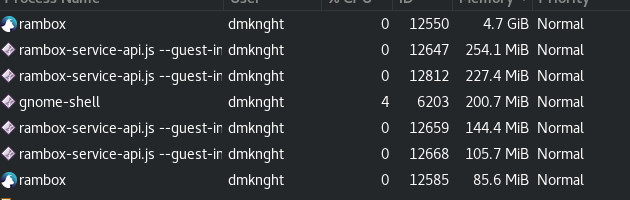
dmknght
on 9 Aug 2018
My installation is using up a lot of CPU while running in the background (with Telegram and 2x Slack). My fans are running non-stop.
Kde Neon / Ubuntu 16.04
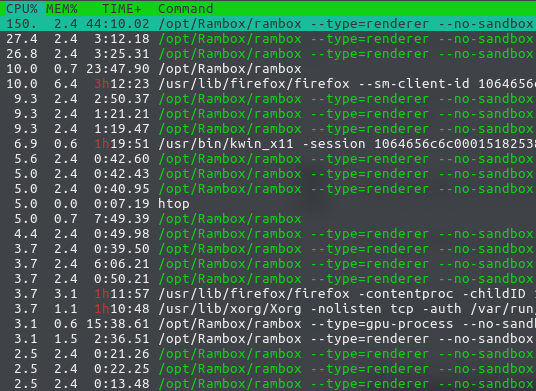
 tobias-kuendig
on 15 Aug 2018
tobias-kuendig
on 15 Aug 2018
This issue has been automatically marked as stale because it has not had recent activity. It will be closed if no further activity occurs. Thank you for your contributions.
![stale[bot] picture](https://avatars3.githubusercontent.com/in/1724?v=4&s=40) stale[bot]
on 24 Oct 2018
stale[bot]
on 24 Oct 2018
Subscribers, can you recheck this problem in fresh 0.6.2 version of app?
How to check this issue right:
- Open Rambox with many services enabled
- Work with that services some long time (3+ hours)
- Check Rambox total memory usage, remember this value.
- Disable all services in Rambox (via checkboxes on main tab) - this will only unload tabs, auth and other settings will stay here.
- Wait 5 minutes when garbage collector will free up memory, check again Rambox total memory usage.
- Publish results here: Rambox usage before disabling all services, after disabling, and difference.
MurzNN
on 24 Oct 2018
Here is my rambox ram after 4 or 5 hours (with 5 services). I can't give full information right now but i think i understand this issue:
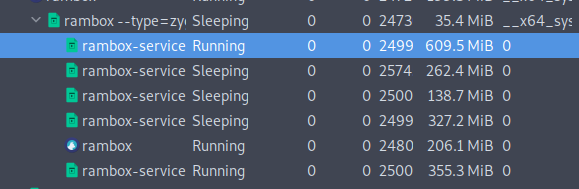
If i am not wrong, rambox is acting like a browser. So it will keep getting new data from chat service and pushing it to users. After a long time, new data will be "malloc" memory, and old data will be kept their location in memory. So if users want rambox (or even franz) use less memory, they must close their application, and start it again. When users start it, it will load latest data from server -> lesser memory after starting. So, basically, rambox is using chromium core, and it is acting like a browser. It is a little it different because rambox won't close its services, so service tabs memory won't be freed.
dmknght
on 26 Oct 2018
This issue is about Rambox core process memory usage. This is like Chromium browser will continue use 2gb of memory after you close all tabs. So can you recheck the memory usage after temporary disabling all services (this must act like you close all tabs in Chrome).
MurzNN
on 26 Oct 2018
This is definitely still an issue. The memory footprint doesn't bother me as much as the consistently high CPU usage, even when in the background.
 raveem
on 29 Nov 2018
raveem
on 29 Nov 2018
I think i've found the reason:
- If i lock my screen in hours, and i don't close rambox (let it run in background (system tray) only), rambox will increase its RAM
- if i lock my screen and close rambox, there is no memory leak
- If i don't lock my screen, it seems rambox won't use many ram even in a long time use
I had this issue on Debian 10, Parrot OS, xfce4, mate, gnome3 and cinnamon has no different.
dmknght
on 15 Jan 2019
I can also confirm that I see this issue. After a few days away, rambox is using over 10GB for the core process on Linux (Ubuntu 18.10).
Process was not minimised to the system tray, but the screen has been locked. All of the tabs are using reasonable amounts of memory.
 Sticklyman1936
on 1 Mar 2019
Sticklyman1936
on 1 Mar 2019
I have also seen high memory and CPU usage after running for 5-10 hours. Pretty sure this is a chromium issue, as it also seems to happen in other similar applications like franz or the electron GPM app.
 mike391
on 5 Apr 2019
mike391
on 5 Apr 2019
This issue has been automatically marked as stale because it has not had recent activity. It will be closed if no further activity occurs. Thank you for your contributions.
stale[bot]
on 4 Jun 2019
bump
MurzNN
on 4 Jun 2019
Bump. This happens on Pro version as well. What is benefit of having multiple groups if it consumes twice as much memory if i just had those services opened in multiple browsers
 zbhoy
on 28 Jun 2019
zbhoy
on 28 Jun 2019
Same problem... But I think this high memory usage maybe is an electron issue because another electorn based IM occupies more memory as well as before...
 blackPantherOS
on 1 Jul 2019
blackPantherOS
on 1 Jul 2019
This issue has been automatically marked as stale because it has not had recent activity. It will be closed if no further activity occurs. Thank you for your contributions.
stale[bot]
on 30 Aug 2019
This issue has been automatically closed since there has not been any recent activity. Please open a new issue for related bugs.
stale[bot]
on 6 Sep 2019
This thread has been automatically locked since there has not been any recent activity after it was closed. Please open a new issue for related bugs.
![lock[bot] picture](https://avatars1.githubusercontent.com/in/6672?v=4&s=40) lock[bot]
on 6 Oct 2019
lock[bot]
on 6 Oct 2019
Related issues
 SimJoSt
·
4Comments
SimJoSt
·
4Comments
 jvdmeij
·
4Comments
jvdmeij
·
4Comments
 arnauldb
·
4Comments
arnauldb
·
4Comments
 menzow
·
4Comments
menzow
·
4Comments
 andrii-riabchun
·
3Comments
andrii-riabchun
·
3Comments
Most helpful comment
This issue is about Rambox core process memory usage. This is like Chromium browser will continue use 2gb of memory after you close all tabs. So can you recheck the memory usage after temporary disabling all services (this must act like you close all tabs in Chrome).