Community-edition: Login to rambox.auth0.com is broken
Steps to reproduce
- Clear cache
- Clear local cache
- Try to login
Expected behavior
Should be logged in
Actual behavior
It shows my profil image and a message "Welcom Jürgen!" follwed by the error message "We're sorry, something went wrong when attempting to login." See this screenshot:
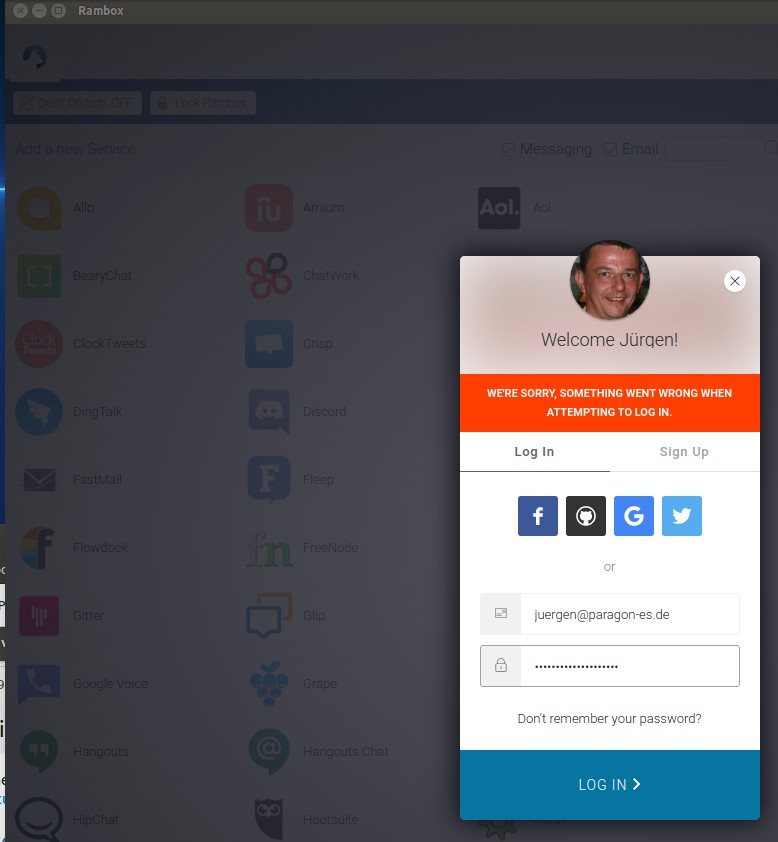
ENVIRONMENT
Rambox: v0.5.17
OS: Linux Ubuntu 16.04
Arch: x64
So, credentials must be correct, otherwise it couldn't find my picture and name. But why does it not login?
 jurgenhaas
All 30 comments
Same here.
Already tried
Fresh installation AND fresh registration at auth0. Tried to change password several times, even to simple ones with only numbers and letters. Still the same error message...
ENVIRONMENT
Version: 0.5.17
Platform: win32 (x64)
Electron: 1.8.4
Chromium: 59.0.3071.115
Node: 8.2.1
OS: Win10
 pzdaniel
on 8 Jun 2018
pzdaniel
on 8 Jun 2018
Same error
Did a fresh install on new linux (x64). Did a logout on my old, cant login in there either.
Changed password, but no effect.
Br
ENVIRONMENT
Version: 0.5.17
Platform: linux (x64)
Electron: 1.8.4
Chromium: 59.0.3071.115
Node: 8.2.1
 NielsSt
on 9 Jun 2018
NielsSt
on 9 Jun 2018
10 June, I got a message via mail, "Account Blocked in Rambox" and I unblocked it via your link. Still same problem cant login.
Also tried the Rambox-0.5.17-x64.AppImage today.
No difference. Can´t login.
Br
NielsSt
on 11 Jun 2018
@saenzramiro reach out to us at Auth0 and we can troubleshoot with you what's going on here. Either setup a support ticket or start a topic on Community.
 jerdog
on 12 Jun 2018
jerdog
on 12 Jun 2018
Feedback and close my issue.
Now I understand, if I try to login just with my user.[email protected], it does not work.
But if i use the providers on top e.g. Facebook or Gmail. All works good.
Br
NielsSt
on 13 Jun 2018
Well, my problem is that my settings are stored in an account with email address and password. If I were to login with one of the other providers I end up in a different account and I won't get access to my settings anymore.
I've just tried to login to auth0.com in the browser with my email address and that doesn't work either. Also the password reset doesn't send me an email. I conclude that my account with my email address doesn't exist anymore - but I'm sure that it's the correct email because it's stored in a vault, so typos are not the issue.
@saenzramiro what can I do to get access to my settings again?
jurgenhaas
on 14 Jun 2018
Maybe the Rambox account over at auth0.com is broken? I've just tried this URL (https://rambox.auth0.com/login) and it shows details like the Rambox logo and support email from Rambox, but the message "Something went wrong"
jurgenhaas
on 14 Jun 2018
I can't login also. Has some workaround?
 haroldogtf
on 16 Jun 2018
haroldogtf
on 16 Jun 2018
??? Has anyone figured a solution to this?
 allstarleb
on 16 Jun 2018
allstarleb
on 16 Jun 2018
I'm investigating this issue. Hopefully I can fix it ASAP.
 saenzramiro
on 18 Jun 2018
saenzramiro
on 18 Jun 2018
@jerdog Seems like when I turn off "Legacy Lock API" all username-password authentication fails. I turned on again and now works ok, but I know it have to be off because of the deprecation.
I think the solutions will be updating Lock to v11 and Auth0.js to v9 or latest like the documentation said.
https://auth0.com/docs/migrations/guides/legacy-lock-api-deprecation
saenzramiro
on 18 Jun 2018
@saenzramiro I've just tried to login again but it doesn't work. Have you turned it off again?
If it's only about deprecation then it sounds like it's not finally necessary to introduce the change but to prepare for it for some future versions. It would be really good if the system were brought back to a working stage until those questions got resolved.
jurgenhaas
on 19 Jun 2018
@jurgenhaas I turned on again until we release a new version of Rambox solving the problem by updating the libraries.
saenzramiro
on 19 Jun 2018
@saenzramiro this is great, thanks a lot. I'm back online again and have access to the account.
jurgenhaas
on 20 Jun 2018
I am getting this error again... it just randomly started when i reformatted my computer at tried to load rambox. Last time it worked randomly after a week or so of my trying to log in. How do you fix this?!
I tried clearing cach, reinstalling, even tried downgrading, I have no idea how to get this to work. I rely heavily on rambox so all my stuff is there please help.
TKS
allstarleb
on 19 Jul 2018
I am also having this problem. I only just started using Rambox this week, but I am migrating to a new computer and want to keep the settings from my old computer. I am trying to log in using a personal domain email that is hosted by G Suite. I've successfully created an account and verified it by email, but I cannot login. I downloaded the application on Monday, so I assume it is the most recent version.
 SatiricPanda
on 19 Jul 2018
SatiricPanda
on 19 Jul 2018
Also having that problem.... Using 64-bit .deb version 0.5.17 and cannot log in. Even switching to English does not help. Looks like cannot use Rambox anymore as I cannot log in :(
Same happens with AppImage or unpacked version... Tried to renew password - did not help...
 edmundlaugasson
on 20 Jul 2018
edmundlaugasson
on 20 Jul 2018
Same problem.. different machines, different installs, fresh install, no cache etc... cant login.
 g00tec
on 23 Jul 2018
g00tec
on 23 Jul 2018
Is anyone going to fix this? @saenzramiro
allstarleb
on 23 Jul 2018
Do you have any update for this incident?
 zetneteork
on 23 Jul 2018
zetneteork
on 23 Jul 2018
Also have this error, can't login.
If using google or FB, yes, if using my personal account? No. Removed all data and cache (manually), uninstalled app, installed again, still can't log in.
 vladpoly90
on 30 Jul 2018
vladpoly90
on 30 Jul 2018
IS ANYONE GOING TO FIX THIS?
allstarleb
on 1 Aug 2018
Or can we fix this ourselves maybe with some piece of the code?
There are accounts to which I'm logged in through Rambox that I only have in Rambox and can't access otherwise (like Telegram for which I have no sim card anymore) etc.
vladpoly90
on 1 Aug 2018
Is there any update to this issue?
zetneteork
on 13 Aug 2018
I stopped using rambox because of this, ridiculous!
allstarleb
on 13 Aug 2018
This will be fixed in the next release coming soon.
saenzramiro
on 3 Sep 2018
Do we have a solution for this? It seems like this issue has been ongoing and still no response from the devs... This is a bummer. I really wanted to use Rambox. Franz doesn't offer the same number of accounts I can sign in to, but Rambox isn't functional as well. A response would be appreciated.
 kmfz07
on 24 Sep 2018
kmfz07
on 24 Sep 2018
@kmfz07 You have response right above your comment.
This will be fixed in the next release coming soon.
Next version will be next week. Release is drafted and all CIs are passing. Just need to be released.
 Ash258
on 24 Sep 2018
Ash258
on 24 Sep 2018

Hi This is from 1-Oct-2018, it is still not solve
 New1997
on 1 Oct 2018
New1997
on 1 Oct 2018
This thread has been automatically locked since there has not been any recent activity after it was closed. Please open a new issue for related bugs.
![lock[bot] picture](https://avatars1.githubusercontent.com/in/6672?v=4&s=40) lock[bot]
on 31 Oct 2018
lock[bot]
on 31 Oct 2018
Related issues
 jamy015
·
4Comments
jamy015
·
4Comments
 juanmlambre
·
3Comments
juanmlambre
·
3Comments
 andrii-riabchun
·
3Comments
andrii-riabchun
·
3Comments
 jvdmeij
·
4Comments
jvdmeij
·
4Comments
 soulchainer
·
3Comments
soulchainer
·
3Comments