Community-edition: option to disable automatic updates
Steps to reproduce
- open Rambox one-day
- see "new version" notice
- try to disable auto-updates, since it's handled via package-manager
Expected behavior
Go to preferences and disable it.
Actual behavior
No such checkbox.
ENVIRONMENT
Version: 0.5.15
Platform: linux (x64)
Electron: 1.8.2
Chromium: 59.0.3071.115
Node: 8.2.1
 schmunk42
All 22 comments
This issue has been automatically marked as stale because it has not had recent activity. It will be closed if no further activity occurs. Thank you for your contributions.
![stale[bot] picture](https://avatars3.githubusercontent.com/in/1724?v=4&s=40) stale[bot]
on 25 Oct 2018
stale[bot]
on 25 Oct 2018
Still valid
schmunk42
on 25 Oct 2018
+1
 VarunAgw
on 8 Dec 2018
VarunAgw
on 8 Dec 2018
Also don't like the automated update check, updates happen anyway via package manager. Sending data to rambox.pro is not required and wanted, also would expect to be able to disable the check and other rambox-server-calls.
 gsantner
on 8 Jan 2019
gsantner
on 8 Jan 2019
@gsantner Maybe you guys can add hosts entry
0.0.0.0 rambox.pro
VarunAgw
on 8 Jan 2019
This issue has been automatically marked as stale because it has not had recent activity. It will be closed if no further activity occurs. Thank you for your contributions.
stale[bot]
on 9 Mar 2019
@saenzramiro These issues won't go away, because they have no activity. We are waiting for actions from your side.
This stale-bot configuration is not ideal - kindly speaking, I am not willing to create more issues in such a setup, because it's useless.
Issues can be marked as stale if you are i.e. waiting for an answer.
schmunk42
on 9 Mar 2019
I have given up on Rambox. I earlier found Wavebox (https://wavebox.io/). So far it's been really awesome and I have not faced any issue/limitation.
VarunAgw
on 11 Mar 2019
wavebox isn't totally FOSS, you still need an api key
 maxerbox
on 12 Mar 2019
maxerbox
on 12 Mar 2019
I'm returning to nativefier instead of any wavebox/franz/rambox. All seem to go for tracking now and focus commercial use.
I need anyway only 1 "webapp".
gsantner
on 12 Mar 2019
Wavebox is looking really good, I actually won't even mind to pay a small fee.
But on the other hand I'd also prefer a 100% FOSS solution, even with some drawbacks.
I was looking into nativefier, but I really need multiple tabs. If someone knows such a solution, I'd really appreciate posting it here.
schmunk42
on 12 Mar 2019
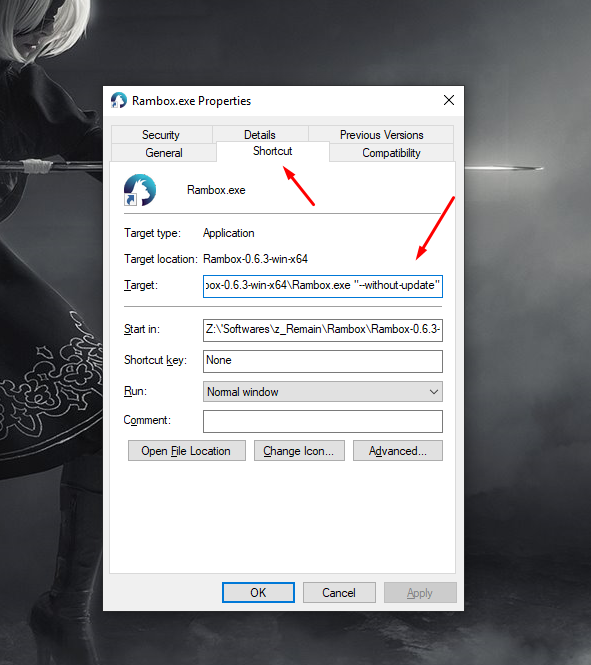
Run rambox with --without-update to stop updates.
Edit your shortcut by appending this argument.
maxerbox
on 16 Mar 2019
For someone don't know what exact to do:
Go to Rambox shortcut and right click and select Properties. In the "Destination" field add at the end "--without-update". Click Accept button.
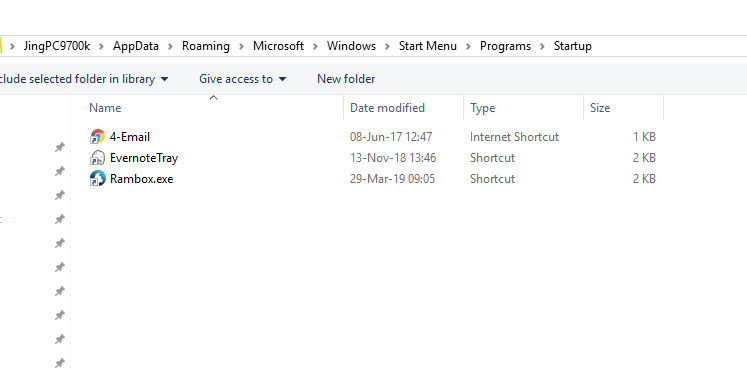
------- Do not enable run with start up. instead that, let copy shortcut and put it in start up folder:
 liwenjing93
on 29 Mar 2019
liwenjing93
on 29 Mar 2019
Is there a similar action I can do in MacOS X that disables auto-update? The app is updating from 0.6.4 to 0.6.6, which is a version incompatible with my obsolete OS version. There should be some kind of warning, or it just stops working!
 alvarogois
on 16 Apr 2019
alvarogois
on 16 Apr 2019
I'm with @alvarogois. Need something similar to elegantly shutdown automatic update checks on MacOS at a Rambox level. Not modifying something on the system level that may negatively impact other components of Rambox or other applications unexpectedly.
 Nosferous
on 17 Apr 2019
Nosferous
on 17 Apr 2019
I also agree with @schmunk42
This stale-bot configuration is not ideal - kindly speaking, I am not willing to create more issues in such a setup, because it's useless.
Issues can be marked as stale if you are i.e. waiting for an answer.
Nosferous
on 17 Apr 2019
I think we can add an option in the About window to disable automatic updates. We will do it in next version.
 saenzramiro
on 1 May 2019
saenzramiro
on 1 May 2019
This issue has been automatically marked as stale because it has not had recent activity. It will be closed if no further activity occurs. Thank you for your contributions.
stale[bot]
on 30 Jun 2019
:rage: stale bot
schmunk42
on 30 Jun 2019
Looking at a few related issues this was marked as done in 0.6.8 and app creator made reference to it being added in next version referring to this 1521 on May 1st.
However I never saw this added to MacOS 0.6.8, nor do I see it as an option in latest 0.6.9
Nosferous
on 1 Jul 2019
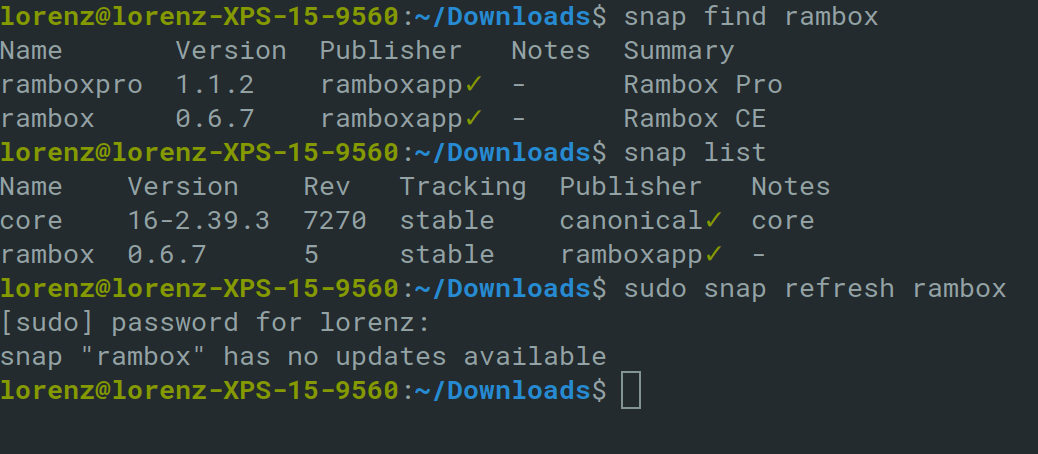
Similar problem on Linux / Elementary OS. I have the latest CE version through snap (0.6.7) but the update notification (0.6.9) appears every time i open rambox.
snap find command output:
rambox update notification:

 AdaLollA
on 10 Jul 2019
AdaLollA
on 10 Jul 2019
This thread has been automatically locked since there has not been any recent activity after it was closed. Please open a new issue for related bugs.
![lock[bot] picture](https://avatars1.githubusercontent.com/in/6672?v=4&s=40) lock[bot]
on 9 Aug 2019
lock[bot]
on 9 Aug 2019
Related issues
 SimJoSt
·
4Comments
SimJoSt
·
4Comments
 menzow
·
4Comments
menzow
·
4Comments
 igalic
·
3Comments
igalic
·
3Comments
 MakuSensei
·
4Comments
MakuSensei
·
4Comments
 leif
·
4Comments
leif
·
4Comments
Most helpful comment
I think we can add an option in the About window to disable automatic updates. We will do it in next version.