Community-edition: MS Teams don't work
<!-- Please describe here your issue and steps to reproduce it. -->
Seeing error when trying to add MS Teams

<!-- DON'T REMOVE THE FOLLOWING LINES -->
-
> Rambox 0.5.13
> Electron 1.7.8
> darwin x64 16.7.0
 maksimu
All 26 comments
Same here. Just started today. Ubuntu 17.10 running 0.5.13.
Version: 0.5.13
Platform: linux (x64)
Electron: 1.7.8
Chromium: 58.0.3029.110
Node: 7.9.0
 yebo29
on 11 Dec 2017
yebo29
on 11 Dec 2017
Same here; 0.5.13 on Fedora 27
 mfestrada
on 11 Dec 2017
mfestrada
on 11 Dec 2017
Same problem. After changing User-agent to "Edge - windows", Teams loaded, but chat wasn't working. Using "Chrome - Windows" doesn't load.
 voda
on 11 Dec 2017
voda
on 11 Dec 2017
Same here:
Version: 0.5.13
Platform: win32 (x64)
Electron: 1.7.8
Chromium: 58.0.3029.110
Node: 7.9.0
 yerminson
on 11 Dec 2017
yerminson
on 11 Dec 2017
Changing User-Agent to "Mozilla/5.0 (X11; Linux x86_64) AppleWebKit/537.36 (KHTML, like Gecko) Chrome/62.0.3202.89 Safari/537.36" helped. Info for how to change UA: https://github.com/saenzramiro/rambox/issues/859#issuecomment-302097150
voda
on 11 Dec 2017
Even the user agent setting did not help and it resets back to auto after Rambox restart. Is there a way to apply / save the user agent setting?
 ppkuronen
on 12 Dec 2017
ppkuronen
on 12 Dec 2017
As a quick and dirty hack: edit the service, open the “Advanced” section, and add the following JavaScript snippet in the “Custom Code” textarea:
navigator.__defineGetter__('userAgent', function(){
    return 'Mozilla/5.0 (X11; Linux x86_64) AppleWebKit/537.36 (KHTML, like Gecko) Chrome/62.0.3202.89 Safari/537.36';
});
It’s ugly as hell and should be removed once the issue has been fixed, but it should work for the time being. (At least it does so for me.)
 yggi49
on 12 Dec 2017
yggi49
on 12 Dec 2017
same here.
Mac, Chrome, Rambox 0.5.13
 mbesch0711
on 12 Dec 2017
mbesch0711
on 12 Dec 2017
same problem
   > Rambox 0.5.10
> Electron 1.7.4
> linux x64 4.10.0-42-generic
 smathys
on 12 Dec 2017
smathys
on 12 Dec 2017
Same problem. Chaning the user agent via dev tools made it load just fine. Chat seems to be working, too after this.
 dNvl
on 12 Dec 2017
dNvl
on 12 Dec 2017
+1
 biffster
on 12 Dec 2017
biffster
on 12 Dec 2017
Changing the user agent string to
Mozilla/5.0 (Windows NT 10.0; Win64; x64) AppleWebKit/537.36 (KHTML, like Gecko) Chrome/63.0.3239.84 Safari/537.36
or
Mozilla/5.0 (Windows NT 10.0; WOW64; rv:57.0) Gecko/20100101 Firefox/57.0
does not resolve the issue.
 almightyfoon
on 12 Dec 2017
almightyfoon
on 12 Dec 2017
For me and more users in my company works option with another User Agent
User Agent: Custom ->
Mozilla/5.0 (X11; Linux x86_64) AppleWebKit/537.36 (KHTML, like Gecko) Chrome/62.0.3202.89 Safari/537.36
- then on app Rambox on Teams TAB - right click and " Reload "
but! that windows with Developer tools - MUST BE OPENED! Do not close it - that's only work "On Live"
:)
 Najkon
on 13 Dec 2017
Najkon
on 13 Dec 2017
How are people changing the User Agent string? I can't seem to find that setting anywhere in RamBox or the dev tools.
 Whoops
on 13 Dec 2017
Whoops
on 13 Dec 2017
@Whoops - You must right click on TAB with Teams - then choise " Toggle Developer tools " on that new windows in left upster corver have tree small dots in line (like firefox have settings menu) -> "More tools" -> " Network conditions" at the bottom of the window You will see " User agent" uncheck the checkbox - in menu choise ' Custom ... " and paste
Mozilla/5.0 (X11; Linux x86_64) AppleWebKit/537.36 (KHTML, like Gecko) Chrome/62.0.3202.89 Safari/537.36
- but! that windows with Developer tools - MUST BE OPENED! Do not close it - that's only work "On Live"
:)
Najkon
on 13 Dec 2017
Hello guys,
I will be fixing this in the next release. Like @Najkon demostrate, Microsoft is blocking Electron browsers so we have to cheat it by using another User Agent.
 saenzramiro
on 14 Dec 2017
saenzramiro
on 14 Dec 2017
The same issue.
RedHat 7
Electron: 1.6.2
Chrome: 56.0.2924.87
Node: 7.4.0
v8: 5.6.326.50
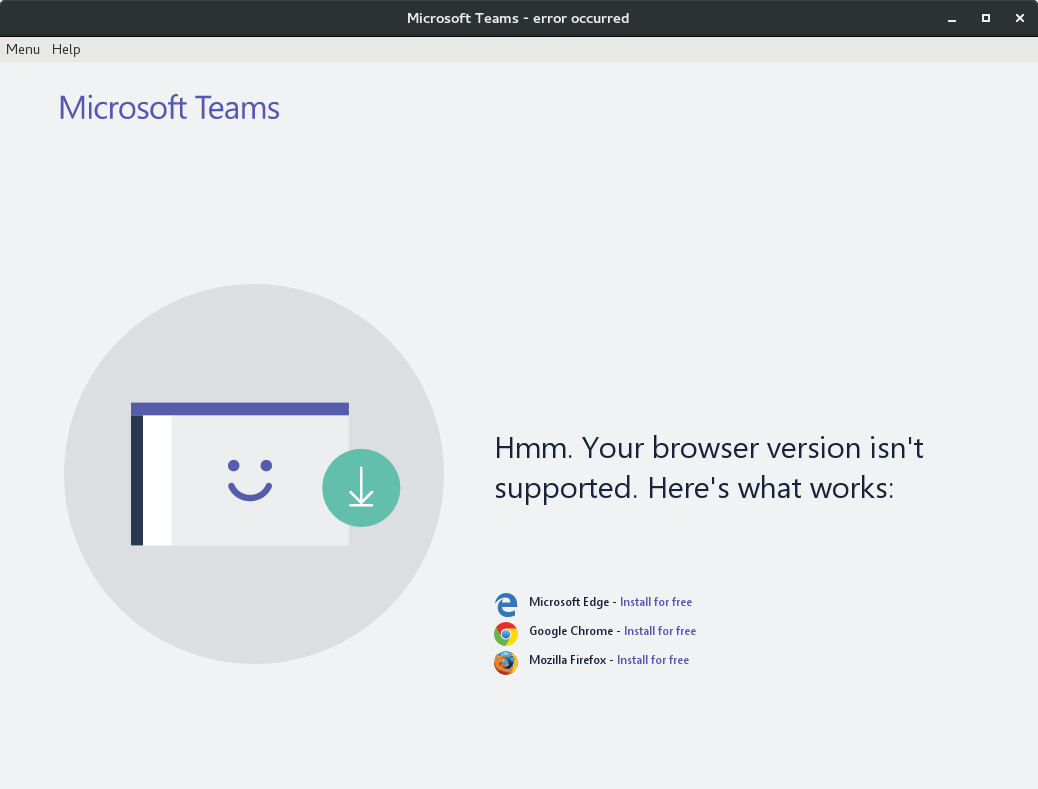
 marcobaccaro
on 5 Jan 2018
marcobaccaro
on 5 Jan 2018
Same here. I've tested with the different user-agent proposed using Developper Tools or Custom Code and I've not succeed in making it work :(
 valvin1
on 5 Jan 2018
valvin1
on 5 Jan 2018
I'm using this app for teams who succeeds in making teams working using Electron.
Here is the commit where User-Agent has been fixed but this user-agent is not working in Rambox using the 2 different method.
Hope it can help.
valvin1
on 5 Jan 2018
I will try to release a new version with this fix next week.
saenzramiro
on 5 Jan 2018
Following works for now
navigator.__defineGetter__('userAgent', function(){
return 'Mozilla/5.0 (X11; Linux x86_64) AppleWebKit/537.36 (KHTML, like Gecko) Chrome/64.0.2883.87 Safari/537.36';
});
 ujwalparker
on 9 Jan 2018
ujwalparker
on 9 Jan 2018
Great. Thanks man
Marco Baccaro
From: Ujwal Parker notifications@github.com
Sent: Tuesday, January 9, 2018 2:03:37 AM
To: saenzramiro/rambox
Cc: Marco Baccaro; Comment
Subject: Re: [saenzramiro/rambox] MS Teams don't work (#1354)
Following works for now
navigator.__defineGetter__('userAgent', function(){ return 'Mozilla/5.0 (X11; Linux x86_64) AppleWebKit/537.36 (KHTML, like Gecko) Chrome/64.0.2883.87 Safari/537.36'; });
—
You are receiving this because you commented.
Reply to this email directly, view it on GitHubhttps://github.com/saenzramiro/rambox/issues/1354#issuecomment-356208610, or mute the threadhttps://github.com/notifications/unsubscribe-auth/AHzXlShTpC1ELm7KdMZD8mpK2b7E2wnjks5tIx1YgaJpZM4Q9qSs.
marcobaccaro
on 9 Jan 2018
I had to change the user agent as the ones given above where blocked also.
I've added the below Advanced Code when editing the Teams tab.
navigator.__defineGetter__('userAgent', function(){
    return 'Mozilla/5.0 (Windows NT 10.0; Win64; x64; rv:57.0) Gecko/20100101 Firefox/57.0';
});
 fingersonfire
on 15 Jan 2018
fingersonfire
on 15 Jan 2018
Today I will release 0.5.14 with this fix.
saenzramiro
on 16 Jan 2018
Great!
Marco Baccaro
From: Ramiro Saenz notifications@github.com
Sent: Tuesday, January 16, 2018 9:55:12 AM
To: saenzramiro/rambox
Cc: Marco Baccaro; Comment
Subject: Re: [saenzramiro/rambox] MS Teams don't work (#1354)
Closed #1354https://github.com/saenzramiro/rambox/issues/1354 via #1389https://github.com/saenzramiro/rambox/pull/1389.
—
You are receiving this because you commented.
Reply to this email directly, view it on GitHubhttps://github.com/saenzramiro/rambox/issues/1354#event-1426443583, or mute the threadhttps://github.com/notifications/unsubscribe-auth/AHzXlYsJ2bhZNIbYADYvMlZBIg-yJLHuks5tLMZggaJpZM4Q9qSs.
marcobaccaro
on 16 Jan 2018
This thread has been automatically locked since there has not been any recent activity after it was closed. Please open a new issue for related bugs.
![lock[bot] picture](https://avatars1.githubusercontent.com/in/6672?v=4&s=40) lock[bot]
on 25 Oct 2018
lock[bot]
on 25 Oct 2018
Related issues
 Tseberechts
·
4Comments
Tseberechts
·
4Comments
 leif
·
4Comments
leif
·
4Comments
 jamy015
·
4Comments
jamy015
·
4Comments
 MakuSensei
·
4Comments
MakuSensei
·
4Comments
 LiBOSS-CZ
·
4Comments
LiBOSS-CZ
·
4Comments
Most helpful comment
As a quick and dirty hack: edit the service, open the “Advanced” section, and add the following JavaScript snippet in the “Custom Code” textarea:
It’s ugly as hell and should be removed once the issue has been fixed, but it should work for the time being. (At least it does so for me.)