Community-edition: High cpu usage and slow keyboard response
Steps to reproduce
- Use version 0.4.4 on linux
- Try to type anything in any chat window (tested with hipchat, whatsapp, flowdock)
- There's visible +100ms lag with every keystroke
Expected behavior
For there to be no lag when typing.
Actual behavior
There's lag when typing + the cpu usage is very high (60-100% on 1 core, tested on a skylake 6600k)
ENVIRONMENT
Rambox: v0.4.4
OS: Arch Linux
Arch: x64
EDIT: changed the title, since it doesn't seem to be OS specific
 kvannotten
All 65 comments
Same lag on macOS 10.12. Tested in Slack.
 andrey-yantsen
on 27 Sep 2016
andrey-yantsen
on 27 Sep 2016
I can't notice a lot of lag. I'm also on Arch Linux with latest Rambox 0.4.4
When pressing a key in a chat window an keep in pressed, I get around 18-20% on a single core, Haswell 4570
But I get the same in other electron apps e.g skype for linux or even more: ~40% when doing this in Atom.
 jbbr
on 27 Sep 2016
jbbr
on 27 Sep 2016
Same here, slow keyboard response in Linux (Xubuntu). All previous versions were pretty good.
Rambox 0.4.4
Xubuntu 16.04
Arch: 32
 Koenig70
on 27 Sep 2016
Koenig70
on 27 Sep 2016
Same behavior with CPU usage of Rambox increases when typing something.
Maybe it's related to Electron.
OS : ArchLinux x64
 unixfox
on 27 Sep 2016
unixfox
on 27 Sep 2016
unixfox
on 27 Sep 2016
unixfox
on 27 Sep 2016
+1 Same issue on Ubuntu
Rambox 0.4.4
Ubuntu 16.04
Arch: 64
 Alexus230
on 27 Sep 2016
Alexus230
on 27 Sep 2016
My 0.4.4 on Win10 1607 Enterprise feels pretty sluggish as well, especiall yon whatsapp web and kiwiirc
Just checked: 40-60% CPU by rambox when typing... earlier versions impact was pretty much nonexistent
 MrChick
on 27 Sep 2016
MrChick
on 27 Sep 2016
Also on arch linux, same error, but only on slack!
 niklaszantner
on 27 Sep 2016
niklaszantner
on 27 Sep 2016
On Ubuntu 16.04, same problem on Skype & Slack mostly
 clementlamoureux
on 27 Sep 2016
clementlamoureux
on 27 Sep 2016
Same here. Same problem in Arch Linux. Is most noticeable in Messenger, but also happens in Tweetdeck.
Rambox: 0.4.4
Platform: linux (x64)
Node: 6.5.0
Arch Linux
EDIT: for reverting on Archlinux to previous release (rambox-bin), just reinstall and change the PKGBUILD according to
Just pkgver y sha... lines.
I will wait till next release to update :).
 soulchainer
on 27 Sep 2016
soulchainer
on 27 Sep 2016
Looks like it could be caused by the tooltip.io Overlay. I did a quick JS profile (via Chrome DevTools):

 bascht
on 27 Sep 2016
bascht
on 27 Sep 2016
Now I have the problem too. CPU is on 80% even when not typing.
I also did a JS profile and have the same stack causing this problem as @bascht
BTW: I reverted the Arch Linux AUR package upgrade. Now it's on 0.4.2 again. To downgrade you can use your preferred AUR helper like
$ yaourt -S rambox-bin
$ pacaur -S rambox-bin
...
Same for me, Rambox is using 70% of the CPU without typing anything :/.
I downgraded Rambox using this method (for Arch users):
wget https://aur.archlinux.org/cgit/aur.git/snapshot/aur-7f09dcfc5cdc3a632f5af435da7984ec9b5a0006.tar.gz
tar -zxvf aur-7f09dcfc5cdc3a632f5af435da7984ec9b5a0006.tar.gz
cd aur-7f09dcfc5cdc3a632f5af435da7984ec9b5a0006/
makepkg -si
Rambox Bouncing from 3% CPU to 75% CPU after update
- OS: Arch Linux x64
- Installed From: AUR
- Desktop: KDE Plasma 5
- Rambox Version: 0.4.4
- Electron: 1.4.1
- Chromium: 53.0.2785.113
- Node: 6.5.0
 dtoebe
on 27 Sep 2016
dtoebe
on 27 Sep 2016
I just downgraded to 0.4.2 and after some time the problem occurred again.
As tooltip.io is loaded from an external server - maybe it's not related to the upgrade but changes by tooltip.io or due to problems with pushed tooltips?
Can someone else confirm that this problem is not going away with downgrading? (Keep in mind: It takes a while after opening rambox until the CPU spikes begin)
jbbr
on 27 Sep 2016
@jbbr I can confirm it. In fact, I already had a comment written, waiting to be published after rechecked this. In my case, CPU don't spikes (about 10%, octacore, 7 services in Rambox), but keyboard entry so slow. It takes time, but it gets slow after that. But I didn't measure the tme. I left the PC alone and after an hour or so, when I returned, it was so slow again. And, obviously, before it wasn't like this.
soulchainer
on 27 Sep 2016
@soulchainer thanks for confirming. Then I will upgrade the AUR package again as keeping it on the old version doesn't fix this issue.
jbbr
on 27 Sep 2016
+1 I confirm : downgrading doesn't help
 LHz7ak
on 27 Sep 2016
LHz7ak
on 27 Sep 2016
EDIT: It does not stay _fixed_, looks like the tooltip stuff gets reloaded after some time - I don't know why. Please refer to @unixfox's solution below.
I just deleted all js which comes from cdn.tooltip.io.
Simply got to sources, select the content from cdn.tooltip.io (something like player.js), set a breakpoint at the first line, reload and when the breakpoint is reached, delete all content of the file. Then the CPU drops again to the usual level.

niklaszantner
on 27 Sep 2016
I temporally fixed the issue by setting my hosts file to:
127.0.0.1 cdn.tooltip.io
127.0.0.1 tooltip.io
Same for me, I've also pin down tooltip.io as the offender. Hack with /etc/hosts helped. Xubuntu 14.04 64bit.
 adambro
on 28 Sep 2016
adambro
on 28 Sep 2016
hosts-Hack helped here as well, thanks!
MrChick
on 28 Sep 2016
Quick update: I nudged Tooltip.io on Twitter – they're looking into it.
bascht
on 28 Sep 2016
Noticed the same problem on Ubuntu Gnome 14.04, Rambox 0.4.4.
unixfox 's temporary solution (editing hosts) seems to be enough for now (got down from 70% of the CPU to 0 to 5% depending on the moment).
I guess it's not related (probably 100% facebook's fault) but when Facebook messenger tab is focused, CPU jumps to 20%.
 FValetudie
on 28 Sep 2016
FValetudie
on 28 Sep 2016
But how can I apply this solution to my Mac app ... ?
LHz7ak
on 28 Sep 2016
@KonradHolubek one more try :)
Almost same way: open Terminal.app and type sudo vi /etc/hosts, navigate to the last line of the file with arrows, type o and paste
127.0.0.1 cdn.tooltip.io
127.0.0.1 tooltip.io
After this hit ESC couple times, enter wq and hit return.
andrey-yantsen
on 28 Sep 2016
Thank guys for the temporary solution.
I just removed one of the tooltips of Tooltip.io that I created for 0.4.4. Can anyone relaunch Rambox and check if keeps using a lot of CPU?
 saenzramiro
on 28 Sep 2016
saenzramiro
on 28 Sep 2016
@saenzramiro I tested it for a few minutes now and it seems to be fine. However, the problem might still occur when the application is running a bit longer. I will get back to you if it does.
Regardless of that, whenever I am typing, rambox's cpu usage still seems to spike a bit (from 1-2% to 20-40%). I'd like to think I'm super fast and my computer has problems following my instructions, but that's probably unlikely :smiley:
EDIT: after about 2 hours of running, the keyboard lag is still not there, so that's good! CPU usage remains high while typing, however!
kvannotten
on 28 Sep 2016
@saenzramiro Same results as @kvannotten (after one hour opened).
unixfox
on 28 Sep 2016
same Problem on Windows
 samuba
on 28 Sep 2016
samuba
on 28 Sep 2016
same problem, ArchLinux x64, previous builds is pretty
 va-al
on 28 Sep 2016
va-al
on 28 Sep 2016
Confirming issue.
All used tabs/services affected, skype almost unusable, slack and whatsapp lags, evernote and rambox also.
OS: Arch Linux x64
Installed From: AUR
Desktop: KDE Plasma 5
Rambox Version: 0.4.4
Electron: 1.4.1
Chromium: 53.0.2785.113
Node: 6.5.0
 darkogerguric
on 28 Sep 2016
darkogerguric
on 28 Sep 2016
Can anyone also confirm if running Tooltip.API.stop(); in the console will improve Rambox performance?
saenzramiro
on 29 Sep 2016
I did Tooltip.API.stop() in the console and have now been running Rambox a couple of hours without seeing any increase in CPU usage, the performance seems to be much better.
 clearmisp
on 29 Sep 2016
clearmisp
on 29 Sep 2016
I'm back on 0.4.4, without the /etc/hosts file hack and so far everything is smooth. In case CPU starts boiling again, I'll try the Tooltip.API.stop() trick and will report back. :)
bascht
on 29 Sep 2016
Tooltip.API.stop() immediately improved CPU usage and eliminated keyboard lag.
 texpert
on 29 Sep 2016
texpert
on 29 Sep 2016
I have had that issue as well. After a couple of hours, Rambox just stalled and kept one of my 8 cores busy all the time. Shutting down and starting Rambox again "solved" the issue for a while.
Yesterday, I re-enabled hardware acceleration and restarted Rambox. It behaves nicely ever since. Let's see if that has an effect on the long run.
 jurgenhaas
on 29 Sep 2016
jurgenhaas
on 29 Sep 2016
Been running with the Tooltip.API.stop() trick for a couple of hours now, and it seems to be the culprit. Runs much better now.
kvannotten
on 29 Sep 2016
Tooltip.API.stop() removed keyboard lag, and improved cpu usage.
will post back if it change on the long run
 jduzan
on 29 Sep 2016
jduzan
on 29 Sep 2016
Tooltip.API.stop()
works, everything seem to work nice now.
darkogerguric
on 29 Sep 2016
I haven't had any problems since your server-side change.
0.4.4, no hosts fix. Usual CPU usage over the day.
Thanks!
jbbr
on 30 Sep 2016
In my main PC (Windows 10 x64), Rambox always works ok and normal CPU and RAM usage. I never had to stop Tooltip.io or block requests in hosts file.
I think in some cases this problem exist.
saenzramiro
on 30 Sep 2016
Confirming issue.
OS: Fedora 24 x64
Installed From: RPM
Desktop: Cinnamon 3.0.7
Rambox Version: 0.4.4
Electron: 1.4.1
Chromium: 53.0.2785.113
Node: 6.5.0
Running Tooltip.API.stop() drop me the next:
Tooltip.API.stop()
undefined
Not sure if it is ok, and not sure if it works.
 Pablohn26
on 30 Sep 2016
Pablohn26
on 30 Sep 2016
@Pablohn26 Are you blocking Tooltip.io from hosts file?
saenzramiro
on 30 Sep 2016
@saenzramiro no, I do not. I hope a fix rather than that kind of workarounds.. I cannot reproduce easily a delay of keyboard response but I have seen a huge increase of resources from Rambox.
Pablohn26
on 30 Sep 2016
Actually, it works same at mine also
Tooltip.API.stop()
undefined
But I am noticing also this error
Uncaught TypeError: Cannot read property 'fireEvent' of undefined (program):1
This is without hosts block, with block I get
Failed to load resource: net::ERR_CONNECTION_REFUSED
but not that other error
darkogerguric
on 30 Sep 2016
@dare023 The Uncaught error, I know that it is, is not important. I will fix it for the next release.
saenzramiro
on 1 Oct 2016
Just chiming in to say that the current release (on Ubuntu 16.04 LTS) is extremely sluggish for me too, including scrolling on the start screen. Adding tooltip.io to the hosts file does nothing so this seems unrelated.
I have experienced similar problems with the (electron-based) Slack desktop client but not other electron apps (Skype Beta, Franz, Unofficial Google Play Music) so I'm not sure what could be causing it.
 pluma
on 31 Jan 2017
pluma
on 31 Jan 2017
We have to make an investigation why this problem is happening.
@pluma Are you using Arch Linux also?
saenzramiro
on 7 Feb 2017
@saenzramiro No, I'm on Ubuntu. However the problem went away after a reboot so I'm not sure what caused it. As I said, other electron-based apps and Chrome were unaffected.
pluma
on 8 Feb 2017
Ok, the difference here is that we use Rambox to run a lot of services inside. That of course takes a lot of RAM (less than if you run it in Google Chrome).
This problem is related with the services the user is running inside Rambox, and what kind of service.
saenzramiro
on 8 Feb 2017
@saenzramiro I have four physical cores and 32 gigs of RAM. I doubt Rambox should justifiably degrade performance in a way that causes scroll stuttering when e.g. Franz (and Chrome with the same services as tabs) is doing fine.
Note that I also experienced this out of the box before adding any services.
pluma
on 8 Feb 2017
@saenzramiro: I use it on Arch, latest Rambox.
Works fine on laptop and desktop I have couple slack accounts, skype, WhatsApp, Evernote and gistbox. I did not notice anything strange so far.
Except that icon in icon-only task manager is wrong on the desktop, while on the laptop is the correct one.
But I am ok with that as long rest of things work ok
darkogerguric
on 8 Feb 2017
@pluma Ok, you are right. I don't remember if I told you to turn on *Disable Hardware Acceleration (needs to relaunch)" in Preferences and see if works ok.
@dare023 Thank you for the info.
saenzramiro
on 8 Feb 2017
@saenzramiro No problem, I forgot to say I have hosts block for tooltip.io
darkogerguric
on 8 Feb 2017
Having this issue. Rambox Helper is using 100% CPU most of the time. Restarting does not help. Causes lots of lag on system with keyboard and mouse. Also causes system to be laggy

Rambox Info
Version: 0.5.12
Platform: darwin (x64)
Electron: 1.7.5
Chromium: 58.0.3029.110
Node: 7.9.0
 bretterer
on 15 Sep 2017
bretterer
on 15 Sep 2017
Same issue for me too. Even when the window is minimized, it uses 100% CPU (one core).

Version: 0.5.13
Platform: Ubuntu 17.10 (x64)
 SaswatPadhi
on 19 Oct 2017
SaswatPadhi
on 19 Oct 2017
Same issue all of a sudden. Never had this problem before. It makes the system virtually inoperable and Rambox unusable.
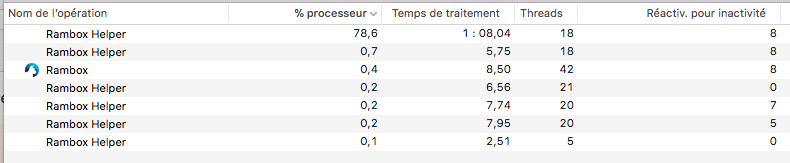
Version: 0.5.13
Platform: darwin (x64)
Electron: 1.7.8
Chromium: 58.0.3029.110
Node: 7.9.0
 bhanquier
on 19 Oct 2017
bhanquier
on 19 Oct 2017
same issue here on 0.5.13, linux mint 18.1. its use of both RAM and CPU resources is about 3 times as high as ~15 firefox tabs combined. tabs used are whatsapp, telegram, and fb messenger.
 highintothesky
on 19 Oct 2017
highintothesky
on 19 Oct 2017
In my opinion, this bug is not caused by the Rambox code itself, the same thing happens in the Franz app: https://github.com/meetfranz/franz/issues/24
Running messenger.com in the browser does not cause Chrome Helper to use so much CPU.
This issue might be related to ELectron or one of the libraries used by Rambox and Franz.
 rafenden
on 19 Oct 2017
rafenden
on 19 Oct 2017
If this is only happening to you with Facebook Messenger active, there is a new open issue specifically on this problem: #1248
 daimpi
on 19 Oct 2017
daimpi
on 19 Oct 2017
As @daimpi reported in #1248, the CPU usage seems normal now. I confirm it too.
SaswatPadhi
on 19 Oct 2017
I confirm @rafenden 's opinion. when I close Message Service in Rambox, it responds normally, no more lags.
 iamcxa
on 14 Jul 2018
iamcxa
on 14 Jul 2018
I'm gonna close this ticket due to inactivity, feel free to open another ticket if the problem persists.
 fvulich
on 9 Mar 2020
fvulich
on 9 Mar 2020
This thread has been automatically locked since there has not been any recent activity after it was closed. Please open a new issue for related bugs.
![lock[bot] picture](https://avatars1.githubusercontent.com/in/6672?v=4&s=40) lock[bot]
on 15 Apr 2020
lock[bot]
on 15 Apr 2020
Related issues
 mforcer
·
3Comments
mforcer
·
3Comments
 jamy015
·
4Comments
jamy015
·
4Comments
 arnauldb
·
4Comments
soulchainer
·
3Comments
arnauldb
·
4Comments
soulchainer
·
3Comments
 leif
·
4Comments
leif
·
4Comments
Most helpful comment
I temporally fixed the issue by setting my hosts file to: