Community-edition: No icon in Linux
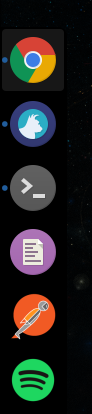
On Ubuntu 16.04 with Budgie desktop installed and Plank as a dock, Rambox shows up with a generic icon in the dock:

also, the installation tarball does not come with a stand-alone png logo file, so it's harder to create a desktop launcher.
 michel-slm
All 20 comments
I have more or less the same problem on Ubuntu 15.10. The only differences being that I use the default Unity dock and the icon I get instead is the default grey question mark one.
 jrhenderson1988
on 13 Jul 2016
jrhenderson1988
on 13 Jul 2016
Just to confirm, this is only on certain distros. It works fine on Arch Linux 64 bit together with cinnamon.

 janpansa
on 13 Jul 2016
janpansa
on 13 Jul 2016
I'm using Unity, and it doesn't seem to create a cached icon. I'm not sure if this is because Rambox doesn't have the icon in an unpacked location, or if it isn't built with the icon packed in a way that Unity can see it. Downloading https://github.com/saenzramiro/rambox/blob/master/resources/Icon.png and editing ~/.local/share/applications/rambox.desktop fixes it. Rambox may need to have a .desktop file included with it to resolve this in Ubuntu
 rummik
on 15 Jul 2016
rummik
on 15 Jul 2016
Ok, guys. I will take a look on this for the next release. Is a priority right now. :wink:
 saenzramiro
on 16 Jul 2016
saenzramiro
on 16 Jul 2016
Hi,
debian 9 and xfce here. Icon is on status bar but no in window selector and window frame:

 Pablohn26
on 21 Jul 2016
Pablohn26
on 21 Jul 2016
Spotting this in KDE now. Currently trying to figure out why. I'm using the .deb for Rambox 0.4.2 on Kubuntu 16.04 / KDE 5.6
rummik
on 19 Sep 2016
I have a this bug on LinuxMint 18 (based on Ubuntu 16.04 LTS) I use Rambox 0.4.5 .
Shouldm't this bug be fixed ?
 abumalick
on 8 Dec 2016
abumalick
on 8 Dec 2016
@janpansa are you using the rambox-bin AUR package? This does add an .desktop-file for rambox together with an icon.
This might confirm that having a .desktop file does fix the problem (Or does provide a workaround).
I can confirm that I don't have any issues with the Rambox icons in Arch Linux using i3 WM and Rambox 0.4.5
EDIT: Okay I now see that this issue is quite old, sorry for mentioning then. I had this issue subscribed as I had this issue too in the past.
Still hope you find a fix @abumalick - How have you installed Rambox? .deb/AppImage/tar.gz?
The .deb does contain a .desktop file and an icon in multiple sizes.
 jbbr
on 8 Dec 2016
jbbr
on 8 Dec 2016
yep, deb file.
I am under XFCE desktop
I dont have a rambox.desktop file
abumalick
on 8 Dec 2016
In the latest 64bit deb this is still an issue. The Icon.png is not included in the tarball.
 tivervac
on 9 Aug 2017
tivervac
on 9 Aug 2017
Same problem on Fedora 26 when using the AppImage version.
 kiview
on 8 Sep 2017
kiview
on 8 Sep 2017
No icon in Xubuntu 16.04, with version 0.5.12
 Israphel
on 11 Sep 2017
Israphel
on 11 Sep 2017
Same here, Debian x64 and XFCE
 diegombeltran
on 25 Sep 2017
diegombeltran
on 25 Sep 2017
Same problem here, Arch Linux with XFCE, installed rambox-bin from AUR.
 alp82
on 18 Oct 2017
alp82
on 18 Oct 2017
I originally installed by downloading from github and manually extracting to a folder, so maybe that's why I didn't have an icon. My ~/.local/share/applications/rambox.desktop file specified Icon=application-default-icon and it needs to point to the rambox executable.
Since installing the .deb package, which rambox now returns /usr/local/bin/rambox and changing my .desktop file to below has fixed the problem. That file path symlinks to /opt/Rambox/rambox so anyone should be able to use the below .desktop file if they're able to run rambox from the terminal simply by typing rambox.
[Desktop Entry]
Encoding=UTF-8
Version=1.0
Type=Application
Name=Rambox
Icon=rambox
Exec=rambox
StartupNotify=false
StartupWMClass=Rambox
OnlyShowIn=Unity;
X-UnityGenerated=true
 zyphlar
on 22 Oct 2017
zyphlar
on 22 Oct 2017
no icon also in ubuntu 17.10 x64 deb file (gnome 3.26)
 francesco-cadei
on 25 Jan 2018
francesco-cadei
on 25 Jan 2018
the same as in @francescocadei
17.10 x64
 gospel91
on 2 Mar 2018
gospel91
on 2 Mar 2018
Installing Rambox using the .deb from Releases on GitHub instead of .tar.gz that is downloaded on the website when you click on .deb option solved for me:
Link: https://github.com/saenzramiro/rambox/releases/download/0.5.16/Rambox_0.5.16-x64.deb
 verzola
on 9 Mar 2018
verzola
on 9 Mar 2018
I had the same issue with 0.5.16 AppImage on Ubuntu Artful/Bionic, and Solus Budgie 3 as well; only a generic icon was shown in panels.
As a remedy, add the following line to ~/.local/share/applications/appimagekit-rambox.desktop:
StartupWMClass=Rambox
The file might be named differently for the .deb package.
 willydee
on 21 Mar 2018
willydee
on 21 Mar 2018
This thread has been automatically locked since there has not been any recent activity after it was closed. Please open a new issue for related bugs.
![lock[bot] picture](https://avatars1.githubusercontent.com/in/6672?v=4&s=40) lock[bot]
on 26 Oct 2018
lock[bot]
on 26 Oct 2018
Related issues
 mforcer
·
3Comments
mforcer
·
3Comments
 LiBOSS-CZ
·
4Comments
LiBOSS-CZ
·
4Comments
 juanmlambre
·
3Comments
juanmlambre
·
3Comments
 jamy015
·
4Comments
jamy015
·
4Comments
 SimJoSt
·
4Comments
SimJoSt
·
4Comments
Most helpful comment
I had the same issue with 0.5.16 AppImage on Ubuntu Artful/Bionic, and Solus Budgie 3 as well; only a generic icon was shown in panels.
As a remedy, add the following line to
~/.local/share/applications/appimagekit-rambox.desktop:The file might be named differently for the .deb package.