Commerce: null commerce_customer records being created
Description
A lot of null records are being added to the commerce_customer table, and they appear to be added every minute.
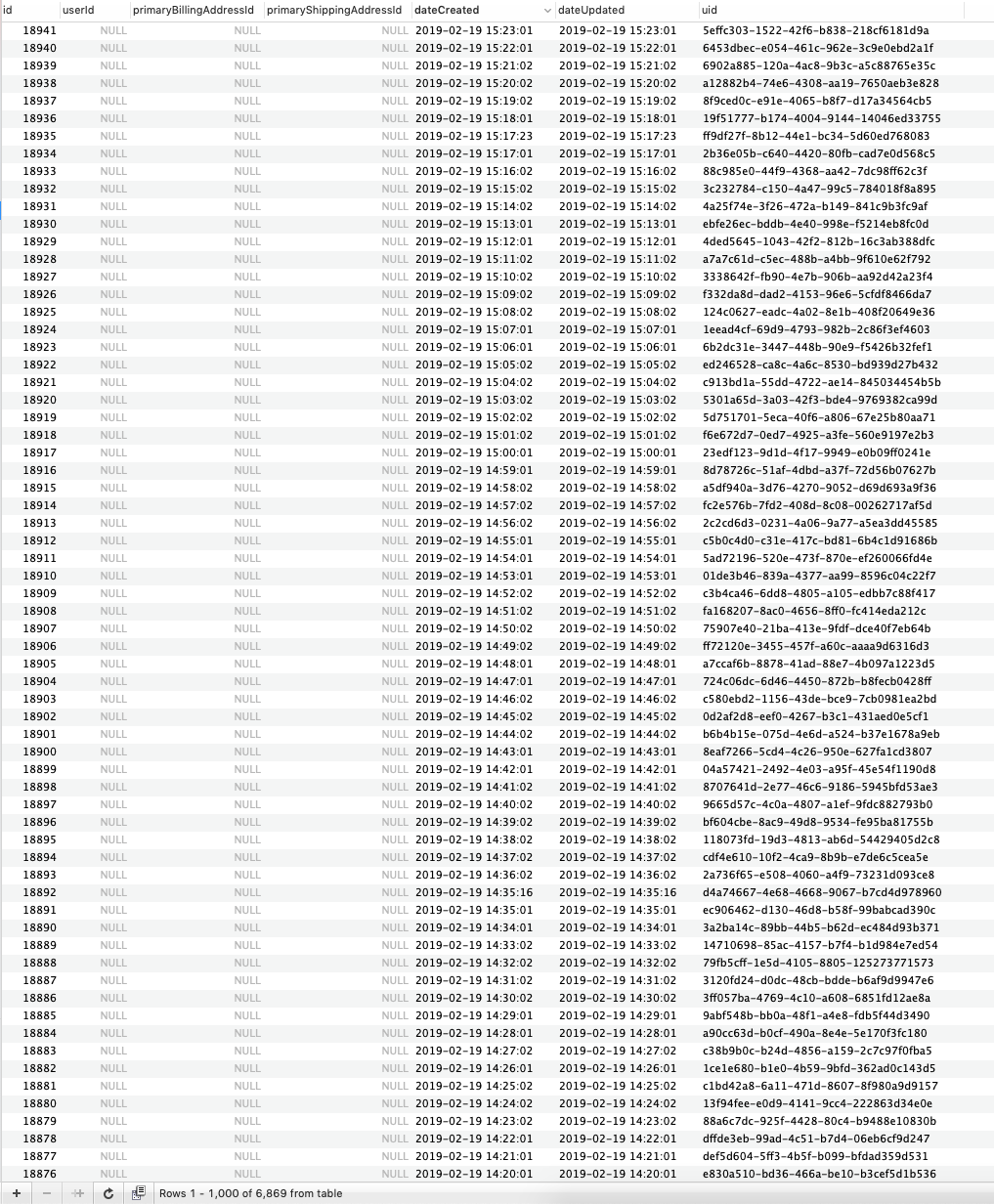
This is a staging site, so there isn't really any traffic on it, but I've noticed it on another production site as well that has ~9,000,000 records in the table.
Let me know if there is any other info I can provide to help diagnose this.
Additional info
- Craft version: Craft Pro 3.1.7
- PHP version: 7.0.33
- Database driver & version: MySQL 5.7.25
- Commerce version: 2.0.4
 davist11
All 10 comments
Looks like we should add a purge of guest customers who never completed an order, just like we do for purging carts. Adding it to the list.
 lukeholder
on 5 Mar 2019
lukeholder
on 5 Mar 2019
Purging is occurring in Commerce 3 alpha.
Will also be in Commerce 2.2 when it comes out.
lukeholder
on 11 Oct 2019
See #1045
lukeholder
on 11 Oct 2019
Hate to resuscitate this, but we just experienced this for the first time on an old client's site that hasn't been moved to 2.2 yet.
Unfortunately, the built-in garbage collection was failing, due to there being so many customer rows that we were exceeding the number of supported arguments for the IN query (something like 65,536)—the first part of the query resulted in an array of 2.5M IDs, which were then pumped into the DELETE operation.
For what it's worth, we had to re-implement in a new method that batched the purge—this isn't likely necessary for maintenance, but for remediation, the normal method won't work if there are more than ~65K customers that will be purged.
<?php namespace modules\utils\console\controllers;
use Craft;
use craft\db\Query;
use yii\console\Controller;
use yii\console\ExitCode;
/**
* Temporary controller that patches Commerce 2.2's customer culling feature.
*/
class MaintenanceController extends Controller
{
/**
* Culls customers in a friendlier way than Commerce does, by default.
*
* Unfortunately (for huge tables) we start hitting the 65K “token” limit for `IN` queries—this implementation batches the delete statements by 10K records at a time to stay within that limit.
*
* @return int
*/
public function actionCullCustomers(): int
{
$customerBatches = (new Query())
->select(['[[customers.id]] id'])
->from('{{%commerce_customers}} customers')
->leftJoin('{{%commerce_orders}} orders', '[[customers.id]] = [[orders.customerId]]')
->where(['[[orders.customerId]]' => null, '[[customers.userId]]' => null])
->batch(10000);
foreach ($customerBatches as $customerBatch) {
Craft::$app->getDb()->createCommand()
->delete('{{%commerce_customers}}', ['id' => $customerBatch])
->execute();
echo "Batch culled...\n";
}
return ExitCode::OK;
}
}
…of course, the 10K limit here is pretty arbitrary, and would probably never make a difference for the typical installation, but I chose it as a sort of overly-cautious way of staying within the 65K limit we'd observed.
FYI!
Edit: There's also a way in the Query builder to make the initial SELECT a sub-query, so that you can let the database construct the list of IDs to delete, on its own, i.e. by not calling an execution method on the first query, and just passing it to the id param of the second:
$customers = (new Query())
->select(['[[customers.id]] id'])
->from('{{%commerce_customers}} customers')
->leftJoin('{{%commerce_orders}} orders', '[[customers.id]] = [[orders.customerId]]')
->where(['[[orders.customerId]]' => null])
->andWhere(['[[customers.userId]]' => null]);
// This will also remove all addresses related to the customer.
Craft::$app->getDb()->createCommand()
->delete('{{%commerce_customers}}', ['id' => $customers])
->execute();
This results in the following SQL:
DELETE FROM "commerce_customers"
WHERE "id" IN (
SELECT "customers"."id" AS "id"
FROM "commerce_customers" "customers"
LEFT JOIN "commerce_orders" "orders" ON "customers"."id" = "orders"."customerId"
WHERE ("orders"."customerId" IS NULL) AND ("customers"."userId" IS NULL)
)
The above query took about 10s to execute (purging 227K rows on another project), on a local Postgres DB—my machine is pretty quick, so this may start to get dangerous on a VPS or shared database instance.
 AugustMiller
on 16 Feb 2020
AugustMiller
on 16 Feb 2020
This results in the following SQL
If it helps anyone, this is what ran nicely locally in Sequel Pro for me (just update your table prefix from craft_ if you don't use that):
DELETE craft_commerce_customers
    FROM craft_commerce_customers
    LEFT JOIN craft_commerce_orders ON craft_commerce_customers.id = craft_commerce_orders.customerId
    WHERE (craft_commerce_orders.customerId IS NULL) AND (craft_commerce_customers.userId IS NULL)
The above query took about 10s to execute (purging 227K rows on another project)
Mine took 42 seconds to purge 423,000 rows!
 zuccs
on 20 Feb 2020
zuccs
on 20 Feb 2020
@zuccs Nice simplification! Didn't realize the JOIN could be part of a DELETE statement. 👍
The same query took almost a full minute on our production Heroku Postgres database—I'm really starting to appreciate the speed of NVMe SSDs! 😅
AugustMiller
on 20 Feb 2020
I've run the query at https://github.com/craftcms/commerce/issues/731#issuecomment-588631879 on a local db with 3 million (f*ck) craft_commerce_customers rows — it took 6 minutes to complete and there are still 85,000 rows left, only 20 of which have a userId. Is it safe to delete these or not?
PS. There are also 48,000 empty craft_commerce_orders rows, can these be deleted too?
 j-greig
on 10 Mar 2020
j-greig
on 10 Mar 2020
@j-greig I would be weary about deleting anything more than these commands purge.
- Customers are still created for "guest" Orders + Carts;
- 48K Orders / Carts may well be legitimate Customers (but, not sure what "empty" means, exactly);
I suspect that this is going to start occurring more and more frequently as folx with older Commerce 2 installs begin to naturally accumulate a dangerous number of records… I'll consider issuing a PR with the second snippet here, so that garbage collection can take care of more significantly impacted customer tables.
AugustMiller
on 11 Mar 2020
@zuccs @AugustMiller
Thanks for the SQL solution to solve the issue!
Running the SQL went fine, took around 20 seconds, but after deleting +/- 1.000.000 rows we are facing against this DB exception error:
SQLSTATE[HY000]: General error: 1205 Lock wait timeout exceeded; try restarting transaction
The error only shows where commerce data is being requested.
Looks like something needs to be synced. Is there something afterwords that needs to be purged to solve this issue? Or just keep refreshing?
 boldenamsterdam
on 18 Jun 2020
boldenamsterdam
on 18 Jun 2020
@zuccs @AugustMiller
Never mind, got it fixed!
After killing the DB processes and triggering a OPTIMIZE TABLE on the commerce_customers table everything seems to be good.
Cheers!
boldenamsterdam
on 18 Jun 2020
Related issues
 jmauzyk
·
5Comments
jmauzyk
·
5Comments
 stenvdb
·
4Comments
stenvdb
·
4Comments
 Tam
·
4Comments
Tam
·
4Comments
 JayBox325
·
7Comments
JayBox325
·
7Comments
 Anubarak
·
3Comments
Anubarak
·
3Comments
Most helpful comment
If it helps anyone, this is what ran nicely locally in Sequel Pro for me (just update your table prefix from
craft_if you don't use that):Mine took 42 seconds to purge 423,000 rows!