Command-line-api: What happens on a blank input?
Can we add an option to display the help text if NOTHING is filled out?
 pduer
pduer
All 13 comments
Can you give an example?
Currently, we show help when there's a parse error, so if your parser is configured such that some arguments or subcommands are required, you should see help displayed on a bare invocation.
 jonsequitur
on 9 Jan 2020
jonsequitur
on 9 Jan 2020
Hey Jon, yeah I think it might be more I just haven't been able to get an example setup correctly.
I write lots of small console apps where I usually just want a set of VERBs. Basically, do this or do that then run till done. Right now I have to write one that has one of either 2 verbs then a filepath behind it.
What I want to have happen is that if one of our "Admins" types in JUST the .EXE for the console app, they'll get the full help screen. In all the examples that I tired, I couldn't get that behavoir.
That said, I am probably just "doing it wrong! :)"
pduer
on 9 Jan 2020
Got it. Here's an example:
using System.CommandLine;
using System.CommandLine.Invocation;
namespace ConsoleApp3
{
class Program
{
static void Main(string[] args)
{
var rootCommand = new RootCommand
{
new Command("one", "This is the description for command one"),
new Command("two", "This is the description for command two")
};
rootCommand.Invoke(args);
}
}
}
When run with no arguments, it produces this output:
Required command was not provided.
Usage:
ConsoleApp3 [options] [command]
Options:
--version Display version information
Commands:
one This is the description for command one
two This is the description for command two
Any time there's a parse error, help is shown. The reason there's a parse error in this case is because there are subcommands (one and two) but none was provided.
Hope this helps.
jonsequitur
on 9 Jan 2020
@jonsequitur I've copied your exact example and oddly it doesn't work for me, it just gives a blank output when I call it with no parameters.
My references are:
<PackageReference Include="System.CommandLine" Version="2.0.0-beta1.20158.1" />
<PackageReference Include="System.CommandLine.DragonFruit" Version="0.3.0-alpha.20158.1">
<!--A workaround to remove a multiple entry points warning in Rider-->
<ExcludeAssets>build</ExcludeAssets>
</PackageReference>
 mungojam
on 10 Mar 2020
mungojam
on 10 Mar 2020
I've now done a workaround which works:
```c#
static Task
{
var command = BuildCommandLineOptions();
if (args == null || !args.Any())
{
var help = new HelpBuilder(new SystemConsole());
help.Write(command);
return Task.FromResult(1);
}
// Parse the incoming args and invoke the handler
return command.InvokeAsync(args);
}
```
mungojam
on 10 Mar 2020
I just verified that this works in System.CommandLine 2.0.0-beta1.20104.2 and is broken in 2.0.0-beta1.20158.1.
jonsequitur
on 10 Mar 2020
This was fixed by #820.
jonsequitur
on 23 Mar 2020
This appears to have regressed in 2.0.0-beta1.20214.1. Can anyone else confirm?
 moswald
on 22 Apr 2020
moswald
on 22 Apr 2020
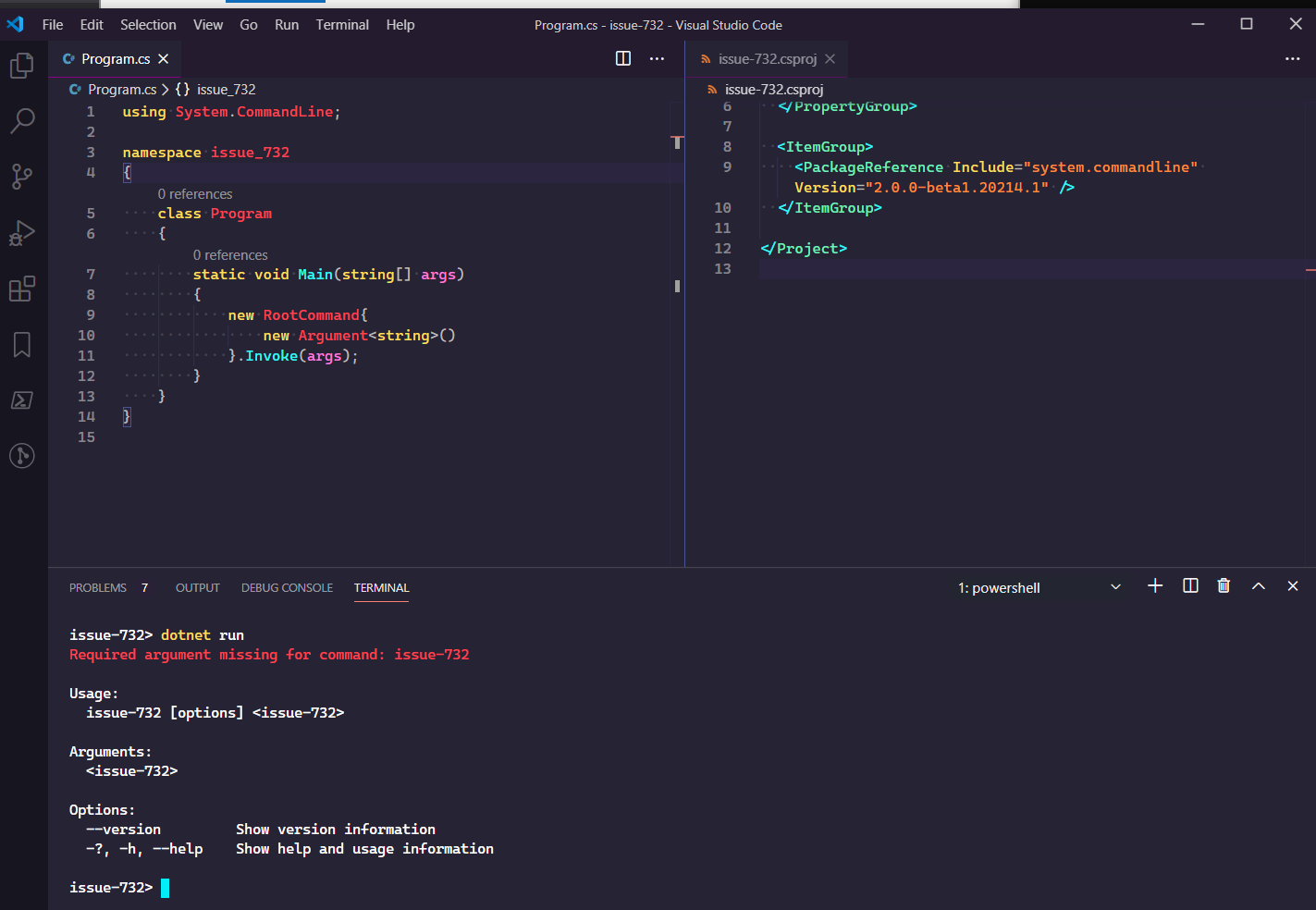
Here's what I tried, which doesn't repro the bug. Can you provide your repro @moswald?
jonsequitur
on 25 Apr 2020
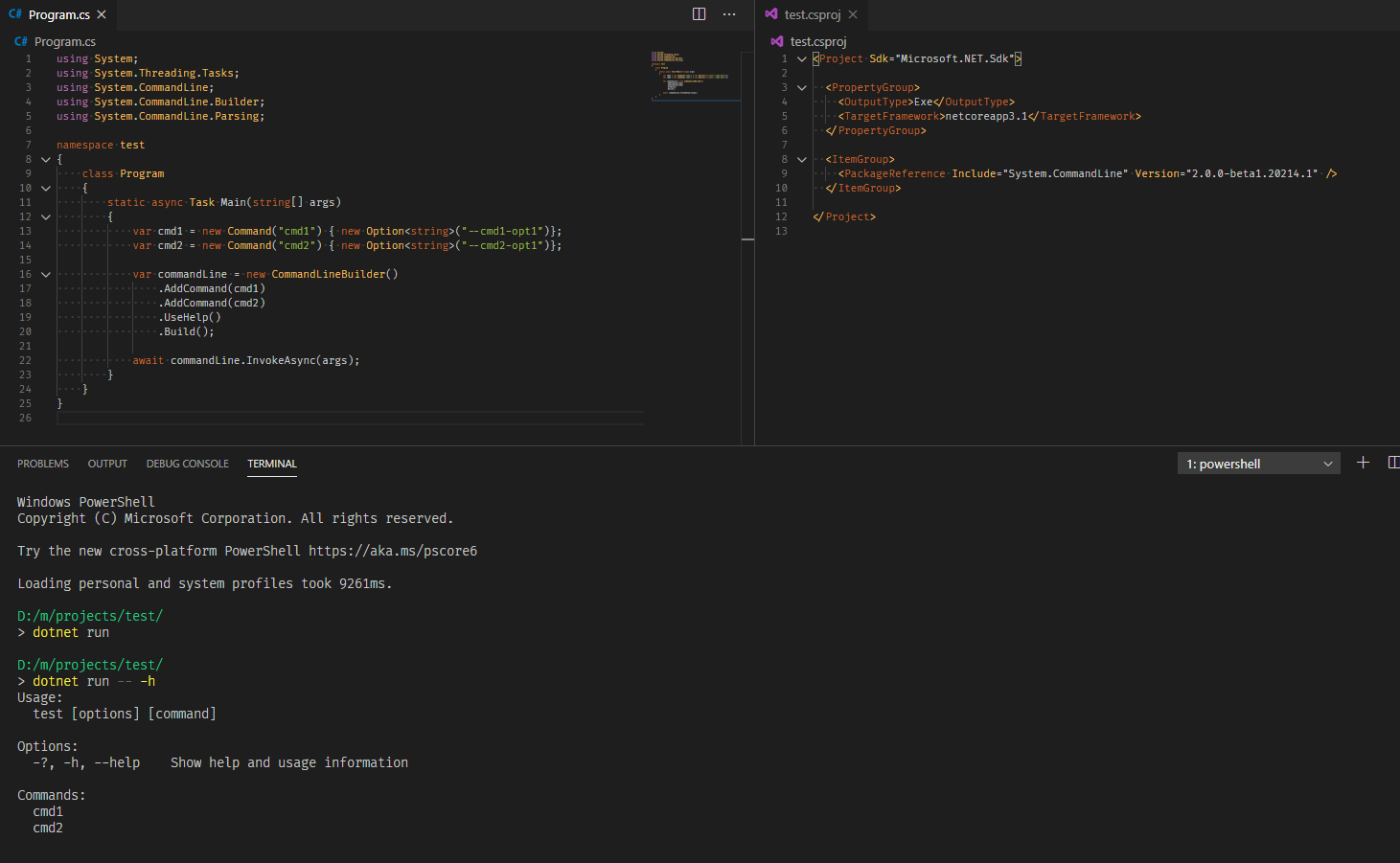
I was using the CommandLineBuilder class. Maybe I'm just using it incorrectly? I can probably rework it to use RootCommand directly, but it looks nicer with the builder pattern.
moswald
on 27 Apr 2020
I'm experiencing the same issue using CommandLineBuilder. Can this issue be re-openend, or should we create a new one?
 thoemmi
on 7 May 2020
thoemmi
on 7 May 2020
Pinging @jonsequitur just in case he missed my (now our) response.
moswald
on 7 May 2020
Ah, I see the problem. Thanks for the code sample, @moswald.
There are two different approaches here. On the one hand, there's what @mungojam's workaround and my attempt to repro did, something like:
var command = new Command(/*...*/);
command.Invoke(args);
On the other hand, the code that you provided did something like:
Parser parser = new CommandLineBuilder()
    .AddCommand(cmd1)
    .UseHelp()
    .Build();

await parser.InvokeAsync(args);
The CommandLineBuilder gives you fine control over individual behaviors whereas Command.Invoke creates a Parser internally with many behaviors applied by default. Those defaults are defined here:
So if want help shown on blank input and you're using CommandLineBuilder directly, both UseHelp and UseParseErrorReporting have to be applied. Or you can call UseDefaults (which is a little simpler) or you can use the Command.Invoke/Command.InvokeAsync extension methods, which are the simplest of all.
Hope that helps.
jonsequitur
on 7 May 2020
Related issues
 gitfool
·
3Comments
gitfool
·
3Comments
 jnm2
·
6Comments
jnm2
·
6Comments
 shaggygi
·
5Comments
shaggygi
·
5Comments
 clmcgrath
·
3Comments
clmcgrath
·
3Comments
 SirJosh3917
·
3Comments
SirJosh3917
·
3Comments
Most helpful comment
Ah, I see the problem. Thanks for the code sample, @moswald.
There are two different approaches here. On the one hand, there's what @mungojam's workaround and my attempt to repro did, something like:
On the other hand, the code that you provided did something like:
The
CommandLineBuildergives you fine control over individual behaviors whereasCommand.Invokecreates aParserinternally with many behaviors applied by default. Those defaults are defined here:https://github.com/dotnet/command-line-api/blob/7146ca4b45df26bbf85ebb38dc1e44a3c40ca7d0/src/System.CommandLine/Builder/CommandLineBuilderExtensions.cs#L231-L244
So if want help shown on blank input and you're using
CommandLineBuilderdirectly, bothUseHelpandUseParseErrorReportinghave to be applied. Or you can callUseDefaults(which is a little simpler) or you can use theCommand.Invoke/Command.InvokeAsyncextension methods, which are the simplest of all.Hope that helps.