Collect: Add "Select on send" option for "Send submissions via"
As discussed at https://forum.opendatakit.org/t/send-submissions-via-sms/12166/19
"If Both is set, then when you hit Send Selected in Send Finalized Forms it pops up a dialog that lets you choose the transport mechanism."
CC @yanokwa @jd-alexander
 lognaturel
All 14 comments
Didn't this also mean that all submission protocols/type would need to implement background mode so that the UI/UX is fluid? Since this selection would be done via a multi-select control.
 jd-alexander
on 14 Jul 2018
jd-alexander
on 14 Jul 2018
What I understood as the suggestion would be buttons for one or the other. I expect that SMS will generally be considered a backup option. What's the use case for sending both at the same time?
Another alternative would be to attempt to send over HTTP and if that failed ask the user if they want to send via SMS. A user suggested that on the forum thread.
I do think there is a case where enumerators end up sending on both transports and that would be if they're gathering a mix of time-sensitive data and less time-sensitive data. For example, for polio monitoring, it's generally important that the relevant parties (ministry of health, WHO, etc) be alerted of possible paralysis cases immediately so they can start following up. The enumerator may also be collecting additional data about the household, last times vaccinated, etc and that can be sent later. In that case a field director might want to set it up so that SMSs are sent immediately and then the full forms are sent whenever data is next available.
I'm starting to think it would be helpful to introduce a new status for instances -- submitted_sms. That way we could easily show instances that were only sent over SMS and let enumerators send those when they can. The status would then become submitted.
lognaturel
on 17 Jul 2018
I'm starting to think it would be helpful to introduce a new status for instances -- submitted_sms. That way we could easily show instances that were only sent over SMS and let enumerators send those when they can. The status would then become submitted.
Yes, this is a really good idea. So a new option would be added to the Change View menu to support this?
jd-alexander
on 18 Jul 2018
a new option would be added to the Change View menu to support this?
I think so. And/or we could come up with a way to make that functionality more visible since it's not very discoverable at the moment.
lognaturel
on 18 Jul 2018
So today we had a good discussion about how we should go about building this feature and these were the main points that were summarized
One of the primary use cases we are targeting is that of enumerators who want to send time sensitive data back to an administrator in environments where they might not have easy access to Wifi/Cellular connectivity so sending that data via SMS would be a great option. The enumerator can then resend the submission over HTTP at a later point.
Adding a
sms_submittedstate in the instances database would help to facilitate the ease of use of the feature since users would be able to toggle the transport that's being shown in the upload list. For eg. When submissions are made via SMS the user can then press a n option that will show all SMS submissions that need to resent over data.We are still looking at which UI/UX approach to take when displaying the prompt. Current options available are : dialogs, bottom sheets and the use of buttons within the existing UI. We will be taking a look at how Medic Collect did this implementation to get an understanding of an approach that has been tested and used by other users.
The next step in this process is to create user stories that will describe the type of users that will be using the both transports functionality, what they would require it to do and why.
jd-alexander
on 19 Jul 2018
Here's a user story that talks about the feature!
Title
An enumerator should be able to select the submission transport type when they are ready to make a submission.
Business/User Value
As an enumerator, I want to send a submission via SMS so that time-sensitive data can always be delivered when operating in challenging environments. I also want to send via data when I am in an environment that facilitates that.
Acceptance Criteria
GIVEN I want to send submissions via both types of transport
WHEN I choose Select on send under the Send via settings in the Server Settings menu
THEN I should see an additional Send (SMS) button and the Send button should be changed to Send (Internet) so I can select which transport method I want to use to make a submission.
Dev Notes
The uploadSelectedFiles function within the InstanceUploaderList could be refactored to accept a boolean param called sendAsSms so that sending via SMS could be evaluated by the condition that's checking to see if the SMS transport is enabled or it could check to see if the sendAsSms value is true. That value would be sent from the onClickListenerof each button.
Design Notes
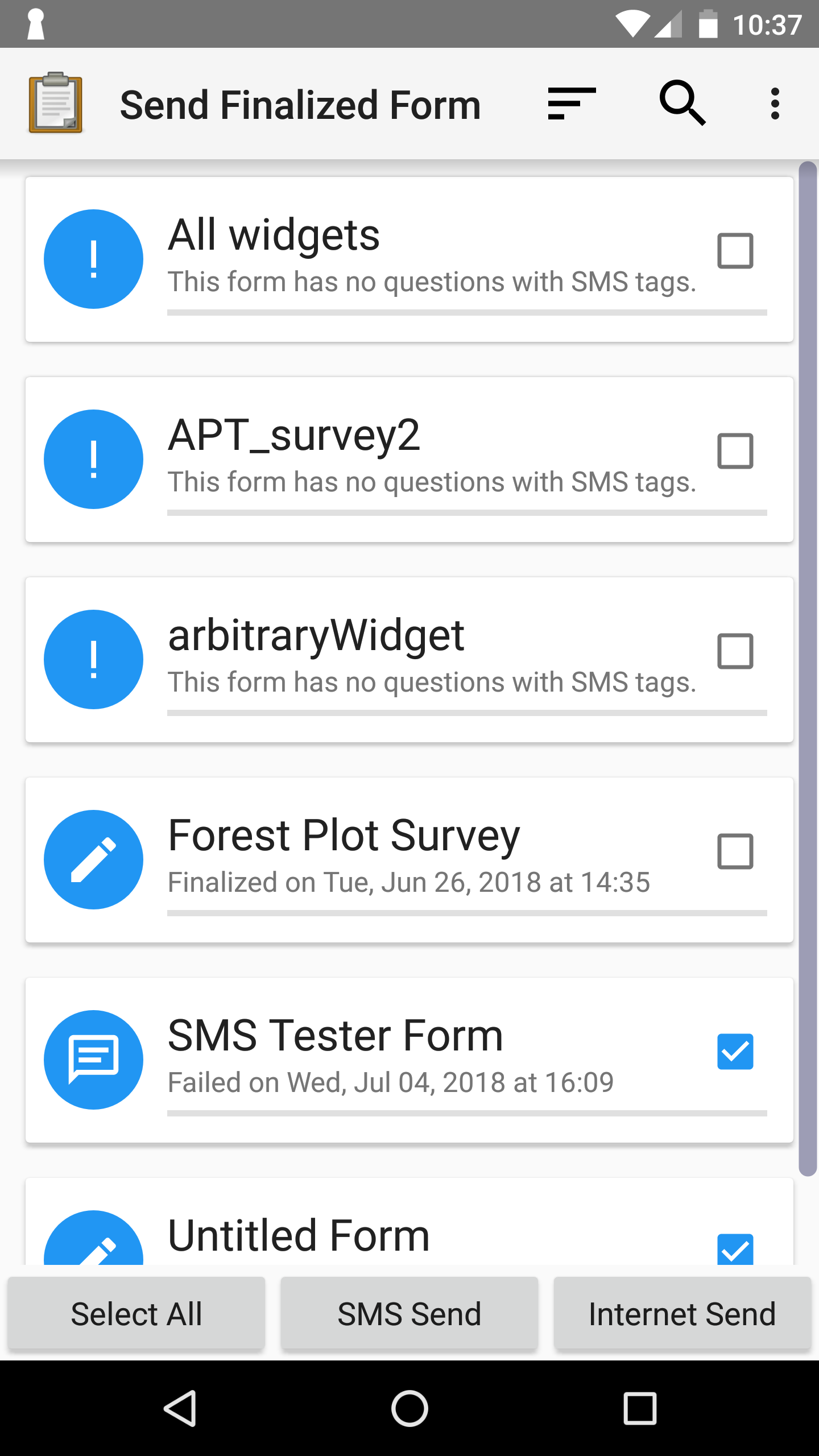
Here is a screenshot of three buttons on the InstanceUploaderList screen on a Nexus 6 and a Motorola Razr.
Nexus
Razr
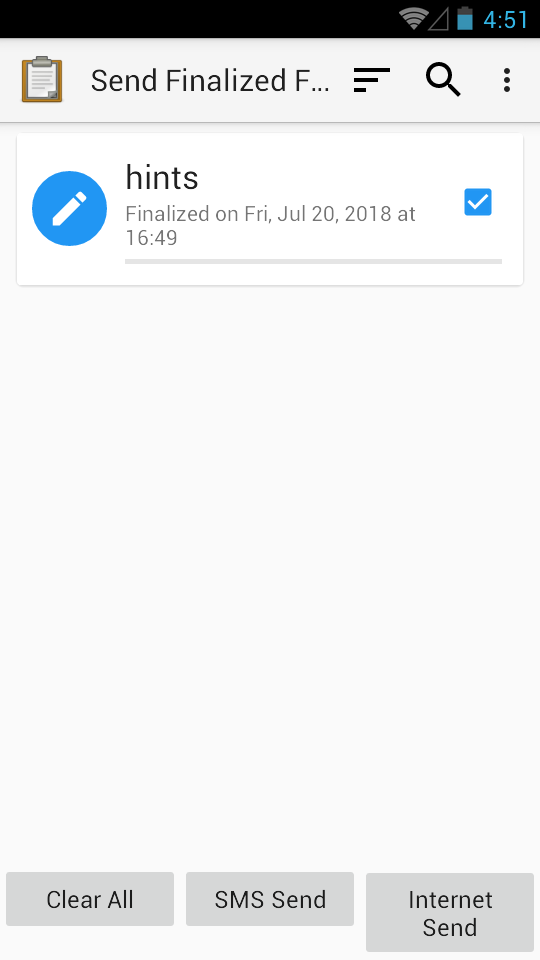
This layout would be used for the three buttons and it would be updated to auto resize vertically based on the largest button.
jd-alexander
on 20 Jul 2018
In regards to the Server Settings, I am thinking that we should find a way to make the meaning of the Both option clearer since a user selecting it might not get what it implies. I think saying Both makes it seem like when you click send it would send to both of them. Of course, when then they navigate to the screen they would realize they have to choose either of the two options so we wouldn't want the language impeding the usage or understanding of the feature.
I am going to see if I can think of an approach that would be more suitable! Ideas and thoughts welcome :smile:
Also I haven't had a chance to look at Medic Collect's language so I am going to download it and see if I have access to the Settings menu to see how they did.
jd-alexander
on 20 Jul 2018
Medic show two buttons if an SMS number is defined -- "Send (SMS)" and "Send (Internet)". Otherwise it just shows one.
Did we consider something similar? That is, not having a "send via" setting but instead, if only one transport is configured, just show a "Send" button and if both are configured show two buttons? Making this change would require holding the current release but if we don't see a downside to it we should consider it. One possible scenario it doesn't cover is if an organization wants to configure a server just to pull forms but always wants enumerators to send via SMS. In that case the users would see two buttons and that might be confusing.
If we do keep the "send via" setting, perhaps "User selected" or "Select on send" or "Choose on send" could be a name for the option we're outlining here.
lognaturel
on 20 Jul 2018
We could probably loop in @yanokwa on this decision! He has an eye for things like these! Personally, I think once we use "Choose on send" in the setting then it all becomes clear. I opt to keep this setting because as you said it will allow organizations to make these configurations and restrict usage and I think there will be users who just won't ever use SMS so having that button their might be a nuisance to them.
jd-alexander
on 20 Jul 2018
I do think adding a third button is somewhat better than using a dialog or bottom sheet because it's immediately visible to the user that they have a decision to make and requires fewer interactions.
lognaturel
on 20 Jul 2018
I think it'll be common for users to want to download forms via Internet and send submissions via SMS and we don't want to lose that functionality. So to summarize...
- Instead of Both, we should say
Select on send - Keep the Send via menu and only show the two buttons if
Select on sendis chosen - Instead of SMS/Internet Send, we should do
Send ($protocol) - Double the vertical size of the buttons so the text fits on smaller devices
 yanokwa
on 20 Jul 2018
yanokwa
on 20 Jul 2018
haha we all commented at the same time :smile:
jd-alexander
on 20 Jul 2018
Double the vertical size of the buttons so the text fits on smaller devices
Do you mean they should always be twice as tall? I think it would be ideal if they could grow to fit the available vertical space and the text could be centered vertically. I believe some of the other views do this now. Maybe Get Blank Form?
lognaturel
on 20 Jul 2018
Yes, @lognaturel, they should be the same behavior as Get Blank Form screen.
yanokwa
on 20 Jul 2018
Related issues
 grzesiek2010
·
5Comments
lognaturel
·
3Comments
yanokwa
·
3Comments
grzesiek2010
·
5Comments
lognaturel
·
3Comments
yanokwa
·
3Comments
 pranavgupta1234
·
4Comments
grzesiek2010
·
5Comments
pranavgupta1234
·
4Comments
grzesiek2010
·
5Comments