Collect: Import/Export settings can crash app with certain invalid QR codes
Software and hardware versions
Collect v1.14.0-beta.1, Android v6.0.1, Samsung A5
Import/Export settings is broken
First thing I noticed is that the QR code wasn't previewed.

Then for few minutes it then shows a popup message saying "ODK Collect has stopped."
Steps to reproduce the problem
- Fresh install Collect v1.14.0-beta.1
- Go to Admin settings › Import/Export settings
- Wait for it... (later, ODK Collect will break itself)
 abelcallejo
All 24 comments
I'm pretty sure it's the same issue https://github.com/opendatakit/collect/pull/2071
so it has been fixed.
 grzesiek2010
on 30 Mar 2018
grzesiek2010
on 30 Mar 2018
@grzesiek2010 thank you for that valuable information. I'll try to install to check the version with the commit #6f94565 included in the code base.
I'll verify later if it really fixed the issue. Thanks again
abelcallejo
on 30 Mar 2018
Status update
QR code is now showing, but SCAN CODE FROM OTHER DEVICE module have issues.
Description
Commit #6f94565 did fix the issue and now shows the QR code. However, importing of settings from a QR code have issues. When I tried to SCAN CODE FROM OTHER DEVICE, the QR scanner fires up and able to scan a QR code. But then... it seems it can not successfully replicate the settings from the QR code and says "ODK Collect has stopped." immediately after scanning.
Steps to reproduce the new problem
- Download a copy of the master branch ~ where commit #6f94565 is part of the code base
- Open the source-code using Android Studio
- Select
releasefor the Build Variant - Rebuild Project
- Build APK(s)
- Install the APK to the device
- Open ODK Collect
- Go to Admin settings › Import/Export settings
- Click SCAN CODE FROM OTHER DEVICE button
- Scan the QR code
- Wait for it... (ODK Collect breaks itself after trying to replicate the contents of the QR code)
abelcallejo
on 30 Mar 2018
@abelcallejo Thanks so much for trying out the beta and reporting that first issue! I'm glad the fix has worked for you. 😊
I'm not currently able to reproduce the issue you're seeing with the two devices I've tried. Do you have ADB installed by any chance? Could you run adb logcat from your command line and provide any crash logs you see there? Any other info you can provide about the devices you're using, Android version, etc would be very helpful.
 lognaturel
on 2 Apr 2018
lognaturel
on 2 Apr 2018
Hi @lognaturel _\ LN \_ , thank you for taking the time to respond on this.
Yesterday, I figured out that the bug turned out to be a fault on my end and not directly about ODK Collect. I'm really sorry about that.
I was trying to generate custom QR code for the ODK Collect settings by using PHP and some PHP-QR-code libraries. As it turns out, there was a slight malformation in the context of my settings which then turned out to have a malformed QR code.
The malformed QR code then creates a bug where it will show "ODK Collect has stopped." all the time. Leaving the ODK Collect unusable starting from when the bug got triggered.
Summary
- SCAN CODE FROM OTHER DEVICE is working fine as long as the contents of the scanned QR code is well-formed.
- SCAN CODE FROM OTHER DEVICE compromises (and even disables) ODK Collect when a user tries to scan a non-odk-collect settings QR code.
abelcallejo
on 3 Apr 2018
Thanks for that clarification, @abelcallejo, and very cool to hear you're using the QR code feature in this way!
I've modified the issue title to better reflect what's going wrong. Could you please attach an example QR code that causes this crash?
lognaturel
on 3 Apr 2018
@lognaturel yeap, we are registering users to ODK Aggregate programmatically then generate them these QR codes for their respective settings.
Anyways, attached is a malformed QR code.
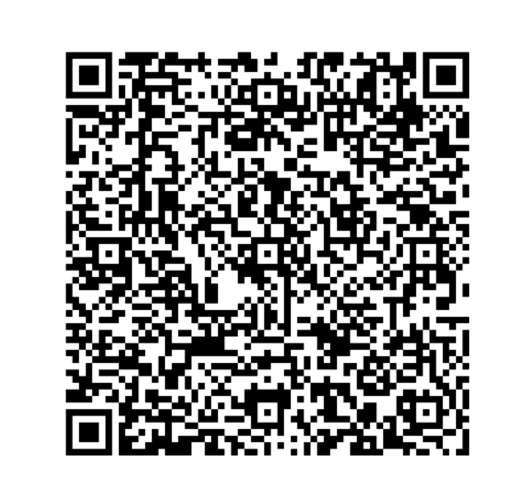
Cheers
abelcallejo
on 3 Apr 2018
Thank you! The settings are loaded fine but then there's a crash when they're actually used which means Collect can then never be launched! Looks like the type of the password ends up wrong:
Caused by: java.lang.ClassCastException: java.lang.Boolean cannot be cast to java.lang.String
    at android.app.SharedPreferencesImpl.getString(SharedPreferencesImpl.java:223)
    at org.odk.collect.android.preferences.GeneralSharedPreferences.get(GeneralSharedPreferences.java:56)
    at org.odk.collect.android.utilities.AuthDialogUtility.getPasswordFromPreferences(AuthDialogUtility.java:127)
    at org.odk.collect.android.utilities.AuthDialogUtility.setWebCredentialsFromPreferences(AuthDialogUtility.java:103)
    at org.odk.collect.android.application.Collect.onCreate(Collect.java:281)
    at android.app.Instrumentation.callApplicationOnCreate(Instrumentation.java:1035)
    at android.app.ActivityThread.handleBindApplication(ActivityThread.java:6034)
Would certainly be good to be more resilient against things like that.
lognaturel
on 3 Apr 2018
Did you compress the JSON data before converting it into the QRCode?
On the collect side, we compress the data before converting it into a QRCode
 shobhitagarwal1612
on 3 Apr 2018
shobhitagarwal1612
on 3 Apr 2018
It looks compressed to me. @abelcallejo I think you eventually got it working, right? Did you use the documentation at https://docs.opendatakit.org/collect-import-export/#making-your-own-qr-code/?
lognaturel
on 3 Apr 2018
As for my end, I was able to make the QR code working. The way I made it work is by compressing the JSON, then the compressed string was encoded in base64.
The QR code content can get messy sometimes when headers were already sent and/or error/warning messages comes in as part of the string.
In my case, warning messages rode on to the context, thus giving a malformed QR code. But yeah, we were able to make it work.
abelcallejo
on 3 Apr 2018
I think the thing to do here is to do some basic checks on types for the settings.
lognaturel
on 9 Apr 2018
@opendatakit-bot claim
 brunoguic
on 11 Apr 2018
brunoguic
on 11 Apr 2018
Hello @brunoguic, you have been unassigned from this issue because you have not updated this issue or any referenced pull requests for over 10 days.
You can reclaim this issue or claim any other issue by commenting @opendatakit-bot claim on that issue.
Thanks for your contributions, and hope to see you again soon!
 getodk-bot
on 20 Apr 2018
getodk-bot
on 20 Apr 2018
I tried on latest master and the app doesn't crash with the malformed QR code until visiting General Settings > Server. It's still possible to recover by visiting Admin Settings > Import/Export and load a different non-malformed QR code.
The imported settings are saved in ShowQRCodeFragment here. They're later loaded in ServerPreferencesFragment here. At no point does the Android library code seem to allow us to type-check this data, it's all automatic.
We could manually type-check (example) which seems hacky, or we could simply try/catch addPreferencesFromResource and refuse to show General Settings > Server if the preferences can't be loaded.
Proposed workaround:
- try/catch
addPreferencesFromResource - Go back and show a Toast if it fails
Will this suffice?
 cooperka
on 16 Oct 2018
cooperka
on 16 Oct 2018
@opendatakit-bot claim
 seadowg
on 24 Oct 2018
seadowg
on 24 Oct 2018
Welcome to Open Data Kit, @seadowg! We just sent you an invite to collaborate on this repository at https://github.com/opendatakit/collect/invitations. Please accept this invite in order to claim this issue and begin a fun and rewarding experience contributing to Open Data Kit!
Here are some tips to get you off to a good start:
- Please read the README.md and CONTRIBUTING.md in this repo. Those two documents have much of what you need to get started.
- Join the ODK developer Slack to get help, chat about this issue, and meet the other developers.
- Sign up and introduce yourself on the ODK community forum to meet the broader ODK community.
See you on the other side (that is, the pull request side)!
getodk-bot
on 24 Oct 2018
@cooperka that makes sense to me. Would it also be good to clear the imported settings as well so the app is back in a working state?
We could offer the user an option to clear that but that feels like it might be another story/issue 😀
seadowg
on 24 Oct 2018
OK I've debugged through this and had a think about it (and a wee chat with a designer) it feels to me like 2 changes makes sense:
- [ ] Validate at least the types upfront when you import from QR. It'll be interesting to see how much we can base the validation on the xml preferences validation. This feels like the best way to prevent someone from getting in broken state.
- [x] Show a toast with a prompt to reimport if "corrupt" settings are loaded on the Server. This will account for anyone currently in a broken state and account for the fact that validation might not cover every case.
Interesting to hear thoughts!
seadowg
on 24 Oct 2018
The first point is sounding great to me! I think there is some good cleanup to do around the way values of different types are interpreted though I haven't looked at that code recently.
I'm not exactly sure I follow the second -- do you mean the blank screen would be shown as the backdrop to the toast and then it would go back to the import/export screen or something else?
lognaturel
on 24 Oct 2018
Sorry that description is a little confusing! I meant that it would show an error to the user when the user visits General Settings > Server and the preferences are "corrupt" (there is an exception when calling addPreferencesFromResource).
After actually playing around with it (in 6827bbb) it seems that the absolute simplest fix (for if the user us already in the broken state not for preventing them getting there) is showing Toast and then just letting the Server settings Fragment load with default values. The user is then in a state where they can change the Server preferences or reimport to fix the problem.
seadowg
on 24 Oct 2018
I am in the favor of failing early as it is important to let the user know that the problem is in the imported settings and hence the QR Code. So it needs to be fixed before it is used by other enumerators.
shobhitagarwal1612
on 24 Oct 2018
I agree with @shobhitagarwal1612 that failing early is the ideal. It should be clear to the user right away that their setting import did not work.
I would tend not to do anything special for the case where the preferences have already become corrupt because that will go away and I doubt many people will have gotten there since it would imply they were writing their own QR codes instead of going from one Collect install to another. But if others think it's important to handle, what @seadowg suggests sounds great to me.
lognaturel
on 25 Oct 2018
Yeah I agree. Failing when the QR code is scanned is the best place to
catch this.
A question: are we worried about people already being stuck in this
scenario? I'd thought also showing an error on settings made sense to try
and help them to get out of a broken state (they've already scanned a
broken QR) but if that isn't a scenario that makes sense then I can not
bother with it.
seadowg
on 25 Oct 2018
Related issues
 yanokwa
·
4Comments
yanokwa
·
4Comments
 dr0pdb
·
5Comments
dr0pdb
·
5Comments
 pranavgupta1234
·
4Comments
pranavgupta1234
·
4Comments
 JeanBaisez
·
4Comments
JeanBaisez
·
4Comments
 nribeka
·
4Comments
nribeka
·
4Comments