Colabtools: OSError: [Errno 5] Input/output error
Bug report for Colab: http://colab.research.google.com/.
- Basically, I am getting OSError: [Errno 5] Input/output error when trying to read a large (6GB) CSV file which is placed on my google drive. This was working fine earlier. I was able to read the data, but then all of a sudden, the same thing has stopped working. This is completely random and the root cause is not understandable. I am working on google chrome browser.
 salmannauman6
All 102 comments
Does https://research.google.com/colaboratory/faq.html#drive-timeout help?
 colaboratory-team
on 16 Apr 2019
colaboratory-team
on 16 Apr 2019
No, it does not. I have just one folder in my root folder which contains this one CSV file I am reading.
salmannauman6
on 16 Apr 2019
Thanks for confirming.
Can you share a minimal self-contained repro notebook, either publicly or just with [email protected] ?
(it would be helpful to see precisely how you're reading the data)
Does the problem go away if you first
!cp path/to/data.csv local.csv
and then read from the local path?
colaboratory-team
on 16 Apr 2019
Similar issue here.
Get
gzip: stdin: Input/output error
tar: Child returned status 1
tar: Error is not recoverable: exiting now
when doing,
!tar -zxvf /content/gdrive/My\ Drive/data.tgz -C ./ > /dev/null
with a large data.tgz file ~ 10GB.
 ShHsLin
on 22 Apr 2019
ShHsLin
on 22 Apr 2019
I've no issue accessing 20 GB files.
What causes this issue for me is when there are many files in the folder (or parent folders) I'm accessing.
Instead of having path/to/data/data_x_of_1000files_in_folder.csv, I transformed the file structure to path/to/data/20folders/data_x_of_50files_in_folder.csv
Try making sure that there are no more than 50 files in the folder the file is in, or in any of the parent folders.
When I was only accessing a single file, or accessing files sequentially, I could also just try to load the file again, that worked because the context has been loaded already. This didn't work for random access.
Works for me, hope this helps you too.
 Syzygy2048
on 25 Apr 2019
Syzygy2048
on 25 Apr 2019
Similarly things were working without a problem until today, now the untar won't finish anymore with a large file:
tar: /content/gdrive/My Drive/bigfile.tar: Cannot read: Operation not permitted
tar: /content/gdrive/My Drive/bigfile.tar: Cannot read: Input/output error
tar: Too many errors, quitting
tar: Error is not recoverable: exiting now
It could successfully untar all the files (31GB tar with 10000 files) even yesterday multiple times..
The command I'm using:
!tar -C features -xf /content/gdrive/My Drive/bigfile.tar
Trying to copy the whole tar into the runtime first also timing out:
cp: error reading '/content/gdrive/My Drive/bigfile.tar': Input/output error
 sgabor1
on 1 May 2019
sgabor1
on 1 May 2019
I have same problem. I can not read my files on drive. It's sometimes working but mostly giving OSError
OSError: Can't read data (file read failed: time = Mon May 20 00:34:07 2019
, filename = '/content/drive/My Drive/train/trainX_file1', file descriptor = 83, errno = 5, error message = 'Input/output error', buf = 0xc71d3864, total read size = 42145, bytes this sub-read = 42145, bytes actually read = 18446744073709551615, offset = 119840768)
Also creating file giving the OSError.
OSError: Unable to create file (unable to open file: name = '/content/drive/My Drive/train/model.hdf5', errno = 5, error message = 'Input/output error', flags = 13, o_flags = 242)
"https://research.google.com/colaboratory/faq.html#drive-timeout" does not helped me.
 furkanyildiz
on 20 May 2019
furkanyildiz
on 20 May 2019
I have same problem too. I can't load my data which is not very large, I can load it with num_workers = 1(use PyTorch Dataloader method), but I can't get my files. The number of my files is about 40000. I have tried io.imread or cv2.imread, they all work fine in my own computer, and I am sure that my files are in right place. I can't figure it out for days, I guess it' not my problem. I will try to get image matrix in my own computer and upload by csv format. If this work out, I will feedback.
The link below offers a method, but my files are already in subfolders, maybe it can help you.
https://stackoverflow.com/questions/54973331/input-output-error-while-using-google-colab-with-google-drive
 kallianisawesome
on 20 May 2019
kallianisawesome
on 20 May 2019
Duplicate of #559
colaboratory-team
on 21 May 2019
I have same issue too. Today, I made voice conversion program in Google Colaboratory. Yesterday it was works. But, today not working since this morning in Japan
 yuuSiVo
on 11 Jun 2019
yuuSiVo
on 11 Jun 2019
I have the same issue. I can't access to a hdf5 file of 42 GB. At some point of my processing pipe comes an OSError, as @furkanyildiz commented. I access each element sequentially and then stored it instantaneously in another .tfrecords file.
 abiantorres
on 22 Jun 2019
abiantorres
on 22 Jun 2019
I have the same problem. This issue should not be closed. When copying a 20GB file from a mounted Google Drive folder:
!cp 'drive/My Drive/cloud/data/coco_colab2.zip' . && unzip -q coco_colab2.zip
cp: error reading 'drive/My Drive/cloud/data/coco_colab2.zip': Input/output error
 glenn-jocher
on 29 Jun 2019
glenn-jocher
on 29 Jun 2019
Have same problem.
I thought the file was corrupted first time, and I downloaded and opened on my local computer it was working fine. Then I uploaded to my brother's account and it was working as well. It is not the problem with the file. I can load other files except that csv file.
 gilgarad
on 30 Jul 2019
gilgarad
on 30 Jul 2019
Same problem. Working perfectly and then suddenly stops with no changes implemented.
 AlanCh3n
on 1 Nov 2019
AlanCh3n
on 1 Nov 2019
Thanks for confirming.
Can you share a minimal self-contained repro notebook, either publicly or just with [email protected] ?
(it would be helpful to see precisely how you're reading the data)Does the problem go away if you first
!cp path/to/data.csv local.csv
and then read from the local path?
I tried this and getting
cp: error reading '/content/drive/My Drive/DSF/file_name.csv': Input/output error
 invincible-akshay
on 2 Nov 2019
invincible-akshay
on 2 Nov 2019
Same problem here as well, reopen the issue.
 deqncho2
on 11 Nov 2019
deqncho2
on 11 Nov 2019
I made an observation but not tested it. It seems that large files on Google Drive have some daily download limits. Could it be that trying to read from Colab is also counted as a download? If yes, then that explains why it suddenly stops working.
invincible-akshay
on 11 Nov 2019
I have no issue downloading to a local machine.
deqncho2
on 11 Nov 2019
Same problem. I can download to a local machine fine. Downloading to Colab from Google Drive is a nightmare, it takes 5 or 6 tries before it completes successfully.
glenn-jocher
on 11 Nov 2019
I think it's a quota problem actually. I can't actually download to a local machine.
deqncho2
on 11 Nov 2019
@deqncho2 you can test by creating a copy of the file in your Drive and trying to read the new file.
That had worked for me hence I had not investigated further but came across this later - https://support.google.com/drive/thread/2035857?hl=en
invincible-akshay
on 11 Nov 2019
Same issue. Trying to read a folder with >40k files from gdrive to colab
 MittalShruti
on 22 Nov 2019
MittalShruti
on 22 Nov 2019
@MittalShruti , maybe you could try this- https://github.com/googlecolab/colabtools/issues/510#issuecomment-552294940 ?
Or check this thread for details: https://support.google.com/drive/thread/2035857?hl=en
invincible-akshay
on 22 Nov 2019
similar issue, reading the csv file through pandas was working fine and suddenly later that day I can't get it into the RAM.
First I got this error , ParserError: Error tokenizing data. C error: Calling read(nbytes) on source failed. Try engine='python'.
then after using engine='python' I got this:-
OSError: [Errno 5] Input/output error
 prashants975
on 8 Dec 2019
prashants975
on 8 Dec 2019
Thanks for confirming.
Can you share a minimal self-contained repro notebook, either publicly or just with [email protected] ?
(it would be helpful to see precisely how you're reading the data)Does the problem go away if you first
!cp path/to/data.csv local.csv
and then read from the local path?
No, It didn't work.
 rajubjc
on 9 Dec 2019
rajubjc
on 9 Dec 2019
any one got the solution?
i moved the files to subfolder. and now each subfolder has one file. still i am getting this error
 talhaanwarch
on 27 Dec 2019
talhaanwarch
on 27 Dec 2019
Same problem in colab reading from gdrive >100k file
 peterpalos
on 4 Jan 2020
peterpalos
on 4 Jan 2020
i noticed that there is some sort of limitation by google. if we access data multiple time from drive, this issue occurs. take a break of 24 hours, and this issue has gone
talhaanwarch
on 4 Jan 2020
I am facing the same issue here. Any solution?
 Nandutu
on 20 Jan 2020
Nandutu
on 20 Jan 2020
Same issue.. I have 4 npy file... 2 files around 10GB and 2 around 6GB..
.
ss = np.load('train_abnormal.npy')
Also,.. I cant open any of those 4 files.
Files with lesser size can be opened though.
 prbsh9
on 28 Jan 2020
prbsh9
on 28 Jan 2020
I have the same problem too, so I am sure this will affect colab pro too.
 JonathanSum
on 14 Feb 2020
JonathanSum
on 14 Feb 2020
I have the same issue when copying a folder of images (around 2000 jpgs)
 cpietsch
on 14 Feb 2020
cpietsch
on 14 Feb 2020
Found a fix for the error when copying a lot of files. Use:
%cp -av fromfolder tofolder
Works for me
cpietsch
on 14 Feb 2020
It just happened to me, apparently after doing various file operations (cp, tar, etc) leading to I/O between my gdrive and local colab VM. After this, i got random python OSError and Input/Output error, sometimes even at importing a python module. At another times, my colab notebook just entirely crashed (during a read feather of >1G) and log showed nothing meaningful.
I hope this is just the case of a gdrive daily quota issue as someone mentioned. Has anyone confirm this? I will wait for a day to pass and re-try.
 kechan
on 23 Feb 2020
kechan
on 23 Feb 2020
Today it happened to me as well, when trying to unrar 30gb file in colab. I'm getting input/output error. Read error in the file
 mujtabaxd
on 29 Feb 2020
mujtabaxd
on 29 Feb 2020
I also got the same error: 'OSError: [Errno 5] Input/output error' when I was trying to import a 14G-large file from gdrive. This error occurred so suddenly, cuz like several minutes ago I did the same operation and everything was alright. When I tried importing a much smaller file from the same folder, it worked normally. It seems like colab has some limits for importing large files ???
Why this issue closed???
btw, I have subscribed colab pro!!!!
Duplicate of #559
 chyan0411
on 20 Mar 2020
chyan0411
on 20 Mar 2020
I am also getting the Input/Output error. I downloaded a dataset from kaggle into my drive. It has 50 zip files each having 2000 images. I successfully extracted 2 zip files but then the error started. Any solutions to this?
 sowmen
on 29 Mar 2020
sowmen
on 29 Mar 2020
Same error, I am trying to load 194082 image files from the drive. It worked once, the first time that I extracted the data and tried to load it. It hasn't worked ever since. Even after I updated to colab pro it doesn't work. Frustrating.
 dipam7
on 1 Apr 2020
dipam7
on 1 Apr 2020
same as well,how can I deal with it?
 dreamerriver
on 8 Apr 2020
dreamerriver
on 8 Apr 2020
Got the same error
Could not read file
Errno 5] Input/output error: .........
Was working fine until some time back.
Had loaded files from a mounted drive
 shadabtughlaq
on 9 Apr 2020
shadabtughlaq
on 9 Apr 2020
For anyone having this problem with colab + gdrive, the most likely cause is excessive I/O due to large files, or merely "ls -l" on a folder with too many files. The latter case is more harmless (as long as you don't do that again, I find using glob much better behaved). The former case you most likely violate some google quota. In my experience, it is either large size (or extremely large # of small files such that the total is big) or, throughput (i.e. size/time).
The limit for me for a single file seemed to be around 10gb. Mileage seemed to vary. So don't copy file from gdrive <---> colab. Note, it counts as "upload" if you access gdrive file in colab via a Mount
Best solution is to use linux "split" to split your huge files into 500m-1g, and then upload it one by one to gdrive. When you need it in colab, then copy the fragment onto your colab's VM local disk, and then perform a "cat .....". This way, no giant file is ever moved from gdrive. The downside is you have to repeat for every new colab session.
It is a pain, but this whole thing isn't designed for huge scale dataset. Note if you violated and hit I/O Error, you have to wait for 1 day for this to go away. I would try not to do anything at all to your gdrive for at least 24 hrs for this to recover.
Hope this helps.
kechan
on 12 Apr 2020
@kechan The answer would be perfect if you could provide an example of how to do this split with the command line. Thanks anyway for your answer.
 gaceladri
on 12 Apr 2020
gaceladri
on 12 Apr 2020
I have the same problem too.
OSError: [Errno 5] Input/output error: '/content/drive/My Drive/COVID-Net/rsna-pneumonia-detection-challenge/stage_2_train_images/003d8fa0-6bf1-40ed-b54c-ac657f8495c5.dcm'
Will i get the same error with Colab Pro?
 homerdiaz
on 18 Apr 2020
homerdiaz
on 18 Apr 2020
I tried using Colab pro and the error does not go. I then segregated my data from all the images in one folder to 50 images per folder. Now it runs however it does not return all the image files. Only 165034 out of 194082. Maybe I need to keep even lesser images per folder. However, this is really frustrating. I like paperspace better now.
dipam7
on 18 Apr 2020
Same issue here, It works yesterday, but not now. With the same code. How could?
update: working by copying the files and put in a different directory. Then import the copied one
 salmanhiro
on 24 Apr 2020
salmanhiro
on 24 Apr 2020
This an unacceptable flaw in Colab and in my view, completely delegitimizes it as a platform for Machine learning. The ability of a computing platform to handle large amounts of data is absolutely essential in this field, and I think it's just plain crooked of Google to tell people they have a product that is designed for deep learning and ML. I paid for a Pro account and have tried every work around and "OSError: [Errno 5] Input/output error" will always show up again eventually and stop you dead in your tracks. This is not just a "bug", this is the reason you should not use Colab if you have other options.
 Zappytoes
on 27 Apr 2020
Zappytoes
on 27 Apr 2020
I feel the same. Even after Colab pro, I had to split my data into various folders and it would partially work. I was so frustrated because I couldn't focus on the project. All my time went in trying to make Colab work.
dipam7
on 27 Apr 2020
It's free mate. Take a breath.
gaceladri
on 27 Apr 2020
@Zappytoes That error is highly likely to do with google drive quota limit than Colab. I have used for Colab for almost 2 years and I found it an excellent platform to experiment with DL on smaller dataset (by modern standard). You are right you shouldn't use Colab if you have other options (i.e. lot of $$). If you work on >10g or more routinely, you should use GCP or AWS and pay the fair price. Pro is only $10? It is the best deal around for the sort of GPU and TPU you get.
kechan
on 27 Apr 2020
@kechan The answer would be perfect if you could provide an example of how to do this split with the command line. Thanks anyway for your answer.
Using Linux "split" to shard a huge file is an old trick you can google around and read far better than i can explain it. Shipping around big file has been an issue since the internet is here. It is only what you mean by "big" that has changed.
kechan
on 27 Apr 2020
@kechan I agree with all that, but I would like Google to be more upfront about these limitations so users can better monitor their usage or pick the right platform for their task before investing lots of time into Colab/ Drive as a computing environment. I admit I probably would't even be using it if it weren't for needing to find work-at-home solutions given the state of things. I will probably take your advice and look into GCP. Thanks!
Zappytoes
on 27 Apr 2020
It's free mate. Take a breath.
"Colab Pro", but for the price I guess I'll need to accept this limitation.
Zappytoes
on 27 Apr 2020
I bypassed it by following steps
1)first make a copy of that file in drive
2)mount your drive to google colab
3)drag it to google colab local directory
4)restore it to your drive by going to trash
5)if you have any doubts plz comment below
 GadirajuSanjayvarma
on 9 May 2020
GadirajuSanjayvarma
on 9 May 2020
I bypassed it by following steps
1)first make a copy of that file in drive
2)mount your drive to google colab
3)drag it to google colab local directory
4)restore it to your drive by going to trash
5)if you have any doubts plz comment below
Hi, restore part I'm still a bit confused
 me10b031
on 13 May 2020
me10b031
on 13 May 2020
@me10b031
If you file is belo 7 gb then it works but i didnt try it more than that size.
create a folder in google colab
mount drive
drag and drop the file into the google colab folder(local folder)
now disconnect wifi
after 5 minutes colab automatically disconnects
now turn on wifi again and try to conect to colab without any restart runtime.Just click connect.
now the file will be there in that folder.
GadirajuSanjayvarma
on 14 May 2020
after connecting to runtime.
GadirajuSanjayvarma
on 14 May 2020
The best, but non-free, solution to this issue is to host your data on a cloud bucket, such as a Google Cloud Platform (GCP) bucket. It's free to set up, but charges you as you go. I've been training with ~13Gb of imagery data almost non-stop for 14 days and its cost me about $7 so far.
1) Create a Google Cloud Storage project. Go to the Resource Manager and create a new project. https://console.cloud.google.com/cloud-resource-manager

2) Enable billing for the project: https://cloud.google.com/billing/docs/how-to/modify-project
3) After the project is created (and you need to have billing enabled, as the storage will cost you a few cents per month) click on the menu in the upper right corner and select Storage (somewhere way down the menu). Next you need to create a bucket for the data (The name of the bucket must be globally unique, not only for your account but for all accounts).

4) Once your bucket is set up (and you've uploaded your data to the bucket), you can connect Colab to GCS using Google Auth API and gcfuse. Run the following commands in Colab:
## Authenticate ##
from google.colab import auth
auth.authenticate_user()
## Use this to install gcsfuse on colab. Cloud Storage FUSE is an open source FUSE adapter that allows you to mount Cloud Storage buckets as file systems on Colab, Linux or macOS systems. ####
!echo "deb http://packages.cloud.google.com/apt gcsfuse-bionic main" > /etc/apt/sources.list.d/gcsfuse.list
!curl https://packages.cloud.google.com/apt/doc/apt-key.gpg | apt-key add -
!apt -qq update
!apt -qq install gcsfuse
## Make a directory name for your bucket in Colab and mount the bucket at that directory in Colab ##
!mkdir name_of_bucket_on_Colab
!gcsfuse --implicit-dirs name_of_bucket_on_GCP name_of_bucket_on_Colab
5) You can continue to also have other storage mounted, such as your Google Drive
from google.colab import drive
drive.mount('/content/drive')
Further reading:
https://medium.com/@philipplies/transferring-data-from-google-drive-to-google-cloud-storage-using-google-colab-96e088a8c041
https://gist.github.com/korakot/f3600576720206363c734eca5f302e38
Zappytoes
on 14 May 2020
having same issue while reading a file by line by line from google drive.
Seems like it just times out after reading certain records
20
21 a=line.rstrip().split(" ")[1:]
OSError: [Errno 125] Operation canceled
 shwetaketu
on 31 May 2020
shwetaketu
on 31 May 2020
@me10b031
If you file is belo 7 gb then it works but i didnt try it more than that size.
create a folder in google colab
mount drive
drag and drop the file into the google colab folder(local folder)
now disconnect wifi
after 5 minutes colab automatically disconnects
now turn on wifi again and try to conect to colab without any restart runtime.Just click connect.
now the file will be there in that folder.
@GadirajuSanjayvarma
How can I drag and drop a file from _google drive_ to _google colab local folder_?
_google colab local folders_ aren't viewable at all in the _google drive_ user interface.
Could you please explain more this step?
 skag1nnya86
on 1 Jun 2020
skag1nnya86
on 1 Jun 2020
Another work-around using wget:
FILEID="<your-gdrive-file-id>"
FILENAME="/path/to/saved/file"
!wget --load-cookies /tmp/cookies.txt "https://docs.google.com/uc?export=download&confirm=$(wget --quiet --save-cookies /tmp/cookies.txt --keep-session-cookies --no-check-certificate 'https://docs.google.com/uc?export=download&id={FILEID}' -O- | sed -rn 's/.*confirm=([0-9A-Za-z_]+).*/\1\n/p')&id={FILEID}" -O {FILENAME} && rm -rf /tmp/cookies.txt
Found it here.
 dimitry-ishenko
on 1 Jun 2020
dimitry-ishenko
on 1 Jun 2020
Thanks, will try this if have the issue again. It automatically got
resolved yesterday.
On Tue, Jun 2, 2020, 3:18 AM Super-intelligent Shade of the Color Blue <
[email protected]> wrote:
Another work-around using wget:
FILEID="
"
FILENAME="/path/to/saved/file"
!wget --load-cookies /tmp/cookies.txt "https://docs.google.com/uc?export=download&confirm=$(wget --quiet --save-cookies /tmp/cookies.txt --keep-session-cookies --no-check-certificate 'https://docs.google.com/uc?export=download&id={FILEID}' -O- | sed -rn 's/.confirm=([0-9A-Za-z_]+)./\1\n/p')&id={FILEID}" -O {FILENAME} && rm -rf /tmp/cookies.txtFound it here
https://medium.com/@acpanjan/download-google-drive-files-using-wget-3c2c025a8b99
.—
You are receiving this because you commented.
Reply to this email directly, view it on GitHub
https://github.com/googlecolab/colabtools/issues/510#issuecomment-637131530,
or unsubscribe
https://github.com/notifications/unsubscribe-auth/ALXUEP32QSYHL4WZBMNDYCLRUQOZHANCNFSM4HF5KFFQ
.
shwetaketu
on 2 Jun 2020
Thanks for confirming.
Can you share a minimal self-contained repro notebook, either publicly or just with [email protected] ?
(it would be helpful to see precisely how you're reading the data)Does the problem go away if you first
!cp path/to/data.csv local.csv
and then read from the local path?
I am facing a similar issue but my file size is ~37.5 GB. I have saved it in a subfolder.
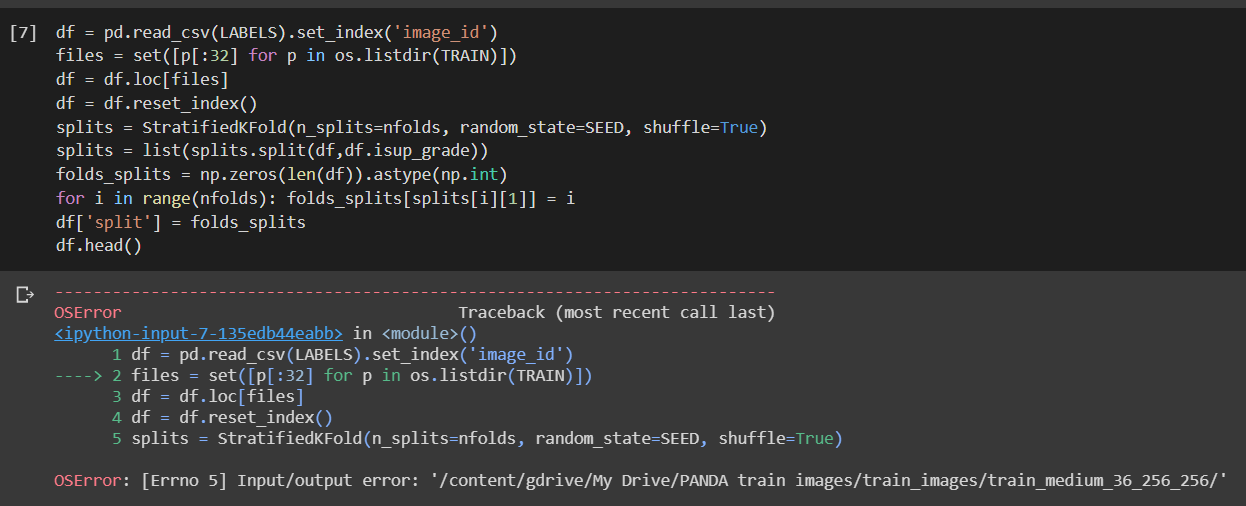
The !cp approach won't work as the internal storage quota whilst using GPU is 37 GB. Any work around?
 SonOfAntonv0
on 3 Jul 2020
SonOfAntonv0
on 3 Jul 2020
This issue shouldn't be closed. I got it today with a 600MB file. It was working and then it was not. Can you please investigate? Thanks!
 GusSand
on 22 Jul 2020
GusSand
on 22 Jul 2020
I got this error today with a 1GB file. I'm using Colab Pro as well. This is super frustrating.
 raghada
on 22 Jul 2020
raghada
on 22 Jul 2020
I literally got this error hour ago and was very frustrated bcoz the exact cell block was working fine earlier. I got this error with mere files no more than 1 GB. Wow, the number of people getting this error does comfort my frustration a little bit, but again plz fix this issue asap. Such a major issue, how to get around it? Do I just have to wait until that G drive Quota expires
 CpSquared
on 22 Jul 2020
CpSquared
on 22 Jul 2020
I'm also a Colab Pro user and this was literally working yesterday.
Now I changed my code to use wget from this article to make it work.
https://medium.com/@acpanjan/download-google-drive-files-using-wget-3c2c025a8b99
GusSand
on 22 Jul 2020
I'm also a Colab Pro user and this was literally working yesterday.
Now I changed my code to use wget from this article to make it work.https://medium.com/@acpanjan/download-google-drive-files-using-wget-3c2c025a8b99
Can you please tell me how to access the file once it is downloaded on colab,
Edit : Nevermind I figured It out, If someone's wondering the same, just get the location of file with !pwd and use it to load data as you would do on local machine
CpSquared
on 22 Jul 2020
I'm wondering why did they close the issue if it isn't solved!
raghada
on 22 Jul 2020
Within Google Drive, navigate to "Trash", hit the dropdown and "Empty Trash".
Remount drive, and you have no further issues.
 DJW41023
on 22 Jul 2020
DJW41023
on 22 Jul 2020
Within Google Drive, navigate to "Trash", hit the dropdown and "Empty Trash".
Remount drive, and you have no further issues.
This didn't help, unfortunately.
raghada
on 23 Jul 2020
Within Google Drive, navigate to "Trash", hit the dropdown and "Empty Trash".
Remount drive, and you have no further issues.
This actually for me. I was importing the python file when it comes Input/Output Error.
 christincha
on 23 Jul 2020
christincha
on 23 Jul 2020
Im getting the same error trying to !cp /mydrive/x/something.zip ../ Input/output error
 xaerincl
on 23 Jul 2020
xaerincl
on 23 Jul 2020
Same error. What's wrong with Colab today
 dinhngoc267
on 23 Jul 2020
dinhngoc267
on 23 Jul 2020
Hello, I got this issue as well. I tried several solutions but the issue still persists. Now I think the way to do it is by download the files and then upload to session storage, but it takes too long.
 kevin-yauris
on 23 Jul 2020
kevin-yauris
on 23 Jul 2020
Hello, I got this issue as well. I tried several solutions but the issue still persists. Now I think the way to do it is by download the files and then upload to session storage, but it takes too long.
I tried that and it takes way too long even for files like 500 mb. Not only that, since it takes too long sometimes i get kicked out of colab
xaerincl
on 23 Jul 2020
Having the same issue using Colab pro
 xusky69
on 23 Jul 2020
xusky69
on 23 Jul 2020
This input/output error started happening to me even access directories with few files. In fact, it was just some python script I am trying to import through sys.path.insert(...) I think there’s something wrong with Colab today in mounting gdrive.
kechan
on 23 Jul 2020
I encoutered with the same problem today when using Colab pro.
 Entongsu
on 23 Jul 2020
Entongsu
on 23 Jul 2020
Same, encountered the same issue
 ktingyew
on 23 Jul 2020
ktingyew
on 23 Jul 2020
I suspect there’s a general “outage” going on concerning reading from gdrive after a mount from a Colab VM. This may also be the root cause on a new issue reported on github (But with no explicit I/O error, but symptoms the same, inability to read any python module files hosted on gdrive). I sent a tweet to Colab and hopefully they can take a look at it.
kechan
on 23 Jul 2020
if anyone wondering why this closed, this issue is tagged as duplicate of #559. If you have same issue, please go to that open issue instead of this.
edit: for the current outage issue, please go to #1428 instead
 Smankusors
on 23 Jul 2020
Smankusors
on 23 Jul 2020
Now displayed by the google team: 'Colab is experiencing issues connecting to Drive, and we are actively investigating.'
DJW41023
on 23 Jul 2020
I can run my code normally in the afternoon, but I can't run it now and the window shows the error.
 szl0144
on 23 Jul 2020
szl0144
on 23 Jul 2020
I run into the same problem, simply copying small text file does not work:
%cp "drive/My Drive/Download/test.txt" .
cp: error reading 'drive/My Drive/Download/test.txt': Input/output error
 Modulariti
on 23 Jul 2020
Modulariti
on 23 Jul 2020
Same problem here as well, reopen the issue.
 sharysky
on 23 Jul 2020
sharysky
on 23 Jul 2020
Trying to load json file in colab from gdrive and get the same error.
 becks-ddf
on 23 Jul 2020
becks-ddf
on 23 Jul 2020
if anyone wondering why this closed, this issue is tagged as duplicate of #559. If you have same issue, please go to that open issue instead of this.
edit: for the current outage issue, please go to #1428 instead
let me repeat this
please all go to #1428 instead continuing this issue.
Smankusors
on 23 Jul 2020
it seems that google collab has a problem today. I was working right well with my files from the my driver, but suddenly it stopped and started to give Error: OSError: [Errno 5] Input/output error.
 vogelPaul
on 23 Jul 2020
vogelPaul
on 23 Jul 2020
I am facing the same problem since yesterday. This issue should be reopened.
 msdey
on 23 Jul 2020
msdey
on 23 Jul 2020
same problem here
 GeorgeLiang3
on 23 Jul 2020
GeorgeLiang3
on 23 Jul 2020
I have the same problem when reading a csv file. It happened to a friend too. Our respective codes were executing normally a couple of days ago and now they aren't. I highly doubt we messed up. I am really disappointed considering that I am paying for Colab PRO.
 coelhogonzalo
on 23 Jul 2020
coelhogonzalo
on 23 Jul 2020
This issue has been reported here https://github.com/googlecolab/colabtools/issues/1428
 rchurt
on 24 Jul 2020
rchurt
on 24 Jul 2020
Have same problem now, only on GPU instances
 maximmasterr
on 24 Jul 2020
maximmasterr
on 24 Jul 2020
Encountered the same problem again today, the code works perfectly in the morning.
Anyone got the same problem today as me?
/usr/local/lib/python3.6/dist-packages/pandas/io/parsers.py in _next_iter_line(self, row_num)
2889
2890 try:
-> 2891 return next(self.data)
2892 except csv.Error as e:
2893 if self.warn_bad_lines or self.error_bad_lines:
OSError: [Errno 5] Input/output error
 seanggggggg
on 30 Jul 2020
seanggggggg
on 30 Jul 2020
I am an occasional Colab Pro/Drive (paid subscription) user, maybe using a 2-3 times a month. I have this problem about half the time over the last few months. I'll come back later and run the same code and it will work fine...
 raynt
on 3 Aug 2020
raynt
on 3 Aug 2020
I encountered this issue as well. I'm trying to load ~14gb images from google drive. It was working fine yesterday.
 danjohnvelasco
on 12 Aug 2020
danjohnvelasco
on 12 Aug 2020
This issue still exists
 ch-hristov
on 23 Aug 2020
ch-hristov
on 23 Aug 2020
It's still broken even with the pro version
 t0efL
on 28 Aug 2020
t0efL
on 28 Aug 2020
Throwing I/O error even with the pro version. It fails to either load or copy file which is 4GB in size.
OpError: /content/drive/Shared drives/.../model.ckpt-0.data-00000-of-00001; Input/output error
 renukaik
on 3 Sep 2020
renukaik
on 3 Sep 2020
still got this error
 zectre
on 21 Nov 2020
zectre
on 21 Nov 2020
any solution to this problem found?
 manjithreddy
on 30 Nov 2020
manjithreddy
on 30 Nov 2020
Inferring from what others have posted, it seems that Google puts some read/write caps on Drive, and if you exceed them, you'll get this error unless you wait for 24 hours without reading or writing. It would be nice if the error message were more specific.
rchurt
on 30 Nov 2020
Related issues
 cornhundred
·
3Comments
cornhundred
·
3Comments
 Edouard2laire
·
3Comments
Edouard2laire
·
3Comments
 paulgureghian
·
6Comments
paulgureghian
·
6Comments
 PareshKamble
·
4Comments
PareshKamble
·
4Comments
 htadashi
·
4Comments
htadashi
·
4Comments
Most helpful comment
Same problem here as well, reopen the issue.