Colabtools: Mounting Google Drive timeout
I used the code
from google.colab import drive
drive.mount('content/drive')
to mount my Google Drive but after entering my credentials it just times out. I've tried resetting my runtimes but it didn't help. I have used this in the past and it used to work but now it doesn't.
Any ideas?
 siaahmadi
All 34 comments
I am experiencing a similar problem. I have to restart many many times so it can connect.
 x110
on 8 Jan 2019
x110
on 8 Jan 2019
Sorry for the trouble. If you're able to link a notebook that shows the code invoked and error observed, please do and we'll take a closer look.
 colaboratory-team
on 8 Jan 2019
colaboratory-team
on 8 Jan 2019
Sorry for the trouble. If you're able to link a notebook that shows the code invoked and error observed, please do and we'll take a closer look.
I already included the code to reproduce the result in my original post. There was no error--the code would appear to be running with no output (i.e. appeared like an infinite loop doing nothing).
It seems that this is not a persistent problem. I was having this issue at the time of posting the original question but haven't faced difficulties since.
siaahmadi
on 8 Jan 2019
Sorry for the trouble. If you're able to link a notebook that shows the code invoked and error observed, please do and we'll take a closer look.
I linked my google colab here: https://github.com/x110/MyFastaiNotebooks/blob/master/lang_model_arxiv.ipynb
Thanks for your help!
x110
on 11 Jan 2019
For the last 8 hours, I was not able to connect google drive to colab. I linked my google colab here
Thank you.
x110
on 17 Jan 2019
@x110: does running the "Reset all runtimes" command (either in the Runtime menu or in the command palette via cmd/ctrl-shift-p) make things work again?
If not, after you observe the same timeout error, can you run !cat /var/colab/hostname and paste the result here (and then _don't_ reset runtimes until we can take a look :))
colaboratory-team
on 17 Jan 2019
reset all runtimes did not make it work.
the result after running !cat /var/colab/hostname:
gpu-umjzoc5wfbye
x110
on 17 Jan 2019
@x110: thanks for the info. Does your "My Drive" folder on drive.google.com have very many (thousands or more) files/folders as direct children? Does creating a child folder and moving the direct children of "My Drive" into that subfolder unblock drive.mount on colab? (you'll have to "reset all runtimes" again to test, after reparenting the contents on drive.google.com).
colaboratory-team
on 17 Jan 2019
This fixed the problem. Thank you!
x110
on 20 Jan 2019
@x110 thanks for confirming and glad you're unblocked.
Out of curiousity, do you have a sense of how many files/folders you had directly in the top-level My Drive folder?
colaboratory-team
on 20 Jan 2019
around 27,000 files and folders.
x110
on 20 Jan 2019
Thanks; that all makes sense then.
(FYI, unfortunately colab+drive integration doesn't scale great w/ the number of direct children of a folder; splitting into more, smaller, subfolders is one approach, and another is archiving lots of files into a single file, e.g. with tar or zip)
colaboratory-team
on 20 Jan 2019
@colaboratory-team i only have 3 folders + 1 file under My Drive, and an empty trash. I still get a time out error. Any recommendations?
 lisatsinis
on 15 May 2019
lisatsinis
on 15 May 2019
@lisatsinis please open a new issue with a minimal notebook showing the issue reproducing immediately after running "Reset all runtimes".
colaboratory-team
on 15 May 2019
@x110: thanks for the info. Does your "My Drive" folder on drive.google.com have very many (thousands or more) files/folders as direct children? Does creating a child folder and moving the direct children of "My Drive" into that subfolder unblock drive.mount on colab? (you'll have to "reset all runtimes" again to test, after reparenting the contents on drive.google.com).
I am suffering the same problem. There are too many files directly contained in the top-level "My Drive" folder so that I couldn't mount my Google Drive. As you suggested, I should reparent the contents in "My Drive" folders, but the problem is that there is no option in the website to bulk delete or remove all those files. What should I do to get things work again?
 BenjaminKZ
on 12 Dec 2019
BenjaminKZ
on 12 Dec 2019
I have around 30000 files in my main folder. i accidentally unzipped a rar file for training a model. i am trying to delete all 30000 files manually...Google doesn't allow easy deleting of files it gets stuck so much. Is there any other way? I wish I could write a python script but I can't do that cuz my drive isn't connecting to google colab in the first place.
 Usmansagemode
on 28 Feb 2020
Usmansagemode
on 28 Feb 2020
I have around 30000 files in my main folder. i accidentally unzipped a rar file for training a model. i am trying to delete all 30000 files manually...Google doesn't allow easy deleting of files it gets stuck so much. Is there any other way? I wish I could write a python script but I can't do that cuz my drive isn't connecting to google colab in the first place.
I experience the same issue previously. Please check below for the fix:
https://webapps.stackexchange.com/questions/110315/trash-with-80-thousand-files-empty-trash-doesnt-work
 abdshomad
on 27 Apr 2020
abdshomad
on 27 Apr 2020
I have found the reason why one cant mount ones own google drive for these things is because of a race condition with google . First it was suggested that changing the mount location from /content/gdrive to /content/something else but this didnt fix it. What I ended up doing was copying manually the files that are copied to google drive, then installing the google drive desktop application I would then in windows 10 go to the folder which is now located on google drive and disable file permissions inheritance and then manually putting full control rights on the folder to the users group and to authenticated users group. This seems to have fixed this for me. Other times I have noticed with these colabs (not this one in particular but some of the components used like the trained models are missing from the repository (as if they had been removed) Only solution for this is to look around for other sources of these files. This includes scurrying through google search engine and also looking at the git checkout level to find branches besides master and also looking for projects that cloned the project on github to see if they still include the files. Hope this helps!
 wanfuse123
on 26 Aug 2020
wanfuse123
on 26 Aug 2020
@colaboratory-team i only have 3 folders + 1 file under My Drive, and an empty trash. I still get a time out error. Any recommendations?
Hi,does you have solved this problems?I suffered the same issue with yours,I only have 2 folders under My Drive, but I attempted to run "Reset all runtimes" many times,It don't success.
 LannyCodes
on 2 Sep 2020
LannyCodes
on 2 Sep 2020
@colaboratory-team Hi,does you have solved this problems?I suffered the same issue with yours,I only have 2 folders under My Drive, but I attempted to run "Reset all runtimes" many times,It don't success.
LannyCodes
on 2 Sep 2020
Hi Lanny!
I believe I understand whats going on!
just to relay what I have found on the google race condition (actual
solution now) I have found the reason why one cant mount ones own google
drive for these things is because of a race condition with google . First
it was suggested that changing the mount location from /content/gdrive to
/content/something else but this didnt fix it. What I ended up doing was
copying manually the files that are copied to google drive, then installing
the google drive desktop application I would then in windows 10 go to the
folder which is now located on google drive and disable file permissions
inheritance and then manually putting full control rights on the folder to
the users group and to authenticated users group. This seems to have fixed
this for me. Other times I have noticed with these colabs (not this one in
particular but some of the components used like the trained models are
missing from the repository (as if they had been removed) Only solution for
this is to look around for other sources of these files. This includes
scurrying through google search engine and also looking at the git checkout
level to find branches besides master and also looking for projects that
cloned the project on github to see if they still include the files.
I believe this missing file issue is because, sorry to say many projects
want to call themselves open source, but don't really want to share their
projects, but just want to use the community to help until their projects
are working. Only real solution to this problem I see is for someone like
google to automatically clone all repositories like the internet archive
does. In fact scurrying through forks for missing files is the only thing
that seems to help!
Perhaps we might be able to collaborate in the future!
Regards,
Steven
On Wed, Sep 2, 2020, 5:25 AM Lanny notifications@github.com wrote:
@colaboratory-team https://github.com/colaboratory-team Hi,does you
have solved this problems?I suffered the same issue with yours,I only have
2 folders under My Drive, but I attempted to run "Reset all runtimes" many
times,It don't success.—
You are receiving this because you commented.
Reply to this email directly, view it on GitHub
https://github.com/googlecolab/colabtools/issues/382#issuecomment-685487870,
or unsubscribe
https://github.com/notifications/unsubscribe-auth/ADDBZWJOMRV4RACMK6KCL33SDYFR7ANCNFSM4GMAIDSA
.
wanfuse123
on 2 Sep 2020
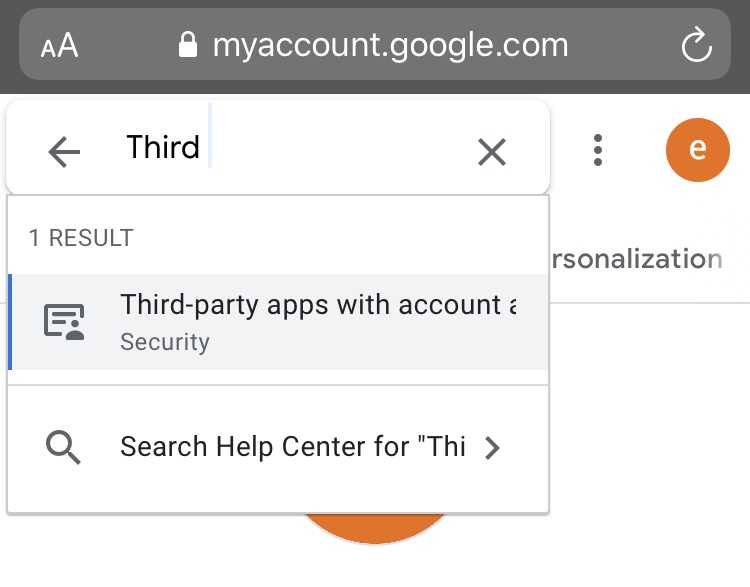
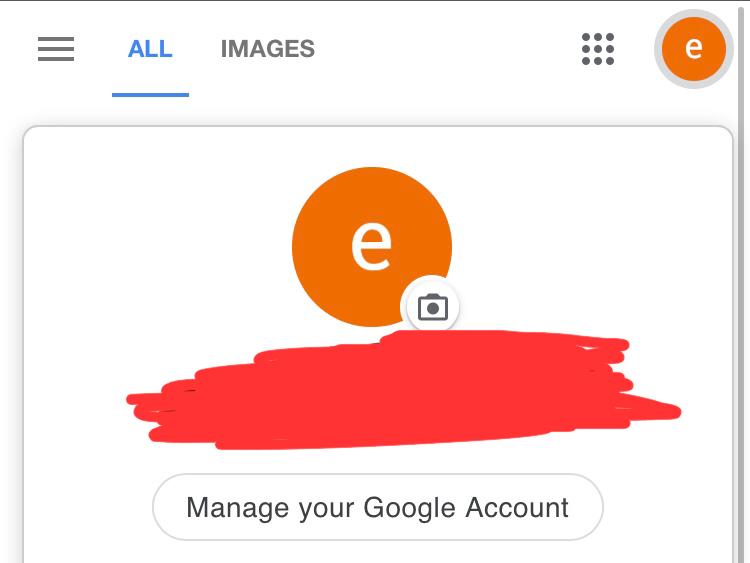
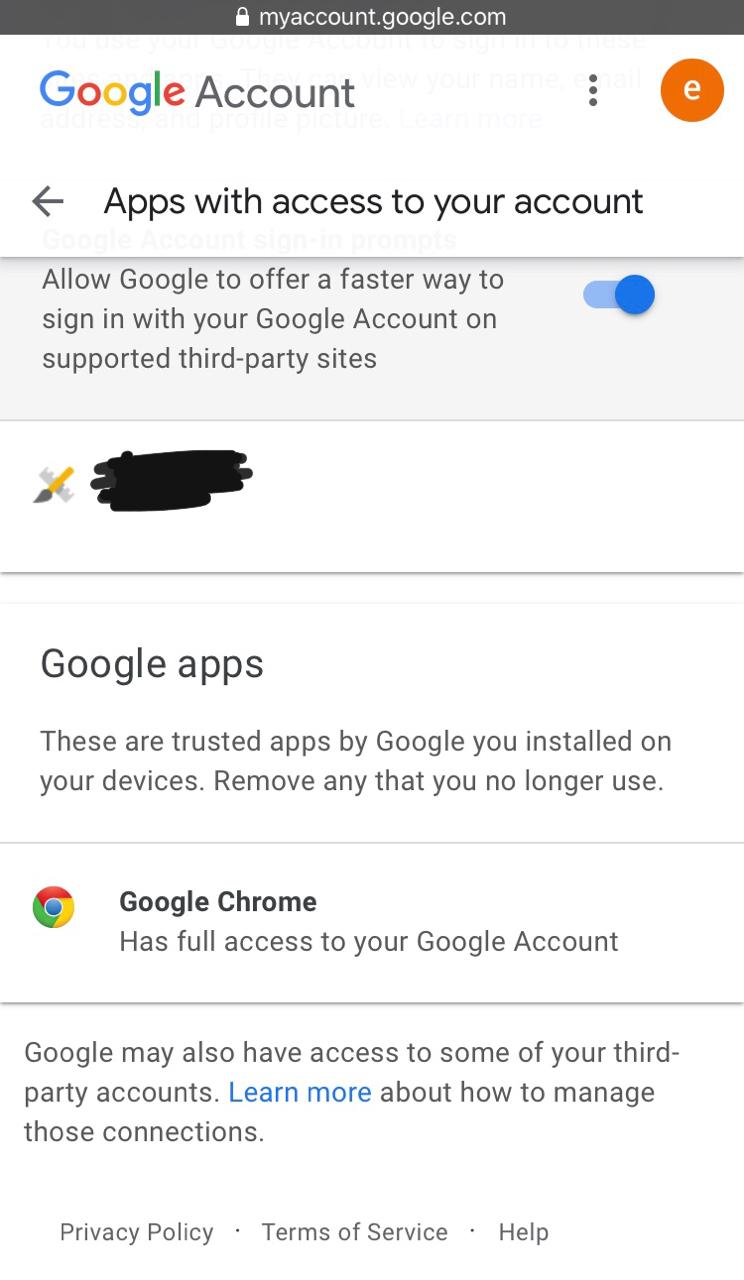
Solution is very easy just go to your manage your google account then search third party apps and then remove all access mainly Google Drive stream except Google Chrome. And reset runtime or factory reset ... Then try mounting.
These easy steps work for me.
And delete also your bin or trash files from your google drive .
 Sarfraz-Cyber
on 4 Sep 2020
Sarfraz-Cyber
on 4 Sep 2020
https://stackoverflow.com/questions/63723763/error-using-drive-mount-with-google-colab
Solutions described here works for me
Also, it seems the 'copy button' is not functioning properly, so copy using selection instead of button and paste to notepad to validate, and then copy to authorization code field worked.
 munitech4u
on 4 Sep 2020
munitech4u
on 4 Sep 2020
https://stackoverflow.com/questions/63723763/error-using-drive-mount-with-google-colab
Solutions described here works for me
yeah this solution works, just manually copy the authorization code instead of clicking copy
 sahil-ramagiri
on 4 Sep 2020
sahil-ramagiri
on 4 Sep 2020
https://stackoverflow.com/questions/63723763/error-using-drive-mount-with-google-colab
Solutions described here works for meyeah this solution works, just manually copy the authorization code instead of clicking copy
https://stackoverflow.com/questions/63723763/error-using-drive-mount-with-google-colab
Solutions described here works for meyeah this solution works, just manually copy the authorization code instead of clicking copy
Yeah . I tried in other browser it works as it but when I tried with Chrome timeout error occurred. So I clear all chrome browser data and cache . Then started to mount and I found the code copy option is not working either so manual copy needed then everything ok . But from previous 2days a error keep showing “ A Google Drive error has occurred” I don’t know why it’s showing continuously.
Sarfraz-Cyber
on 4 Sep 2020
https://www.youtube.com/watch?v=PoETnY1ju20
On Fri, Sep 4, 2020, 7:17 AM Sahil Kumar notifications@github.com wrote:
>
https://stackoverflow.com/questions/63723763/error-using-drive-mount-with-google-colab
Solutions described here works for me
yeah this solution works, just manually copy the authorization code
instead of clicking copy—
You are receiving this because you commented.
Reply to this email directly, view it on GitHub
https://github.com/googlecolab/colabtools/issues/382#issuecomment-687082898,
or unsubscribe
https://github.com/notifications/unsubscribe-auth/ADDBZWM67FVKFQPTD46CRQ3SEDEERANCNFSM4GMAIDSA
.
wanfuse123
on 4 Sep 2020
I was doing the following to get it working and created this video!
https://www.youtube.com/watch?v=PoETnY1ju20
On Fri, Sep 4, 2020, 5:38 AM munitech4u notifications@github.com wrote:
>
https://stackoverflow.com/questions/63723763/error-using-drive-mount-with-google-colab
Solutions described here works for me
—
You are receiving this because you commented.
Reply to this email directly, view it on GitHub
https://github.com/googlecolab/colabtools/issues/382#issuecomment-687039978,
or unsubscribe
https://github.com/notifications/unsubscribe-auth/ADDBZWKNPQ7KZOMBJ3PYIDLSECYQ7ANCNFSM4GMAIDSA
.
wanfuse123
on 4 Sep 2020
I got it to work using the method I show in this video!
https://www.youtube.com/watch?v=PoETnY1ju20
On Fri, Sep 4, 2020, 4:20 AM Sarfraz-Cyber notifications@github.com wrote:
Solution is very easy just go to your manage your google account then
search third parties apps and then remove all access mainly Google Drive
stream except Google Chrome. And reset runtime or factory reset ... Then
try mounting.These easy steps works for me.
And delete also your bin or trash files from your google drive .
[image: 57617C84-4BBF-4D36-9551-063F0266DAA9]
https://user-images.githubusercontent.com/68226896/92217647-9684d380-eeb5-11ea-897a-01605f3c9c9c.jpeg
[image: FD941C83-0E00-4B11-B53D-604410E42221]
https://user-images.githubusercontent.com/68226896/92217658-9be21e00-eeb5-11ea-94ea-2c1fb1239c9b.jpeg
[image: 490097C9-911D-4E3C-997D-D6FB38930B3C]
https://user-images.githubusercontent.com/68226896/92217660-9d134b00-eeb5-11ea-933a-52a168dc549e.jpeg—
You are receiving this because you commented.
Reply to this email directly, view it on GitHub
https://github.com/googlecolab/colabtools/issues/382#issuecomment-687002553,
or unsubscribe
https://github.com/notifications/unsubscribe-auth/ADDBZWOAZFZHVUKYEH7WAUTSECPOTANCNFSM4GMAIDSA
.
wanfuse123
on 4 Sep 2020
https://github.com/googlecolab/colabtools/issues/382#issuecomment-687082898 works for me as well. What in the world causes this???
 trezm
on 4 Sep 2020
trezm
on 4 Sep 2020
#382 (comment) works for me as well. What in the world causes this???
It maybe because Colab is using an external server or some kind of system acts as a mediator of file sync or transferring data . You might see large files take some time to being save in gdrive.
Connector or mediator’s code either broken or a bug or recent changes
Some major weak points
Sarfraz-Cyber
on 4 Sep 2020
That doesn't really explain why using the copy button vs copying manually would yield different results. My guess is that there's an invisible character being copied, or a newline or blank space or something.
trezm
on 5 Sep 2020
I realized that the GPU I set in runtime made me timeout many times. I reset Runtime mode by using "Change Runtime Type" to None and I can be mounted to Google Drive easily. After that, you can "change Runtime Type" again to GPU.
 nhy1210
on 5 Sep 2020
nhy1210
on 5 Sep 2020
https://stackoverflow.com/questions/63723763/error-using-drive-mount-with-google-colab
Solutions described here works for meyeah this solution works, just manually copy the authorization code instead of clicking copy
Great solution!It is a immense help for me ,Thx!
LannyCodes
on 5 Sep 2020
to make it even simpler copy the code into a text file like gedit or
notepad then just copy it out
If that doesn't work you could use some magic with sed like so
ed $'s/[^[:print:]\t]//g' file.txt
On Sat, Sep 5, 2020 at 7:21 AM Lanny notifications@github.com wrote:
>
https://stackoverflow.com/questions/63723763/error-using-drive-mount-with-google-colab
Solutions described here works for meyeah this solution works, just manually copy the authorization code
instead of clicking copyGreat solution!It is a immense help for me ,Thx!
—
You are receiving this because you commented.
Reply to this email directly, view it on GitHub
https://github.com/googlecolab/colabtools/issues/382#issuecomment-687594432,
or unsubscribe
https://github.com/notifications/unsubscribe-auth/ADDBZWO2223KCME37HHX7ALSEINMVANCNFSM4GMAIDSA
.
wanfuse123
on 5 Sep 2020
Related issues
 markus-weiss
·
4Comments
markus-weiss
·
4Comments
 Edouard2laire
·
3Comments
Edouard2laire
·
3Comments
 rtumac
·
4Comments
rtumac
·
4Comments
 PareshKamble
·
4Comments
PareshKamble
·
4Comments
 nprandall
·
5Comments
nprandall
·
5Comments
Most helpful comment
https://stackoverflow.com/questions/63723763/error-using-drive-mount-with-google-colab
Solutions described here works for me
Also, it seems the 'copy button' is not functioning properly, so copy using selection instead of button and paste to notepad to validate, and then copy to authorization code field worked.