Cognitive-services-speech-sdk: SDK doesn't work in .NET 4.6.1
Describe the bug
A clear and concise description of what the bug is.
To Reproduce
Steps to reproduce the behavior:
- Create a project with .NET core
- Change the target framework to net461
- Add configuration manager for x64 or x32 and target that platform
- Installed the VC++ distributables (no effect)
- Try to call a sample code that uses SDK that used to work with .NET core
Expected behavior
It should work like when .NET core was target platform
Version of the Cognitive Services Speech SDK
1.3.1
Platform, Operating System, and Programming Language
- OS: Windows 10
- Hardware - x64
- Programming language: C#
Additional context
System.DllNotFoundException: Unable to load DLL 'Microsoft.CognitiveServices.Speech.core.dll': The specified module could not be found. (Exception from HRESULT: 0x8007007E)
   at Microsoft.CognitiveServices.Speech.Internal.SpeechConfig.speech_config_from_subscription(IntPtr& config, String subscriptionKey, String region)
   at Microsoft.CognitiveServices.Speech.SpeechConfig.FromSubscription(String subscriptionKey, String region)
   at SpeechCognitiveServices.Program.<CallCognitiveServices>d__3.MoveNext()
 leolorenzoluis
All 23 comments
Comparing the two output. It looks like .NET core includes Microsoft.CognitiveServices.Speech.core.dll and .NET Framework output doesn't include that one? I'm not sure if it has any relationship.
leolorenzoluis
on 28 Feb 2019
You are describing the steps you took in Visial Studio?
I had the problem also once. It appears that during build/deployment the dll wasn't copied. I did a 'clean project' and 'rebuild' and it worked ...
hope this helps.
 wolfma61
on 7 Mar 2019
wolfma61
on 7 Mar 2019
Yes I did. I also cleaned and rebuild that time nothing happened.
leolorenzoluis
on 7 Mar 2019
I got same issue when I tried the demo in https://github.com/Azure-Samples/cognitive-services-speech-sdk/tree/master/samples/csharp/dotnet-windows/translation-wpf. Is there any workaround ?
 leonlj
on 10 May 2019
leonlj
on 10 May 2019
I'm having the very same problem, but using a plain .netcore console app on a Windows 10 Pro PC. The dll is correctly installed on nuget package folder.
I also tested the command
"dotnet add package Microsoft.CognitiveServices.Speech" --path ".\packages" on the project folder and I see the packages correctly installed, but the same errore appear:
"System.DllNotFoundException: Unable to load DLL 'Microsoft.CognitiveServices.Speech.core.dll' or one of its dependencies: Impossibile trovare il modulo specificato. (Exception from HRESULT: 0x8007007E)"
 simonemarra
on 22 May 2019
simonemarra
on 22 May 2019
Thanks for feedback, I tried to reproduce the problem with following steps
I am using following versions
- Visual Studio 2017 Enterprise, version 15.9.11
- Microsoft .NET Framework, version 4.7.03190
Repro steps I had:
- New Project -> Visual C# -> .NET Core -> Console App (.NET Core)
- Manage Nuget Packages -> search and install "Microsoft.CognitiveServices.Speech" v1.5.1
- Unload ConsoleApp1 project and edit .csproj file and replace
netcoreapp2.1
with
net461 - Configuration Manager -> create x64 target
- Builds OK
- Configuration Manager -> create x86 target
- Builds OK
- Add some code which is using Microsoft.CognitiveServices.Speech to the project
- Builds OK
- After running the sample, I can see problem you have reported,
We will investigate.
 jhakulin
on 22 May 2019
jhakulin
on 22 May 2019
After investigating bit more as a workaround could you please try adding RuntimeIdentifier to your project as follows (.csproj) and let us know does this help ?
<Project Sdk="Microsoft.NET.Sdk">
  <PropertyGroup>
    <OutputType>Exe</OutputType>
    <TargetFramework>net461</TargetFramework>
    <Platforms>AnyCPU;x64;x86</Platforms>
    <!--<TargetFramework>netcoreapp2.1</TargetFramework>-->
  </PropertyGroup>

  <PropertyGroup Condition="'$(Platform)'=='x64'" Label="Configuration">
    <RuntimeIdentifier>win-x64</RuntimeIdentifier>
  </PropertyGroup>

  <PropertyGroup Condition="'$(Platform)'=='x86'" Label="Configuration">
    <RuntimeIdentifier>win-x86</RuntimeIdentifier>
  </PropertyGroup>

  <ItemGroup>
    <PackageReference Include="Microsoft.CognitiveServices.Speech" Version="1.5.1" />
  </ItemGroup>
</Project>
We probably need to fix our samples regarding this.
jhakulin
on 23 May 2019
Actually we found the source of our problem: visual studio d++ redistributable!!!
https://support.microsoft.com/en-us/help/2977003/the-latest-supported-visual-c-downloads
The PC we are using as a deploy machine for speech recognition software didn't have any vc_redist installed. In fact any solution using speech recognition libs (we tested .netcore console app, wpf .net framework) were not able to run correctly. After installing the vc_redist_x64.exe file all the samples where running correctly.
I think you should update the documentation specifying that vc_redist is a MUST HAVE lib to correctly execute the code on any machine running Windows. It may be a obvious, but if you are developing some apps and deploying to third-party machines a reminder could be really useful (we wasted about two working days of development for this missing!!!)
simonemarra
on 23 May 2019
@simonemarra installing the vc_redist didnt work for me.
@jhakulin adding that to the csproj didnt work either.
I'm using OneClick install.. my WinForms app works fine in debug mode.
Any new ideas?
 anbhar
on 30 May 2019
anbhar
on 30 May 2019
Discussed with @anbhar and the issue there was solved by manually adding Microsoft.CognitiveServices.Speech.core.dll to the application project.
Based on this thread, there is several reasons why the issue might happen.
We will collect information from here and improve our sample projects/documentation on this in coming releases.
Thanks for all feedback
jhakulin
on 5 Jun 2019
@jhakulin , where can we get this missing dll?
Edit: got it: need to install the latest Visual C++ Redistributable here https://support.microsoft.com/help/2977003/the-latest-supported-visual-c-downloads
By the way, there is a page in the documentation regarding this dll: https://docs.microsoft.com/en-us/azure/cognitive-services/speech-service/ship-application
 nrobert
on 5 Jun 2019
nrobert
on 5 Jun 2019
@jhakulin , where can we get this missing dll?
@nrobert it should be in the \bin\x64\Debug or \bin\x86\Debug directory based on how you Debug - "Microsoft.CognitiveServices.Speech.core.dll".
A simple "Add -> Existing Item" to the project should do the trick. You'll want to make sure its included in the deployment.
anbhar
on 5 Jun 2019
@jhakulin , where can we get this missing dll?
@nrobert it should be in the \bin\x64\Debug or \bin\x86\Debug directory based on how you Debug - "Microsoft.CognitiveServices.Speech.core.dll".
A simple "Add -> Existing Item" to the project should do the trick. You'll want to make sure its included in the deployment.
I added this missing dll manually from the \bin\x64\Debug directory , still didn't work.
Visual studio 2017
.Net Framework project
Windows 7 x64
What do you mean its included in the deployment? I'm new to programming
 Electrik97
on 17 Jun 2019
Electrik97
on 17 Jun 2019
@Electrik97 You should right click on the project -> Properties -> Publish Section (screenshot attached)

Then click on "Application Files" and scroll down to the Speech.core.dll and change the dropdown to "Included" (screenshot attached)
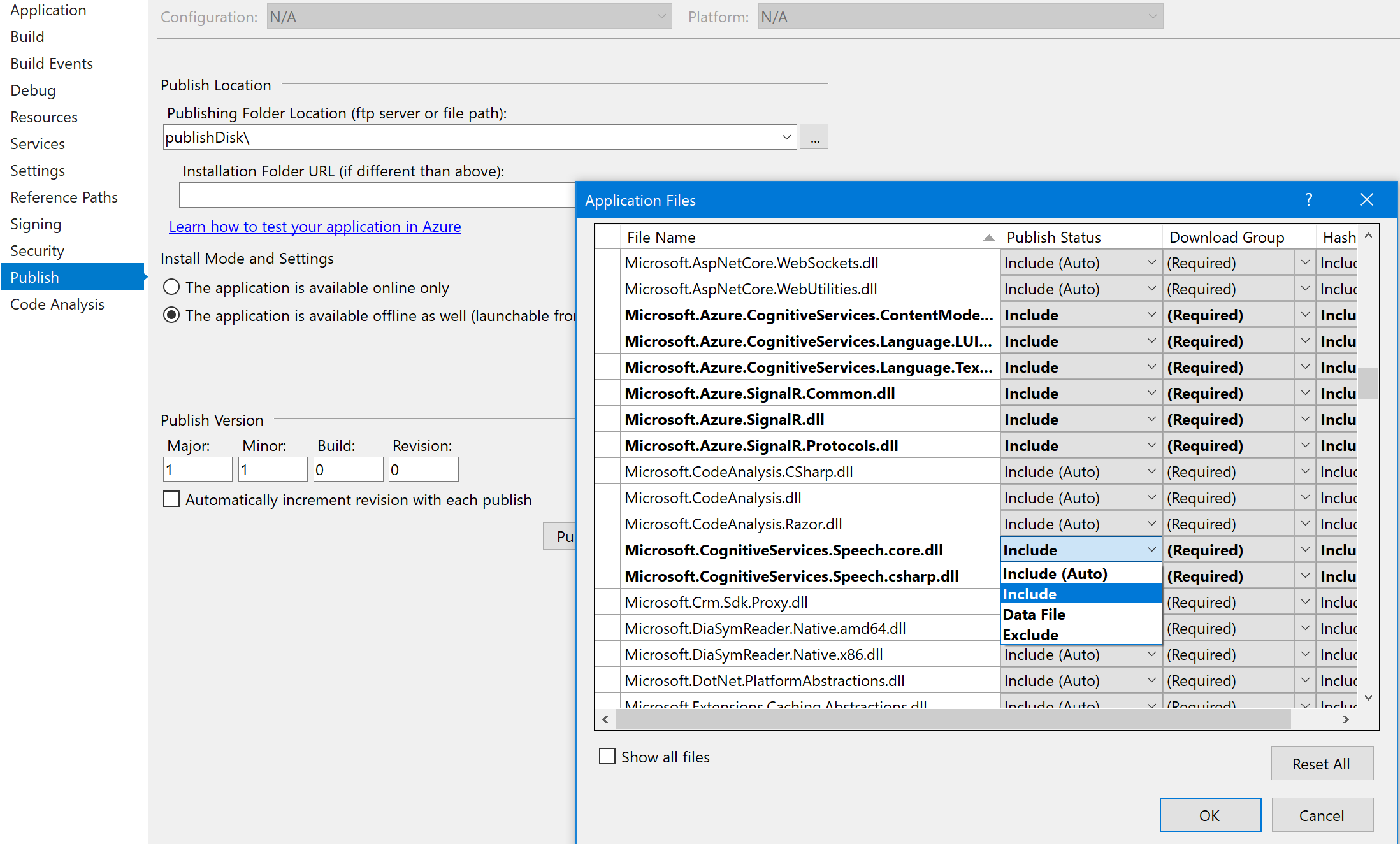
Once you do that, Visual Studio will include the file when you Publish/deploy the project.
anbhar
on 17 Jun 2019
@Electrik97: Window 7 is not a supported platform for the SDK. Sorry for the inconvenience.
 chlandsi
on 17 Jun 2019
chlandsi
on 17 Jun 2019
@Electrik97: Window 7 is not a supported platform for the SDK. Sorry for the inconvenience.
Can I use it via REST API? By getting a JWT token? on windows 7 i mean
Electrik97
on 17 Jun 2019
sure - for REST you don't install the SDK, so this will work.
wolfma61
on 18 Jun 2019
Closing the issue, we are going to update sample + documentation in the next release. Let us know if there is new and unidentified issues related to this.
jhakulin
on 26 Jun 2019
Closing the issue, we are going to update sample + documentation in the next release. Let us know if there is new and unidentified issues related to this.
Hello Jhakulin,
i have same issue in Window form application.i have migrated my application to 4.6.1 .NET framework.
but still it shows Microsoft.CognitiveServices.Speech.Core.dll not found exception.Could you please help?
when i tried in new sample window form application it works.but not in existing windows application.
 kiran5362
on 10 Jul 2019
kiran5362
on 10 Jul 2019
@kiran5362 have you tried solutions above in the thread ?
@anbhar do you have ideas for the issue @kiran5362 has?
jhakulin
on 11 Jul 2019
@kiran5362 please try the steps in this reply from this post - https://github.com/Azure-Samples/cognitive-services-speech-sdk/issues/176#issuecomment-502737298
If you add Microsoft.CognitiveServices.Speech.Core.dll to the project root manually and make sure its included in the deployment, it should be a definite fix, can you please try that and let us know the result?
anbhar
on 11 Jul 2019
@kiran5362 were you able to solve your issue ?
jhakulin
on 17 Jul 2019
I am facing the same problem. Adding dll manually to the root and setting it to 'copy always' didn't work.
Everything works fine while running the app from VS2019.
Issue pops up while deploying docker container locally as well as when deploying docker image on local service fabric cluster.
 anjsha
on 21 Apr 2020
anjsha
on 21 Apr 2020
Related issues
 Anduin2017
·
3Comments
Anduin2017
·
3Comments
 maczikasz
·
6Comments
maczikasz
·
6Comments
 RodrigoRVieira
·
7Comments
RodrigoRVieira
·
7Comments
 sk2andy
·
3Comments
sk2andy
·
3Comments
 ahjones
·
5Comments
ahjones
·
5Comments
Most helpful comment
Discussed with @anbhar and the issue there was solved by manually adding Microsoft.CognitiveServices.Speech.core.dll to the application project.
Based on this thread, there is several reasons why the issue might happen.
We will collect information from here and improve our sample projects/documentation on this in coming releases.
Thanks for all feedback