Codesandbox-client: Tests Tab do not work on Firefox
🐛 bug report
Description of the problem
The browser page with the sandbox is blocked. I can close the page, or click a button to stop the script forcefully, but it is not ideal.
How has this issue affected you? What are you trying to accomplish?
I was trying to see if the tests in the Tests tab are passed or not.
Link to sandbox: link
Your Environment
| Software | Name/Version |
| ---------------- | ------------ |
| Сodesandbox | The latest version in codesandbox.io as of 03.06.2020
| Browser | Firefox 76.0.1 (64 de biți) (Ubuntu version)
| Operating System | Ubuntu 20.04
 silviubogan
All 7 comments
Hi Silviu,
Just to make sure I understand the issue. You have a sandbox where you run a script that blocks the browser?
You can add "?runonclick=1" to the url of your Sandbox, to prevent it from running immediately.
Does this solve the issue or you?
Best regards
Christian
--- original message ---
On June 3, 2020, 2:07 PM GMT+2 [email protected] wrote:
🐛 bug report
Description of the problem
The browser page with the sandbox is blocked. I can close the page, or click a button to stop the script forcefully, but it is not ideal.
How has this issue affected you? What are you trying to accomplish?
I was trying to see if the tests in the Tests tab are passed or not.
Link to sandbox: link
Your Environment
Software Name/Version
Сodesandbox The latest version in codesandbox.io as of 03.06.2020
Browser Firefox 76.0.1 (64 de biți) (Ubuntu version)
Operating System Ubuntu 20.04
—
You are receiving this because you are subscribed to this thread.
Reply to this email directly, view it on GitHub, or unsubscribe.
--- end of original message ---
 CodeSandboxTeam
on 4 Jun 2020
CodeSandboxTeam
on 4 Jun 2020
This issue is stale because it has been open many days with no activity. It will be closed soon unless the stale label is removed or a comment is made.
![github-actions[bot] picture](https://avatars2.githubusercontent.com/in/15368?v=4&s=40) github-actions[bot]
on 4 Sep 2020
github-actions[bot]
on 4 Sep 2020
Hello!
Many things might have changed since I posted this issue, but currently this is the situation.
When switching to the Tests tab of the sidebar on the right, I see this:
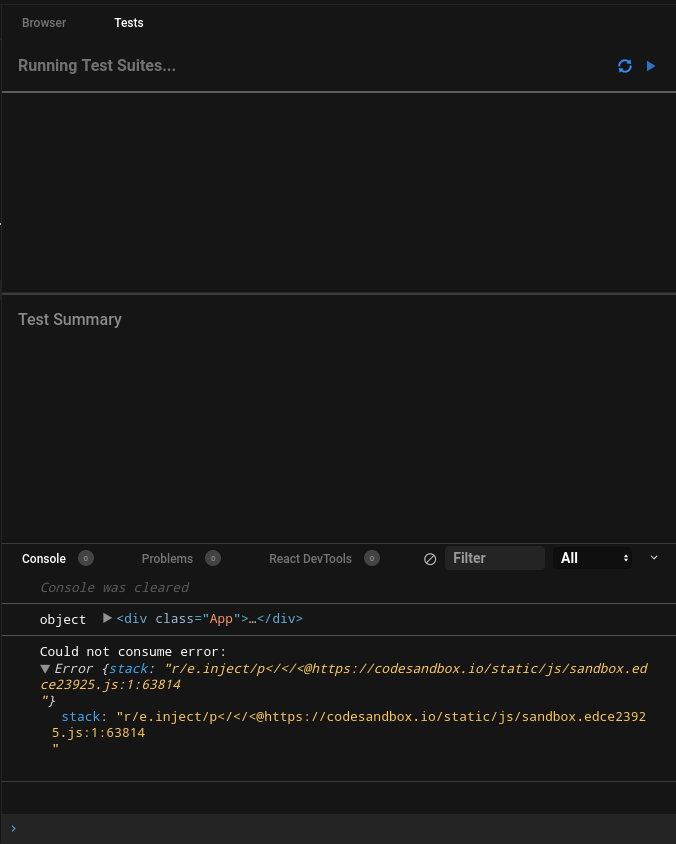
The browser does not crash but the tests are not run. The loading indicator for tests shows up and stays there indefinitely.
Thank you.
silviubogan
on 4 Sep 2020
Ah, I think this is because in Firefox Error.captureStacktrace is not available. Jest uses this function to determine where the error happens. I thought we had added it as a polyfill with error-polyfill, but it seems like it doesn't work 100%.
 CompuIves
on 7 Sep 2020
CompuIves
on 7 Sep 2020
This the error I am getting when opening the TESTS tab in Firefox:
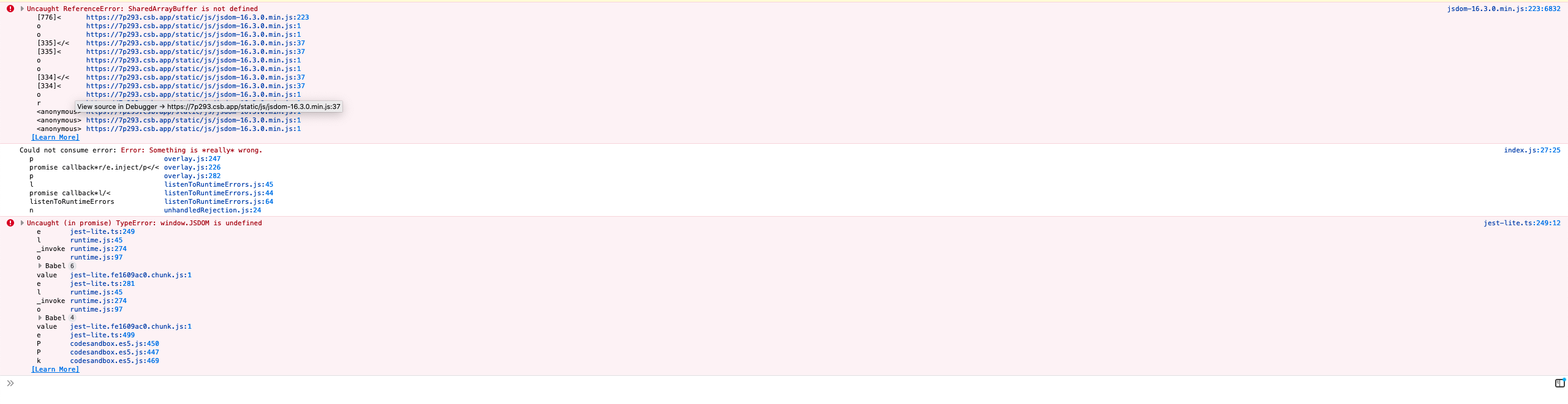
In our app/src/sandbox/eval/tests/jest-lite.ts is the logic for this devtool. It seems to be an issue with the version of JSDOM we are running. On line 61 you see it being loaded.
In app/static is the dist bundle used. We should try updating the version and see what happens.
 christianalfoni
on 9 Sep 2020
christianalfoni
on 9 Sep 2020
I'm getting bit by this bug again on Firefox 83 and Brave (Chromium) 86.
 ryanpcmcquen
on 7 Dec 2020
ryanpcmcquen
on 7 Dec 2020
Hey
This is a different thing, a bug was created by @ryanpcmcquen
 SaraVieira
on 8 Dec 2020
SaraVieira
on 8 Dec 2020
Related issues
 andreplaranja
·
3Comments
andreplaranja
·
3Comments
 k15a
·
3Comments
k15a
·
3Comments
 yazaabed
·
3Comments
yazaabed
·
3Comments
 waruyama
·
3Comments
waruyama
·
3Comments
 donavon
·
3Comments
donavon
·
3Comments