Codesandbox-client: Chose installed version of TypeScript for editor
Question / Bug
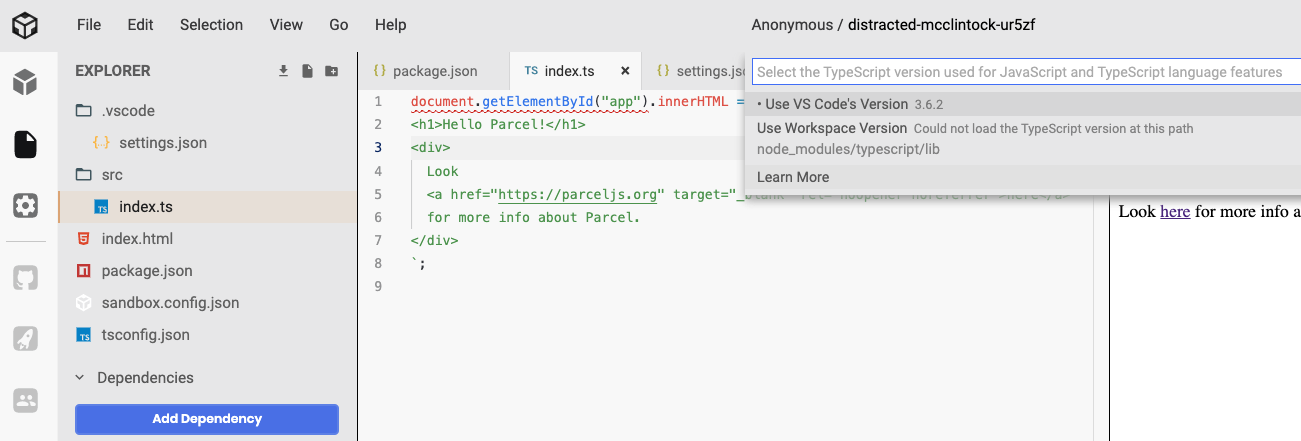
I'm not able to choose installed TypeScript version in editor. is this a bug or missing feature ?
Thanks!
.vscode/settings.json
{
    "files.autoSave": "onFocusChange",
    "typescript.suggest.autoImports": true,
    "typescript.tsdk": "node_modules/typescript/lib"
}
package.json
{
  "name": "parcel-sandbox",
  "version": "1.0.0",
  "description": "Simple Parcel Sandbox",
  "main": "index.html",
  "scripts": {
    "start": "parcel index.html --open",
    "build": "parcel build index.html"
  },
  "dependencies": {},
  "devDependencies": {
    "typescript": "3.7.2",
    "parcel-bundler": "^1.6.1"
  }
}
related https://github.com/codesandbox/codesandbox-client/issues/942
 Hotell
All 2 comments
Hey!
On client sandboxes we don't really install node modules so you have to use the one on VSCode, this is most likely possible with a container as the node modules will be installed there.
It's a missing feature on client sandboxes as node modules folder doesn't exist
 SaraVieira
on 2 Jan 2020
SaraVieira
on 2 Jan 2020
Hey!
On client sandboxes we don't really install node modules so you have to use the one on VSCode, this is most likely possible with a container as the node modules will be installed there.
It's a missing feature on client sandboxes as node modules folder doesn't exist
right, so with that said, there is no option to use different version of TS, except that one which is shipped with client?
thx!
Hotell
on 2 Jan 2020
Related issues
 miukimiu
·
3Comments
miukimiu
·
3Comments
 supersonicclay
·
3Comments
supersonicclay
·
3Comments
 BingoRUS
·
3Comments
BingoRUS
·
3Comments
 wojciechczerniak
·
3Comments
wojciechczerniak
·
3Comments
 waruyama
·
3Comments
waruyama
·
3Comments
Most helpful comment
right, so with that said, there is no option to use different version of TS, except that one which is shipped with client?
thx!