Codesandbox-client: Activating extension 'vscodevim.vim' failed: Invalid regular expression: invalid group specifier name.
🐛 bug report
Description of the problem
I get Activating extension 'vscodevim.vim' failed: Invalid regular expression: invalid group specifier name. error when trying to use Vim mode with VSCode in Safari
How has this issue affected you? What are you trying to accomplish?
Want to use Vim mode but can't.
Link to sandbox: link (optional)
Your Environment
| Software | Name/Version |
| ---------------- | ------------ |
| Сodesandbox | Latest I think
| Browser | Safari 12.1.2
| Operating System | macOS 10.14.6
 nikitavoloboev
All 10 comments
Hmm yes, I think this is caused by a regexpression that's used by the VIM Extension that's only supported in Chrome. I opened a PR for the vim extension to remove this logic, I'll check if it got merged so we can update the extension!
 CompuIves
on 2 Aug 2019
CompuIves
on 2 Aug 2019
@CompuIves Can you link the PR, please?
 lbogdan
on 5 Aug 2019
lbogdan
on 5 Aug 2019
Any way I can help fix this?
nikitavoloboev
on 3 Sep 2019
Can I at least turn off Vim mode in Safari?
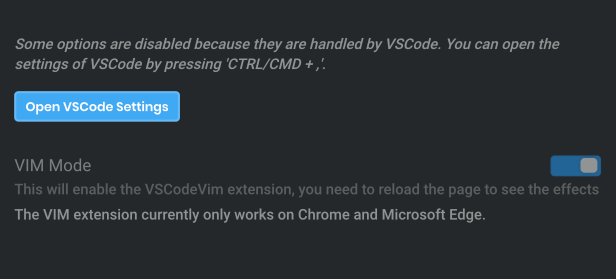
It doesn't let me do it.
nikitavoloboev
on 12 Sep 2019
This is an annoying issue for me as I can't copy things in CodeSandbox on Safari too. I assume due to VIM that doesn't even work. 😞
nikitavoloboev
on 18 Sep 2019
I can't edit the code now. What do I do? I tried resetting the cache and that doesn't fix it.
I believe it's due to Vim mode not working in Safari but I can't turn it off either. 😞
cc @CompuIves @lbogdan
nikitavoloboev
on 2 Oct 2019
Hey @nikitavoloboev, did you try resetting your localStorage? That is where we set the extension settings.
CompuIves
on 3 Oct 2019
That helped, can type now.
Still would love to use Vim extension with Safari.
nikitavoloboev
on 12 Oct 2019
This issue is stale because it has been open many days with no activity. It will be closed soon unless the stale label is removed or a comment is made.
![github-actions[bot] picture](https://avatars2.githubusercontent.com/in/15368?v=4&s=40) github-actions[bot]
on 4 Sep 2020
github-actions[bot]
on 4 Sep 2020
Hey!
This will work as soon as Safari supports lookbhind expressions: https://caniuse.com/#feat=js-regexp-lookbehind
Right now it's lagging behind and there is really not a lot we can do
I am closing this issue since the error is now gone, I hope you understand :/
 SaraVieira
on 4 Sep 2020
SaraVieira
on 4 Sep 2020
Related issues
 andreplaranja
·
3Comments
andreplaranja
·
3Comments
 faceyspacey
·
3Comments
faceyspacey
·
3Comments
 Haroenv
·
3Comments
Haroenv
·
3Comments
 NataliaTepluhina
·
3Comments
NataliaTepluhina
·
3Comments
 donavon
·
3Comments
donavon
·
3Comments
Most helpful comment
Hmm yes, I think this is caused by a regexpression that's used by the VIM Extension that's only supported in Chrome. I opened a PR for the vim extension to remove this logic, I'll check if it got merged so we can update the extension!