Codesandbox-client: Lines mixed together during live code.
Hi Ives,
As requested hereby a screenshot of what happens during live coding:
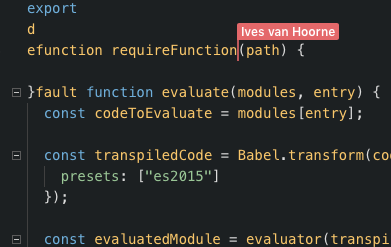
In your Twitch feed you were just typing on a new line, in the code sandbox feed, lines were mixed up.
OS: macOS 10.13.3 (17D102)
Browser: Safari 11.0.3 (13604.5.6)
 MichMich
All 35 comments
Not sure if it's true, but it 'feels' like not all (socket) messages are received, resulting in missing necessary context data (line and character position of cursor).
MichMich
on 6 Apr 2018
Interesting, do you remember approximately when the out-of-sync started happening? After an undo or maybe after a module view change?
 CompuIves
on 6 Apr 2018
CompuIves
on 6 Apr 2018
Every so often. Happend more than once. No particular time or event to pinpoint.
MichMich
on 6 Apr 2018
Hmmm okay, I'll test some more!
CompuIves
on 6 Apr 2018
Idea for debugging: add an incremental id to all socket messages, and check if you receive everything.
MichMich
on 6 Apr 2018
I think this (https://github.com/CompuIves/codesandbox-client/commit/38b1bd21f56880cf82ecff207fae28d8785ede42) fixes the issue! After long testing I found out that after a certain point Windows adds a \r linebreak character, which caused our Operational Transforms to be offset. I'll do more testing before closing this issue.
CompuIves
on 6 Apr 2018
Nice work! Were you able to replicate the issue?
MichMich
on 6 Apr 2018
Yes, characters were inserted out of place. Not sure if this was the only thing causing the problem. Will have to test some more!
CompuIves
on 6 Apr 2018
@CompuIves has that commit been pushed that fixes this issue to the app? I was having the same problem last night when I was streaming on twitch and someone else was coding along with me.
 singletoncoding
on 9 Apr 2018
singletoncoding
on 9 Apr 2018
I pushed it, but this could definitely be a separate issue @singletoncoding. Or it could be a version mismatch, which version are you on (you can find it in the bottom left)? Approximately when did it start happening? After an undo or save or prettify?
I'm going to do a new test run tonight, I'll keep you posted!
CompuIves
on 9 Apr 2018
I'll check once I get home tonight. It was happening last night (4/8/2018) and it was happening for a specific user. He has followed me on twitch, so if he shows up again, we can try to see if we can figure out where the issue is. I think it might have been after a save, but I could be wrong as well.
Thanks for being so responsive and developing this feature. This is such a fantastic idea. I'm loving streaming with others online and having them code with me!
singletoncoding
on 9 Apr 2018
Hmm, I wasn't able to reproduce it yet. I'm curious, do you have a recording of the moment you went out of sync @singletoncoding? Maybe I can derive from that which action caused the loss of sync.
CompuIves
on 10 Apr 2018
@CompuIves I'm about to start streaming here in about 10 - 15 minutes. I'll see if it happens again. If it does, I'll record as much as I can.
singletoncoding
on 11 Apr 2018
This is the 2nd session now where I've experienced this issue really heavily. It seems to correct sometimes when other save, but not always. Below is the version that we were using:
PROD-1523365492
I plan to stream tomorrow night at 7PM CST, not sure if someone could show up that is more familiar with being able to diagnose and what to look for. Tonight, we had a live coding session with 4 simultaneous users (including myself) when we were experiencing the issue.
singletoncoding
on 11 Apr 2018
Ah, that's such a shame to hear! Do you know where I can find the video? I will work on this today and make sure that every sync bug gets squashed.
CompuIves
on 11 Apr 2018
GitHub was too optimistic haha, we need to test this more first.
CompuIves
on 11 Apr 2018
I'm not sure if I can clip on twitch or not. Perhaps I can. If not, the stream is located at https://twitch.tv/singletoncoding I'll be coding again tonight at 7 PM CST.
singletoncoding
on 11 Apr 2018
I did a bigger test (1.5 hours session) with some friends today, with one friend I never had any kind of desync, but with the other friend we got desynced. It turned out that the 'desynced' friend was running on a broken build of CodeSandbox because the service worker had cached half of the assets. It was really confusing, because also other (subtle) functionalities like HMR didn't work for him. The version shown in the bottom left was correct though...
Resetting the service worker fixed all the issues, and we kept in sync for the rest of the session. I'll check if this happened to more people before.
CompuIves
on 11 Apr 2018
Here are a few clips that I took last night with this issue (I have no idea what is going on with the name of the url):
https://clips.twitch.tv/SolidGlutenFreeMinkFreakinStinkin - This is an example of how it had done it.
https://clips.twitch.tv/DeliciousEnjoyableChinchillaBleedPurple - This shows when the user save it corrects the desync
https://clips.twitch.tv/LightDelightfulDeerFrankerZ
None of these show the start of where it desyncs, but hopefully it shows something useful to you.
singletoncoding
on 12 Apr 2018
One other thing too. People have been notifying me during these times that it tells them they do not have permissions to save, even though they have been given access. Perhaps this is a different issue? I know that when things get out of sync a lot, people will perform a refresh to try to get back in but I have checked and they have access when they indicate that they don't have permission to save.
singletoncoding
on 12 Apr 2018
Hmm, maybe there is a version mismatch. I think the desync actually happens because of the save, so I disabled that functionality yesterday.
What first happened is this: when someone saves they send the code of the module as they know it. All clients receiving this code will then set the code to what's sent if it's different.
I think the desync happens here because of a race issue.
An example scenario:
- User 1 makes edits (rev = 1)
- User 2 saves their current version (rev = 0)
- User 1 receives the old code, edits undone. But revision is still 1.
- User 2 receives the edits from step 1, and is now on rev 1.
Now User 1 and User 2 see a different version of the code, but are both on revision 1.
I decided to disable the manual sync for saving for this reason, I deployed it yesterday but it may be the case that some users were still on the old version, because you mentioned that saving caused everything to sync up again (manual code setting).
There is a chance that people still stay out of sync after another save (so User 1 and User 2 are both on rev=1 with same code), because an error is thrown when an edit operation is applied on code that's different from the moment the operation is created. In that case we add the edit to a buffer so we can try again later when we get more edits. In this case it could be the cause of the 'stay-out-of-syncness' hahaha.
So the first solution was deployed yesterday, disable manual syncing for live.
I will try to deploy the second solution today, which is version checking between all collaborators and letting users know that they eg. need to update before joining the session.
Hopefully that will fix the issue you've shown as well! I will take a closer look at the videos after dinner 😄
CompuIves
on 12 Apr 2018
Thanks for all of the hard work on this! Live is truly an amazing feature. If there is anything additional that I can do to help you troubleshoot this, I will do my best, just let me know.
singletoncoding
on 12 Apr 2018
It seems to still be having issues. These were recorded on Wednesday night, April 18th:
https://clips.twitch.tv/BlatantSolidCakeBudBlast - I'm thinking that it desynced when the other person used the left arrow after creating open and close curly braces.
https://clips.twitch.tv/AntediluvianCredulousLyrebirdPraiseIt - Ignore me giving someone a hard time about how their code was breaking the application. But, you will notice that it keeps adding imports to the bottom of the file. This seems to happen all the time.
https://clips.twitch.tv/BoredComfortableNarwhalPogChamp - This shows how when someone hit save, it re-synced, but added the import to the bottom of the file.
https://clips.twitch.tv/KathishExcitedQuelea4Head - Here is the last example, where it shows that they went out of sync again while they were changing a single line.
Hopefully, these videos help. They're all 60 seconds long, so hopefully not too long.
singletoncoding
on 21 Apr 2018
Thank you so much @singletoncoding, this is sooooo helpful! I will look at the reproductions this evening and try to figure out what is causing a desync.
I think we've almost covered all 'desync leaks', can't wait to have a perfectly robust system!
This shows how when someone hit save, it re-synced, but added the import to the bottom of the file.
Is this one recent? Because I disabled this behaviour I think somewhere last week.
CompuIves
on 22 Apr 2018
This happened April 18th, around 10 PM CST. Hope that helps. I stream on Tuesday and Wednesday nights in CST time, so if it keeps happening, I'll give you another update this coming week.
I think we've almost covered all 'desync leaks', can't wait to have a perfectly robust system!
I'm loving the system and really excited to get rid of the last few quirks.
Thank you so much @singletoncoding, this is sooooo helpful! I will look at the reproductions this evening and try to figure out what is causing a desync.
I'll keep them coming as long as needed! I just hope they help you figure out what's going on. Let me know if there's anything that I can do to give you a bit more information. Happy to help how I can.
singletoncoding
on 23 Apr 2018
Any update on this? I've continued to see some behavior that has made it be hard for me to use it on stream, such as this last night (May 2nd)...
singletoncoding
on 3 May 2018
The video you just sent is perfect @singletoncoding! It perfectly illustrates a bug that I can pinpoint, it seems like the prettify on the side of the other doesn't sync perfectly.
I'm sorry for the silence on this issue by the way, I wasn't sure if there was still an issue in the latest version but now see a perfect reproduction. I'll take a look at it this week (I'm in SF right now, so similar timezone) and fix it.
One thing I'd like to know, I see there's an undo there. Do you remember who did the undo?
CompuIves
on 3 May 2018
No undo from me, at least. I can't speak for the other person.
singletoncoding
on 4 May 2018
I ran into this issue today. I'm hopeful for even a workaround that resyncs the session without disconnecting other live coders.
 erezny
on 31 Aug 2018
erezny
on 31 Aug 2018
Looking at this now! There seems to be an issue with syncing undos. I will create a fix for this today.
CompuIves
on 10 Sep 2018
Heya! After a lot of testing and adding this bug fix I think that we've reached a stable point with Live synchronization.
I will leave this issue open for a week, let me know if there's any sync issue that you might get. I will fix them as fast as possible!
CompuIves
on 11 Sep 2018
This happens a lot when I do "Command + Z"
 eminaz
on 26 Oct 2018
eminaz
on 26 Oct 2018
We saw this yesterday during my team's first attempt at a live session, we had to fall back to a Zoom webconference which was not nearly as good :(
 camflan
on 6 Dec 2018
camflan
on 6 Dec 2018
Ahh I couldn't find why this still happened, but it turns out that the VSCode editor was using an outdated version of the CodeSandbox Live logic. That explains a lot. Hopefully this PR will fix it (https://github.com/CompuIves/codesandbox-client/pull/1362) for VSCode as well.
CompuIves
on 8 Dec 2018
I'm closing this one until we get new reports! For me everything seems to be working very well now.
CompuIves
on 12 Dec 2018
Related issues
CompuIves
·
3Comments
 MarcelloTheArcane
·
3Comments
MarcelloTheArcane
·
3Comments
 zocky
·
3Comments
zocky
·
3Comments
 Haroenv
·
3Comments
Haroenv
·
3Comments
 miukimiu
·
3Comments
miukimiu
·
3Comments
Most helpful comment
Ahh I couldn't find why this still happened, but it turns out that the VSCode editor was using an outdated version of the CodeSandbox Live logic. That explains a lot. Hopefully this PR will fix it (https://github.com/CompuIves/codesandbox-client/pull/1362) for VSCode as well.