Codesandbox-client: how to get rid of cross-origin error?
IN FIREFOX: When I execute my code the typical error I should get is: "TypeError: Cannot read property 'setState' of undefined", instead I received a very weird cross-origin error.
Here is a screenshot of the error:
http://prntscr.com/iwipnb

Error
A cross-origin error was thrown. React doesn't have access to the actual error object in development. See https://fb.me/react-crossorigin-error for more information.
here is my code: https://codesandbox.io/s/4885l37xrw
How can I avoid the cross-origin error in Codesandbox?
 mescalito
All 65 comments
It looks like you need to enable CORS on your S3 bucket that serves: https://s3-eu-west-1.amazonaws.com/codesandbox-downtime/downtime.json
To do so, just navigate to your bucket, then click the Permissions tab, then in the CORS box enter an XML document with the permissions you'd like. Sample permissions to allow any host to make a GET request:
<?xml version="1.0" encoding="UTF-8"?>
<CORSConfiguration xmlns="http://s3.amazonaws.com/doc/2006-03-01/">
<CORSRule>
    <AllowedOrigin>http://*</AllowedOrigin>
    <AllowedOrigin>https://*</AllowedOrigin>
    <AllowedMethod>GET</AllowedMethod>
</CORSRule>
<CORSRule>
    <AllowedOrigin>*</AllowedOrigin>
    <AllowedMethod>GET</AllowedMethod>
</CORSRule>
</CORSConfiguration>
Thanks to: duhaime
https://stackoverflow.com/questions/49493279/react-js-how-to-get-rid-of-cross-origin-error-in-codesandbox
mescalito
on 26 Mar 2018
This is a serious issue, we need to fix this quick. The reason for these cross origin errors is that we use eval to evaluate the code in the browser (https://reactjs.org/docs/cross-origin-errors.html#source-maps). The solution is to put the code in script tags, and we can definitely do that, but it's a big change to our bundler.
I will take a look at it this weekend, and check if performance is affected if we put all code in script tags. Thanks for opening this issue!
 CompuIves
on 27 Mar 2018
CompuIves
on 27 Mar 2018
I'm seeing the same issue with a simple Node service running on Now (Zeit). I can send POST's to the service, but GET's and any data returned on POST's is ignored (fetch is showing CORS errors and XHTTP puts up a response status of 0 instead of 200).
(Code at https://codesandbox.io/s/1oyy6mp0vq and https://zeit.co/sirbryan/simplenode/uhnsgppoho/source?f=index.js )
 SirBryan
on 10 May 2018
SirBryan
on 10 May 2018
@SirBryan You need to return CORS headers from your Node service, in order to be able to access it from external sites (like your codesandbox.io sandbox).
 lbogdan
on 10 May 2018
lbogdan
on 10 May 2018
Thanks for that reminder. It had been a while since I had to mess with headers on the server end...
SirBryan
on 18 May 2018
@CompuIves I'm having a similar issue when trying to make a API call to https://deckofcardsapi.com/api/deck/new/
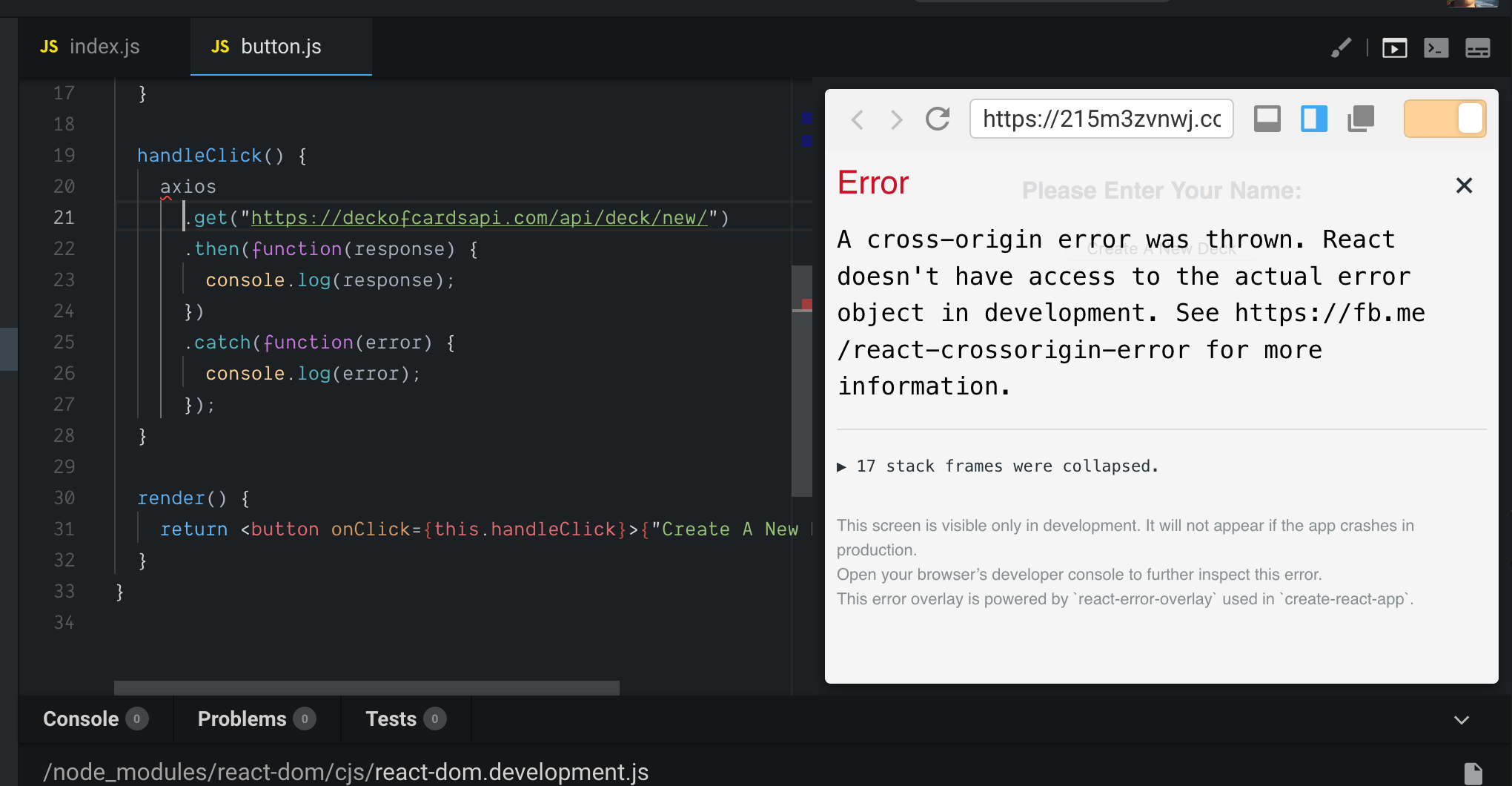
How can I resolve this?
 boscorona
on 8 Aug 2018
boscorona
on 8 Aug 2018
Hmm, I think that decks of card API should return CORS headers to make it work from cross origins in this case. Or you could set up your own proxy that adds the headers locally with something like express-proxy, but that's quite hacky.
CompuIves
on 9 Aug 2018
Yes looks like the API isn't returning CORS headers, I'll have to develop locally. Thanks for the help @CompuIves.
boscorona
on 17 Aug 2018
@CompuIves @mescalito @lbogdan I had same issue.
Then I came to know that the custom method I used, I didn't binded like this.customMethod = this.customMethod.bind(this); or used arrow function syntax instead.
So it's like we have to use either arrow functions by adding babel preset or we have to bind it.
It's now working :raised_hands:
 meetzaveri
on 4 Jan 2019
meetzaveri
on 4 Jan 2019
I have the error if I create <custom-elements> wrap them with @skatejs/val to render them with react 😲
https://codesandbox.io/s/l4jkw43q7
As soon as I remove all wrapper custom elements, all CORS errors are gone.
I have no special API or whatever calls 🤔
Only the hyperscript (h) function os React.createElement is wrapped and I have an inline /** @jsx h */ comment.
EDIT:
Meanwhile I found the bug, @skatejs/val seems not to support implicit children passed by spreaded {...this.props}, instead I had to explicitly use JSX-style children.
 AndyOGo
on 20 Mar 2019
AndyOGo
on 20 Mar 2019
Hopefully this was solved, and we forgot to close it.
lbogdan
on 21 Mar 2019
@lbogdan
I hope so too, but I experienced the bug yesterday 🤔
AndyOGo
on 21 Mar 2019
Looks like I got lost in the unrelated comments, and missed the actual issue 🙂 , reopening.
lbogdan
on 21 Mar 2019
Yes! Still valid bug, the problem is that we execute code using eval, and that causes React to have this cross origin issue. I can make an exception and include the UMD build of React as a script tag to circumvent the issue. It's really ugly and manual, but would at least solve this.
Another way might be to evaluate everything using script tags, but this is quite tricky since every file would require its own script tag.
CompuIves
on 21 Mar 2019
I don't know the current implementation.
But from what you say, I'm convinced that one script tag for each file is the best option.
Correct me, if I'm wrong. I would object that this isn't tricky at all.
If you do know all scripts, iterate over all files and eval their content?
You would just replace eval by document.createElement('script'); ... and append it to the DOM.
Maybe you have to occasionally remove/replace those script tags if they get outdated or removed, etc 🤔
AndyOGo
on 21 Mar 2019
Has this bug been addressed? or is the solution switching to codepen?
 iamricky
on 3 Apr 2019
iamricky
on 3 Apr 2019
Correct me, if I'm wrong. I would object that this isn't tricky at all.
That's right! Implementation wise I think that it's not a lot of changes, I'm a bit afraid for sandboxes with >1000 files. Creating 1000 script tags for a sandbox might be expensive, but then again, I haven't tested it yet. We're on a bug fixing spree this week so I think we'll address this this week!
CompuIves
on 3 Apr 2019
Has this bug been addressed? or is the solution switching to codepen?
No and yes
 SaraVieira
on 3 Apr 2019
SaraVieira
on 3 Apr 2019
I see, that could be maaaany files 🤔
I haven't tested so many files either, but would it be possible to concatenate them or run a full fledged build?
How about the Function constructor? Does it have the same cross origin issue?
Seems not, as the react docs says:
Some JavaScript bundlers may wrap the application code with
evalstatements in development. (For example Webpack will do this ifdevtoolis set to any value containing the word “eval”.) This may cause errors to be treated as cross-origin.
https://reactjs.org/docs/cross-origin-errors.html#source-maps
AndyOGo
on 3 Apr 2019
I am still experiencing this issue. Here is a sandbox link I am working on: https://codesandbox.io/s/n4xno16npj. Not sure if this is GraphCMS setting or codesandbox issue.
 shrutikapoor08
on 3 Apr 2019
shrutikapoor08
on 3 Apr 2019
@CompuIves I started to provide above PR, from a first quick github search I hope haven't missed something.
AndyOGo
on 3 Apr 2019
May it helps to enable CORS as suggested here:
https://stackoverflow.com/questions/48953727/display-cross-origin-react-error-boundary-errors-with-webpack-devtool-eval
And here is an extensive issue discussion:
https://github.com/facebook/react/issues/10441
AndyOGo
on 14 Apr 2019
Also setting 'unsafe-eval' For CSP header could help🤔
https://developer.mozilla.org/en-US/docs/Web/HTTP/Headers/Content-Security-Policy/script-src
AndyOGo
on 14 Apr 2019
If anyone is looking for a temporary work-around to be able to inspect the error object closer (without being blocked by "A cross-origin error was thrown"...). You could create a new Chrome shortcut and append some flags to make it unsafe (no more CORS):
Add
--disable-web-security --user-data-dir="C:/ChromeDevSession"
to the launch target.
 robertkofoed
on 8 May 2019
robertkofoed
on 8 May 2019
@robertkofoed this temporary work-around is not something a general user is able to do during their codesandbox.io session. It is a react/webpack issue.
The issue is when using the provided react/react-dom dependencies from the create-react-app generated react sandbox, the user is unable to edit any of the webpack config files. As @CompuIves mentioned, it is a code execution issue, where CodeSandbox uses eval to evaluate code, and if a user has used CRA using the template for a react sandbox, this is not something the user can change. @CompuIves had mentioned using cdn scripts to provide react/react-dom, but the scale switch is very daunting. Is there any way to enhance error boundary notices to tell the user to try binding methods to components or telling them that they should try creating a generic sandbox and then adding webpack, react, reactdom, .... as I'm typing this, I realize that I don't want to do that, and I'm sure most other users are not going to want to do that.... A fix for this is requested still.
Sidenote: I also received this react cross-origin error when trying to wrap THREE.js inside a React component.
 SHoar
on 7 Jun 2019
SHoar
on 7 Jun 2019
As at this minute am still getting the same error.
 phavor
on 2 Jul 2019
phavor
on 2 Jul 2019
@phavor Replied on Twitter. 🙂
lbogdan
on 2 Jul 2019
@lbogdan @CompuIves
Did you have any chance to look into setting Content-Securty-Headers for script-src at your servers?
https://developer.mozilla.org/en-US/docs/Web/HTTP/Headers/Content-Security-Policy/script-src
AndyOGo
on 2 Jul 2019
@lbogdan @CompuIves
Here is another great article about CSP:
https://developer.chrome.com/extensions/contentSecurityPolicy#JSEval
AndyOGo
on 16 Jul 2019
I think the only way of fixing this issue is by not using eval or Function for loading the JS bundle of React. If we load it using eval or Function React doesn't have access to the error stacktrace, which is the root cause of the issue.
The easiest fix for this, since React is the only library with this issue, is to add an override and specify that for React we load the UMD bundle from unpkg.com. This will make it possible for React to see the stacktrace and shouldn't change the behaviour for the user. I'll put it on my list, hopefully I can have something ready today.
CompuIves
on 16 Jul 2019
@CompuIves @lbogdan
According to the Content Security Policy spec, a <meta> tag can also be used to set script-src 🎉 Like:
<meta http-equiv="Content-Security-Policy" content="script-src 'self' 'unsafe-eval'">
That doesn't even need a server change and would cover all cases, not only React.
AndyOGo
on 16 Jul 2019
Would be super nice to have solution for this…
I'm trying to showcase an error in some other OSS library and went on to use codesandbox to provide a reproducable case, only to realise it doesn't show the error at all, but instead I got hit with the masked error described in here :/
 stnwk
on 30 Jul 2019
stnwk
on 30 Jul 2019
Haven't really investigated why or in much depth, but thought it might be worth mentioning that I experience this problem with react/react-dom 16.9.0, but not 16.8.4.
 jonnyasmar
on 23 Aug 2019
jonnyasmar
on 23 Aug 2019
Yup got the same issue with React 16.9.0 too: https://codesandbox.io/s/codesandbox-cross-origin-error-usxnb
 lintonye
on 2 Sep 2019
lintonye
on 2 Sep 2019
I have the same error in code here: https://codesandbox.io/s/reactjs-popup-issue-template-f8ibg. Not using
However wrapping AudioCalibrator component in Popup works perfectly: https://codesandbox.io/s/reactjs-popup-issue-template-2dr8e
 leonbrag
on 16 Sep 2019
leonbrag
on 16 Sep 2019
https://github.com/codesandbox/codesandbox-client/pull/1711 does this resolve the issue?
 startupgurukul
on 18 Sep 2019
startupgurukul
on 18 Sep 2019
@startupgurukul no #1711 does not 😞
Anyway I would really like to go with CSP headers:
According to the Content Security Policy spec, a
<meta>tag can also be used to setscript-src🎉 Like:<meta http-equiv="Content-Security-Policy" content="script-src 'self' 'unsafe-eval'">That doesn't even need a server change and would cover all cases, not only React.
But this has to be done either at the servers or with above <meta> tag
AndyOGo
on 18 Sep 2019
The error has been there from a long time and reactjs offical page seems to be using codepen for examples now, sad to see such a well-architected solution not getting much love
startupgurukul
on 19 Sep 2019
Got this issue with React 16.9
Downgraded to React 16.8.6 and the issue no longer manifests on Codesandbox
 perich
on 20 Sep 2019
perich
on 20 Sep 2019
Just got the error out of a blue: https://6gtpg.csb.app/
Is there any workaround or can we get any ETA on when this will be fixed?
 alesmenzel
on 24 Sep 2019
alesmenzel
on 24 Sep 2019
I ran into this issue as well with React 16.11.0.
 alexdevero
on 26 Oct 2019
alexdevero
on 26 Oct 2019
I ran into this issue as well with React 16.11.0.
Same here with useHistory hook. Try uncommenting the useHistory lines in src/App.tsx file of my otherwise working sandbox. This happens in Chrome. If I open it with Edge, the error is slightly different: TypeError: Unable to get property 'history' of undefined or null reference
 madrus
on 13 Nov 2019
madrus
on 13 Nov 2019
I ran into this issue as well with React 16.11.0.
Same here with
useHistoryhook. Try uncommenting the useHistory lines insrc/App.tsxfile of my otherwise working sandbox. This happens in Chrome. If I open it with Edge, the error is slightly different:TypeError: Unable to get property 'history' of undefined or null reference
Good observation.
This error may not be specifically about cross-origin problem. In my app, I solved this error by adding some default, empty, values for the data I wanted to fetch from API. After this, the error disappeared and app worked.
So, the real error can actually be caused by some null or undefined, not cross-origin error per se.
Any thoughts about this @CompuIves?
alexdevero
on 13 Nov 2019
Allowed CORS using https://addons.mozilla.org/en-US/firefox/addon/access-control-allow-origin/
Expected this issue to be gone. but that did'nt happen. may be there is another reason. or am i missing something here?
 santosh898
on 13 Nov 2019
santosh898
on 13 Nov 2019
Still having this issue, and it's hindering our company's ability to use this as a tool for remote interviews. Obviously, we cannot ask our hiring candidates to fiddle around with their browsers to overcome these issues.
 dejay-at-work
on 14 Nov 2019
dejay-at-work
on 14 Nov 2019
can't debug serverless code due to this issue. It's working fine elsewhere. I'm stuck with the same issue in vscode debug.
 chintanvyas360
on 29 Nov 2019
chintanvyas360
on 29 Nov 2019
I just created a PR #3098 to set proper Content Security Policy to fix React's cross-origin error.
@mescalito
@nbosco
@alexdevero
@shrutikapoor08
@startupgurukul
@chintanvyas360
@leonbrag
@CompuIves
@lbogdan
I would be happy if we can collect your reproduction examples and check if they work now.
I used following reproduction examples:
- broken: https://codesandbox.io/embed/ly0q02y9q9
- works (PR): https://pr3098.build.csb.dev/s/dawn-tdd-cg7ny
- broken (@shrutikapoor08 ): https://codesandbox.io/s/n4xno16npj
works (PR): https://pr3098.build.csb.dev/s/nifty-taussig-t0rr7
broken (@leonbrag ): https://codesandbox.io/s/reactjs-popup-issue-template-f8ibg
- works (PR): https://pr3098.build.csb.dev/s/gifted-satoshi-7wv8q
AndyOGo
on 29 Nov 2019
This happened to me when I accidentally invoked setState within a React Functional Component.
https://codesandbox.io/s/react-88o0s
Without eslint to identify the problem, this is hard to track down.
 jdolearydl
on 3 Dec 2019
jdolearydl
on 3 Dec 2019
@jdolearydl
I also created a reproduction for your case at my PR #3098
- broken: https://codesandbox.io/s/react-88o0s
- works (PR): https://pr3098.build.csb.dev/s/react-q1xc8
AndyOGo
on 3 Dec 2019
@AndyOGo I hope after, that after merging those PRs issue will be gone? Is it really codesandbox issue? I also have same error w React/ReactDOM, Redux and Express and connected-react-router, but I'm not yet sure if it's the fact of my code or codebox behavior?
Here is url to original codebox I found recently - https://codesandbox.io/s/ymk0787ox
I wanted to fix it, forked, - I tried to downgrade to React DOM 16.8.6 but then I faced with my forked version can't run now anyhow (browser stuck).
 alundiak
on 6 Dec 2019
alundiak
on 6 Dec 2019
Sometime the cross origin error occurs if you forget to import react when using JSX. (https://github.com/yannickcr/eslint-plugin-react/blob/master/docs/rules/react-in-jsx-scope.md). For example, inside codesandbox
index.js
import React from 'react';
import ReactDOM from 'react-dom';

import App from './app';

import './styles.css';

function Main() {
  return <App />;
}

const rootElement = document.getElementById('root');
ReactDOM.render(<Main />, rootElement);
app.js
// This gonna cause error in codesandbox (currently).
function App() {
  return <p>asdasd</p>;
}

export default App;
app.js
// This should solve the error.
import React from 'react';

function App() {
  return <p>asdasd</p>;
}

export default App;
Yes, the cross origin is confusing since we don't know what actually the error is... :bowing_man:
 jeffryang24
on 10 Dec 2019
jeffryang24
on 10 Dec 2019
Current temporary solution to let you know the actual error is by using error boundary and then open the project in the new window. You will find the clue for your error inside the browser console in your new browser window. (The error doesn't appear inside codesandbox console... :thinking: don't know why...)
ErrorBoundary.js (copy paste from react official doc here)
import React, { Component } from 'react';

class ErrorBoundary extends Component {
  state = {
    hasError: false
  };

  static getDerivedStateFromError(error) {
    return { hasError: true };
  }

  componentDidCatch(error, errorInfo) {
    console.log(`Error: `, error);
    console.log(`Error info: `, errorInfo);
  }

  render() {
    if (this.state.hasError) {
      return <p>Oops.... Error just invaded this page...</p>;
    }

    return this.props.children;
  }
}

export default ErrorBoundary;
Then, wrap you App children with error boundary, such us
<ErrorBoundary>
  <FormProvider>
    <MyApp />
  </FormProvider>
</ErrorBoundary>
Finally, open your project in new window. React will give a little clue about your error... :bowing_man:

Above error is an example for my previous thread...
jeffryang24
on 10 Dec 2019
Current temporary solution to let you know the actual error is by using error boundary and then open the project in the new window. You will find the clue for your error inside the browser console in your new browser window. (The error doesn't appear inside codesandbox console... don't know why...)
ErrorBoundary.js (copy paste from react official doc here)
import React, { Component } from 'react';

class ErrorBoundary extends Component {
  state = {
    hasError: false
  };

  static getDerivedStateFromError(error) {
    return { hasError: true };
  }

  componentDidCatch(error, errorInfo) {
    console.log(`Error: `, error);
    console.log(`Error info: `, errorInfo);
  }

  render() {
    if (this.state.hasError) {
      return <p>Oops.... Error just invaded this page...</p>;
    }

    return this.props.children;
  }
}

export default ErrorBoundary;
Then, wrap you
Appchildren with error boundary, such us<ErrorBoundary> <FormProvider> <MyApp /> </FormProvider> </ErrorBoundary>Finally, open your project in new window. React will give a little clue about your error...
Above error is an example for my previous thread...
Sorry, actually you don't need error boundary. Just open your project in the new window, and you will find the error clue inside the browser console. :bowing_man:
jeffryang24
on 10 Dec 2019
In case it is helpful, here is a Minimal non-Working Example (MnWE) of the CORS error. Maybe a dozen lines in all. The only external resources are completely standard (Material-UI).
This is the second project in a row where this has happened, so I am guessing it happens to a lot of folks.
 natkuhn
on 12 Dec 2019
natkuhn
on 12 Dec 2019
In case it is of any help, here is a minimal example of the problem, less than a dozen lines of code, using just React and Material-UI.
https://codesandbox.io/s/cors-error-demo-uvsoo
The error is caused by an undefined variable in the JSX (which is even noted by the syntax highlighter). If you un-comment the variable's declaration, everything works as expected.
Here is index.js:
/*
Minimal non-Working Example of codesandbox CORS error
If you un-comment the declaration of `fail`, it works fine.
But for me, as is, it throws a cross-origin error,
on both Chrome and Firefox.
*/

import React from "react";
import ReactDOM from "react-dom";
import { Typography } from "@material-ui/core";

// const fail="error";

function Demo() {
  return (
    <Typography color={fail}>
      Cross-origin error demo
    </Typography>
  );
}

ReactDOM.render(<Demo />, document.querySelector("#root"));
And index.html
<body>
  <!-- Fonts to support Material Design -->
  <link rel="stylesheet" href="https://fonts.googleapis.com/css?family=Roboto:300,400,500,700&display=swap" />
  <!-- Icons to support Material Design -->
  <link rel="stylesheet" href="https://fonts.googleapis.com/icon?family=Material+Icons" />
  <div id="root"></div>
</body>
One more use case I encountered that throws A cross-origin error was thrown. When using a class before its declaration.
Does throw error
import React from "react";
import ReactDOM from "react-dom";

ReactDOM.render(<App />, document.getElementById("root"));

class App extends React.Component {
  render() {
    return "The App";
  }
}
Does not throw
import React from "react";
import ReactDOM from "react-dom";

class App extends React.Component {
  render() {
    return "The App";
  }
}

ReactDOM.render(<App />, document.getElementById("root"));
Keep in mind, a class not a function.
Much like their function counterparts, JavaScript class declarations are hoisted. However, they remain uninitialised until evaluation.
https://scotch.io/tutorials/understanding-hoisting-in-javascript
 iamandrewluca
on 18 Dec 2019
iamandrewluca
on 18 Dec 2019
confirmed on January 4th, 2020 on the latest React version (v16.12.0). come on, codesandbox. it's already 2020 and haven't solved yet.
this issue post must be bumped to the uppermost list
 handhikadj
on 4 Jan 2020
handhikadj
on 4 Jan 2020
Hey! I finaaaally found the issue after long debugging. I was confused, as the error never happened both on the PR builds and on dev. Initially, I thought this happened because of having self-signed certificates. But after verifying that the error even happens after using the right certificates, I started to look at other differences.
The difference turns out to be that sandboxes load their script files from the root domain (codesandbox.io), we do this to use the browser cache whenever possible. If you load 2 sandboxes then the second sandbox should load their files from cache. The tricky thing is that we only do this in production, not in our pr branch builds, not in our dev builds, not even in our local docker builds.
When looking at the React documentation I saw that using eval was discouraged, so I thought that the use of eval was the problem, and that we should find a different way of executing the code. This was the real distraction, because it turns out that using eval is not the problem, it's only a problem if the script that runs eval is from a different origin.
The errors started to show up correctly after adding crossorigin to the script files of the sandbox. So now everything is finally fixed! I'm sorry for the long time of the fix, the distraction on eval, combined with the fact that it could only be reproduced on codesandbox.io, caused me to take far too long.
TLDR: the problem was not using eval, the problem was the actual scripts that run eval were from a cross origin. It's now finally fixed!
CompuIves
on 7 Jan 2020
Thanks, Ives, that is great news!
It would have been very helpful to have a post earlier on saying something like, “We are aware of this issue and we are working on it.” That way, we know someone is listening!
It’s a great site, and I’m really glad I will be able to count on it once again. Thanks for everything you are doing.
On Jan 7, 2020, at 8:00 AM, Ives van Hoorne notifications@github.com wrote:
Hey! I finaaaally found the issue after long debugging. I was confused, as the error never happened both on the PR builds and on dev. Initially, I thought this happened because of having self-signed certificates. But after verifying that the error even happens after using the right certificates, I started to look at other differences.
The difference turns out to be that sandboxes load their script files from the root domain (codesandbox.io), we do this to use the browser cache whenever possible. If you load 2 sandboxes then the second sandbox should load their files from cache. The tricky thing is that we only do this in production, not in our pr branch builds, not in our dev builds, not even in our local docker builds.
When looking at the React documentation I saw that using eval was discouraged, so I thought that the use of eval was the problem, and that we should find a different way of executing the code. This was the real distraction, because it turns out that using eval is not the problem, it's only a problem if the script that runs eval is from a different origin.
The errors started to show up correctly after adding crossorigin to the script files of the sandbox. So now everything is finally fixed! I'm sorry for the long time of the fix, the distraction on eval, combined with the fact that it could only be reproduced on codesandbox.io, caused me to take far too long.
TLDR: the problem was not using eval, the problem was the actual scripts that run eval were from a cross origin. It's now finally fixed!
—
You are receiving this because you are subscribed to this thread.
Reply to this email directly, view it on GitHub https://github.com/codesandbox/codesandbox-client/issues/667?email_source=notifications&email_token=ABGZVJVHKOEPCYP3HOZLJI3Q4R4IFA5CNFSM4EXMBIW2YY3PNVWWK3TUL52HS4DFVREXG43VMVBW63LNMVXHJKTDN5WW2ZLOORPWSZGOEIIY7CY#issuecomment-571576203, or unsubscribe https://github.com/notifications/unsubscribe-auth/ABGZVJUXQKBEU2C5LRF2D3TQ4R4IFANCNFSM4EXMBIWQ.
natkuhn
on 7 Jan 2020
We are aware of this issue and we are working on it.
I agree, I need to work on our communication here. It's one of my intentions for 2020! 😄
CompuIves
on 7 Jan 2020
AWWEESSOOOMMEEE!!!!
AndyOGo
on 7 Jan 2020

 AlfredBryan
on 23 Jan 2020
AlfredBryan
on 23 Jan 2020
Would be better to give some context first, we all know how error looks like :smile:
iamandrewluca
on 23 Jan 2020
Still getting this issue.
 Omar-Aziz
on 11 Jul 2020
Omar-Aziz
on 11 Jul 2020
@Omar-Aziz, can you please post a link to whichever sandbox your using showing CORS errors?
 oskarabc
on 13 Jul 2020
oskarabc
on 13 Jul 2020
Related issues
 Haroenv
·
3Comments
Haroenv
·
3Comments
 k15a
·
3Comments
k15a
·
3Comments
 wojciechczerniak
·
3Comments
wojciechczerniak
·
3Comments
 NataliaTepluhina
·
3Comments
NataliaTepluhina
·
3Comments
 oliversturm
·
3Comments
oliversturm
·
3Comments
Most helpful comment
This is a serious issue, we need to fix this quick. The reason for these cross origin errors is that we use
evalto evaluate the code in the browser (https://reactjs.org/docs/cross-origin-errors.html#source-maps). The solution is to put the code in script tags, and we can definitely do that, but it's a big change to our bundler.I will take a look at it this weekend, and check if performance is affected if we put all code in script tags. Thanks for opening this issue!