Codesandbox-client: React DevTools doesn't work on sandbox
Currently the DevTools defaults to the React version of CodeSandbox, it should default to the sandbox.
 CompuIves
All 10 comments
It looks like to debug an iframe, the React devtools electron app can be used. See https://github.com/facebook/react-devtools/issues/76
Is there a way to modify the <head> to add a <script> before the bundle?

 ryanbraganza
on 21 Jul 2017
ryanbraganza
on 21 Jul 2017
Happy to help here. Not sure which direction @CompuIves wants to take this -- as a separate window which is odd to me or part of the react dev tools plugin. There are also several places where react-dom is initialized so not sure where I'd place the block if (window.parent !== window) { mentioned in https://github.com/facebook/react-devtools/issues/76.
 artivilla
on 17 Oct 2017
artivilla
on 17 Oct 2017
For others which find this issue after searching something like 'React devtools codesandbox' and need a workaround - You can now use the React DevTools by opening the iframe in a new window:
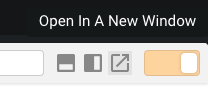
Then use the DevTools on the new tab 👍
Thanks to Kent C Dodds for revealing this solution to me!
 JonShort
on 1 May 2018
JonShort
on 1 May 2018
And for those who search for "vue devtools codesandbox", this also works for Vue! :slightly_smiling_face:
 lbogdan
on 1 May 2018
lbogdan
on 1 May 2018
Just in time for the spring cleaning, so that I can close this long-standing issue! :clap:
lbogdan
on 1 May 2018
I've had no luck getting vue devtools to work on codesandbox even with the sandbox running inside a new window, has anyone else? When I move any vue project from codesandbox to local machine it does work however.
 PeterKnight
on 25 Sep 2018
PeterKnight
on 25 Sep 2018
@PeterKnight It's working here:

lbogdan
on 25 Sep 2018
for me the vue devtools extension shows "Vue.js not detected", I'm running windows 10 x64 and have tried 3 different browsers with the latest vue devtools installed.
PeterKnight
on 25 Sep 2018
Hint: it doesn't need to be detected in order to work (if you look closely you'll see my Vue icon is grayed, too). Just open Chome DevTools and go to the Vue tab. 🙂
lbogdan
on 25 Sep 2018
Lol, it does! Thanks @lbogdan
PeterKnight
on 25 Sep 2018
Related issues
 waruyama
·
3Comments
waruyama
·
3Comments
 supersonicclay
·
3Comments
supersonicclay
·
3Comments
 miukimiu
·
3Comments
CompuIves
·
3Comments
miukimiu
·
3Comments
CompuIves
·
3Comments
 Haroenv
·
3Comments
Haroenv
·
3Comments
Most helpful comment
For others which find this issue after searching something like 'React devtools codesandbox' and need a workaround - You can now use the React DevTools by opening the iframe in a new window:

Then use the DevTools on the new tab 👍
Thanks to Kent C Dodds for revealing this solution to me!