Codeceptjs: Assertions on a page with fields with the same name
Hi,
I am working on a web site that has forms with multiple fields that share the same name. I want to be able to assert the value of each of these text boxes.
For example, given a page that has multiple text boxes with the same name:
  <div>
    <input type="text" name="txtName">  <!-- has value of david -->
    <input type="text" name="txtName">  <!-- has value of emma -->
    <input type="text" name="txtName">  <!-- has value of joa -->
  </div>
I want to be able to assert the value of each of these fields. Is there any way I could assert the value of each of these fields?
I've tried by name with index, like so:
I.seeInField('txtName[1]', 'emma');
but I get a failure: "invalid selector: An invalid or illegal selector was specified"
I've also tried using xpath
I.seeInField("//input[@name='txtName'][2]", 'emma');
here I get a failure of : "Field //input[@name='txtName'][2] not found by name|text|CSS|XPath
Is there an easy way to assert fields that share the same name? or is this not supported?
Thank you,
David
 dsypien
All 4 comments
This both options should work for you:
// xpath
I.seeInField("//input[@name='txtName'][2]", 'emma');
// css
I.seeInField("input[name='txtName']:nth-child(2)", 'emma');
Just tried and added this to internal codeceptjs tests
 DavertMik
on 10 Dec 2016
DavertMik
on 10 Dec 2016
Thank you Michael,
That works for that scenario. I found a different scenario in which assertions don't work. It's the case where each of these fields are in their own container. Like this for example:
<html><body>
<table>
<tr>
<td>
<input type="text" name="txtName" value="david">
</td>
</tr>
<tr>
<td>
<input type="text" name="txtName" value="emma">
</td>
</tr>
<tr>
<td>
<input type="text" name="txtName" value="joa">
</td>
</tr>
</table>
</body>
</html>
I commented the results of query by xpath and css in the following snippet:
// xpath
I.seeInField("//input[@name='txtName'][2]", 'emma');
// Result --> Failure: //input[@name='txtName'][2] not found by name|text|CSS|XPath
// css
I.seeInField("input[name='txtName']:nth-child(2)", 'emma');
// Result --> Failure: (expected: emma) (actual: david)
Is there a way to query the second and third values of 'txtName' in this example?
Thank you
dsypien
on 12 Dec 2016
Yep, XPath can do that. You can dig into some manuals about it, w3schools is a good place to start.
You need to specify the path to identify the element, not it is:
//table/tr[0]/td/input[@name='txtName'] -> david
//table/tr[1]/td/input[@name='txtName'] -> emma
//table/tr[2]/td/input[@name='txtName'] -> joa
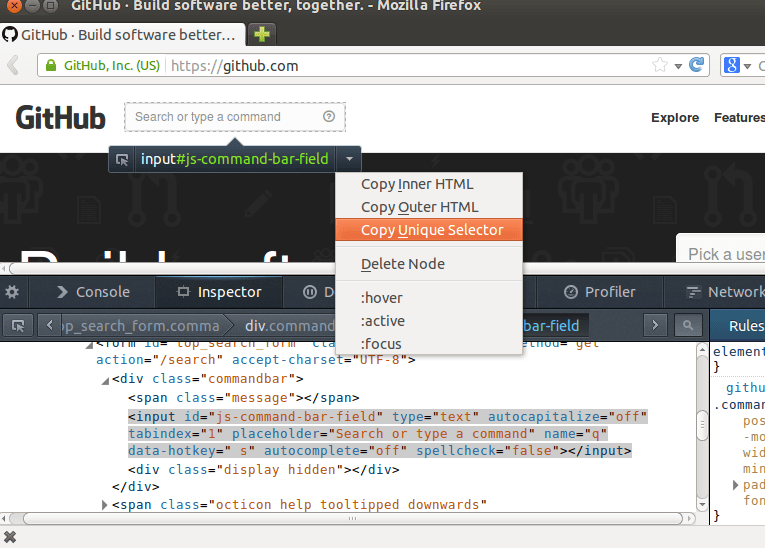
Like this. In Firefox there is a copy locator button you can use to get unqiue XPath for page elements
DavertMik
on 13 Dec 2016
@DavertMik Thanks for pointing me in the right direction 👍
dsypien
on 13 Dec 2016
Related issues
 hanthomas
·
4Comments
hanthomas
·
4Comments
 himanshuqdabra
·
3Comments
himanshuqdabra
·
3Comments
 prashantsail
·
4Comments
prashantsail
·
4Comments
 foobarth
·
4Comments
foobarth
·
4Comments
 wahengchang
·
4Comments
wahengchang
·
4Comments
Most helpful comment
Yep, XPath can do that. You can dig into some manuals about it, w3schools is a good place to start.
You need to specify the path to identify the element, not it is:
Like this. In Firefox there is a copy locator button you can use to get unqiue XPath for page elements