Codeception: Updating codeception to latest version and running the test I get this exeception.[Facebook\WebDriver\Exception\SessionNotCreatedException] Unable to create new service: GeckoDriverService
What are you trying to achieve?
I am trying to run the test on Chrome and Firefox browser using selenium standalone server.
What do you get instead?
This is the output from my console.
[Facebook\WebDriver\Exception\SessionNotCreatedException] Unable to create new service: GeckoDriverService
Build info: version: '3.6.0', revision: '6fbf3ec767', time: '2017-09-27T16:15:40.131Z'
System info: host: 'krupa.local', ip: '192.168.0.100', os.name: 'Mac OS X', os.arch: 'x86_64', os.version: '10.12.6', java.version: '1.8.0_111'
Driver info: driver.version: unknown
Provide test source code if related
This is my Sample cept file -
<?php
    $I = new AcceptanceTester($scenario);
    $I->wantTo('perform actions and see result');
    $I->amOnPage('/');
    $I->wait(10);
?>
Details
- Codeception version: 2.3.6
- PHP Version: 5.6.3
- Operating System: Mac OSx
- Installation type: Composer
- List of installed packages (
composer show)
antecedent/patchwork               2.1.5   Method redefinition (monkey-patc...
bacon/bacon-string-utils           1.1.0   BaconStringUtils contain utitili...
behat/gherkin                      v4.4.5  Gherkin DSL parser for PHP 5.3
codeception/codeception            2.3.6   BDD-style testing framework
composer/ca-bundle                 1.0.8   Lets you find a path to the syst...
composer/composer                  1.5.2   Composer helps you declare, mana...
composer/semver                    1.4.2   Semver library that offers utili...
composer/spdx-licenses             1.1.6   SPDX licenses list and validatio...
dg/mysql-dump                      v1.4.0  MySQL database dump.
doctrine/inflector                 v1.1.0  Common String Manipulations with...
doctrine/instantiator              1.0.5   A small, lightweight utility to ...
facebook/webdriver                 1.4.1   A PHP client for Selenium WebDriver
guzzlehttp/guzzle                  6.3.0   Guzzle is a PHP HTTP client library
guzzlehttp/promises                v1.3.1  Guzzle promises library
guzzlehttp/psr7                    1.4.2   PSR-7 message implementation tha...
hautelook/phpass                   0.3.3   Portable PHP password hashing fr...
illuminate/contracts               v5.4.36 The Illuminate Contracts package.
illuminate/support                 v5.4.36 The Illuminate Support package.
justinrainbow/json-schema          5.2.4   A library to validate a json sch...
lucatume/codeception-setup-local   1.0.3   Flexible local setup for Codecep...
lucatume/wp-browser                1.21.18 WordPress extension of the PhpBr...
lucatume/wp-browser-commons        1.2.8.2 Common libraries of the WP-Brows...
mikemclin/laravel-wp-password      2.0.0   Laravel package that checks and ...
mustache/mustache                  v2.12.0 A Mustache implementation in PHP.
myclabs/deep-copy                  1.6.1   Create deep copies (clones) of y...
nb/oxymel                          v0.1.0  A sweet XML builder
paragonie/random_compat            v2.0.11 PHP 5.x polyfill for random_byte...
phpdocumentor/reflection-common    1.0.1   Common reflection classes used b...
phpdocumentor/reflection-docblock  3.2.2   With this component, a library c...
phpdocumentor/type-resolver        0.3.0
phpspec/prophecy                   v1.7.2  Highly opinionated mocking frame...
phpunit/php-code-coverage          4.0.8   Library that provides collection...
phpunit/php-file-iterator          1.4.2   FilterIterator implementation th...
phpunit/php-text-template          1.2.1   Simple template engine.
phpunit/php-timer                  1.0.9   Utility class for timing
phpunit/php-token-stream           1.4.11  Wrapper around PHP's tokenizer e...
phpunit/phpunit                    5.7.22  The PHP Unit Testing framework.
phpunit/phpunit-mock-objects       3.4.4   Mock Object library for PHPUnit
psr/container                      1.0.0   Common Container Interface (PHP ...
psr/http-message                   1.0.1   Common interface for HTTP messages
psr/log                            1.0.2   Common interface for logging lib...
ramsey/array_column                1.1.3   Provides functionality for array...
rmccue/requests                    v1.7.0  A HTTP library written in PHP, f...
sebastian/code-unit-reverse-lookup 1.0.1   Looks up which function or metho...
sebastian/comparator               1.2.4   Provides the functionality to co...
sebastian/diff                     1.4.3   Diff implementation
sebastian/environment              2.0.0   Provides functionality to handle...
sebastian/exporter                 2.0.0   Provides the functionality to ex...
sebastian/global-state             1.1.1   Snapshotting of global state
sebastian/object-enumerator        2.0.1   Traverses array structures and o...
sebastian/recursion-context        2.0.0   Provides functionality to recurs...
sebastian/resource-operations      1.0.0   Provides a list of PHP built-in ...
sebastian/version                  2.0.1   Library that helps with managing...
seld/cli-prompt                    1.0.3   Allows you to prompt for user in...
seld/jsonlint                      1.6.1   JSON Linter
seld/phar-utils                    1.0.1   PHAR file format utilities, for ...
stecman/symfony-console-completion 0.7.0   Automatic BASH completion for Sy...
symfony/browser-kit                v3.3.10 Symfony BrowserKit Component
symfony/config                     v3.3.10 Symfony Config Component
symfony/console                    v3.3.10 Symfony Console Component
symfony/css-selector               v3.3.10 Symfony CssSelector Component
symfony/debug                      v3.3.10 Symfony Debug Component
symfony/dependency-injection       v3.3.10 Symfony DependencyInjection Comp...
symfony/dom-crawler                v3.3.10 Symfony DomCrawler Component
symfony/event-dispatcher           v3.3.10 Symfony EventDispatcher Component
symfony/filesystem                 v2.8.28 Symfony Filesystem Component
symfony/finder                     v3.3.10 Symfony Finder Component
symfony/polyfill-mbstring          v1.5.0  Symfony polyfill for the Mbstrin...
symfony/process                    v2.8.28 Symfony Process Component
symfony/translation                v3.3.10 Symfony Translation Component
symfony/yaml                       v3.3.10 Symfony Yaml Component
webmozart/assert                   1.2.0   Assertions to validate method in...
wp-cli/autoload-splitter           v0.1.5  Composer plugin for splitting a ...
wp-cli/cache-command               v1.0.3  Manage object and transient caches.
wp-cli/checksum-command            v1.0.3  Verifies file integrity by compa...
wp-cli/config-command              v1.1.5  Manage the wp-config.php file.
wp-cli/core-command                v1.0.3  Download, install, update and ma...
wp-cli/cron-command                v1.0.3  Manage WP-Cron events and schedu...
wp-cli/db-command                  v1.2.1  Perform basic database operation...
wp-cli/entity-command              v1.1.0  Manage WordPress core entities.
wp-cli/eval-command                v1.0.3  Execute arbitrary PHP code.
wp-cli/export-command              v1.0.3  Export WordPress content to a WX...
wp-cli/extension-command           v1.1.3  Manage WordPress plugins and the...
wp-cli/import-command              v1.0.4  Import content from a WXR file.
wp-cli/language-command            v1.0.4  Manage language packs.
wp-cli/media-command               v1.1.0  Import new attachments or regene...
wp-cli/mustangostang-spyc          0.6.3   A simple YAML loader/dumper clas...
wp-cli/package-command             v1.0.5  Manage WP-CLI packages.
wp-cli/php-cli-tools               v0.11.7 Console utilities for PHP
wp-cli/rewrite-command             v1.0.3  Manage rewrite rules.
wp-cli/role-command                v1.0.3  Manage user roles and capabilities.
wp-cli/scaffold-command            v1.0.8  Generate code for post types, ta...
wp-cli/search-replace-command      v1.0.4  Search/replace strings in the da...
wp-cli/server-command              v1.0.7  Launch PHP's built-in web server...
wp-cli/shell-command               v1.0.3  Opens an interactive PHP console...
wp-cli/super-admin-command         v1.0.3  Lists, adds, or removes super ad...
wp-cli/widget-command              v1.0.3  Manage widgets and sidebars.
wp-cli/wp-cli                      v1.3.0  A command line interface for Wor...
xamin/handlebars.php               v0.10.4 Handlebars processor for php
- Suite configuration:
# paste suite config here
class_name: AcceptanceTester
modules:
    enabled:
        - \Helper\Acceptance
        - WPWebDriver
    config:
        WPWebDriver:
            browser: 'firefox'
            url: 'http://demo.rtmedia.io/'
            adminUsername: ''
            adminPassword: ''
            adminPath: '/wp-admin'
NOTE : Same issue happens with chrome driver.
Chrome Driver version - 2.33
Gecko Driver version - 0.18
 kjnanda
All 21 comments
Are you passing paths to drivers as parameters to selenium.jar ?
 Naktibalda
on 6 Oct 2017
Naktibalda
on 6 Oct 2017
This is how I run my test -
java -Dwebdriver.chrome.driver=chromdriver -jar selenium-server-standalone-3.6.0.jar
kjnanda
on 6 Oct 2017
chromdriver should be a correct absolute or relative path to the driver file.
Naktibalda
on 6 Oct 2017
I have set both divers in $PATH.
With older version I used to run the same and it was working fine. I am wondering that why it is not working for me now! 🤔
M I missing anything here?
kjnanda
on 6 Oct 2017
It would be better to ask Selenium community.
Naktibalda
on 6 Oct 2017
Yeah, I have posted my query over there also.
https://github.com/SeleniumHQ/selenium/issues/4818
kjnanda
on 6 Oct 2017
I asked Selenium community. Looks like this issue is that facebook/php-webdriver was not updated to handle last changes in WebDriver protocol :(
There is nothing we can do about it
 DavertMik
on 6 Oct 2017
DavertMik
on 6 Oct 2017
@kjnanda use Selenium 3.5 or even 3.4 until https://github.com/facebook/php-webdriver/issues/469 is implemented.
There is a ticket https://github.com/facebook/php-webdriver/issues/479 which says that php-webdriver is incompatible with Selenium 3.5, but I think that it isn't true.
Naktibalda
on 6 Oct 2017
@Naktibalda happy to be proven wrong. Would very much like to be. Anyway, I opted to use the 3.6 selemium standalone container with the python bindings, and I created basic tests in PHP (php-webdriver = not working), node.js (WebDriverJS = working mostly, but not actions), python (Python Bindings = working completely), ruby (Ruby Bindings = working completely).
 dlgoodchild
on 10 Oct 2017
dlgoodchild
on 10 Oct 2017
I am using the recent Codeception 2.3.6 with the recent Selenium Standalone Server 3.6.0 and the recent ChromeDriver 2.33 by setting the ChromeDriver path explicitly in the corresponding parameter when starting Selenium Standalone Server, e.g.
java -Dwebdriver.chrome.driver=./chromedriver.exe -jar selenium-server-standalone-3.6.0.jar
As @Naktibalda said, try to set the correct absolute or relative path to the ChromeDriver file.
 torsten-pohl
on 11 Oct 2017
torsten-pohl
on 11 Oct 2017
I'm having the same problmem:
[Facebook\WebDriver\Exception\SessionNotCreatedException] Unable to create new service: ChromeDriverService
Build info: version: '3.6.0', revision: '6fbf3ec767', time: '2017-09-27T16:15:40.131Z'
System info: host: 'diana-Altex', ip: '127.0.1.1', os.name: 'Linux', os.arch: 'amd64', os.version: '4.4.0-97-generic', java.version: '1.8.0_144'
Driver info: driver.version: unknown
I tried to run all the selenium versions from 3.4 to 3.5.3 and I get the same error. If I try on firefox I get the same error. And If I try with 3.3 selenium version I get the error:
[Facebook\WebDriver\Exception\UnknownServerException] Unable to find a free port
I'm using ubuntu, so I think I don't need to set the path... I don't know what to do anymore... please help
 dianaolaru
on 25 Oct 2017
dianaolaru
on 25 Oct 2017
I am still facing the same problem. 😞 @dianaolaru
kjnanda
on 25 Oct 2017
@dianaolaru as an option you could try to run dockerized Selenium. I'm pretty sure it will work for you if you download version <= 3.6.
On Ubuntu that helps for me:
docker run --net=host selenium/standalone-chrome
thank you @DavertMik I'm afraid I crushed it even more... I tried to dockarize selenium (using this steps: https://www.linkedin.com/pulse/dockerized-execution-setup-selenium-test-vishal-mishra) , but now, when I try to run a test, the browser is not opening and it doesn't seem to do anything (it's runnig so slowly.. + my processor is going crazy). I finnaly got this error:
[Facebook\WebDriver\Exception\UnknownServerException] unknown error: $ is not defined
And when I run docker run --net=host selenium/standalone-chrome
The last info is this:
java.lang.RuntimeException: java.net.BindException: Address already in use
    at org.openqa.selenium.remote.server.SeleniumServer.boot(SeleniumServer.java:182)
    at org.openqa.grid.selenium.GridLauncherV3$1.launch(GridLauncherV3.java:238)
    at org.openqa.grid.selenium.GridLauncherV3.main(GridLauncherV3.java:99)
Caused by: java.net.BindException: Address already in use
    at sun.nio.ch.Net.bind0(Native Method)
    at sun.nio.ch.Net.bind(Net.java:433)
    at sun.nio.ch.Net.bind(Net.java:425)
    at sun.nio.ch.ServerSocketChannelImpl.bind(ServerSocketChannelImpl.java:223)
    at sun.nio.ch.ServerSocketAdaptor.bind(ServerSocketAdaptor.java:74)
    at org.seleniumhq.jetty9.server.ServerConnector.open(ServerConnector.java:298)
    at org.seleniumhq.jetty9.server.AbstractNetworkConnector.doStart(AbstractNetworkConnector.java:80)
    at org.seleniumhq.jetty9.server.ServerConnector.doStart(ServerConnector.java:236)
    at org.seleniumhq.jetty9.util.component.AbstractLifeCycle.start(AbstractLifeCycle.java:68)
    at org.seleniumhq.jetty9.server.Server.doStart(Server.java:431)
    at org.seleniumhq.jetty9.util.component.AbstractLifeCycle.start(AbstractLifeCycle.java:68)
    at org.openqa.selenium.remote.server.SeleniumServer.boot(SeleniumServer.java:180)
    ... 2 more
I have no idea what I did :))
dianaolaru
on 25 Oct 2017
I solved the problem! Apparently, I modified some stuff into /etc/hosts/ and my first line was:
128.0.0.1 localhost
I modified it with 127.0.0.1 localhost
(I also deleted the old ChromeDriver from /usr/local/bin/ and reinstalled the last update of the ChromeDriver but I'm not sure this influenced it very much)
Now it works!
- I'm using last version of codeception (2.3.6) - installed with composer (also tupdated) and
selenium 3.6.0 started with this command:
java -jar selenium-server-standalone-3.6.0.jar
@kjnanda If you run on Windows, make sure you have your paths to Chromedriver added to your PATH list
dianaolaru
on 26 Oct 2017
@dianaolaru This is the output of my /etc/host
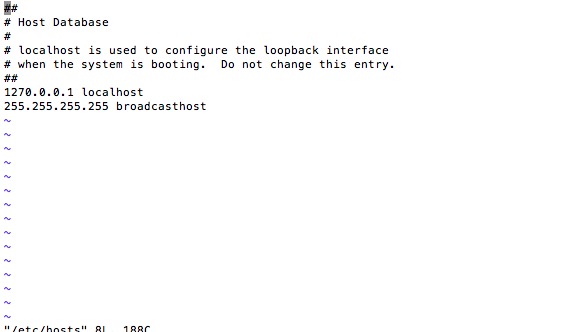
I keep my driver files in /user/local/bin only. Yet I am not able to run the script on my local browser. 🤔
kjnanda
on 26 Oct 2017
@kjnanda you are using Linux also?
Try to modify your localhost line with : 127.0.0.1 localhost
you have 1270 instead of 127 (maybe it will work)
Also you can erase your Chromedriver and use these commands to install it again:
wget -N http://chromedriver.storage.googleapis.com/2.33/chromedriver_linux64.zip -P ~/
unzip ~/chromedriver_linux64.zip -d ~/
rm ~/chromedriver_linux64.zip
sudo mv -f ~/chromedriver /usr/local/bin/chromedriver
sudo chown root:root /usr/local/bin/chromedriver
sudo chmod 0755 /usr/local/bin/chromedriver
dianaolaru
on 26 Oct 2017
phpunit -c MagiumMagentoExample/tests/phpunit.xml.dist
[1) MyTests\Admin\LoginTest::testLogin
Facebook\WebDriver\Exception\SessionNotCreatedException: Unable to create new service: ChromeDriverService
Build info: version: '3.6.0', revision: '6fbf3ec767', time: '2017-09-27T16:15:40.131Z'
System info: host: 'Unknown', ip: 'Unknown', os.name: 'Linux', os.arch: 'amd64', os.version: '4.4.0-97-generic', java.version: '9.0.1'
Driver info: driver.version: unknown
]
Please help me on this
 yuvraj993
on 28 Oct 2017
yuvraj993
on 28 Oct 2017
"host: 'Unknown', ip: 'Unknown" - It seems like the system does not know your host and your ip.
Did you set your host? In /etc/hosts you should have:
127.0.0.1 localhost
127.0.0.1 your-Name
dianaolaru
on 30 Oct 2017
Adding below entry in my hosts file resolved this issue for me. Thanks @dianaolaru
127.0.0.1 localhost
 manivoolla
on 11 Dec 2017
manivoolla
on 11 Dec 2017
I had a similar issue and in my case the solution was:
I had this two line in my hosts file:
127.0.0.1       localhost
::1             localhost
I deleted the second, and problem solved.
 uhi67
on 19 Mar 2018
uhi67
on 19 Mar 2018
Related issues
 simara-svatopluk
·
3Comments
simara-svatopluk
·
3Comments
 mipon
·
3Comments
mipon
·
3Comments
 joshhornby
·
3Comments
joshhornby
·
3Comments
 marcelodeandrade
·
3Comments
marcelodeandrade
·
3Comments
 m4rcinkowski
·
4Comments
m4rcinkowski
·
4Comments
Most helpful comment
I am using the recent Codeception 2.3.6 with the recent Selenium Standalone Server 3.6.0 and the recent ChromeDriver 2.33 by setting the ChromeDriver path explicitly in the corresponding parameter when starting Selenium Standalone Server, e.g.
java -Dwebdriver.chrome.driver=./chromedriver.exe -jar selenium-server-standalone-3.6.0.jarAs @Naktibalda said, try to set the correct absolute or relative path to the ChromeDriver file.