Code-settings-sync: Sync : Error Logged In Console (Help menu > Toggle Developer Tools).
🐛 Describe the bug
clean install VS Code , install Sync Settings - try download settings from private gist:
Sync : Error Logged In Console (Help menu > Toggle Developer Tools).
🌴 Visual Studio Code Version : [ 1.33.0 ]
🌴 Code Settings Sync Version : [ 3.2.8 ]
🌴 Standard or Insiders : [ standart]
🌴 OSS or Portable : [ OSS ]
🌴 Operating System : [ Windows 10]
🌴 Occurs On: [ Download ]
🌴 Proxy Enabled: [ No ]
🌴 Gist Id: [ 098315d52e48044120f91c83375f9b0c ]
📰 To Reproduce
Steps to reproduce the behavior:
- Go to 'CTRL+SHIFT+P'
- Click on 'DOWNLOAD SETTINGS - gistID'
- See error :
Sync : Error Logged In Console (Help menu > Toggle Developer Tools).
💪 Expected behavior
Downloading and sync settings
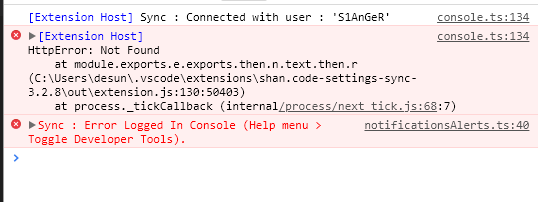
📺 Console Error Log
If applicable, add screenshots or paste the console log from developer console of VSCode (Help Menu > Developer Tool - Console Tab).
 S1AnGeR
All 17 comments
Duplicate of #829
 glossnyx
on 6 Apr 2019
glossnyx
on 6 Apr 2019
Resolved in #829, you can look there for the solution.
glossnyx
on 7 Apr 2019
@S1AnGeR you might have entered an invalid gist id. Make sure it's correct and try again.
glossnyx
on 8 Apr 2019
upon fresh vscode installation, install extension, click on extension gear, choose _configure extension settings_ , feed id of valid gist to _gist id field_
and then _shift + ctrl + p_, _Sync: Download Settings_

 devellopah
on 11 Jun 2019
devellopah
on 11 Jun 2019
This issue still exists. Neither of the provided solutions works for me. This extensions is simply broken.
 sbszcz
on 28 Jun 2019
sbszcz
on 28 Jun 2019
Yes, same for me @objectbakery
 benoitMariaux
on 29 Jun 2019
benoitMariaux
on 29 Jun 2019
me too
 nova76
on 30 Jun 2019
nova76
on 30 Jun 2019
Guys check out the troubleshooting and see how the the different issues on how users were able to fix the thing.
You need to configure it correctly, documentation says it all.
But still you can perform different steps written over there to see how other people have fixed it.
I am always looking to improve the wiki and readme and help user configuring the Settings Sync.
 shanalikhan
on 1 Jul 2019
shanalikhan
on 1 Jul 2019
I ran into this error as well. I thought I got the correct Gist ID. Turned out I took the ID from where I created the token, and not from the Gist itself.
 Nielson
on 3 Jul 2019
Nielson
on 3 Jul 2019
Hey guys,
Managed to get it working again, just had to update the Gist ID and vooola.. it worked!
 edineu
on 12 Feb 2020
edineu
on 12 Feb 2020
When you download the settings, check output tab. In my case, it gave error and paused trying to download imagepreview & filewatcher extension.
I manually deleted them (the following lines) from the gist and the download completed.
```
{
"metadata": {
"id": "9240cee3-8289-4b9d-886e-531440411918",
"publisherId": "buzzfrog.imagepreview",
"publisherDisplayName": "buzzfrog"
},
"name": "imagepreview",
"publisher": "buzzfrog",
"version": "0.5.1"
}
{
"metadata": {
"id": "12e95fdd-b0d5-4978-8174-122b925efaf9",
"publisherId": "AppulateInc.filewatcher",
"publisherDisplayName": "AppulateInc"
},
"name": "filewatcher",
"publisher": "AppulateInc",
"version": "1.0.3"
}
```
I know this is weird but it is what it is. I think someone from the dev-team (probably @shanalikhan) should look into it.
 blueray453
on 21 Jun 2020
blueray453
on 21 Jun 2020
For my case, I have to install "Visua Studio Code", because I had the open source version.
And when It was trying to fetch and install extensions these weren't available from Open Source Extensions...
After that, I don't face this problem anymore.
 ulises-castro
on 15 Oct 2020
ulises-castro
on 15 Oct 2020
I think you have to set up VSCodium to work with extensions:
https://www.reddit.com/r/vscode/comments/hls9ef/vscodium_and_extensions/
https://github.com/VSCodium/vscodium/blob/master/DOCS.md#extensions-marketplace
 aindriu80
on 18 Nov 2020
aindriu80
on 18 Nov 2020
Sync error happening as the C Sharp extension names has change in my case:
Error: Error: Error: Extension 'ms-vscode.csharp' not found. at c:Usersusername.vscodeextensionsshan.code-settings-sync-3.4.3outextension.js:290:22293
Info here about the extension name change:
https://alfredmyers.com/2020/03/06/idms-vscode-csharp-no-extensions-found/
Not sure how to "get out" of this loop
 redteg
on 18 Feb 2021
redteg
on 18 Feb 2021
This helped me out in Linux.
 samueleabs
on 25 Mar 2021
samueleabs
on 25 Mar 2021
I face the same problem, sync block by installing a "extension", and I solved this issue by delete bad "extension" via github.
follow this workflow:
github-> Your gists -> select gist I use to sync vscode -> Edit gist -> delete bad "extension" -> upload. done.
return to vscode download my setting.
 cheerswym
on 7 May 2021
cheerswym
on 7 May 2021
install manual extension broken, if you installed using code sync stuck
 restuwahyu13
on 20 May 2021
restuwahyu13
on 20 May 2021
Related issues
 mklement0
·
5Comments
mklement0
·
5Comments
 toXel
·
3Comments
toXel
·
3Comments
 marcevrard
·
5Comments
marcevrard
·
5Comments
 axetroy
·
4Comments
axetroy
·
4Comments
 pravic
·
5Comments
pravic
·
5Comments
Most helpful comment
This issue still exists. Neither of the provided solutions works for me. This extensions is simply broken.