Code-settings-sync: v2.3.5 Not working with VSCode 1.31
🐛 Describe the bug
A clear and concise description of what the bug is. You are always welcome to check the Troubleshooting section before filing the ticket.
🌴 Visual Studio Code Version : [ 1.31.1]
🌴 Code Settings Sync Version : [ 3.2.5]
🌴 Standard or Insiders : [ both of them are tested ]
🌴 Operating System : [ windows 10 ]
🌴 Occurs On: [ Upload ]
🌴 Proxy Enabled: [ No ]
📺 Console Error Log
If applicable, add screenshots or paste the console log from developer console of VSCode.
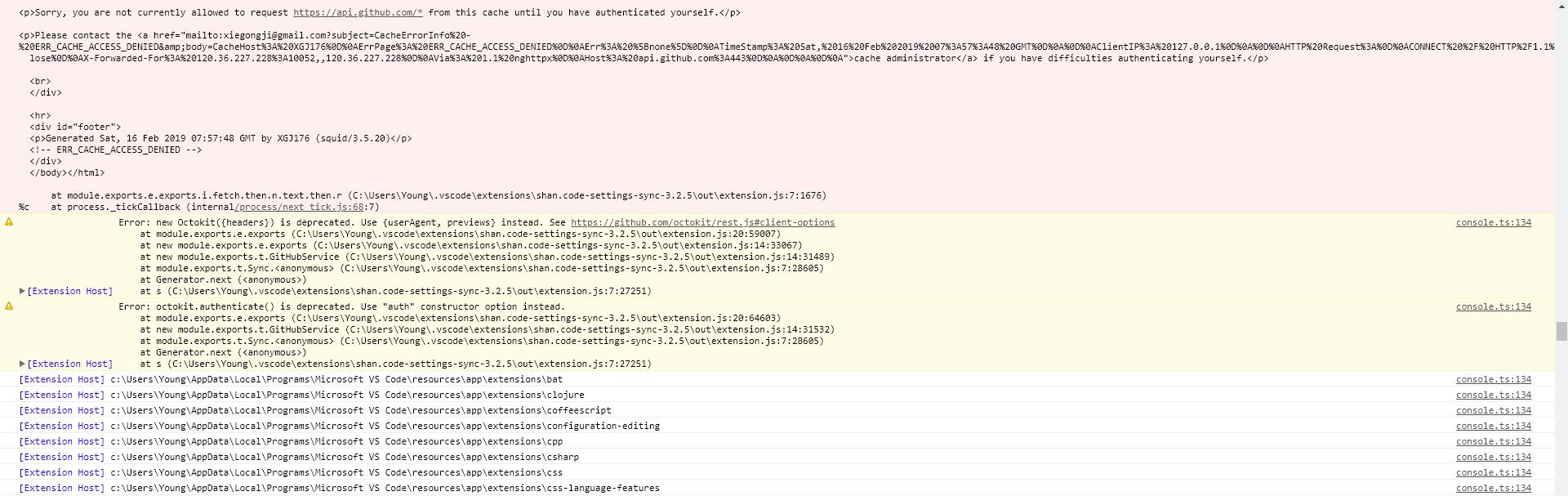
 Amoystyle
All 14 comments
yes, getting the same error
 mkempkes
on 16 Feb 2019
mkempkes
on 16 Feb 2019
same problem here
 niravjethva
on 19 Feb 2019
niravjethva
on 19 Feb 2019
same
Visual Studio Code Version : [ 1.31.1]
Code Settings Sync Version : [ 3.2.5]
Standard or Insiders : [ Standard ]
Operating System : [ Fedora 28 ]
Occurs On: [ Download ]
Proxy Enabled: [ No ]
`[Embedded Page] Refused to apply inline style because it violates the following Content Security Policy directive: "style-src vscode-core-resource:". Either the 'unsafe-inline' keyword, a hash ('sha256-DL2IXj82ZaxyeudYyUlldcmA2Ado0C8vLkhPmTFfEd8='), or a nonce ('nonce-...') is required to enable inline execution.
console.ts:134 [Extension Host] Error: new Octokit({headers}) is deprecated. Use {userAgent, previews} instead. See https://github.com/octokit/rest.js#client-options
at module.exports.e.exports (/home/danielmd/.vscode/extensions/shan.code-settings-sync-3.2.5/out/extension.js:20:59007)
at new module.exports.e.exports (/home/danielmd/.vscode/extensions/shan.code-settings-sync-3.2.5/out/extension.js:14:33067)
at new module.exports.t.GitHubService (/home/danielmd/.vscode/extensions/shan.code-settings-sync-3.2.5/out/extension.js:14:31489)
at /home/danielmd/.vscode/extensions/shan.code-settings-sync-3.2.5/out/extension.js:7:32729
at Generator.next (
at module.exports.n (/home/danielmd/.vscode/extensions/shan.code-settings-sync-3.2.5/out/extension.js:7:27418)
at new Promise (
at module.exports.n (/home/danielmd/.vscode/extensions/shan.code-settings-sync-3.2.5/out/extension.js:7:27195)
at /home/danielmd/.vscode/extensions/shan.code-settings-sync-3.2.5/out/extension.js:7:32688
at module.exports.t.Sync.
at Generator.next (
at s (/home/danielmd/.vscode/extensions/shan.code-settings-sync-3.2.5/out/extension.js:7:27251)
t.log @ console.ts:134
e.$logExtensionHostMessage @ mainThreadConsole.ts:39
t._doInvokeHandler @ rpcProtocol.ts:390
t._invokeHandler @ rpcProtocol.ts:375
t._receiveRequest @ rpcProtocol.ts:295
t._receiveOneMessage @ rpcProtocol.ts:225
(anonymous) @ rpcProtocol.ts:100
e.fire @ event.ts:567
s @ ipc.net.ts:295
(anonymous) @ ipc.net.ts:302
e.fire @ event.ts:567
a @ ipc.net.ts:103
_socketDataListener @ ipc.net.ts:132
emit @ events.js:182
addChunk @ _stream_readable.js:279
readableAddChunk @ _stream_readable.js:264
Readable.push @ _stream_readable.js:219
onread @ net.js:636
console.ts:134 [Extension Host] Error: octokit.authenticate() is deprecated. Use "auth" constructor option instead.
at module.exports.e.exports (/home/danielmd/.vscode/extensions/shan.code-settings-sync-3.2.5/out/extension.js:20:64603)
at new module.exports.t.GitHubService (/home/danielmd/.vscode/extensions/shan.code-settings-sync-3.2.5/out/extension.js:14:31532)
at /home/danielmd/.vscode/extensions/shan.code-settings-sync-3.2.5/out/extension.js:7:32729
at Generator.next (
at module.exports.n (/home/danielmd/.vscode/extensions/shan.code-settings-sync-3.2.5/out/extension.js:7:27418)
at new Promise (
at module.exports.n (/home/danielmd/.vscode/extensions/shan.code-settings-sync-3.2.5/out/extension.js:7:27195)
at /home/danielmd/.vscode/extensions/shan.code-settings-sync-3.2.5/out/extension.js:7:32688
at module.exports.t.Sync.
at Generator.next (
at s (/home/danielmd/.vscode/extensions/shan.code-settings-sync-3.2.5/out/extension.js:7:27251)
t.log @ console.ts:134
e.$logExtensionHostMessage @ mainThreadConsole.ts:39
t._doInvokeHandler @ rpcProtocol.ts:390
t._invokeHandler @ rpcProtocol.ts:375
t._receiveRequest @ rpcProtocol.ts:295
t._receiveOneMessage @ rpcProtocol.ts:225
(anonymous) @ rpcProtocol.ts:100
e.fire @ event.ts:567
s @ ipc.net.ts:295
(anonymous) @ ipc.net.ts:302
e.fire @ event.ts:567
a @ ipc.net.ts:103
_socketDataListener @ ipc.net.ts:132
emit @ events.js:182
addChunk @ _stream_readable.js:279
readableAddChunk @ _stream_readable.js:264
Readable.push @ _stream_readable.js:219
onread @ net.js:636
console.ts:134 [Extension Host] HttpError: Not Found
at module.exports.e.exports.i.fetch.then.n.text.then.r (/home/danielmd/.vscode/extensions/shan.code-settings-sync-3.2.5/out/extension.js:7:1676)
at process._tickCallback (internal/process/next_tick.js:68:7)
t.log @ console.ts:134
e.$logExtensionHostMessage @ mainThreadConsole.ts:39
t._doInvokeHandler @ rpcProtocol.ts:390
t._invokeHandler @ rpcProtocol.ts:375
t._receiveRequest @ rpcProtocol.ts:295
t._receiveOneMessage @ rpcProtocol.ts:225
(anonymous) @ rpcProtocol.ts:100
e.fire @ event.ts:567
s @ ipc.net.ts:295
(anonymous) @ ipc.net.ts:302
e.fire @ event.ts:567
a @ ipc.net.ts:103
_socketDataListener @ ipc.net.ts:132
emit @ events.js:182
addChunk @ _stream_readable.js:279
readableAddChunk @ _stream_readable.js:264
Readable.push @ _stream_readable.js:219
onread @ net.js:636
notificationsAlerts.ts:40 Sync : Error Logged In Console (Help menu > Toggle Developer Tools).
t.onDidNotificationChange @ notificationsAlerts.ts:40
(anonymous) @ notificationsAlerts.ts:26
e.fire @ event.ts:567
t.notify @ notifications.ts:113
t.notify @ notificationService.ts:52
(anonymous) @ mainThreadMessageService.ts:84
e._showMessage @ mainThreadMessageService.ts:45
e.$showMessage @ mainThreadMessageService.ts:39
t._doInvokeHandler @ rpcProtocol.ts:390
t._invokeHandler @ rpcProtocol.ts:375
t._receiveRequest @ rpcProtocol.ts:295
t._receiveOneMessage @ rpcProtocol.ts:225
(anonymous) @ rpcProtocol.ts:100
e.fire @ event.ts:567
s @ ipc.net.ts:295
(anonymous) @ ipc.net.ts:302
e.fire @ event.ts:567
a @ ipc.net.ts:103
_socketDataListener @ ipc.net.ts:132
emit @ events.js:182
addChunk @ _stream_readable.js:279
readableAddChunk @ _stream_readable.js:264
Readable.push @ _stream_readable.js:219
onread @ net.js:636
console.ts:134 [Extension Host] Sync : Connected with user : 'lightydo'
webviewElement.ts:294 [Embedded Page] Refused to apply inline style because it violates the following Content Security Policy directive: "style-src vscode-core-resource:". Either the 'unsafe-inline' keyword, a hash ('sha256-DL2IXj82ZaxyeudYyUlldcmA2Ado0C8vLkhPmTFfEd8='), or a nonce ('nonce-...') is required to enable inline execution.
`
 lightydo
on 20 Feb 2019
lightydo
on 20 Feb 2019
Ditto here. Any workaround?
 KenanHArik
on 22 Feb 2019
KenanHArik
on 22 Feb 2019
Getting the same error on settings download with 1.32-insiders
 rickrankin
on 26 Feb 2019
rickrankin
on 26 Feb 2019
@Amoystyle It looks like you're behind a proxy, and haven't set up your proxy config properly and you may need help from your network administrator [email protected] (The email is on your screenshot)
@lightydo your error isn't related to this issue and I'm pretty sure that isn't related to this extension at all. Could you try again without any other extension but code-settings-sync?
 LuisUrrutia
on 26 Feb 2019
LuisUrrutia
on 26 Feb 2019
@Amoystyle It looks like you're behind a proxy, and haven't set up your proxy config properly and you may need help from your network administrator
[email protected](The email is on your screenshot)
@lightydo your error isn't related to this issue and I'm pretty sure that isn't related to this extension at all. Could you try again without any other extension but code-settings-sync?
OK, I try it again
Amoystyle
on 26 Feb 2019
Ditto here. Any workaround?
FYI I was able to get things working again with this workaround:
1) down-grade the add-in version. I chose several revs back.
2) successfully syncing to my gist
3) upgrading the add-in version.
Now everything is back to normal for me.
KenanHArik
on 26 Feb 2019
@KenanHArik did you have exactly the same error (the red one)? If that's so, could you share us the rev?
LuisUrrutia
on 26 Feb 2019
@KenanHArik & @LuisUrrutia
I had the same problem as well. Turns out I simply entered the gist id incorrectly. I thought this was the name of the gist that was used when I initially uploaded my settings (it wasn't too clear from the docs). It is in fact an ID number. To get this to work correctly on a fresh download of settings, follow these steps:
- Reset the extension settings (ctrl-shift-p sync reset).
- Initiate a download. (ctrl-shift sync download)
- You will be prompted for the personal access token and the gist. To get the gist id, visit GitHub Gist and find the __cloudSettings__ gist. The gist id is the last part of the URL of the gist. Copy that portion of the URL.
- Paste the gist id into VS Code when prompted.
Your settings will begin to download. I don't think this is a bug. Maybe some clarification in the docs is needed.
 joehavila
on 27 Feb 2019
joehavila
on 27 Feb 2019
Turns out that I think I probably reversed the gist id and token. I cleared the settings and tried again and it's working now.
rickrankin
on 27 Feb 2019
Visual Studio Code add setting:
"http.proxySupport": "off"
Amoystyle
on 27 Feb 2019
@Amoystyle It looks like you're behind a proxy, and haven't set up your proxy config properly and you may need help from your network administrator
[email protected](The email is on your screenshot)
@lightydo your error isn't related to this issue and I'm pretty sure that isn't related to this extension at all. Could you try again without any other extension but code-settings-sync?
The problem was the gist id, I gave it a full path instead of just the id.
lightydo
on 27 Feb 2019
@shanalikhan check this comment.
@lightydo thanks for the feedback, but the log that you provided has nothing to do with this issue. The warning about Octokit are just that, warnings, but not an error.
LuisUrrutia
on 27 Feb 2019
Related issues
 OlegChep
·
5Comments
OlegChep
·
5Comments
 afnpires
·
4Comments
afnpires
·
4Comments
 jdshkolnik
·
3Comments
jdshkolnik
·
3Comments
 hfcheng66
·
5Comments
hfcheng66
·
5Comments
 betimer
·
3Comments
betimer
·
3Comments
Most helpful comment
@KenanHArik & @LuisUrrutia
I had the same problem as well. Turns out I simply entered the gist id incorrectly. I thought this was the name of the gist that was used when I initially uploaded my settings (it wasn't too clear from the docs). It is in fact an ID number. To get this to work correctly on a fresh download of settings, follow these steps:
Your settings will begin to download. I don't think this is a bug. Maybe some clarification in the docs is needed.