Code-settings-sync: Github Access Token issue
Numerous attempts at trying to get and upload a GitHub personal access token; instead I get this error;

 SheepDomination
All 7 comments
Can you please provide more info?
...like "What error is logged in the so said console?"
This will help people to under stand your issue rather than label as "info needed" and ignore away.
 escape0707
on 13 Mar 2018
escape0707
on 13 Mar 2018
I get my personal access token, as described within the overview section for this extension, I copy it. Within code I open the command palette with >sync upload, then attempt to paste my access token only to get an error ?
SheepDomination
on 14 Mar 2018
Hi, I mean, please first paste your:

escape0707
on 15 Mar 2018
I hope this is what you wanted ?
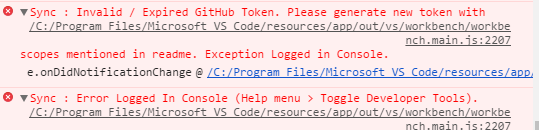
I created two git tokens both didn't work.
SheepDomination
on 17 Mar 2018
Hello, good to hear you again. 👍
Here is what I did:
command palette>Sync : Reset Extension Settings- (Then follow the steps as the developer described)
command palette>Sync : Update / Upload Settings - This opens a webpage to let you create a
Personal access token - Click
Generate new token> fill theToken description& checkgist> clickGenerate token - Copy the token and switch back to VS Code, there should be an prompt input field, paste the token and hit
Enteror click the listed item - And Sync works fine here on my PC.
All software latest, including Windows 10, VS Code, Sync, Firefox.
Can't reproduce.
Anything related to how to reproduce is welcomed.
Please make sure you didn't miss or mess up with any steps and
if you are in a country (e.g.: China) with limited internet access like me, please verify your accessibility to GitHub Gist.
escape0707
on 17 Mar 2018
Hi, re-setting the extension setting solved the problem. 👍
SheepDomination
on 17 Mar 2018
Guys feel free to send me PR, or improve the wiki if you get some problem in understanding. !
 shanalikhan
on 17 Mar 2018
shanalikhan
on 17 Mar 2018
Related issues
 axetroy
·
4Comments
axetroy
·
4Comments
 UTexas80
·
5Comments
UTexas80
·
5Comments
 afnpires
·
4Comments
afnpires
·
4Comments
 toXel
·
3Comments
toXel
·
3Comments
 jdshkolnik
·
3Comments
jdshkolnik
·
3Comments
Most helpful comment
Hi, re-setting the extension setting solved the problem. 👍