Code-server: iOS copy and cut keyboard shortcuts are not working
code-server1.1156-vsc1.33.1- OS Version: iPadOS 13.1 Beta 4 (on iPad Pro 2018 12.9)
Description
The keyboard shortcuts for copying and cutting text don‘t work. Changing the shortcuts in the code-server settings to something different of „cmd+c“ and „cmd+x“ does not help.
Steps to Reproduce
- Open and edit a file.
- Try using „cmd+c“ or „cmd+x“.
- Change the shortcuts in the settings.
- Fail again.
 schradeyannik
All 93 comments
please use desktop mode in safari.
trun on : Setting—Safari—Request dessktop website
 phoenixsfly
on 22 Sep 2019
phoenixsfly
on 22 Sep 2019
@schradeyannik AFAIK we do not support Safari in mobile mode, try using the Desktop mode. We have no plans to support mobile UAs due to Monaco's limitation.
 sr229
on 22 Sep 2019
sr229
on 22 Sep 2019
@sr229 @phoenixsfly The desktop mode is activated. The mentioned keyboard shortcuts do not work in desktop mode.
schradeyannik
on 22 Sep 2019
Try using Control + C and Control + V
 mattapperson
on 29 Sep 2019
mattapperson
on 29 Sep 2019
@mattapperson This does not work either.
schradeyannik
on 29 Sep 2019
Will test and get back to you.
 nhooyr
on 28 Jan 2020
nhooyr
on 28 Jan 2020
Any update on this bug? I’m having the same issue. iOS 13.3 iPad Air version 3.
Edit: So this is only in V3. Using the last build of V2 I’m having no issues with cut/copy/paste
 dasalazar1
on 22 Mar 2020
dasalazar1
on 22 Mar 2020
@dasalazar1 not much of an update. Seems like more and more people wanna try this workflow, so we might prioritize it.
@code-asher we use the clipboard API right? So maybe we just have to adjust the keybind if they're on an iPad.
 kylecarbs
on 23 Mar 2020
kylecarbs
on 23 Mar 2020
For the terminal it uses the clipboard API if it can but for the editor
I don't think it does. I think it just uses native paste there.
 code-asher
on 23 Mar 2020
code-asher
on 23 Mar 2020
Ah. I assume we could patch that quite easily.
kylecarbs
on 23 Mar 2020
Same behaviour here. iPad Air 3, iOS 13.4
I just tried out the last V2 and it works there.
Using a V2 is the only workaround currently? (no copy/paste makes development work defacto impossible :)
 perelin
on 26 Mar 2020
perelin
on 26 Mar 2020
Seeing the same behavior. If it is a quick patch would love to see this fixed!
 Brent-Hickey
on 4 Apr 2020
Brent-Hickey
on 4 Apr 2020
Same for me even when using Chrome.
 pr1metine
on 8 Apr 2020
pr1metine
on 8 Apr 2020
Would love a fix for this.
 infinitedaremo
on 8 Apr 2020
infinitedaremo
on 8 Apr 2020
FYI a simple workaround I’ve used is to highlight the text, cmd+f, and then you can immediately cmd+c out of the search bar. Paste works as expected. This doesn’t solve cut, but it’s pretty usable
Brent-Hickey
on 8 Apr 2020
That’s a brilliant temporary “fix”. Thank you.
Cmd + Shift + F allows you to copy entire blocks too.
 gavinbd
on 8 Apr 2020
gavinbd
on 8 Apr 2020
I'm pretty sure this is because WebKit doesn't let us override copy/paste on mobile unfortunately.
kylecarbs
on 14 Apr 2020
I'm pretty sure this is because WebKit doesn't let us override copy/paste on mobile unfortunately.
On iOS the copy button is just greyed out. It’s like text selection doesn’t recognise that text has been highlighted in the editor view. Paste does work already if you’ve got something in the clipboard.
gavinbd
on 14 Apr 2020
Even from the context menu (Right button click) it does not work.
 Mrc527
on 27 Apr 2020
Mrc527
on 27 Apr 2020
I'm pretty sure this is because WebKit doesn't let us override copy/paste on mobile unfortunately.
I’m not sure about this, considering that there is a working workaround and some reports V2 was working... Let’s keep finger crossed!
Mrc527
on 27 Apr 2020
Glad to see this is an open issue, why was the clipboard API removed in v3 for editors? V2 works flawlessly on my iPad Pro.
 demyxco
on 27 Apr 2020
demyxco
on 27 Apr 2020
Hmm, maybe we should double-check v2. I don't believe we made any changes but it's possible VS Code did. To confirm, cmd+c, cmd+x, and cmd+v work when editing a file in v2 but not in v3?
code-asher
on 27 Apr 2020
To confirm,
cmd+c,cmd+x, andcmd+vwork when editing a file in v2 but not in v3?
Correct. Though in v3, paste gets disabled when switching tabs. It’s probably due to it losing focus from the attempting to reconnect dialog? You have to click the terminal first then the editor to paste again.
demyxco
on 27 Apr 2020
Point is, in some places it does work! If you right click on a file and select “copy path” it works. So, to me it looks like it’s only in the code focus where you cannot copy.
Btw, did any of you managed to use the virtual keyboard in the code view? I don’t get it open, maybe it’s linked to this issue here, might be it’s a focus stuff.
Mrc527
on 28 Apr 2020
V3:
I guess its also related to the Keyboard layout. MacOS (chrome) works with cmd

iPad (chrome) with new apple keyboard detects linux layout (MOBILE version) and works with control instead of cmd. control + c + x doesn't work, but control + shift + z + a + v etc. works.

DESKTOP version on iPad (chrome) detects same keyboard as on MacOS (cmd works), but only with + shift + z + a + v.
Combination with cmd + c + x don't work. (same as on MOBILE version)

Fun fact: When I copy text on MacOS I can paste it immediately on my iPad. Somehow scary as well.
I will do further testing.
 rpweb
on 28 Apr 2020
rpweb
on 28 Apr 2020
V3:
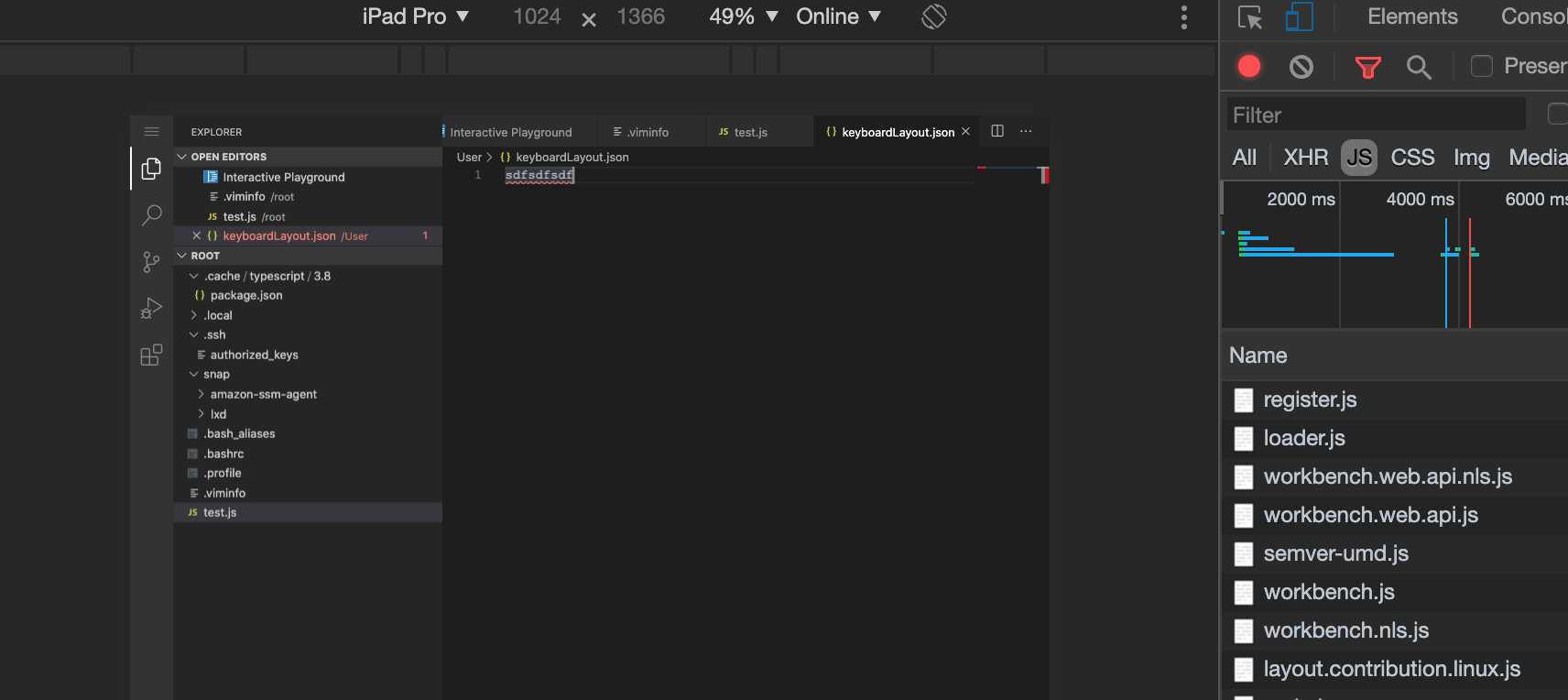
I could reproduce the issue on MacOS when I emulate iPad in Chrome code-server via inspector!
rpweb
on 28 Apr 2020
@rpweb Thats awesome, will definitely help us debug easier.
nhooyr
on 30 Apr 2020
I've been fighting with this for the better part of a week, and I think I understand what is happening. Strangely, what I've seen is that I can paste anything, but I can't copy anything new into the clipboard. If the clipboard already has the information I want, then it can be read with cmd-V, as expected.
I loaded my iPad up in the Safari remote debugger (by plugging the iPad into my computer via usb-c), and was looking for some error messages. I didn't see anything when I tried to use cmd-C. So, I tried programmatically copy/pasting.
What I saw was this:

This led me to start looking for granting permissions to the clipboard in Safari. And unfortunately, I don't think it will be possible. From my reading, I think that the only way for web applications to interact with the clipboard is using the system copy/paste UI. This is a recent update to the iPadOS/Safari code. And this obviously won't work with an editor like code-server/VSCode that is expecting to be able to use keyboard shortcuts.
Here's the update from Webkit that mentions this behavior: https://webkit.org/blog/10247/new-webkit-features-in-safari-13-1/
The implementation is available through the navigator.clipboard API which must be called within user gesture event handlers like pointerdown or pointerup, and only works for content served in a secure context (e.g. https://). Instead of a permissions-based model for reading from the clipboard, a native UI is displayed when the page calls into the clipboard API; the clipboard can only be accessed if the user then explicitly interacts with the platform UI.
So, the issue maybe a combination of code-server and the version of iPadOS in use. I'm not sure if there is a work around...
 mbreese
on 5 May 2020
mbreese
on 5 May 2020
I've been fighting with this for the better part of a week, and I think I understand what is happening. Strangely, what I've seen is that I can paste anything, but I can't copy anything new into the clipboard. If the clipboard already has the information I want, then it can be read with cmd-V, as expected.
I loaded my iPad up in the Safari remote debugger (by plugging the iPad into my computer via usb-c), and was looking for some error messages. I didn't see anything when I tried to use cmd-C. So, I tried programmatically copy/pasting.
What I saw was this:
This led me to start looking for granting permissions to the clipboard in Safari. And unfortunately, I don't think it will be possible. From my reading, I think that the only way for web applications to interact with the clipboard is using the system copy/paste UI. This is a recent update to the iPadOS/Safari code. And this obviously won't work with an editor like code-server/VSCode that is expecting to be able to use keyboard shortcuts.
Here's the update from Webkit that mentions this behavior: https://webkit.org/blog/10247/new-webkit-features-in-safari-13-1/
The implementation is available through the navigator.clipboard API which must be called within user gesture event handlers like pointerdown or pointerup, and only works for content served in a secure context (e.g. https://). Instead of a permissions-based model for reading from the clipboard, a native UI is displayed when the page calls into the clipboard API; the clipboard can only be accessed if the user then explicitly interacts with the platform UI.
So, the issue maybe a combination of code-server _and_ the version of iPadOS in use. I'm not sure if there is a work around...
Hi @mbreese thanks for your feedback, I really appreciate it. I have a question: why is it possible to copy for instance the path of a file?
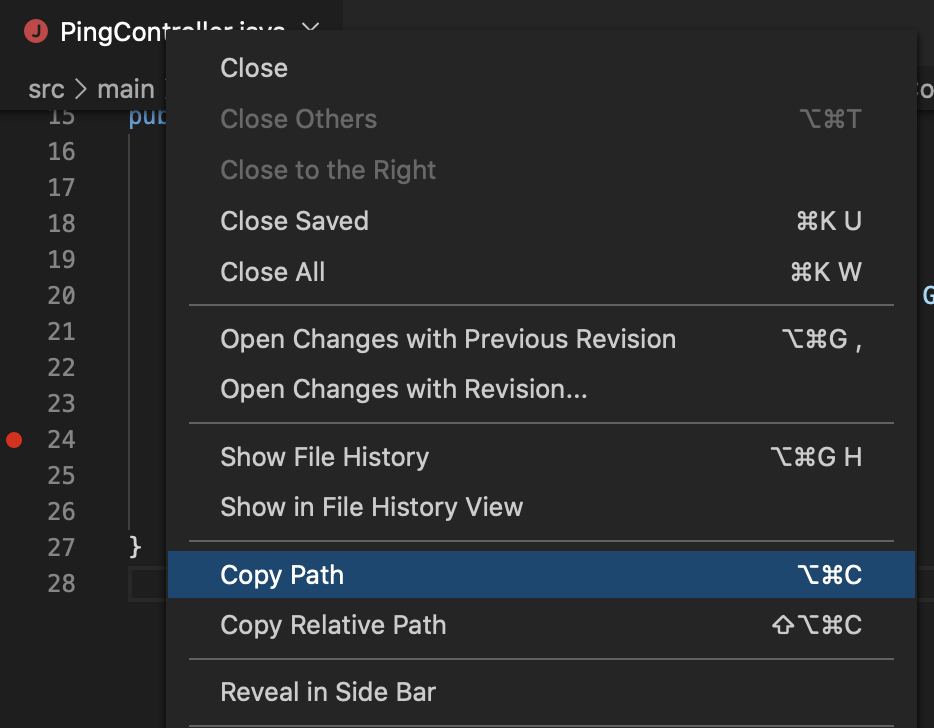
This one works for me on my iPad, updated with the latest iPad OS.
Is this in contradiction with your conclusions? Might be this is not, since this button is acting on an element that is outside of the editor view or maybe because this is not using a keyboard shortcut...
Mrc527
on 5 May 2020
Hi @mbreese thanks for your feedback, I really appreciate it. I have a question: why is it possible to copy for instance the path of a file?
This one works for me on my iPad, updated with the latest iPad OS.Is this in contradiction with your conclusions? Might be this is not, since this button is acting on an element that is outside of the editor view or maybe because this is not using a keyboard shortcut...
Yes, that works. But I think the difference is where the source of the clipboard text is. Even above, I mentioned that I could still paste w/ cmd-V, but only something that was clipped from a different app (like notes, email, or the safari url, etc).
So, what we've shown is that you can
a) programmatically add data to the clipboard and
b) programmatically paste data from the clipboard
What you can't do is copy user-data to the clipboard. So, my guess is that it's somewhere in the selection API. If you run (from the console):
window.getSelection().toString()
On Safari on my Mac, I get the correct selected text. On my iPad, I get an empty string (""). I think this is where the root issue lies.
You're right that this all seems strange and contradictory. It also seems like it doesn't match the Webkit announcement at all. The rest of it may end up a red herring. I believe that any copy/paste code needs to run in the context of a user event (keydown, pointerdown, etc). The tests I've been doing haven't done that, so maybe that's another issue with the testing?
And strangely, undo/redo also works. I expect that's a similar mechanism as copy/paste. As does dragging and dropping... (select code, drag it around to move it someplace else).
Finally to add to the confusion... from @code-asher above,
For the terminal it uses the clipboard API if it can but for the editor
I don't think it does. I think it just uses native paste there.
You can copy from the terminal and paste into the editor. So, maybe there is hope afterall!
mbreese
on 5 May 2020
I working with the v2 docker container and copy/paste with CMD-C works. (Strangely the codercom/code-server:v2 tag doesn`t exist anymore on docker hub...)
Could it help to analyze what changed between v2 and v3?
perelin
on 12 May 2020
Ah, we removed the v2 tag but the individual v2 version tags are still there. Definitely sounds like it's worth checking out.
code-asher
on 12 May 2020
I´d love to do it, but I´m afraid I don´t have the necessary expertise :(
perelin
on 14 May 2020
Glad I found this, i thought I may have installed something that caused this behavior. I would absolutely love to see it work. If it did (and still works, maybe someone can confirm this) work in v2, then likely more a code change and less but still possibly an iPadOS issue.
 neoighodaro
on 16 May 2020
neoighodaro
on 16 May 2020
Can confirm again: works in codercom/code-server:v2 but I haven´t tried any of the other v2 tags
perelin
on 18 May 2020
Can confirm this is an issue. Tried remapping the copy / paste shortcuts and now I get the error: Command ‘references-view.copy’ not found.
 kschembri
on 18 May 2020
kschembri
on 18 May 2020
For those using an iPad, you can temporarily use this app called VS App - code server, they pushed an update to the app that fixes copy/paste.
You can use your custom code server in the app itself and not have to pay
neoighodaro
on 20 May 2020
For those using an iPad, you can temporarily use this app called VS App - code server, they pushed an update to the app that fixes copy/paste.
You can use your custom code server in the app itself and not have to pay
Nice to hear, but what exactly is the fix? Can't we implement it into code-server?
rpweb
on 20 May 2020
For those using an iPad, you can temporarily use this app called VS App - code server, they pushed an update to the app that fixes copy/paste.
You can use your custom code server in the app itself and not have to payNice to hear, but what exactly is the fix? Can't we implement into code-server?
No idea, it's closed source i believe. Just found out that they pushed the update for this fix and i decided to try if it works with my custom code-server and it did.
neoighodaro
on 20 May 2020
@neoighodaro nice find! I think the app itself is doing the copy/cut instead of the browser? Also it has the ability to upload folders/files; which is a nice touch. I seen this app a while ago but assumed it was for the app developer’s platform.
demyxco
on 20 May 2020
For those using an iPad, you can temporarily use this app called VS App - code server, they pushed an update to the app that fixes copy/paste.
You can use your custom code server in the app itself and not have to payNice to hear, but what exactly is the fix? Can't we implement into code-server?
No idea, it's closed source i believe. Just found out that they pushed the update for this fix and i decided to try if it works with my custom code-server and it did.
Just tested it and it works! Thanks for sharing.
I just firgured out that @ColdGrub1384 is the developer. Maybe he can give us more insides?
rpweb
on 20 May 2020
Unfortunately scrolling is not working.
rpweb
on 20 May 2020
Yes thats a regular problem in both code-server and the app, for now i use a combination of touch scroll, shortcuts to jump between scroll pages, and the mini-map.
neoighodaro
on 20 May 2020
@rpweb The WebView didn’t seem to receive Copy Paste shortcuts, so I added a listener in the app level that then sends Copy and Paste events. It’s just Swift code, no JavaScript.
That’s the code I have in the WebView:
class WebView: WKWebView {

    override func willMove(toWindow newWindow: UIWindow?) {
        super.willMove(toWindow: newWindow)

        let cut = UIBarButtonItem(image: UIImage(systemName: "scissors"), style: .plain, target: self, action: #selector(cut(_:)))

        let copyItem = UIBarButtonItem(image: UIImage(systemName: "doc.on.doc"), style: .plain, target: self, action: #selector(copy(_:)))

        let pasteItem = UIBarButtonItem(image: UIImage(systemName: "doc.on.clipboard"), style: .plain, target: self, action: #selector(paste(_:)))

        let done = UIBarButtonItem(barButtonSystemItem: .done, target: self, action: #selector(endEditing(_:)))

        if UIDevice.current.userInterfaceIdiom == .pad {
            inputAssistantItem.trailingBarButtonGroups = []
            inputAssistantItem.leadingBarButtonGroups = [UIBarButtonItemGroup(barButtonItems: [cut, copyItem, pasteItem], representativeItem: nil)]
        } else {
            toolbar = UIToolbar(frame: CGRect(x: 0, y: 0, width: 500, height: 44))
            toolbar?.tintColor = .label
            toolbar?.items = [
                cut,
                copyItem,
                pasteItem,
                UIBarButtonItem(barButtonSystemItem: .flexibleSpace, target: nil, action: nil),
                done
            ]
        }
    }

    @objc func _copy(_ sender: Any) {
        NSLog("Copy")
        copy(sender)
    }

    @objc func _cut(_ sender: Any) {
        NSLog("Cut")
        cut(sender)
    }

    @objc func _paste(_ sender: Any) {
        NSLog("Paste")
        paste(sender)
    }

    override var keyCommands: [UIKeyCommand]? {
        return [
            UIKeyCommand(input: "c", modifierFlags: .command, action: #selector(_copy(_:))),
            UIKeyCommand(input: "x", modifierFlags: .command, action: #selector(_cut(_:))),
            UIKeyCommand(input: "v", modifierFlags: .command, action: #selector(_paste(_:))),
        ]
    }

    private var toolbar: UIToolbar?

    override var inputAccessoryView: UIView? {
        if UIDevice.current.userInterfaceIdiom == .pad {
            return nil
        } else {
            return toolbar
        }
    }
}
I don’t know what’s exactly the problem but that worked. Seems like the keyboard shortcut isn’t detected but sending the event manual works.
Edit: copy(_:), paste(_:) and cut(_:) are methods from https://developer.apple.com/documentation/uikit/uiresponderstandardeditactions.
WKWebView implements these methods.
Well, my guess is that iOS doesn’t detect text as selected, so it doesn’t call copy(_:) when cmd+c is pressed so calling it manually works because there is no check, we just send the function. So maybe the problem is that text is not detected as selected?
As you can see in the code, I didn’t pass the iOS methods directly to the key commands, but I passed a method that called the other method. That’s because passing the methods directly didn’t work, so that would prove that iOS checks if text is selected before calling copy(_:) when cmd+c is pressed.
 ColdGrub1384
on 20 May 2020
ColdGrub1384
on 20 May 2020
The WebView didn’t seem to receive Copy Paste shortcuts, so I added a listener in the app level that then sends Copy and Paste events. It’s just Swift code, no JavaScript.
I called it! v3 does not implement the clipboard API in the editor from v2 because v3's terminal works just fine.
demyxco
on 20 May 2020
@rpweb The WebView didn’t seem to receive Copy Paste shortcuts, so I added a listener in the app level that then sends Copy and Paste events. It’s just Swift code, no JavaScript.
That’s the code I have in the WebView:
class WebView: WKWebView {

    override func willMove(toWindow newWindow: UIWindow?) {
        super.willMove(toWindow: newWindow)

        let cut = UIBarButtonItem(image: UIImage(systemName: "scissors"), style: .plain, target: self, action: #selector(cut(_:)))

        let copyItem = UIBarButtonItem(image: UIImage(systemName: "doc.on.doc"), style: .plain, target: self, action: #selector(copy(_:)))

        let pasteItem = UIBarButtonItem(image: UIImage(systemName: "doc.on.clipboard"), style: .plain, target: self, action: #selector(paste(_:)))

        let done = UIBarButtonItem(barButtonSystemItem: .done, target: self, action: #selector(endEditing(_:)))

        if UIDevice.current.userInterfaceIdiom == .pad {
            inputAssistantItem.trailingBarButtonGroups = []
            inputAssistantItem.leadingBarButtonGroups = [UIBarButtonItemGroup(barButtonItems: [cut, copyItem, pasteItem], representativeItem: nil)]
        } else {
            toolbar = UIToolbar(frame: CGRect(x: 0, y: 0, width: 500, height: 44))
            toolbar?.tintColor = .label
            toolbar?.items = [
                cut,
                copyItem,
                pasteItem,
                UIBarButtonItem(barButtonSystemItem: .flexibleSpace, target: nil, action: nil),
                done
            ]
        }
    }

    @objc func _copy(_ sender: Any) {
        NSLog("Copy")
        copy(sender)
    }

    @objc func _cut(_ sender: Any) {
        NSLog("Cut")
        cut(sender)
    }

    @objc func _paste(_ sender: Any) {
        NSLog("Paste")
        paste(sender)
    }

    override var keyCommands: [UIKeyCommand]? {
        return [
            UIKeyCommand(input: "c", modifierFlags: .command, action: #selector(_copy(_:))),
            UIKeyCommand(input: "x", modifierFlags: .command, action: #selector(_cut(_:))),
            UIKeyCommand(input: "v", modifierFlags: .command, action: #selector(_paste(_:))),
        ]
    }

    private var toolbar: UIToolbar?

    override var inputAccessoryView: UIView? {
        if UIDevice.current.userInterfaceIdiom == .pad {
            return nil
        } else {
            return toolbar
        }
    }
}
I don’t know what’s exactly the problem but that worked. Seems like the keyboard shortcut isn’t detected but sending the event manual works.
Edit:
copy(_:),paste(_:)andcut(_:)are methods from https://developer.apple.com/documentation/uikit/uiresponderstandardeditactions.
WKWebViewimplements these methods.Well, my guess is that iOS doesn’t detect text as selected, so it doesn’t call
copy(_:)when cmd+c is pressed so calling it manually works because there is no check, we just send the function. So maybe the problem is that text is not detected as selected?As you can see in the code, I didn’t pass the iOS methods directly to the key commands, but I passed a method that called the other method. That’s because passing the methods directly didn’t work, so that would prove that iOS checks if text is selected before calling
copy(_:)when cmd+c is pressed.
Its a pitty that Apple can't provide a sustainable solution yet. Thank you for sharing your workaround!
rpweb
on 20 May 2020
Last time I checked Copy and Paste worked on Theia. You guys could give that one a try.
pr1metine
on 21 May 2020
@pr1metine tried it and it was meh. Not as refined as code-server.
demyxco
on 21 May 2020
Is there any chance of @ColdGrub1384 workaround being implemented in a coming V3?
perelin
on 21 May 2020
@perelin That's not possible. Not the same workaround at least. He "fixed" it on app level. Not server level.
neoighodaro
on 21 May 2020
After a long trek in Azure-land -- I can confirm that this is also a problem in Microsoft Visual Studio Codespaces as well. When trying that version out on Chrome on my iPad (Safari doesn't work for some reason), copying doesn't work. You can paste text (cmd-V) that was already in the clipboard, but you can't paste new data. Similarly, cmd-Z doesn't work for undo either.
Interestingly, in code-server, you can copy from the terminal; however, in VS Codespaces, you can't copy from that terminal.
This makes me suspect that changes upstream are the primary cause for the lack of copy/paste/undo functionality in code-server as well. Given that this will be the basis for their Github codespaces product, I would wager that these problems will probably also get fixed upstream. Until then, VS App might be the best "workaround".
mbreese
on 21 May 2020
Another workaround is installing the extension „Copy Copy Paste“ and assign Cmd+V to its paste action. It gives you an extra „hit return“ after paste, but otherwise works great at least for copy. Cut does not delete the selected text - you have to delete it on your own.
 markuzzi
on 11 Jun 2020
markuzzi
on 11 Jun 2020
This probably looks like a userAgent problem?
- PC Chrome: Working
- PC Chrome iOS Mobile Mode: Not Working
- Safari: Working
- Safari iPhone agent: Not Working
- iPad Desktop Mode: Working
- iPad Mobile Mode: Not Working
UserAgent (Test PC)
Test Code
<head>
...
<script>
Object.defineProperty(navigator, "userAgent", {
  get: () => "Mozilla/5.0 (Macintosh; CPU iPhone OS 13_2_3 like Mac OS X) AppleWebKit/605.1.15 (KHTML, like Gecko) Version/13.0.3 Mobile/15E148 Safari/604.1",
});
// iOS "Mozilla/5.0 (iPhone; CPU iPhone OS 13_2_3 like Mac OS X) AppleWebKit/605.1.15 (KHTML, like Gecko) Version/13.0.3 Mobile/15E148 Safari/604.1"
// Mac Safari "Mozilla/5.0 (Macintosh; Intel Mac OS X 10_15_4) AppleWebKit/605.1.15 (KHTML, like Gecko) Version/13.1 Safari/605.1.15" = $1
</script>
...
</head>
...
Not Working
- "Mozilla/5.0 (iPhone; CPU iPhone OS 13_2_3 like Mac OS X) AppleWebKit/605.1.15 (KHTML, like Gecko) Version/13.0.3 Mobile/15E148 Safari/604.1"
"Mozilla/5.0 (What; CPU iPhone OS 13_2_3 like Mac OS X) AppleWebKit/605.1.15 (KHTML, like Gecko) Version/13.0.3 Mobile/15E148 Safari/604.1"
Working
"Mozilla/5.0 (Macintosh; Intel Mac OS X 10_15_4) AppleWebKit/605.1.15 (KHTML, like Gecko) Version/13.1 Safari/605.1.15"
- "Mozilla/5.0 (Macintosh; CPU iPhone OS 13_2_3 like Mac OS X) AppleWebKit/605.1.15 (KHTML, like Gecko) Version/13.0.3 Mobile/15E148 Safari/604.1"
Result
- If userAgent does not have Macintosh, it does not work.
- Probably because the userAgent checks the platform and the Macintosh uses the meta key. On the iPhone platform, it seems to cause the illusion of not using the meta key.
 daybrush
on 23 Jun 2020
daybrush
on 23 Jun 2020
Interesting
On 23. Jun 2020, 18:00 +0200, Daybrush (Younkue Choi) notifications@github.com, wrote:
This probably looks like a userAgent problem?
• PC Chrome: Working
• PC Chrome iOS Mobile Mode: Not Working
• Safari: Working
• Safari iPhone agent: Not Working
• iPad Desktop Mode: Working
• iPad Mobile Mode: Not WorkingUserAgent (Test PC)
Test Code
......
...
Not Working• "Mozilla/5.0 (iPhone; CPU iPhone OS 13_2_3 like Mac OS X) AppleWebKit/605.1.15 (KHTML, like Gecko) Version/13.0.3 Mobile/15E148 Safari/604.1"
• "Mozilla/5.0 (What; CPU iPhone OS 13_2_3 like Mac OS X) AppleWebKit/605.1.15 (KHTML, like Gecko) Version/13.0.3 Mobile/15E148 Safari/604.1"Working
• "Mozilla/5.0 (Macintosh; Intel Mac OS X 10_15_4) AppleWebKit/605.1.15 (KHTML, like Gecko) Version/13.1 Safari/605.1.15"
• "Mozilla/5.0 (Macintosh; CPU iPhone OS 13_2_3 like Mac OS X) AppleWebKit/605.1.15 (KHTML, like Gecko) Version/13.0.3 Mobile/15E148 Safari/604.1"Result
• If userAgent does not have Macintosh, it does not work.
• Probably because the userAgent checks the platform and the Macintosh uses the meta key. On the iPhone platform, it seems to cause the illusion of not using the meta key.—
You are receiving this because you were mentioned.
Reply to this email directly, view it on GitHub, or unsubscribe.
neoighodaro
on 24 Jun 2020
daybrush
on 2 Jul 2020
I totally missed it, but the issue created by @daybrush on the vscode repository needs upvotes to get considered: microsoft/vscode#101564
vscode-triage-bot commented 24 days ago
This feature request is now a candidate for our backlog. The community has 60 days to upvote the issue. If it receives 20 upvotes we will move it to our backlog. If not, we will close it.
8 Upvotes so far. If everybody from this thread upvotes, we are good.
perelin
on 26 Jul 2020
I totally missed it, but the issue created by @daybrush on the vscode repository needs upvotes to get considered: microsoft/vscode#101564
vscode-triage-bot commented 24 days ago
This feature request is now a candidate for our backlog. The community has 60 days to upvote the issue. If it receives 20 upvotes we will move it to our backlog. If not, we will close it.8 Upvotes so far. If everybody from this thread upvotes, we are good.
9 now.
demyxco
on 26 Jul 2020
@perelin Thanks for sharing! 20 upvotes now. 👍👍
 wei
on 26 Jul 2020
wei
on 26 Jul 2020
Woo hoo
neoighodaro
on 26 Jul 2020
@perelin @wei @demyxco @neoighodaro
I hope this issue will be resolved quickly. I uploaded the PR, but the vscode cannot be checked.
daybrush
on 26 Jul 2020
@daybrush thanks, keep us posted.
demyxco
on 26 Jul 2020
vscode-triage-bot commented 10 hours ago
🙂 This feature request received a sufficient number of community upvotes and we moved it to our backlog.
microsoft/vscode/issues/101564
Looking good!
 spatinolang-vtr
on 27 Jul 2020
spatinolang-vtr
on 27 Jul 2020
This just got merged upstream! 😉
 ethanx94
on 17 Aug 2020
ethanx94
on 17 Aug 2020
@ethanx94
Nice!!
It will release august 2020
daybrush
on 17 Aug 2020
Awesome, then we just need to update our vs code version!
nhooyr
on 17 Aug 2020
For those of us who are new around here, can someone explain what it takes to get this in code-server?
kschembri
on 20 Aug 2020
@kschembri Waiting for https://github.com/microsoft/vscode/wiki/Iteration-Plans Says August 2020 milestone to be released in early September. Then wait for code-server to pull it in. Currently there is an open PR in this repo to bump up vscode to its July 2020 milestone release. We'll just have to wait maybe another 2 months 🤦 .
wei
on 20 Aug 2020
- Mozilla/5.0 (Macintosh; Intel Mac OS X 10_15_4) AppleWebKit/605.1.15 (KHTML, like Gecko) Version/13.1 Safari/605.1.15
I was able to get copy/paste working using the iCabMobile browser, which lets you change the user agent. Definitely a hack, but its better than nothing.
 christianjuth
on 24 Aug 2020
christianjuth
on 24 Aug 2020
- Mozilla/5.0 (Macintosh; Intel Mac OS X 10_15_4) AppleWebKit/605.1.15 (KHTML, like Gecko) Version/13.1 Safari/605.1.15
I was able to get copy/paste working using the iCabMobile browser, which lets you change the user agent. Definitely a hack, but its better than nothing.
Great, feedback. I just paid my AU$4.50 for iCabMobile and have dedicated it to this single purpose. Love how it can be customised. Full screen VSCode on the ipad pro works incredibly (while the macbook is in for service). Looking forward though to copy and paste running in Safari though
 chrisn-au
on 27 Aug 2020
chrisn-au
on 27 Aug 2020
@chrisn-au or @christianjuth by any chance does scroll work on iCabMobile? See issue #1455
kschembri
on 27 Aug 2020
@kschembri unfortunately no
christianjuth
on 27 Aug 2020
nhooyr
on 31 Aug 2020
I just installed v3.5.0. I can confirm that pasting works. However, I still cannot copy. Anyone else seeing this or is that an issue that only I am facing? 🙂
 jendrikjoe
on 31 Aug 2020
jendrikjoe
on 31 Aug 2020
I just installed v3.5.0. I can confirm that pasting works. However, I still cannot copy. Anyone else seeing this or is that an issue that only I am facing? 🙂
Same here. What now?
 AlfaJackal
on 31 Aug 2020
AlfaJackal
on 31 Aug 2020
Installed v3.5.0. I can't even get copy working by right clicking and selecting copy from the context menu. ☹️
Is also seems that chaning your user agent no longer fixes the issue.
christianjuth
on 31 Aug 2020
This sucks, was hoping upstream fixed it but I guess not :(
nhooyr
on 31 Aug 2020
@nhooyr according to microsoft/vscode#101702 it's in August 2020 milestone which will be in a early Sept release.
wei
on 31 Aug 2020
@nhooyr according to microsoft/vscode#101702 it's in August 2020 milestone which will be in a early Sept release.
Is it?
AlfaJackal
on 31 Aug 2020
@wei I checked and v1.48.2 included the commits that were supposed to fix it.
nhooyr
on 31 Aug 2020
@nhooyr @AlfaJackal
1.48.2:
https://github.com/microsoft/vscode/blob/1.48.2/src/vs/editor/browser/controller/textAreaHandler.ts#L182-L189
master:
https://github.com/microsoft/vscode/blob/master/src/vs/editor/browser/controller/textAreaHandler.ts#L181-L182
You can tell the changes in https://github.com/microsoft/vscode/pull/101702/files are in master but not 1.48.2.
wei
on 31 Aug 2020
@nhooyr
As @wei said, it doesn't seem to be fixed in 1.48.2.
We should hope the master's commit is released.
daybrush
on 2 Sep 2020
Good news August 2020 milestone is in endgame. They are targeting next Wednesday/Thursday for release. Let's hope code-server team can bump up vscode version quicker this time 😉
wei
on 2 Sep 2020
looks like copy paste work well in the app https://apps.apple.com/us/app/servediter-for-code-server/id1504491325
 keiqsa
on 7 Sep 2020
keiqsa
on 7 Sep 2020
@keiqsa are you using a self hosted instance of code-server with the Servediter app or their hosted service? I tried to get the app to connect to my self hosted server, but it didn't work. Their app seems really buggy in general.
christianjuth
on 7 Sep 2020
@christianjuth It's a little buggy if you mess up the self hosted options. I got caught in a some kinda auth loop a few times and had to uninstall/reinstall to clear the settings. But once it's connected I've run self hosted for a while with no issues. Ended up turning auth off since I only have it exposed in my home network anyway.
dasalazar1
on 7 Sep 2020
I use that app heavily due to it having a working copy/paste. My only gripe about it is that the app refreshes when switching to other apps, losing my open terminals and what not.
demyxco
on 7 Sep 2020
@demyxco As far as I know that's an iOS limitation. Something about how long apps can retain state or activity in the background. I've had that complaint from other apps that do terminals. Textastic seems to be able to keep them open a bit longer but still not great.
dasalazar1
on 7 Sep 2020
@dasalazar1 right, those other apps uses the location feature to prevent the app from refreshing. Maybe implement the same? The other thing also is scrolling loses it’s scroll momentum but I think that’s an upstream issue.
demyxco
on 7 Sep 2020
@demyxco hmm okay. I didn't know that was the work around. There's issue #1455 for scrolling with trackpad. Not sure about the momentum.
dasalazar1
on 7 Sep 2020
Good news August 2020 milestone is in endgame. They are targeting next Wednesday/Thursday for release. Let's hope code-server team can bump up vscode version quicker this time 😉
My hopes are so high for today, Thursday.
 pavlovcik
on 10 Sep 2020
pavlovcik
on 10 Sep 2020
code-server: v3.5.0
VS Code: v1.48.2
Commit: de41646fc402b968ca6d555fdf2da7de9554d28a
Date: 2020-08-31T09:43:23Z
Browser: Mozilla/5.0 (iPad; CPU OS 14_0 like Mac OS X) AppleWebKit/605.1.15 (KHTML, like Gecko) CriOS/85.0.4183.109 Mobile/15E148 Safari/604.1
Have same problem
 cdswyda
on 30 Sep 2020
cdswyda
on 30 Sep 2020
Merged the latest VS Code, will be in 3.6.0 very soon. Keep an eye on the milestone to see progress.
code-asher
on 7 Oct 2020
Merged the latest VS Code, will be in 3.6.0 very soon. Keep an eye on the milestone to see progress.
It works!
 kennymatic
on 16 Oct 2020
kennymatic
on 16 Oct 2020
Related issues
 nol166
·
3Comments
nol166
·
3Comments
 avelino
·
3Comments
avelino
·
3Comments
 balazssoltesz
·
3Comments
balazssoltesz
·
3Comments
 lshamis
·
3Comments
lshamis
·
3Comments
 broady
·
3Comments
broady
·
3Comments
Most helpful comment
Merged the latest VS Code, will be in 3.6.0 very soon. Keep an eye on the milestone to see progress.